Artifact search
All Items tabs at the Study, Country, and Site levels now support searching by Artifact ID.
Search by Artifact ID
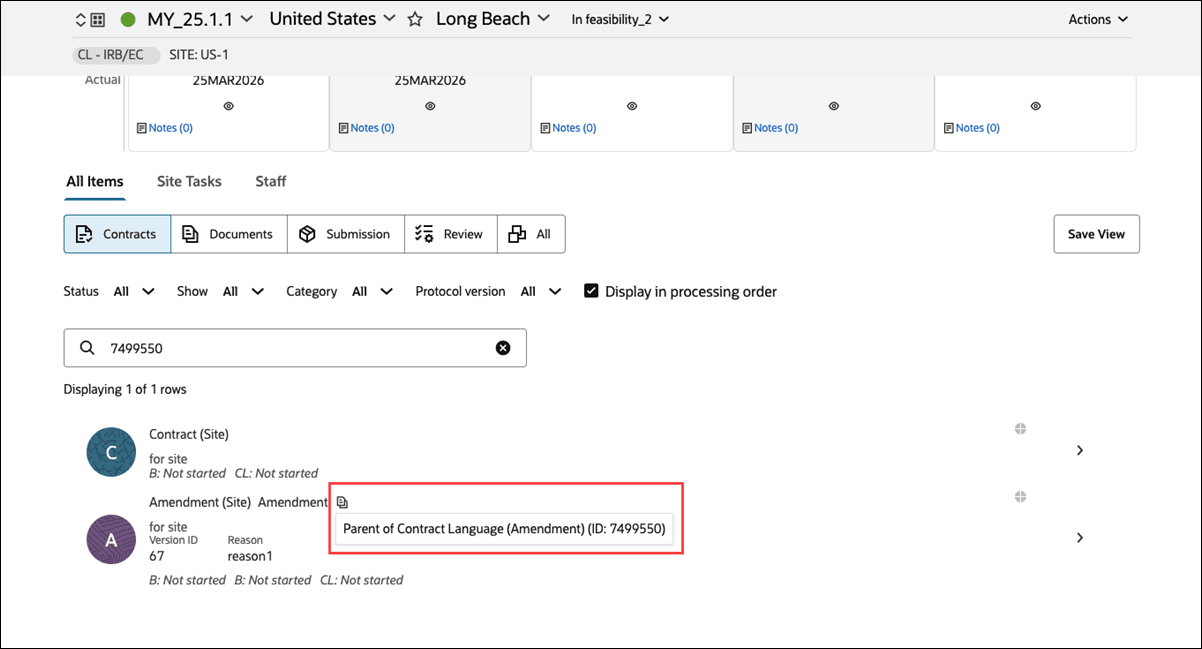
This release adds the ability to search by Artifact ID from the All Items tab across Study, Country, and Site levels to help you quickly locate items without opening the artifact drawer.
Enter an Artifact ID in the search field on any All Items sub tab (i.e., Documents, Submissions, Review, Contracts, and All) and the list refreshes to show matching results. All existing functionality, such as filters, display settings, sorting, and pagination or infinite scroll, continues to work as before.
The search helper text is also updated to reflect this capability, changing from “Search by item name, protocol version, person, or type…” to “Search by item name, protocol version, person, type, or Artifact ID…”.
When you search using a child artifact ID, the related parent artifact is displayed in the search results. Parent items are identified with an icon and include hover text indicating the relationship, for example, showing that the displayed item is the parent of the searched Artifact ID.