Communications
When you invite a site to a study, Oracle Site Select now uses each site user’s first and last name from the study site instance, and you can now include the Study information file in site invitation emails.
Study invitation names match site records
When you invite a site to a study, Oracle Site Select now uses each site user’s first and last name from the study site instance. The site instance contains the merged site data that you see in the site grid and site profile.
Previously, if a site user had been invited to another study, Oracle Site Select could use the user’s name from their Site portal account profile. As a result, the name on the site details drawer Invitation and site status tab or the study invitation email could differ from the name displayed in the site grid.
Oracle Site Select now uses the site instance name on the Invitation and site status tab and in invitation email placeholders for site contacts, such as the principal investigator, clinical trial coordinator, institutional review board contact, and other site users. Changes to the user’s Site portal account profile no longer determine the name used for a study invitation.
Note:
For the invitation name to match the site profile, the site profile must be the highest-priority data source for the study. If another data source has a higher priority, the merged site instance may use a name from that data source.Example 1
A principal investigator is listed as Alex Morgan in the site grid for Study1. The same person’s Site portal account profile lists the name Alex Reed.
Previously, when you invited the site, the site details drawer Invitation and site status tab and the invitation email could display Alex Reed, even though the site grid displayed Alex Morgan. If the Site portal profile name changed again before you reinvited the site, the next invitation could display the newly edited profile name.
With this enhancement, the invitation uses Alex Morgan, the name from the Study1 site instance. The site details drawer Invitation and site status tab, the invitation email placeholders, and the site grid display the same name.
Example 2
If you update the principal investigator’s name in the Study1 site profile to Jordan Lee, and the site profile is the highest-priority study data source, the site grid and subsequent invitations display Jordan Lee.
Epic: SEL-22489
Study invitation file attachment
You can now include the Study information file in site invitation emails, giving site users direct access to the study information when they receive their invitation.
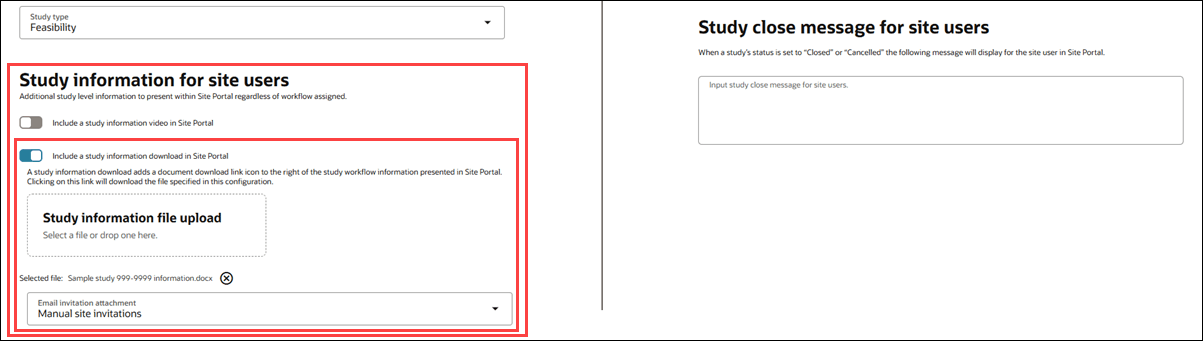
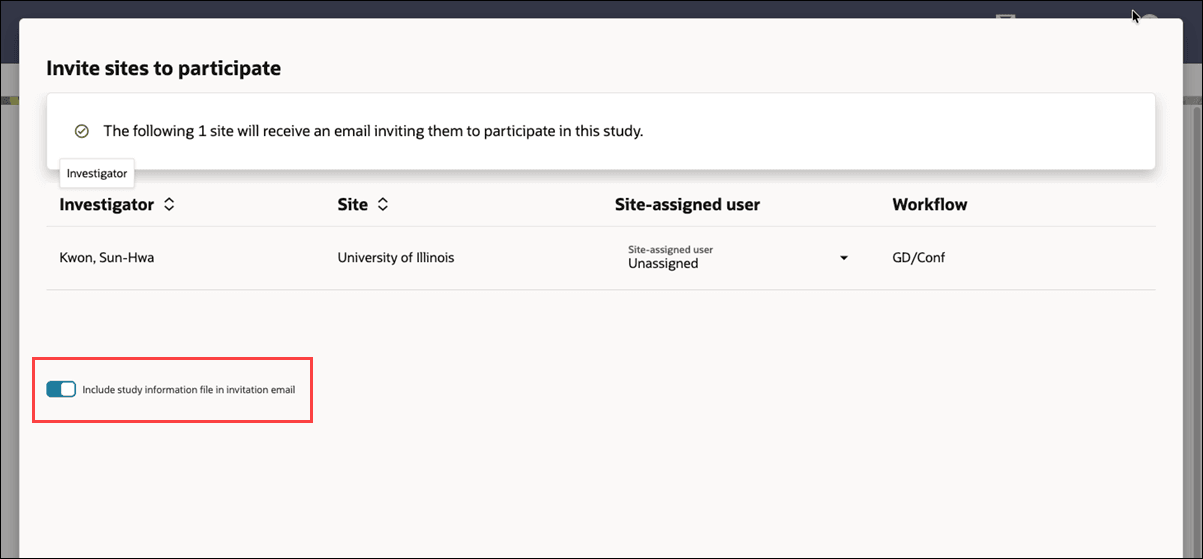
When the Study details page has the “Include a study information download in Site Portal” setting turned on, and a file is attached, a new Email invitation attachment setting lets you choose Automatic site invitations or Manual site invitations. For automatic invitations, Oracle Site Select attaches the file to the invitation email. For manual invitations, the Invite sites to participate modal includes a toggle to attach the file. The toggle is on by default, but you can turn it off before sending the invitation.
When the Include a study information download in Site Portal setting is turned off on the Study details page, or no file is attached, Oracle Site Select doesn’t include a study information file with invitation emails. The existing invitation subject, body, recipients, and links remain unchanged.
Epic: SEL-22883
Parent topic: What's new