Account settings
A new account-level option lets you include non-question text in survey PDF exports and a new on/off switch in Account Management: Integrations makes Oracle IDCS authentication easier to troubleshoot.
Survey PDF exports
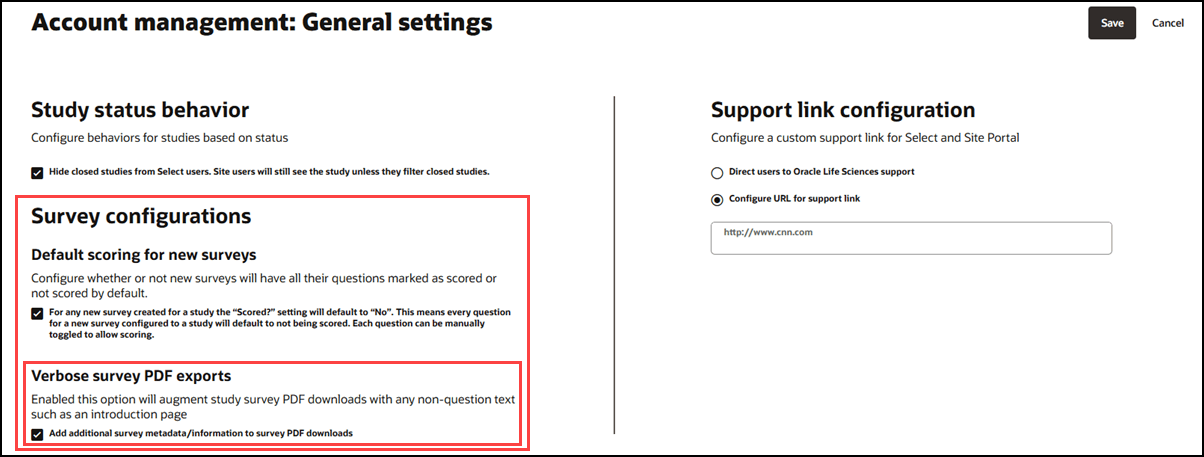
You can now include additional metadata and information in your survey PDF downloads, providing greater flexibility for survey reporting across your account. This new feature is managed through a setting on the Account > General settings page, where you will find a new "Survey configurations" section. The existing "Default scoring for new surveys" option now appears within this section as well. To enable this enhancement, use the new "Verbose survey PDF exports" option, described as "Enable this option to augment study survey PDF downloads with any non-question text such as an introduction page." The checkbox is available by default and is not selected.
When you turn on the verbose survey PDF export option, all survey PDF downloads will include any supplementary text or pages that are not directly related to survey questions or answers. This may include introductory text, or welcome letters, as applicable to your survey. The additional text or pages will appear as unformatted, plain text (i.e., non-HTML formatted). Any survey question hidden due to branching or skip logic, such as questions disabled in Alchemer, will not appear in the PDF. However, non-questions hidden due to skip logic will always be included in the survey PDF.
This enhancement applies to survey PDF exports from several locations: study Document submissions, the survey response modal, the studysite document download popover, the site document library, and the API /documents/document_id route.
If you leave the verbose option turned off, your survey PDF downloads will not include any additional information. This feature does not affect survey response exports in CSV or Excel format; these files will never include the non-question survey information, no matter how you configure the setting.
Disable IDCS integration
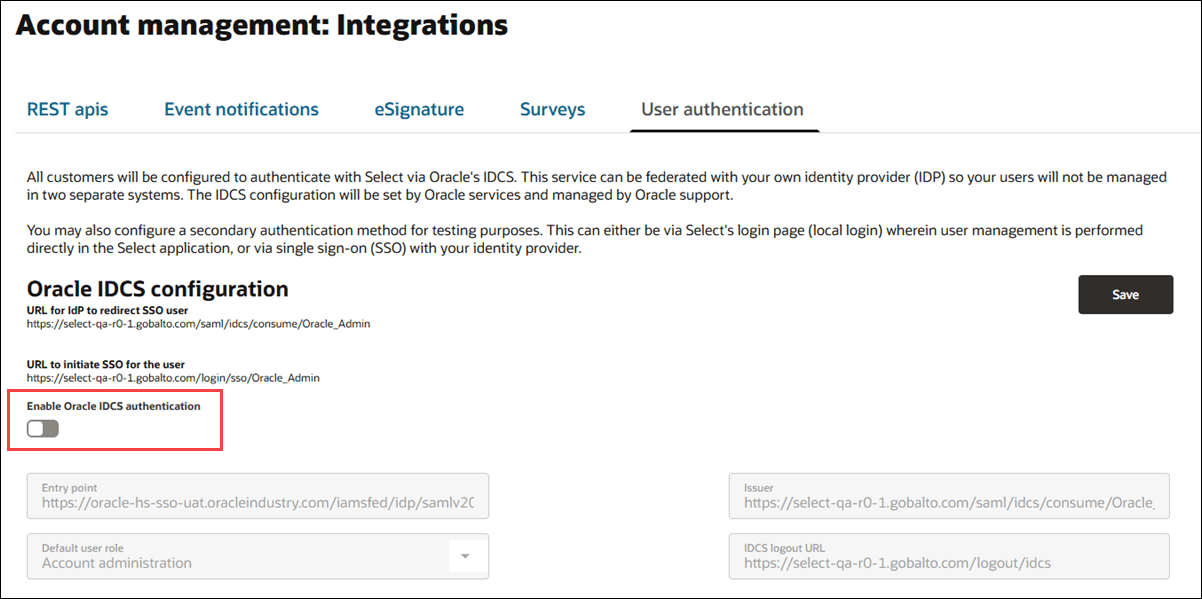
To support troubleshooting scenarios and make it easier to manage your IDCS integration settings, you can now enable or disable Oracle IDCS authentication for your account using a new switch on the Account Management: Integrations page, under the User Authentication tab. The switch, labeled "Enable Oracle IDCS authentication," lets you toggle IDCS on or off.
When you disable IDCS, any related fields are disabled visually; however, the information entered in those fields is preserved and not deleted.
Parent topic: What's new in release 26.1