Data Export Utility
Data Export Utility columns have additional categories, recently added Alchemer survey question types are now included, and it's easier to see who created a report and when.
Column categorization
Now, when creating or updating a Data Export Utility report you'll see additional column categories that organize fields and make them easier to find.
The cubes now have the following column categories:
- Note Data Cube: Date, Site, Study, Person, Survey, General, Criteria, PI and Institution
- Site Survey Responses Cube: Site, Study, Survey, General, Criteria, PI and Institution
- Study Site Data Cube: Date, Site, Study, Person, General, Criteria, PI and Institution
- Study-site Users Data Cube: Site, User, Study, General, Criteria, PI and Institution
Survey question types
We updated the Data Export Utility to support recently added Alchemer survey question types and data columns. The Site Survey Responses Cube now has a "total possible score" column and the Study Site Data Cube now includes a "survey possible score" column.
The Site Survey Responses Cube now includes survey questions and responses for all survey question types that can be exported via the site grid export utility.
- Numeric and percentage grid
- Textbox grid
- Dropdown menu grid
- Checkbox grid
- Radio grid
- Continuous sum
- Textbox list (numeric and percentage validation)
- Dropdown menu list
- Checkbox list
- Radio button list
Report author and create and update dates
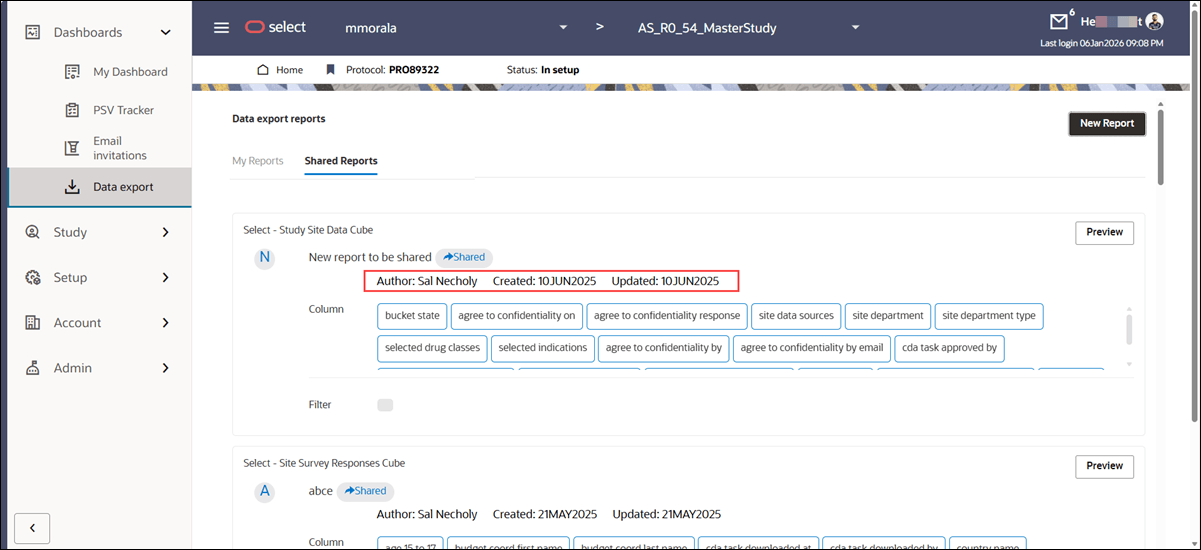
You now see the Author, Created date, and Updated date for shared reports in the Shared Reports tab, as well as for your reports in the My Reports tab on the Data Export Utility homepage, when that information is available. This enhancement provides visibility into report ownership and change history across shared and personal DEU reports.
Author, Created date, and Updated date display for all newly created or updated reports, so you can track who authored the report and when it was created or last modified. Some older reports may not show Author or Created date information, which is expected, but you’ll consistently see this information for newly recreated reports.
Parent topic: What's new in release 26.1