15 Inventory Planning Optimization
This chapter describes the Inventory Planning Optimization (IPO).
Overview
Inventory Planning Optimization (IPO) determines the optimal time-phased replenishment plan which consists of the replenishment policies, that is the reorder point (RP) and receive up-to level (RUTL), and the recommended purchase order (PO), transfer and allocations at item/location/day level for the configurable planning horizon. The optimal plan is generated using simulation and optimization methods and considers inputs like supply chain network, replenishment attributes and business rules. Moreover, the optimization engine uses machine learning methods and simulation-based optimization to calculate the trade-offs between the service level and the inventory cost for different replenishment policies. The trade-off analysis is leveraged to generate the optimal replenishment policies for achieving a desired target service level. In addition to the replenishment plan, IPO-IO recommends optimal rebalancing transfers between stores to increase sell-through and to avoid markdowns. This type of recommendation can be turned off when not applicable (for example, for grocery categories).
The data-driven replenishment policies/allocations, PO/transfers/allocations, and rebalancing transfers can be pushed to Oracle Retail Merchandising Foundation Cloud Service (MFCS) to execute purchase orders, transfers, and allocations. Optionally, the retailer can choose to send only the replenishment policies to MFCS and have the final order quantity and PO/transfers/allocations be calculated and generated in MFCS. If the retailer has a different system for order execution and does not use MFCS, they can configure IPO for export to the external application. See IPO Integration with External Application (non-MFCS Integration).
IPO leverages historical sales, inventory positions, replenishment attributes such as lead time and review schedule, business requirements such as store priorities for shortfall reconciliation, and the demand forecast to generate the optimal time-phased replenishment plan. The demand forecast that is generated by the forecast engine within AI Foundation considers different factors such as price effect, holidays, and promotions, and variation across customer segments.
Inventory Planning Optimization Runs
Types of Runs
IPO supports two kinds of runs: user runs and batch runs. By default, the batch runs are scheduled for daily execution. User runs are typically created by the user to do what-if analysis and/or to override the recommendations generated by the latest batch run. IPO runs generate recommendations at the item-location level. The items that are included in a run can be selected by specifying one, a multiple, or all of the nodes at a higher merchandise level, such as department. This level is configurable. Similarly, the locations that are to be included in a run can be selected by specifying one, a multiple, or all of the nodes at a higher location level, such as area. This level is configurable.
Each run will generate one or multiple type of recommendations depending on the type of analysis that are selected when creating the run from UI. For batch runs, the type of analysis is controlled by the following configurations in RSE_CONFIG.
IO_BATCH_RUN_TIME_PHASED_FLG: Y/N flag that indicates whether time phased simulation is performed as part of batch run. The default value is Y.
IO_BATCH_RUN_INV_REBAL_FLG: Y/N flag that indicates whether inventory rebalancing analysis is performed as part of batch run. The default value is N.
IO_TIME_PHASED_OPT_PO_TSF_FLG: Y/N flag to indicate whether the time phased optimization should generate the PO/Tsf recommendations. Default value is Y. (When the value is N, only the replenishment policies is generated.)
Time-Phased Planning
Time-phased planning is the main type of analysis that must run as part of the batch, so the replenishment policies and PO/transfers are generated daily. If the implementation scope is to generate replenishment policies only, set IO_TIME_PHASED_OPT_PO_TSF_FLG to N.
Inventory Rebalancing
Inventory rebalancing can be enabled in as part of the batch if it’s relevant (for example for fashion retailers) and if there is a need to generate rebalancing recommendations daily. Alternatively, the rebalancing runs can be done as-hoc from UI when needed.
Trade-Off Analysis
Note:
It is strongly recommended not to enable the trade-off analysis for the batch runs. This can make the batch runtime long since the trade-off analysis performs extensive data processing and large-scale simulation.Inventory Planning Optimization UI Workflow
- Order Overview: Provides a view of alerts that are generated based on low stock, shortage, and overstock alerts that are set up in Alerts Management within Rules & Strategies. It also provides a calendar view of different type of recommended orders.
- Orders: Provides a separate view for each type of recommendations: Purchase Order, Transfer, and Allocation.
- Inventory Plan: Provides a time-phased view of different inventory plan metrics and alerts. Also, allows the user to change strategy and perform what-if analysis.
- Replenishment Policies: Provides a view for replenishment policies and all metrics that are used for calculating the policies.
- Rebalancing Transfers: Provides a grid view and a map view for recommended rebalancing transfers.
- Inventory Dashboard: Provides a view of all items that can be manually allocated. The user can create, submit, and review the manual allocations within this dashboard.
- Forecast Review: Provides a read-only view of the forecast at SKU/location level.
-
Manage recommendations:
-
Replenishment: Provides a calendar view of different recommendations and a separate view for each type of recommendations: Replenishment Policy, Rebalancing Transfers, PO and Transfers.
-
Allocation: Provides a view of initial and cross-dock allocations and details of each allocation.
-
Inventory Plan: Provides a time-phased view of different inventory plan metrics and alerts. Also, allows user to change strategy and perform what-if analysis.
-
Run Overview: Provides a summary of inputs and outputs of batch and ad-hoc runs. The user can create a run, copy a run, open a run, or delete a run. When the user clicks a successful run, it is opened in a new tab with three sub-tabs to show replenishment policies, rebalancing transfers, and orders, as well as two sub-tabs to show the summary of inputs of the run and summary of rules. For a failed run, only the input and rule summary sub-tabs are displayed. To create a run, the user must specify the run scope and strategy. As part of the run scope, the user specifies the areas and departments for the run and the type of analysis to be performed. As part of run strategy, the user can specify the business rules.
- Create Run: The user can create ad-hoc runs and specify the run scope and the strategy that will be used to determine the business rules for the run.
-
The following sections explain the main implementation tasks that involve configuring the following:
-
The roles and permissions assigned to users.
-
The loading of retailer data.
-
The configuration parameters.
-
The business rules that determine constraints that the application takes into account during the optimization process.
Security
IPO supports both data-based and user role-based filtering or security. Data filtering informs the application regarding which merchandise and locations can be accessed by a particular user (for example, the user "tom" can only access locations within the US). The user role restricts or allows which UI actions can be performed by a particular user.
Data Filtering
Data filtering can be specified (and integrated wherever applicable) in a similar fashion as discussed in the Manage Data Filtering chapter of the Oracle Retail Merchandising Suite Administration Guide (https://docs.oracle.com/cd/E79623_01/rms/pdf/192000/merchcs-admin.pdf). When a customer does not have Oracle Retail Merchandising Service, then the following interfaces can be leveraged to specify the user groups and users:
- RAF_FILTER_GROUP_MERCH
- RAF_FILTER_GROUP_ORG
- RAF_SEC_GROUP
- RAF_SEC_USER_GROUP
User Roles
User roles are used to set up application user accounts through Oracle Identity Management (OIM). See the Oracle Retail AI Foundation Cloud Services Administration Guide for details. The following roles are required.
-
ADMINISTRATOR_JOB in order to access the Control & Tactical Center
-
INVENTORY_ANALYST_JOB in order to access the IPO application.
- CHATBOT_VIEW_JOB in order to enable real time bot conversations.
- DATA_ADMINISTRATOR_JOB in order to access the Manage Data Upload under the Control & Tactical Center to upload some of the IPO required data using the UI (as an alternative to batch jobs for file-based data load).
In addition to above roles, verify the following:
-
Access to Innovation Workbench and/or Data Visualizer: This is necessary in order to query or visualize the data and verify that the data loaded matches the desired expectations.
-
Access to POM to execute ad-hoc and batch jobs: The POM UI URL is something like <host>/POMJetUI. If the user cannot access the POM UI, contact the administrator to obtain the relevant access/user roles.
Data Input Requirements
This section provides information about setting up the data that the IPO application uses, including guidelines regarding the expectations for the data element requested and where it is used. Information about these files can be found in Oracle Retail Insights Cloud Service Suite/Oracle Retail Analytics and Planning Cloud Services Data Interface.
Most of the AI Foundation Cloud Services (AIF) data is pushed in two-step process. Any additional IPO-specific data is directly pushed into the AIF.
-
First, data is loaded, using CSV and W_ interfaces and jobs in the AIF DATA standalone schedule in POM. Then, RADM_REFRESH_JOB must be run to refresh the table statistics before any AIFApps job is run (though REFRESH_RADM_JOB is automatically executed as part of most ad hoc processes in AIF Data).
-
Second, appropriate AIF applications jobs are used to push data into AIF applications. At the time of implementation, the user will only use ADHOC jobs, not any batch jobs. Batch jobs (described in "POM Jobs") are necessary to put the system on a batch schedule.
Note that some of the jobs require relevant configuration parameters to be specified with client-specific values. If incorrect configuration values are used, a job may run without errors, but will not produce the desired data in the target tables. If the client or implementation team wants to view the progress of the job or any errors in order to file an SR, then AIF provides database logging in a table called RSE_LOG_MSG. In addition, analytic logs generated by the programs that run optimization can be found in RSE_ANALYTIC_LOG_MSG. More details are provided in the Troubleshooting section in this chapter.
RAP Foundation Data
These interfaces provide the foundation data for the AI Foundation Cloud Services. First, the user must execute and verify that all the RAP foundation data has been loaded.
For IPO, the following data is required.
Location Hierarchy
Here is an example of a location hierarchy: CHAIN ' COUNTRY ' REGION ' DISTRICT ' STORE. The run's scope level must match a node in the location hierarchy. For example, you can specify the run scope at the Area level and include one, multiple, or all areas in the run. Batch runs by default include all values of the scope level (for example, all areas). Note that the E-com channel can be defined as part of the location hierarchy. Relevant interfaces are: W_INT_ORG_ATTR_D and W_INT_ORG_DH, W_INT_ORG_D. These are all loaded using the ORGANIZATION.csv file.
Merchandise Hierarchy
An example of merchandise hierarchy is as follows: CHAIN 'COMPANY/BANNER 'DIVISION ' DEPARTMENT 'CLASS ' SUBCLASS ' STYLE 'COLOR ' SIZE (SKU). There can be up to nine levels in the merchandise hierarchy. When IPO-IO is used for fashion apparel, it is expected that Style and Color will be provided through the relevant interfaces.
The STYLE, COLOR and SIZE SKUs are expected to be provided in the W_PRODUCT_D interface, while the levels between CHAIN and Subclass are provided using the W_PROD_CAT_DH interface. In addition, there must be consistency among the levels provided when using an extended hierarchy. W_PRODUCT_ATTR_D, is used to indicate the relationship between Style, Style/Color, and Style/Color/Size for an extended hierarchy. All of these tables will be populated when providing a PRODUCT.csv file as a foundation file input. If the retailer wants to use an extended merchandise hierarchy, then the retailer must populate this interface.
Here are the specific fields:
- PRODUCT_ATTR13_NAME = PROD_NUM for the Style (for example, 0000190086820900)
- PRODUCT_ATTR14_NAME = PROD_NUM for the Style/Color (for example, 190086834203)
- PRODUCT_ATTR15_NAME = PROD_NUM for the Style/Color/Size (for example, 1975699). The value of PROD_NUMs is the same as the value in the W_PRODUCT_DS.PROD_NUM interface.
Calendar Hierarchy
This is one of the core hierarchies. A retailer can specify the calendar depending on that retailer's business requirements (for example, fiscal calendar). The relevant interface for this is W_MCAL_PERIOD_D, loaded using the CALENDAR.csv file.
Customer Segments Hierarchy
The AIF forecast engine in IPO supports demand forecasting at the customer segment level. This is leveraged by the optimization algorithm to recommend customer-aware rebalancing transfers. To use this functionality, the retailer must load customer segments. The relevant interfaces to supply this data are: W_RTL_CUSTSEG_DS and W_RTL_CUST_CUSTSEG_DS. Even when the retailer is not planning to load or use customer segments, a dummy record is required. The AIF ad hoc jobs will create a dummy record when the source data is not provided, and it is not required for the client or implementer to provide these interfaces if they are not going to use them.
Product Attributes
Product attributes are not required for IPO, but they are useful for the demand forecasting, and can be used for demand forecasting of new items. They can also be used for setting up business rules. Product attributes must use W_RTL_ITEM_GRP1_DS since it can support any number of attributes.
If the retailer wishes to load STYLE or COLOR as product attributes, then the W_RTL_ITEM_GRP1_DS interface is used to provide style and color attributes for the different products, using a value in PROD_GRP_TYPE of either STYLE or COLOR. The actual values for the Styles and Colors are provided in columns FLEX_ATTRIB_2_CHAR and FLEX_ATTRIB_4_CHAR using values that represent the ID for the Style (for example, 1234), and a description for the Style (for example, Loose Fit). The columns FLEX_ATTRIB_3_CHAR and FLEX_ATTRIB_10_CHAR contain the appropriate designation for STYLE or COLOR.
Product Images
The Images URL can be provided through the W_RTL_PRODUCT_IMAGE_DS.dat interface. This interface has a column called PRODUCT_IMAGE_ADDR that contains the full URL to an image of the product. This URL must be in the following format: http[s]://servername[:port]/ location/filename.extension
For example:
- PRODUCT_IMAGE_NAME = imagename.png
- PRODUCT_IMAGE_ADDR = http://hostname/url/imagename.png
- PRODUCT_IMAGE_DESC= Short description of the image
For IPO, the following data is required:
-
Sales. It is recommended to load at least 24 months of historical data to obtain a good signal in the model training and a reliable parameter estimation for the demand forecasting.
-
Inventory. (INVENTORY.csv). For the time-phased planning, it is sufficient to have the latest inventory position (i.e., quantity of on-hand, on-order, in-transit, etc. for the latest day). For trade-off analysis, it is recommended to provide historical inventory which will be used for lost sales correction before performing simulation. If not provided, the trade-off analysis will be performed on the sales time series. While this is not ideal, for most categories the final trade-off curves are not too sensitive to the lost sales correction when the KPIs are measured at aggregate level.
-
Price and Cost (PRICE.csv). This data is required for calculating some of the KPIs that are shown in IPO-IO screens. Moreover, price data must be provided for forecasting fashion items that are considered short life cycle.
- Supplier (SUPPLIER.csv) and supplier item (PRODUCT.csv supplier columns). This data is required for all type of runs and analysis in IPO- IO.
-
Promotions (PROMOTION.csv). This is an optional data for IPO-IO. It is used in showing the promotion flag at item/location/day level in some of the UI charts. Moreover, promotions must be provided for forecasting fashion items that are considered short life cycle; otherwise, the forecast will not reflect the promotion effects.
- Review schedule. This data is required for all type of runs and analysis in IPO-IO. It can be provided using W_RTL_REPL_DAY_DS.dat or REPL_REV_INT.csv. The latter is more flexible and allows for defining data at the parent level.
-
Replenishment attributes. This data is required for all type of runs and analysis in IPO-IO. The required attributes include but not limited to primary supplier/warehouse source, lead time and replenishment method. This data can be provided either using PROD_LOC_REPL.csv, or using the n-tier interfaces mentioned below. The latter is more flexible and allows for defining multi-tier supply chain network. The data source for replenishment attributes is controlled by the global configuration IO_ENABLE_NTIER_INTER FACE_FLG which is explained in the Global Configurations section.
The following data is optional and can be provided depending on the business use cases. These are referred to as n-tier interfaces. For more details, refer to the RAP interface guide.
- Distribution networks (REPL_DISTRO.csv)
- Review cycles (REPL_REV_INT.csv)
- Internal lead times (REPL_LT_INT.csv)
- Supplier lead times (REPL_LT_SUP.csv)
- Procurement networks (REPL_PROC.csv)
- Internal order multiples (REPL_MULT_INT.csv)
- Supplier order multiples (REPL_MULT_SUP.csv)
- Rounding levels (REPL_ROUND.csv)
- Scaling rules (W_RTL_REPL_SUP_DIM_DS.dat)
For example, if there is a need to define time-dimensioned replenishment attributes (e.g. longer lead time during holidays and shorter lead time at other times of the year), it will have to be provided using the REPL_LT_INT.csv and REPL_LT_SUP.csv. Another example is defining a warehouse-to-warehouse relationship in the supply chain network. For customers who use Merchandising Foundation CS (MFCS), it will not be possible to have a source warehouse defined for a warehouse location. If there is a need to define such a link in the supply chain network, it will have to be provided using REPL_DISTRO.csv.
Before pushing any data into the AIF, it is critical to make sure RAP foundation data is accurate and verified. Verification can be done through Data Visualizer or through the Innovation Workbench. Re-loading some of the RAP foundation data elements is non-trivial as it will require an SR to reset/truncate some of the target tables.
RSP Foundation Data (RSE_% Tables)
Once the interface configuration is complete and the RAP Foundation data has been verified, the user can push the data from RAP into AIF. As mentioned before, once database logging has been enabled, users can check for any errors and the progress of the process in RSE_LOG_MSG. Before running the RSE_MASTER_ADHOC with appropriate flags to execute the following jobs, the user must set the correct values for configuration parameters in RSE_CONFIG. This can be done using Manage System Configurations (as described in Control and Tactical Center) and then selecting RSE_CONFIG from the drop-down list.
Inventory Planning Optimization Data (IO_% Tables)
Once RSE_MASTER_ADHOC is successfully run, data can be loaded to IPO tables by running the IO_MASTER_ADHOC.
Runs in IPO-IO can be set up to run at configured levels for location and merchandise:
- Location Level. The location level of a run's scope is configurable in RSE_CONFIG, and it is denoted as IO_LOC_HIER_FILTER_LVL. For example, a typical level is Area.
- Merchandise Level. The merchandise level of a run's scope is configurable in RSE_CONFIG, and it is denoted as IO_PROD_HIER_FILTER_LVL. For example, a typical level is Department.
Global Configurations
Table 15-1 shows the configurations that must be provided at the time of implementation. These configurations can be modified in RSE_CONFIG table using the Manage System Configuration screen under Control & Tactical Center in the AIF dashboard.
Table 15-1 Global Configuration Parameters
| APPL CODE | Parameter Name | Parameter Value | Description |
|---|---|---|---|
|
RSE |
EXTENDED_HIERARCHY_SRC |
Default value is NON-RMS. |
Data source providing extended hierarchy data RMS/NON-RMS. |
|
RSE |
LOAD_EXTENDED_PROD_HIER |
Default value is Y. If the prod-uct hierarchy data had 9 levels, keep this value as Y. If it has 7 levels, change this value to N. |
Y/N Value. This parameter is used by the product hierarchy ETL to know if the extended product hierarchy is needed. |
|
PMO |
PMO_PROD_HIER_TYPE |
Default value is 3. If the product hierarchy data has 9 levels (i.e. it has extended hierar-chy), keep this value as 3. If it has 7 levels, change this value to 1. |
The hierarchy ID to use for the product (Installation configuration). |
|
PMO |
PMO_AGGR_INVENTORY_DATA_FLG |
Default value is Y. Set this value to N if inventory data is not loaded (inventory data is not required for MFP forecasting but it is required for other applications like Lifecycle Pricing Optimization, Inventory Planning Optimization-Inventory Optimization and IPO-Demand Forecasting). |
Specifies if inventory data is present and if it should be used when aggregating activities data. |
|
RSE |
PROD_HIER_SLSTXN_HIER_LEVEL_ID |
Default value is 9. |
This parameter identifies the hierarchy level at which sales transactions are provided (7-Style, 8-Style/color or 9 Style/color/Size). It MUST match the extended hierarchy leaf level. |
| IO | AUTO_APPR_ALLOC_BATCH | ALL | Indicates whether the allocations should be auto-approved for batch runs. Valid values are ALL (approve all allocations), N (do not approve any of the allocations). PO (approve allocations off of PO and from WH stock), ASN (approve allocations off of ASN and from WH stock), PO_ASN (approve allocations off of PO and ASN and from WH stock), TSF (approve allocations off of transfers and from WH stock), ALLOC (approve allocations off of allocations and from WH stock), Default value is N. |
| IO | AUTO_APPR_PO_BATCH | ALL | Indicates whether the purchase orders should be auto-approved for batch runs. Valid values are ALL (approve all POs), N (do not approve any of the POs). Default value is N. |
| IO | AUTO_APPR_REBAL_BATCH | ALL | Indicates whether the rebalancing transfers should be auto-approved for batch runs. Valid values are ST-WH (approve all store-to-warehouse transfers), ST-ST (approve all store-to-warehouse and store-to-store transfers), ALL (approve all rebalancing transfers), N (do not approve any of the rebalancing transfers). Default value is N. |
| IO | AUTO_APPR_TSF_BATCH | ALL | Indicates whether the transfers should be auto-approved for batch runs. Valid values are WH-ST (approve all warehouse-to-store transfers), WH-WH (approve all warehouse-to-warehouse and warehouse-to-store transfers), ALL (approve all transfers), N (do not approve any of the transfers). Default value is N. |
| IO | IO_ALLOC_PROD_GROUP_LVL | 4 | Product parent hierarchy level which is used in grouping allocations into one allocation header. Default value 4. |
| IO | IO_AUTO_APPR_NEW_PARAMS | Y | Indicates whether net new parameters in a batch should be auto-approved. Default to N (No). |
| IO | IO_AUTO_APPR_THRESHOLD_PCT | 0.2 | The threshold percentage change of Reorder Point (RP) and Receive Up To Limit (RUTL) between batches that is acceptable for auto-approval of the parameters. |
| IO | IO_BATCH_RUN_INV_REBAL_FLG | Y | Y/N flag that indicates whether inventory rebalancing analysis is performed as part of batch run. |
| IO | IO_BATCH_RUN_PO_TNSFR_RECOMM_FLG | N | Y/N flag that indicates whether po transfer recommendation is performed as part of batch run. |
| IO | IO_BATCH_RUN_TIME_PHASED_FLG | Y | Y/N flag that indicates whether time phased simulation is performed as part of batch run. |
| IO | IO_BATCH_RUN_TRADEOFF_SIM_FLG | N | Y/N flag that indicates whether trade-off simulation is performed as part of batch run. |
| IO | IO_CURRENT_DATE | 20230516 | This value will be automatically updated to latest daily inventory date by ETL process. It should not be modified manually. |
| IO | IO_DELIV_USE_CLOSURES | Y | When Y, the system will validate dates against company and individual location closure tables (W_RTL_CMP_CLOSED_D, W_RTL_CMP_CLOSED_EXC_D, W_RTL_LOC_CLOSED_D) for sales, shipping and receiving. |
| IO | IO_DELIV_USE_SCHEDULES | Y | When Y, the system will validate dates against standard delivery schedule and exceptions of the destination location (W_RTL_REPL_DLVRY_SCHED_D, W_RTL_REPL_DLVRY_SCH_EXC_D). |
| IO | IO_ENABLE_NTIER_INTERFACE_FLG | Y | Indicates source of data to populate IO_REPL_ATTR_PROD_LOC_EXP (Y,N,X). Possible values are: Y (data loaded from RI interfaces for replenishment attributes and review schedule (typically coming from RMS). In addition, data loaded into IO_FINAL_RULE for each run from N-tier replenishment interfaces. Data in N-tier interfaces always take precedence over data loaded via PROD_LOC_REPL.CSV and W_RTL_REPL_DAY_DS.dat); N (data loaded into IO_REPL_ATTR_PROD_LOC_EXP and IO_FINAL_RULE solely from RI interfaces for replenishment attributes and review schedule); X (data loaded into IO_REPL_ATTR_PROD_LOC_EXP and IO_FINAL_RULE solely through N-tier interfaces). In all cases, any rule that is set up in Rules and Strategies will override the interfaced data. |
| IO | IO_EXT_APP_EXP_FETCH_SIZE | 5000 | Fetch Size for external application export. |
| IO | IO_EXT_APP_EXP_NOTIFY_TOKEN | Stores the authorization token used while calling the external application notify API. This token is sent in the notify API request header for authentication. | |
| IO | IO_EXT_APP_EXP_NOTIFY_URL | http://localhost:3001/sample-app | Stores the external application notify API endpoint URL. The system calls this URL after export temp data and window metadata are generated. |
| IO | IO_INV_REBAL_FCST_DAYS | 5 | Number of days to look into future forecast for inventory rebalancing. |
| IO | IO_INV_REBAL_HIST_SLS_WKS | 52 | Number of weeks to look into sales history to get average price for inventory rebalancing |
| IO | IO_INV_REBAL_LEAD_TIME | 3 | Number of days added to the inventory rebalancing recommendation date to calculate expected delivery date. Default value is 3. |
| IO | IO_LOC_HIER_PROCESSING_LVL | 6 | Level Identifier for the level of the Location Hierarchy at which we process Inventory. Default 6 is to process at STORE Level. |
| IO | IO_LOC_HIER_TYPE | 2 | Hierarchy Type Identifier for the Location Hierarchy Type. |
| IO | IO_MAX_AFTER_DAYS | 7 | Maximum Number of days after Release Date for which we will consider inventory movements (PO, Transfer, Allocation) in Net Inventory calculation. Default value 7. |
| IO | IO_MAX_TIME_PHASED_HORIZON | 180 | Number of maximum allowed periods in the future for which the time phased plan is generated. Default value 180. |
| IO | IO_MERCH_RMS_AUTH_SERVICE_TYPE | OAUTH | Used in determining whether to use OAuth or basic authentication for IO RMS integration. |
| IO | IO_MERCH_RMS_CONTEXT_ROOT | RmsReSTServices/services/private | Context root of the RMS Restservice url. |
| IO | IO_MERCH_RMS_HOSTNAME | msp00aay.us.oracle.com | URL host name to publish replenishment parameter to RMS, this should be same as CN name in the certificate. |
| IO | IO_MERCH_RMS_HTTPS_PROXY_PORT | Https proxy port number to publish replenishment parameter to RMS. | |
| IO | IO_MERCH_RMS_HTTP_PROXY_HOSTNAME | Proxy host name to publish replenishment parameter to RMS. | |
| IO | IO_MERCH_RMS_HTTP_PROXY_PORT | Http proxy port number to publish replenishment parameter to RMS. | |
| IO | IO_MERCH_RMS_PORT | Port number to publish replenishment parameter to RMS. | |
| IO | IO_PO_PROD_GROUP_LVL_ST | DEPT | PO product grouping level for STORE destination type. Valid values: ALL, DEPT, CLASS, SUBCLASS. Default value DEPT. |
| IO | IO_PO_PROD_GROUP_LVL_WH | DEPT | PO product grouping level for WAREHOUSE destination type. Valid values: ALL, DEPT, CLASS, SUBCLASS. Default value DEPT. |
| IO | IO_PO_SINGLE_DEST_FLG_ST | Y | Single-destination PO flag for STORE destination type. Valid values: Y, N. Default value Y. |
| IO | IO_PO_SINGLE_DEST_FLG_WH | Y | Single-destination PO flag for WAREHOUSE destination type. Valid values: Y, N. Default value Y. |
| IO | IO_PRODUCT_MAX_SELECTABLE_COUNT | 500 | Maximum number of products selectable in the filter. |
| IO | IO_PROD_HIER_INV_DASHBOARD_LVL | 4 | Level Identifier for the first level of the Product Hierarchy shown at the Inventory Dashboard UI table. |
| IO | IO_PROD_HIER_PROCESSING_LVL | 9 | Level Identifier for the level of the Product Hierarchy at which we process Inventory. Default 9 is to process at SKU Level. |
| IO | IO_PROD_HIER_TYPE | 3 | Hierarchy Type Identifier for the Product/Merchandise Hierarchy Type. |
| IO | IO_PURGE_ALL_RUNS | N | Indicates to clean up all run data. |
| IO | IO_PURGE_RETENTION_DAYS | 30 | Number of days to wait before permanently deleting run data. |
| IO | IO_REV_SCH_AS_OPT_SCH_FLG | N | Y/N flag to indicate whether the review schedule rules (whether loaded from Ntier interface or created from rules & strategies) should be used as the scope of the run. If Y, prod/locs will be optimized only if run day is a review day for them. Default value is N. |
| IO | IO_RMS_WH_REPL_ENABLE_FLG | N | Y/N flag that indicates whether WH replenishment is enabled in RMS. N indicates that replenishment attributes for WH locations are not coming from RMS so we internally generate the WH data that optimization needs. |
| IO | IO_TIME_PHASED_HORIZON | 28 | Number of periods in the future for which the time phased plan is generated. This value should be less than IO_MAX_TIME_PHASED_HORIZON. |
| IO | LOCATION_ATTR_NAME_1 | CLMT | Indicates first location attribute name(SHORT_DB_NAME) used in allocation, purchase order and transfer details screen. |
| IO | LOCATION_ATTR_NAME_2 | FFLT | Indicates second location attribute name(SHORT_DB_NAME) used in allocation, purchase order and transfer details screen. |
| IO | LOCATION_ATTR_NAME_3 | Indicates third location attribute name(SHORT_DB_NAME) used in allocation, purchase order and transfer details screen. | |
| IO | LOCATION_ATTR_NAME_4 | Indicates fourth location attribute name(SHORT_DB_NAME) used in allocation, purchase order and transfer details screen. | |
| IO | LOCATION_ATTR_NAME_5 | Indicates fifth location attribute name(SHORT_DB_NAME) used in allocation, purchase order and transfer details screen. | |
| IO | LOC_FILTER_END_LEVEL_ID | 6 | Last location level id whose corresponding filter appears in the location filter drop-downs. |
| IO | LOC_FILTER_START_LEVEL_ID | 3 | First location level id whose corresponding filter appears in the location filter drop-downs. |
| IO | MANUAL_ALLOC_ATTR_NAME_1 | BRAND | Indicates first product attribute name(SHORT_DB_NAME) used in allocation, purchase order and transfer details screen. |
| IO | MANUAL_ALLOC_ATTR_NAME_2 | COLOR | Indicates second product attribute name(SHORT_DB_NAME) used in allocation, purchase order and transfer details screen. |
| IO | MANUAL_ALLOC_ATTR_NAME_3 | Indicates third product attribute name(SHORT_DB_NAME) used in allocation, purchase order and transfer details screen. | |
| IO | MANUAL_ALLOC_ATTR_NAME_4 | Indicates fourth product attribute name(SHORT_DB_NAME) used in allocation, purchase order and transfer details screen. | |
| IO | MANUAL_ALLOC_ATTR_NAME_5 | Indicates fifth product attribute name(SHORT_DB_NAME) used in allocation, purchase order and transfer details screen. | |
| IO | MERCH_FILTER_END_LEVEL_ID | 7 | Last merchandise level id whose corresponding filter appears in the merchandise filter drop-downs. |
| IO | MERCH_FILTER_START_LEVEL_ID | 4 | First merchandise level id whose corresponding filter appears in the merchandise filter drop-downs. |
| IO | METRIC_PANEL_SELECTION_LIMIT | 30 | Maximum no of metrics a user can select on metric panel. |
| IO | N_TIER_CHAIN_AUTO_APPROVE_FLG | N | Y indicates that all chained allocations will be auto-approved. Default value is N. If the inbound inventory line from MFCS has Pre_Marked_Ind = TRUE, it will override this configuration and all chained allocations will be auto-approved. |
| IO | PACK_ENABLE_FLG | Y | Indicates whether to show pack metrics in contextual area of order detail. Default value is N. |
| IO | PACK_TUNE_OBJ_DFLT | BALANCE | Indicates pack allocation tuning objective to use if no rule is created. Default value is BALANCE. |
| IO | ROS_CALC_LOC_PARENT_LVL | 4 | Rate of sales for each sku/store is calculated at this parent location level. ROS is used by the time phased process to calculate min/max based on historical ROS and the coefficients from tradeoff analysis. Default value is level 4. |
| IO | ROS_CALC_PROD_PARENT_LVL | 4 | Rate of sales for each sku/store is calculated at this parent merchandise level. ROS is used by the time phased process to calculate min/max based on historical ROS and the coefficients from tradeoff analysis. Default value is level 4.. |
| IO | SIMPLE_PACK_ROUND_DFLT_THR | 0.5 | Indicates simple pack rounding threshold to use if no rule is created. Default value is 0.5. |
| IO | TIME_PHASED_JOB_TIME_OUT | 7200 | The time out threshold for IO time phased runs. If the total runtime exceeds this value, the POM status will be set to FAILED. However, the run execution in the backend may continue. Default is 7200 sec.. |
| IO | IO_TSF_DEST_GROUP_LVL | 6 | Location parent hierarchy level of destinations which is used in grouping replenishment transfers into one transfer header. Default value is 6 (leaf level). |
| IO | IO_LOAD_NTIER_TO_RULES_UI | Indicates whether to load Ntier interface data at the RI configuration level to the rules UI. Default value Y. If ntier data is provided at very low level and data volume is too high, it is strongly recommended to set this configuration to N. |
Business Rules
The following table shows the rules category for IPO and whether they are optional or required for each module.
| Category | Sub category | Generic | Replenishment | Initial Allocation | Manual Allocation | Cross docking | Default (Optional) |
|---|---|---|---|---|---|---|---|
| Alerting | Capacity | Optional | None | ||||
| Alerting | Low Stock | Optional | None | ||||
| Alerting | Overstock | Optional | None | ||||
| Alerting | Shortage | Optional | None | ||||
| Allocation and Replenishment | Replenishment | Required | |||||
| Allocation and Replenishment | Reserve Stock | Optional | 0 | ||||
| Allocation and Replenishment | Store Priority Groups | Optional | Priority 1 | ||||
| Allocation and Replenishment | Display Stock | Optional | 0 | ||||
| Allocation and Replenishment | Initial Allocation | Required | |||||
| Allocation and Replenishment | Holdback Stock | Optional | 0 | ||||
| Allocation and Replenishment | Simple Pack Rounding Threshold | Optional | 50% | ||||
| Constraints | Supplier Order Multiple | Optional | 1 | ||||
| Constraints | Pack Tuning Objective | Optional | Balance | ||||
| Constraints | Internal Order Multiple | Optional | Required | Required | |||
| Life Cycle Calendar | Life Cycle Calendar | Required | |||||
| Post-processing | Auto-approval | Optional | Optional | ||||
| Supply Chain Network | Cross-docking | Required | |||||
| Supply Chain Network | Review Schedule | Required |
These rules can be set up in Manage Rules and Manage Alerts under Control & Tactical Center. In Manage Strategy, rules can be attached to the default strategy (which is used by IPO batch runs) or a custom strategy (which can be used by IPO ad-hoc runs).
Data Setup
The IPO required data can be provided via data interfaces. Many of the data elements can also be defined as a business rule. The following table shows the rules categories for IPO and whether they are optional or required for each module.
For the MFCS customer, there is a GA integration to get data from MFCS into IPO as explained in the notes column. MFCS customers can also take a hybrid approach: leverage the GA integration and at the same time use the n-tier interfaces and/or rules to fill in the gaps and achieve more flexible setup (such as, multi-tier network).
| Data | Mandatory | Level | Source (N-tier Interfaces) | Alternate Source of Data | Notes |
|---|---|---|---|---|---|
| Supply Chain NW | Yes | SKU/source/destination |
W_RTL_REPL_DISTRO_IT_LC_DS (internal) REPL_DISTRO.csv |
1. W_INVENTORY_PRODUCT_ATTR_DS PROD_LOC_REPL.CSV |
GA integrated data which is sourced from MFCS is loaded via PROD_LOC_REPL.CSV |
|
W_RTL_REPL_PROC_IT_LC_DS (supplier sourced) REPL_PROC.csv |
1. W_INVENTORY_PRODUCT_ATTR_DS PROD_LOC_REPL.CSV |
GA integrated data which is sourced from MFCS is loaded via PROD_LOC_REPL.CSV Required only for generating purchase orders |
|||
| Lead Time | Yes | SKU/source/destination |
W_RTL_REPL_LT_INT_IT_LC_DS REPL_LT_INT.csv |
1. W_INVENTORY_PRODUCT_ATTR_DS PROD_LOC_REPL.CSV |
GA integrated data which is sourced from MFCS is loaded via PROD_LOC_REPL.CSV |
|
W_RTL_REPL_LT_SUP_IT_LC_DS REPL_LT_SUP.csv |
1. W_INVENTORY_PRODUCT_ATTR_DS PROD_LOC_REPL.CSV |
GA integrated data which is sourced from MFCS is loaded via PROD_LOC_REPL.CSV Required only for generating purchase orders |
|||
| Review Schedule | Yes | SKU/destination |
W_RTL_REPL_REV_INT_IT_LC_DS REPL_REV_INT.csv |
1. Rules & Strategies UI or io_strategy_rule_stg 2. W_RTL_REPL_DAY_DS.dat |
GA integrated data which is sourced from MFCS is loaded via W_RTL_REPL_DAY_DS.dat Required for WH sourced. Required for supplier sourced only for generating purchase orders |
| Order Multiple | Yes | SKU/source/destination |
W_RTL_REPL_MULT_INT_IT_LC_DS REPL_MULT_INT.csv |
1. Rules & Strategies UI or io_strategy_rule_stg 2. W_INVENTORY_PRODUCT_ATTR_DS PROD_LOC_REPL.CSV |
GA integrated data which is sourced from MFCS is loaded via PROD_LOC_REPL.CSV |
|
W_RTL_REPL_MULT_SUP_IT_LC_DS REPL_MULT_SUP.csv |
1. Rules & Strategies UI or io_strategy_rule_stg |
Required only for generating purchase orders | |||
| Replenishment Method | Yes | SKU/destination | Rules & Strategy |
1. Rules & Strategies UI or io_strategy_rule_stg 2. W_INVENTORY_PRODUCT_ATTR_DS PROD_LOC_REPL.CSV |
|
| Rounding Levels | Optional | SKU/source/destination |
W_RTL_REPL_ROUND_IT_LC_DS REPL_ROUND.csv |
1. W_RTL_REPL_SUP_MGMT_DS.dat | GA integrated data which is sourced from MFCS is loaded via W_RTL_REPL_SUP_MGMT_DS.dat |
| Display Stock | Optional | SKU/destination | Rules & Strategy |
1. Rules & Strategies UI or io_strategy_rule_stg 2. W_INVENTORY_PRODUCT_ATTR_DS PROD_LOC_REPL.CSV |
GA integrated data which is sourced from MFCS is loaded via PROD_LOC_REPL.CSV |
| Cross-docking | Optional | SKU/Warehouse | Rules & Strategy |
Rules & Strategies UI or io_strategy_rule_stg |
|
| Holdback Stock/Reserved Stock | Optional |
SKU/Warehouse / SKU/destination |
Rules & Strategy |
Rules & Strategies UI or io_strategy_rule_stg |
|
| Pack Rounding/Pack Tuning Obj. | Optional | SKU/destination | Rules & Strategy |
Rules & Strategies UI or io_strategy_rule_stg |
|
| Auto-approve of Policies | Optional. | SKU/destination | Rules & Strategy |
Rules & Strategies UI or io_strategy_rule_stg |
Apart from the data setup mentioned above, the following requirements should be satisfies for cross-docking (XD).
| Data | Path | Source | Replenishment Mandatory | Initial Allocation Mandatory | Manual Allocation Mandatory |
|---|---|---|---|---|---|
| Supply Chain NW | Supplier to Source WH | PROD_LOC_REPL.CSV or W_RTL_REPL_DISTRO_IT_LC_DS | Required | Optional | Optional |
| Source WH to XD WH | W_RTL_REPL_DISTRO_IT_LC_DS | Required | Required | Required | |
| XD WH to Store | PROD_LOC_REPL.CSV or W_RTL_REPL_DISTRO_IT_LC_DS | Required | Required | Required | |
| Lead Time | Supplier to Source WH | PROD_LOC_REPL.CSV or W_RTL_REPL_LT_SUP_IT_LC_DS | Required | Optional | Optional |
| Source WH to XD WH | W_RTL_REPL_LT_INT_IT_LC_DS | Required | Required | Required | |
| XD WH to Store | PROD_LOC_REPL.CSV or W_RTL_REPL_LT_INT_IT_LC_DS | Required | Required | Required | |
| Review Schedule | Source WH | W_RTL_REPL_DAY_DS.dat or W_RTL_REPL_REV_INT_IT_LC_DS | Required | Optional | Optional |
| Store | W_RTL_REPL_DAY_DS.dat or W_RTL_REPL_REV_INT_IT_LC_DS | Required | Required | Required | |
| Order Multiple | Supplier to Source WH | W_RTL_REPL_DAY_DS.dat or W_RTL_REPL_MULT_INT_IT_LC_DS | Optional | Optional | Optional |
| Source WH to Store | W_RTL_REPL_DAY_DS.dat or W_RTL_REPL_MULT_INT_IT_LC_DS | Optional | Optional | Required |
Auto-Approval of Replenishment Policies and Orders
Auto-approval can be controlled using global configurations as well as business rules.
Global Configurations for Auto-Approval
-
IO_AUTO_APPR_THRESHOLD_PCT
The threshold percentage change of Reorder Point (RP) and Receive Up To Level (RUTL) between two consecutive batches that is acceptable for auto-approval of the replenishment parameters.
-
IO_AUTO_APPR_NEW_PARAMS
Indicates whether net new parameters in a batch should be auto-approved. Defaults to N (No).
-
AUTO_APPR_PO_BATCH
Indicates whether the purchase orders should be auto-approved for batch runs. Valid values are ALL (approve all POs) and N (do not approve any of the POs). Auto-approval is done only for the orders that have an order date as first day of the planning horizon. Default value is N.
-
AUTO_APPR_TSF_BATCH
Indicates whether the transfers should be auto-approved for batch runs. Valid values are WH-ST (approve all warehouse-to-store transfers), WH-WH (approve all warehouse-to-warehouse and warehouse-to-store transfers), ALL (approve all transfers), and N (do not approve any of the transfers). Auto-approval is done only for the transfers that have an order date as first day of the planning horizon. Default value is N.
-
AUTO_APPR_REBAL_BATCH
Indicates whether the rebalancing transfers should be auto-approved for batch runs. Valid values are ST-WH (approve all store-to-warehouse transfers), ST-ST (approve all store-to-warehouse and store-to-store transfers), ALL (approve all rebalancing transfers), and N (do not approve any of the rebalancing transfers). Auto-approval is done only for the transfers that have an order date as first day of the planning horizon. Default value is N.
-
AUTO_APPR_ALLOC_BATCH
Indicates whether the allocations should be auto-approved for batch runs. Valid values are ALL (approve all allocations), N (do not approve any of the allocations), PO (approve allocations off of PO and from WH stock), ASN (approve allocations off of ASN and from WH stock), PO_ASN (approve allocations off of PO and ASN and from WH stock), TSF (approve allocations off of transfers and from WH stock), and ALLOC (approve allocations off of allocations and from WH stock). As part of auto-approving allocations, the linked order (which can be another allocation, a transfer, or a PO) also gets approved. Default value is N.
-
N_TIER_CHAIN_AUTO_APPROVE_FLG
Y indicates that all chained allocations will be auto-approved, when the user approves an allocation in the UI. Default value is N. If N, a message is shown to the user to confirm the auto-approval of all chained allocations.
Business Rules for Auto-Approval
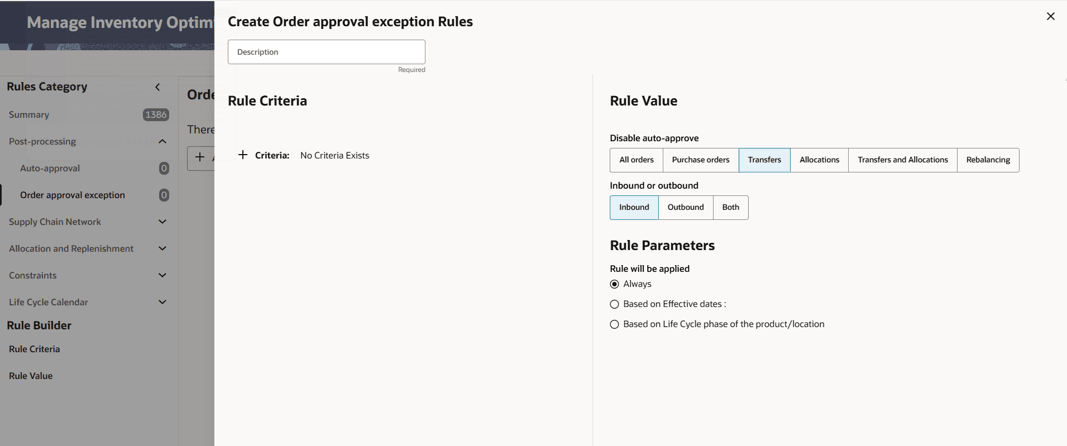
The user can set up order approval exception rules within Rules & Strategies. This rule is under the post-processing category and allows for selecting different type of orders and specify inbound/outbound/all for disabling auto-approval using different criteria such as product and location hierarchy, and supplier.
IPO Integration with External Application (non-MFCS Integration)
This section describes the customer-facing export flow. In summary, the system generates request-specific temporary export data, notifies the configured customer endpoint when the data is ready, and allows the customer system to fetch export data in smaller windows and in parallel. The process is the same for all type of recommendations: PO, transfer, allocation, rebalancing, and replenishment policies. Note that the export process is asynchronous. Instead of returning the entire export data set in one response, IPO prepares data for a specific request and sends a notification that contains the request ID, temporary export table metadata, window information, and window fetch endpoints.
Here is the end to end sequence for one export process:
- User triggers export from the UI (by clicking on Approve) or by running nightly or ad-hoc batch process for export
- IPO validates that the external notify API is configured.
- IPO generates temporary export data for the received export request.
- IPO calculates row count, window count, window IDs, and fetch URLs for each window.
- IPO posts a notification payload to the configured customer endpoint.
- Customer reads the windows array and fetches data for each window.
- Customer may fetch multiple windows in parallel.
- For each completed window, customer calls the export status update API.
- IPO persists status and returns confirmation for the request/window.
Customer Notify API Contract
IPO sends a POST request to the customer-configured external endpoint when the export data is ready.
| Method | POST |
|---|---|
| Endpoint |
Customer environment endpoint, for example http://{HOSTNAME}/external/env/endpoint Set in IO_EXT_APP_EXP_NOTIFY_URL in rse_config. |
| Authorization |
Customer-defined authorization token or gateway mechanism, if required. Set in IO_EXT_APP_EXP_NOTIFY_TOKEN in rse_config. |
| When called | After IPO creates export data and window metadata. |
| Required customer action | Persist the payload, parse windows[].href, fetch each window, and update status after processing. |
Notification Payload Example
{
  "exportNotifyRequestHeader": {
    "requestID": "00070",
    "exportType": "PO",
    "userID": "user@example.com",
    "windowCount": 33
  },
  "windows": [
    {
      "window_id": 1,
      "href": "/rase/resources/io/view/v1/getPurchaseOrderByWindow/00070/1"
    }
  ]
}
| Field | Description | Customer use |
|---|---|---|
| requestID | Export request identifier generated by IO. | Use for correlation, fetch requests, status updates, and logs. |
| exportType | Export type, such as PO, ALLOCATION, WH_STORE_TRANSFER, WH_WH_TRANSFER, REBALANCE, or REPLENISHMENT. | Confirm that the payload matches the requested export flow. |
| userID | User who triggered the export. | Use for audit and support correlation. |
| windowCount | Total number of export windows. | Must match the number of windows the customer processes. |
| windows[].window_id | Window sequence number. | Use for status update and progress tracking. |
| windows[].href | API endpoint for retrieving that window. | Call each endpoint to fetch exported data. |
Data Fetch APIs
The customer application reads the fetch endpoint from each windows[].href value in the notification payload and calls the corresponding API. For transfer export there is an additional parameter to indicate the type. Transfer types include WHST for warehouse-to-store transfers, WHWH for warehouse-to-warehouse transfers, and REBAL for rebalance transfers.
| Export Domain | Endpoint Pattern | Example |
|---|---|---|
| Transfer | GET /rase/resources/io/view/v1/getTransferByWindow/{transferType}/{requestId}/{windowId} | GET /rase/resources/io/view/v1/getTransferByWindow/WH_ST/00065/1 |
| Purchase Order | GET /rase/resources/io/view/v1/getPurchaseOrderByWindow/{requestId}/{windowId} | GET /rase/resources/io/view/v1/getPurchaseOrderByWindow/00070/1 |
| Allocation | GET /rase/resources/io/view/v1/getAllocationByWindow/{requestId}/{windowId} | GET /rase/resources/io/view/v1/getAllocationByWindow/REQ123/10 |
| Replenishment | GET /rase/resources/io/view/v1/getReplenishment ByWindow/{requestId}/{windowId} | GET /rase/resources/io/view/v1/getAllocationByWindow/REQ123/10 |
Status Update API
The customer calls the status update API after a window has been fetched and processed. This gives IPO visibility into export progress and prevents duplicate successful processing.
| Method | PUT |
|---|---|
| Endpoint | /rase/resources/io/view/v1/export/status |
| Authorization | Internal generic or configured service authorization |
| When called | Once per completed window |
| Success response | {"success": true, "message": "Status is Updated successfully.", "requestId": "12345"} |
Status Update Request Example
{
  "exportStatusRequestHeader": {
    "requestID": "REQ123",
    "window_id": 10,
    "status": "S",
    "reason": "Processed successfully"
  }
}
| Status | Meaning | When to send |
|---|---|---|
| S | Success | The customer application fetched and processed the window successfully. |
| F | Failure | The customer application could not process the window. Include a useful reason. |
Customer Application Responsibilities
- Expose an HTTP endpoint that accepts the IPO notification POST request and update IO_EXT_APP_EXP_NOTIFY_URL accordingly.
- Read and store the complete notification payload for audit and troubleshooting.
- Parse exportNotifyRequestHeader and the windows array.
- Confirm that the number of windows entries matches exportNotifyRequestHeader.windowCount.
- Call every endpoint listed in windows[].href.
- Process or import each window of data.
- Call the IPO status update API for each processed window.
- Log requestID, exportType, window_id, fetch status, and status update response.
Validation Checklist
| Check | Expected result |
|---|---|
| Notify endpoint is running | The customer endpoint is reachable before export starts. |
| Notification received | Exactly one notification payload is received for the export request. |
| Header fields validated | requestID, exportType, userID, tableName, windowTableName, and windowCount are present. |
| Window count validated | windows array size equals exportNotifyRequestHeader.windowCount. |
| Window fetch completed | Every windows[].href endpoint returns the expected exported data. |
| Status update completed | The status update API returns success for every processed window. |
| Error logs reviewed | No connection-refused or failed-notification errors are present for the request ID. |
Common Issues
| Issue | Likely cause | Recommended action |
|---|---|---|
| Notification not received | Customer endpoint is not running, URL is incorrect, or network path is blocked. | Start the external app, verify host/port/path, and confirm network access from IO. |
| Window count mismatch | Customer app did not process the full windows array or payload was truncated in logs. | Use the original JSON payload, not a copied partial payload, and process each windows entry. |
| Duplicate window fetch | Status was already marked success for that window. | Treat the window as already complete and avoid refetching successful windows. |
| Status update fails | Incorrect requestID/window_id/status value or environment-specific endpoint configuration. | Validate request body, authorization, and endpoint URL for the test environment. |
Note:
Customers should treat the notification payload as the source of truth for request ID, export type, window count, and fetch URLs. Endpoint examples in this guide are illustrative and may vary by environment, host name, authorization, or supported export type.IPO Integration with MFCS
When a sku-store is set up in MFCS for replenishment, if the optimization flag in MFCS is set to Y, the optimal replenishment policies for that sku-store is sent back to MFCS via Web Service integration.
Additional configuration parameters must be set to integrate IPO with MFCS. The configuration parameters that must be set for integration of replenishment policies and rebalancing transfers are listed in Table 15-2 and Table 15-3, respectively.
In addition, the MFCS username and password must be added under the credential store for Merchandise MFCS Access. You can modify these values using the UI screen for Data Management -> Manage Credential Store, as shown in Figure 15-1 and Figure 15-2. Data Management screen is available under the task menu in the main dashboard.
The export process can be done from the UI by approving recommended replenishment policies, purchase orders, transfers, and allocations. The nightly job for export pushes the auto-approved recommendations to MFCS.
Table 15-2 Configuration Parameters for Integration of Replenishment Policies with MFCS
| Parameter Name | Parameter Value | Description |
|---|---|---|
|
IO_MERCH_RMS_CONTEXT_ROOT |
RmsReSTServices/services/private This value must be set based on the client environment. |
Context root of the RMS Restservice url. |
|
IO_MERCH_RMS_FLG |
Y |
Flag to identify whether to publish replenishment parameter to RMS. |
|
IO_MERCH_RMS_HOSTNAME |
msp00aay.us.oracle.com This value must be set based on the client environment. |
URL host name to publish replenishment parameter to RMS. This must be same as CN name in the certificate. |
|
IO_MERCH_RMS_PORT |
8002 This value must be set based on the client environment. |
Port number to publish replenishment parameter to RMS. |
|
IO_MERCH_RMS_REPL_PATH |
inventory/replenishment/createReplSched |
Path of the Restservice e.g., inventory/replenishment/createReplSched. |
|
IO_MERCH_RMS_VERSION |
16.0 This value must be set based on the client environment. |
RMS Version to use for publishing replenishment parameter to RMS (format 16.0). |
|
IO_MERCH_RMS_AUTH_SERVICE_TYPE |
OAUTH |
Used in determining whether to use OAuth or basic authentication for IPO-IO RMS integration. |
Table 15-3 Configuration Parameters for Integration of Rebalancing Transfers with MFCS
| Parameter Name | Parameter Value | Description |
|---|---|---|
|
IO_REBAL_TRANSF_MERCH_RMS_FLG |
Y |
Flag to identify whether to publish rebalancing transfers to RMS. |
|
IO_REBAL_TRANSF_MERCH_RMS_HOSTNAME |
msp00aay.us.oracle.com This value must be set based on the client environment. |
URL host name to publish rebalancing transfers to RMS. This must be same as CN name in the certificate. |
|
IO_REBAL_TRANSF_RMS_PORT |
443 This value must be set based on the client environment. |
Port number to publish rebalancing transfers to RMS |
|
IO_REBAL_TRANSF_RMS_SERVICE_VERSION |
v1 This value must be set based on the client environment. |
Transfer Management Service Version to use for publishing rebalancing transfers to RMS (format v1). |
Figure 15-1 and Figure 15-2 show adding a username and password for the credential store.
Figure 15-1 Selecting the Credential Store
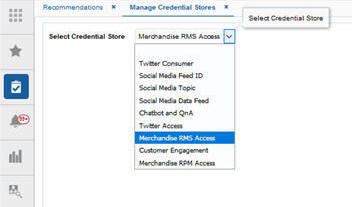
Description of "Figure 15-1 Selecting the Credential Store"
Figure 15-2 Adding the Username and Password for the Credential Store
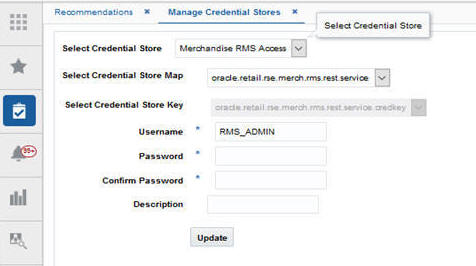
Description of "Figure 15-2 Adding the Username and Password for the Credential Store"
Forecast Engine Setup for IPO
The forecast engine that generates demand forecast and feeds into the IPO consists of two modules: parameter estimation and demand forecasting. Parameter estimation uses the historical data to determine the parameters, including seasonality, price elasticity, promotion elasticity, and promotion lift (or holiday lift) values. Demand forecasting leverages the parameters estimated from historical data and in-season sales data (the base demand is re-estimated on a regular basis as part of batch process) to determine the demand and generate the forecast.
To set up the parameter estimation and forecast runs and configure various settings, you can use the Manage Forecast Configurations functionality under Strategy & Policy Management. Based on the configuration settings, parameter estimation can be executed through the UI to initially estimate the parameters and then updated at specified intervals to reflect the latest sales trends. Similarly, a weekly batch job is used to generate demand forecasts every week after the weekly data has been updated.
For details regarding setting up run types and runs and configuring parameters, refer to the Control and Tactical Center chapter in the implementation guide.
Here are the points to take into consideration when setting up forecast runs types for IPO.
-
Forecast level: data must be aggregated at the lowest level (Sku/store/week level) and the option for spreading the forecast to day level must be enabled when setting up the run type. If customer segment data is available and is desired to be used as additional dimension in the forecast, enable the option for customer segments.
-
Forecast method: if the items are fashion/short life cycle, select Causal-Short Life Cycle. If items are basic items which live for at least 16 weeks and often longer, select Causal-Long Life Cycle.
-
Forecast measure: select Total Gross Sales Units.
-
Spread Forecast to Day level: must be enabled.
-
Spread Profile Level: Spread profile can be provided through rse_fcst_spread_profile_stg.txt. If the spread profile is not available, leave the profile level selection empty. In such case, a default uniform profile will be applied for spreading forecast from week to day level.
-
Run the data aggregation in the Setup train stop.
-
Once the aggregation is complete, use Test train stop to create an ad-hoc run. Select Run estimation and base demand and enable Run forecast. Once the run is successfully complete, if desired, you can review the results using Innovation Workbench.
-
Use the Manage train stop to activate the run type and override the configurations for the run type if desired. In addition, turn on auto-approve batch runs.
-
Use Map train stop to map the run type to IPO.
-
Make sure proper POM jobs (listed in Batch and Ad-Hoc Jobs for IPO-DF Forecasting in the Control & Tactical Center chapter) are enabled so the forecast is generated via batch jobs.
Batch and Ad Hoc Jobs for IPO
The following jobs with mentioned options must be executed to load required data for IPO and forecast engine.
Table 15-4 Batch and Ad Hoc Jobs for IPO
| JobName | Description | RmsBatch | Parameters |
|---|---|---|---|
|
RSE_MASTER_ADHOC_AIF_JOB The batch job is |
Run RSE master script |
rse_master.ksh |
You can run this with parameter '-A' which will run all data loads. You can also provide parameters to load certain data only. These parameters can be found in the AIF Operations Guide. The parameters that are relevant for IPO-IO are listed below this table. |
|
IO_MASTER_ADHOC_AIF_JOB |
Run IPO-IO master script |
io_master.ksh |
You can run this with parameter '-A' which will run all data loads. Alternatively, you can specify specific parameters to load certain data. List of parameters are listed below this table |
|
IO_WAREHOUSE_LOAD_START_JOBIO_WAREHOUSE_LOAD_JOBIO_WAREHOUSE_LOAD_END_JOB |
Load job for warehouses |
io_warehouse_load.ksh |
|
|
IO_SEASON_LOAD_START_JOBIO_SEASON_LOAD_STG_JOBIO_SEASON_LOAD_COPY_JOBIO_SEASON_LOAD_STG_CNE_JOBIO_SEASON_LOAD_JOBIO_SEASON_LOAD_END_JOB |
Load job for seasons |
io_season_load.ksh |
|
|
RSE_RULES_TO_IO_LOAD_START_JOBRSE_RULES_TO_IO_LOAD_JOBRSE_RULES_TO_IO_LOAD_END_JOB |
Job to load RSE rules to IPO-IO |
rse_rul_eng_io_load.ksh |
|
|
IO_CREATE_BATCH_RUN_ADHOC_JOB |
IPO-IO batch run creation ad hoc job |
io_create_batch_run.ksh |
|
|
IO_RUN_ANALYTICS_ADHOC_JOB |
IPO-IO analytics run ad hoc job |
io_run_analytics.ksh |
|
|
IO_PUBLISH_MERCH_RMS_START_JOBIO_PUBLISH_MERCH_RMS_JOBIO_PUBLISH_REBAL_RMS_JOBIO_PUBLISH_MERCH_RMS_END_JOB |
Publish job for pushing replenishment param-eters and Rebalancing transfers to RMS |
io_publish_merch_RMS.kshio_publish_rebal_transfer.ksh |
Parameters for running RSE_MASTER_ADHOC_AIF_JOB
Table 15-5 Parameters for running RSE_MASTER_ADHOC_AIF_JOB
| Data (-<parameter>) | Notes |
|---|---|
|
RSE Product Hierarchy ETL (including CM Groups Hierarchy) (-p) |
|
|
RSE Location Hierarchy ETL (-l) |
|
|
Trade Area alternate hierarchy (-t) |
|
|
RSE Calendar Hierarchy ETL (-d) |
|
|
RSE Promotion Hierarchy ETL (-r) |
Required if client has promotion data that they want to use in forecasting |
|
RSE Customer Segment Hierarchy ETL (-g) |
|
|
RSE Product Attributes (-P) |
|
|
Location attributes (-L) |
|
|
Like Location / Product data load (-K) |
Required if client wants to use like location and/or like product in forecasting |
|
Holiday load (-h) |
|
|
Inventory data load (-i) |
|
|
Sales transaction data (-x) |
|
|
Weekly Aggregate Sales data (Load or Calc) (-w) |
|
|
Aggregate Sales data processing (-a) |
|
|
Price and Cost data load (-C) |
|
|
UDA Load (-u) |
|
|
Weekly Return transactions (-T) |
|
|
Weekly Return Aggregation (-e) |
|
|
Weekly Sales Return Price Consolidation (-S) |
|
|
Promotion data load (-n) |
|
|
Daily data load (-D) |
|
|
Supplier, supplier item, daily supplier cost and supplier inventory management ETLs (-U) |
w_party_org_d, w_party_attr_d, w_rtl_it_supplier_dsupplier inventory management is optional data for order scaling rules, which are sourced from w_rtl_repl_sup_mgmt_d |
|
Seasons, phases and related items ETL (-N) |
|
|
Load rules engine data to IPO-IO (-j) |
Optional. It's needed for loading IPO-IO rules that are defined in Rules & Strategies into IPO-IO. |
|
Buyer, allocation, purchase order and transfer ETLs (-H) |
Optional If provided it can be used for value assessment to compare optimized history with actual history |
|
load forecast spread profiles (-M) |
Optional. Source: rse_fcst_spread_profile_stg.txtIt's needed for spreading week level forecast to day level. If not provided, a uniform profile will be applied. |
|
Load life cycle classification data (-V) |
Optional Source: rse_fcst_life_cycle_clsf_stg.txtThis allows user to classify product/locations as being short or long life cycle. By default, all product/location combinations are considered to have the life cycle classification which is indicated by DFLT_LIFE_CYCLE in RSE_CONFIG. Exceptions to DFLT_LIFE_CYCLE can be provided through rse_fcst_life_cycle_clsf_stg.txt and loaded by running this job. This information is forecast engine to apply the proper forecast method ac-cording to the life cycle of the item. |
Parameters for running IO_MASTER_ADHOC_AIF_JOB
Table 15-6 Parameters for running IO_MASTER_ADHOC_AIF_JOB
| Data (-<parameter>) | Notes |
|---|---|
|
Replenishment Attributes at Product/Location or Group level (-a) |
Source: w_inventory_product_attr_d |
| Supply chain for Distribution Networks (-C) | Source: REPL_DISTRO.csv. See the RAP Foundation Data section for more details |
| Review cycles (-S) | Source: REPL_REV_INT.csv. See the RAP Foundation Data section for more details. |
| Lead times (-L) ) | Source: REPL_LT_INT.csv. See the RAP Foundation Data section for more details. |
| Supply chain for Procurement Networks (-P) | Source: REPL_PROC.csv. See the RAP Foundation Data section for more details. |
| Supplier Lead times (-T) | Source: REPL_LT_SUP.csv. See the RAP Foundation Data section for more details. |
| Internal Order Multiples (-M) | Source: REPL_MULT_INT.csv. See the RAP Foundation Data section for more details. |
| Supplier Order Multiples (-m) | Source: REPL_MULT_SUP.csv. See the RAP Foundation Data section for more details. |
| Rounding Levels (-l) | Source: REPL_ROUND.csv. See the RAP Foundation Data section for more details. |
| Load rules from IO table to rules engine (-I) | Source: IO_STRATEGY_RULE |
| Load N-tier interface data to rules engine (-N) ) | Source: the 8 REPL_* interfaces. See the RAP Foundation Data section for more details. |
| Location Priority Groups (-G) | Source: io_loc_priority_grp_stg.txt |