1 Noteworthy Enhancements
This guide outlines the information you need to know about new or improved functionality in the Oracle Retail Analytics and Planning applications update and describes any tasks you might need to perform for the update. Each section includes a brief description of the feature, the steps you need to take to enable or begin using the feature, any tips or considerations that you should keep in mind, and the resources available to help you.
Important:
Due to the highly extensible nature of the Retail Analytics and Planning suite of cloud services, scheduled updates to its application features can affect your custom scripts, reports, datasets, and other objects added in the Innovation Workbench and Oracle Analytics Server. The customer is solely responsible for regularly backing up all custom objects created across the suite of Retail Analytics and Planning (RAP) cloud services and ensuring that these custom objects continue to function as intended after each major update. Oracle does not maintain backups of custom objects in a way that enables their individual restoration if they are lost or corrupted. For example, if a custom script is deleted by a user or modified in a way that makes it non-functional, Oracle cannot restore it without rolling back the environment to an earlier point in time (before the changes occurred).
Column Definitions
-
Feature: Provides a description of the feature being delivered.
-
Module Impacted: Identifies the module impacted associated with the feature, if any.
-
Scale: Identifies the size of the feature. Options are:
-
Small: These UI or process-based features are typically comprised of minor field, validation, or program changes. Therefore, the potential impact to users is minimal.
-
Medium: These UI or process-based features are typically comprised of field, validation, or program changes. Therefore the potential impact on users is moderate
-
Large: These UI or process-based features have more complex designs. Therefore, the potential impact to users is higher.
-
-
Delivered: Is the new feature available for use immediately after upgrade or must the feature be enabled or configured? If no, the feature is non-disruptive to end users and action is required (detailed steps below) to make the feature ready to use.
-
Customer Action Required: You must take action before these features can be used. These features are delivered disabled and you choose if and when to enable them.
Feature Module Impacted Scale Delivered Customer Action Required? Analytics and Planning (RAP) Enhancements Analytics and Planning
Medium
Yes
No
Analytics and Planning
Small
Yes
No
Analytics and Planning
Medium
Yes
No
Analytics and Planning
Small
Yes
No
Analytics and Planning
Small
Yes
No
Inventory Planning Optimization (IPO) Cloud Service Enhancements Optimization
Medium
No
Yes
Integration
Medium
No
Yes
Inventory Planning
Large
Yes
No
Optimization
Small
Yes
Yes
Optimization
Small
Yes
Yes
Optimization
Small
Yes
Yes
Inventory Planning
Large
Yes
No
Inventory Planning
Small
Yes
No
Lifecycle Pricing Optimization (LPO) Cloud Service Enhancements Manage LPO Recommendations: The User Filter Manage LPO Recommendations Medium Yes No Manage LPO Recommendations: Sidebar Redesign for Key Actions
Manage LPO Recommendations
Medium
Yes
No
Manage LPO Recommendations: Collapsible and Scrollable Summary Panel
Manage LPO Recommendations
Small
Yes
No
Custom Budget: Integration of MFP Budgets in LPO with Price Zones
Manage LPO Recommendations: Custom Budget
Medium
Yes
Yes, review and update the configuration flags as needed.
Custom Budget: Support for Multiple Price Zones and Locations
Manage LPO Recommendations: Custom Budget
Medium
Yes
No
Manage LPO Recommendations: Pivot
Small
Yes
No
Manage LPO Recommendations: Computed Columns Now Included in ‘Export to Excel’
Manage LPO Recommendations: Computed Columns
Small
Yes
No
Improved Markdown Elasticity Calculation in Lifecycle Forecasting Method
Lifecycle Forecasting
Medium
Yes
No
Rules Management: Displaying Rule Criteria ID and Rule Value ID
Rules Management
Medium
Yes
No
Rules Management: Multiple Node Selection for Price Zone in Rule Criteria Rules Management Medium Yes No Rules Management: Remapping Rule Criteria and Values Directly in the Edit Rule Interface
Rules Management
Medium
Yes
No
POM Batch Run - PRO_OPT_JOB
Small
Yes
No
Retail Insights Cloud Service Enhancements AI Services
Small
Yes
No
Reporting
Small
Yes
No
Reporting
Small
Yes
No
Reporting
Small
Yes
No
Reporting
Small
Yes
No
Reporting
Small
Yes
No
Retail Predictive Application Server Cloud Edition Server Enhancements Hierarchy load
Medium
Yes
Yes
Batch
Small
Yes
Yes
Retail Predictive Application Server Cloud Edition Client Enhancements
RPAS UI
Small
Yes
No
RPAS UI
Small
Yes
No
User Preference: Local Language UI Small Yes No Assortment Planning Cloud Service Enhancements
Assortment Strategy and Assortment Fit
Medium
Yes
Yes
Assortment Fit
Small
Yes
Yes
Item Flow
Small
Yes
Yes
Merchandise Financial Planning Cloud Service Enhancement
Merchandise Financial Planning
Small
Yes
No
Analytics and Planning Enhancements
Oracle Analytics Cloud Availability
For entirely new provisioned instances only, this release of Retail Analytics and Planning (RAP) applications replaces Oracle Analytics Server (OAS) with Oracle Analytics Cloud (OAC). Existing RAP customers will remain on their current OAS environments at this time, with no changes to the server version or configurations. Migration of existing customer environments from OAS to OAC is a separate process that is not performed by this application update.
Integration and Interface Updates
This release of Retail Analytics and Planning (RAP) applications includes the following updates to data integrations and commonly used batch programs in the AIF DATA batch schedule:
-
The job RA_ERROR_COLLECTION_JOB has been added as the final step of all AIF DATA standalone processes for loading fact data and should be enabled by default. This job is mandatory for maintaining the W_ETL_REJECTED_RECORDS table.
-
The ETLREFRESHGENSDE_JOB has been modified to stop extracting certain parameters from Merchandising that were not being used in downstream applications, such as PRIME_EXCHNG_RATE and MULTI_CURRENCY_IND. Job failures relating to this parameter extraction have also been resolved.
-
A new standalone process RDE_SLSMKDNILDSDE_INITIAL_ADHOC has been added for extracting markdown transaction history from TRAN_DATA_HISTORY.
-
A new nightly and standalone batch job W_RTL_PLAN6_PROD6_LC6_T6_FS_SDE_JOB has been added for extracting the MFP markdown budget plan to RI.
-
A new set of jobs are added to the nightly batch for staging and loading the W_RTL_CUSTOM_HIER_MAP_F table that is used for custom Planning hierarchies.
-
A new standalone job PURGE_ODI_LOG_JOB has been added to weekly maintenance processes (and is enabled by default) for deleting old ODI execution logs that result from AIF DATA batch runs.
This release also includes the following notable changes to common batch processes in the AIF APPS batch schedule:
-
RSE_SPREAD_APPD_RDF_FCST_TO_DAY_JOB is enabled by default based on the status of job IO_CREATE_BATCH_RUN_JOB.
-
Add a standalone job RSE_COLLECT_GLOBAL_STATS_ADHOC_JOB for refreshing global statistics on demand.
-
Added a new flow AIF_MAINT_CYCLE for scheduling recurring runs of RSE_COLLECT_GLOBAL_STATS_ADHOC_JOB.
- A mandatory parameter has been added for existing jobs IO_ORDER_MULT_PROD_LOC_JOB,
IO_ORDER_MULT_PROD_SUPP_JOB, IO_ORDER_MULT_PROD_LOC_ADHOC_JOB, and
IO_ORDER_MULT_PROD_SUPP_ADHOC_JOB. The parameter sets a force purge flag as follows:
- Y - Deletes from IO_ORDER_MULT_PROD_LOC and IO_ORDER_MULT_PROD_SUPP tables where RULE_SET_HDR_ID = -2, then runs the loader.
- N - Deletes from IO_ORDER_MULT_PROD_LOC and IO_ORDER_MULT_PROD_SUPP tables where DATA_SOURCE = 'ntier_intf', then runs the loader. Inserts only if a product/location combination does not exist.
- New jobs IO_TIMEPHASED_VALIDATION_JOB and IO_TIMEPHASED_VALIDATION_ADHOC_JOB have been added to the existing IO analytics nightly and standalone processes. The jobs validate IO time phased runs. The jobs accept an optional BATCH_RUN_ID parameter. The batch IO_TIMEPHASED_VALIDATION_JOB has no parameter by default.
- IO_CREATE_BATCH_RUN_JOB and IO_CREATE_BATCH_RUN_ADHOC_JOB jobs have been removed from IO_ANALYTICS_PROCESS and IO_ANALYTICS_ADHOC_PROCESS processes, respectively, as the job functionality has been moved to IO_RUN_ANALYTICS_JOB and IO_RUN_ANALYTICS_ADHOC_JOB jobs.
- The following batch POM jobs have been added to the existing ORASE_MAINT_PURGE_PROCESS: ORASE_MAINT_PURGE_RECYCLEBIN_RASE_JOB, ORASE_MAINT_PURGE_RECYCLEBIN_RTLWSP_JOB. ADHOC versions of the jobs have been added to the Standalone process. These jobs purge objects from the recycle bin for the RASE and RTLWSP schemas. The jobs accept mandatory non-editable parameters.
Data Streaming Web Services
This release introduces a new way to load data for Retail Analytics and Planning solutions through ReSTful web service APIs. The APIs provide a streamlined method for ingesting data into the RAP data warehouse in near-real-time and for propagating that data to certain AI Foundation applications so they can immediately leverage the data. Not all interfaces will support data streaming in this release; it is focused on specific key functional areas such as purchase orders and allocations. Any usage of this data within RAP applications (except Retail Insights, which automatically leverages all data warehouse updates) is noted as part of the application-specific enhancements and documentation.
Data streaming services allow you to make updates to specific data warehouse tables outside of the nightly batch, while also preserving those changes for automatic inclusion in the next nightly batch cycle without providing the same data again. You can also leverage this data in custom extensions in Innovation Workbench that require more frequent updates. RAP documentation is updated with details on the usage and functionality of the data streaming processes.
Planning Integration Changes
The following changes have been made to the integration between the RAP data warehouse and Planning applications in this release:
| Interface | Change Summary |
|---|---|
|
Transfers (W_PDS_INVTSF_IT_LC_WK_A) |
New configuration PDS_TRANSFER_SOURCE_TYPE defines whether the source system is MFCS or NON-MFCS and alters the extract accordingly to account for differences in the data format. Default is NON-MFCS, which matches current behavior. |
|
Inventory(W_PDS_INV_IT_LC_WK_A) |
New column PURCH_TYPE_CODE added, representing the purchase type of the item/location, such as Consignment or Concession. |
|
Markdowns(W_PDS_MKDN_IT_LC_WK_A) |
Reworked the extract to handle job failures resulting from too many weeks of data being moved in a single execution. |
|
Item Differentiators(W_PDS_DIFF_D) |
Resolved issues that prevented custom differentiators (beyond the basic size and color attributes) from integrating correctly to PDS. |
|
Item Location Ranging(W_PDS_IT_LC_DV) |
Exposed a new integration view for item/location ranging and status flags for Planning (as a custom configuration only). |
|
Custom Hierarchy Mapping(W_PDS_CUSTOM_HIER_MAP_FV) |
Exposed a new integration view for custom hierarchy intersection mappings for Planning (as a custom configuration only). |
RAP Data Dictionary
The RAP Data Interfaces Guide has been converted into a new interactive workbook that is published with our standard Oracle Analytics catalog to all newly provisioned environments. The new workbook is available at: /Shared Folders/Custom/AI Foundation/RAP Data Dictionary. The data dictionary leverages the reporting capabilities of Oracle Analytics Cloud to provide an easily searchable and customizable view of the data interfaces used by all RAP applications, with options to display and export specific file specifications matching the older format found in the Data Interfaces Guide, if required.
The RAP Data Interfaces Guide has also been updated for this release but will stop receiving updates once the Data Dictionary is available to all customers. In this release, the Data Dictionary is only available in new environments having Oracle Analytics Cloud.
Inventory Planning Optimization (IPO) Cloud Service Enhancements
Location Delivery Schedules and Closures
Location delivery schedules and company or location closure information will enable IPO to better automate executable orders, ensuring orders are not raised for days that a location is closed for shipping or receiving. This data, set up in the Oracle Retail Merchandising Foundation Cloud Service, is used by IPO when determining valid review days and expected delivery dates. Closures will impact review period duration in forecast-based replenishments.
-
To enable the use of delivery schedules, update the R
SE_CONFIGparameter:IO_DELIV_USE_SCHEDULES. -
To enable the use of location closures, update the
RSE_CONFIGparameter:IO_DELIV_USE_CLOSURES.
Intra-Day Inventory Updates
Scheduled purchase order and warehouse inventory updates throughout the day give the inventory planner the ability to rapidly complete the end-to-end allocation journey, as well as generate ad hoc recommendations based on the latest warehouse inventory information.
User Allocation from ASN, or Warehouse On-Hand
The user-driven allocation workflow is enhanced to include allocation of warehouse inventory and Advance Shipping Notice inventory. The inventory planner can choose to allocate Purchase Order, Advance Shipping Notice, and on-hand inventory together or separately.
Store Rounding Thresholds
Rounding thresholds is able to be applied to all orders. The threshold is a percent that indicates the point beyond which a location's need should be rounded up to an order multiple, rather than rounded off.
Pack Tuning Objective
Inventory planners can influence pack quantity recommendations by setting a pack tuning objective rule. This rule informs the optimization of the business goals for meeting size need where need is disproportionate to pack quantity.
When creating a rule, select between:
-
Over Allocate: to ensure the need of all sizes are met. The packs allotted may exceed the need of some sizes to ensure the need (for example, weeks of supply) of all sizes is met.
-
Under Allocate: to never over allocate any size. The packs allotted will come as close as possible to meeting the size needs. However, no size’s quantity may be exceeded.
-
Balance: to meet all size needs as closely as possible; some sizes might be over allotted while some are under.
If no rule is created, the default is Balance.
Order Multiple Override Rule
Inventory planners can influence quantity recommendations by overriding location order multiple rules. Where inventory is selling slower than planned, decreasing the order multiple for specific locations can ensure better availability and sell-through.
Lifecycle Pricing Optimization (LPO) Cloud Service Enhancements
Manage LPO Recommendations: The User Filter
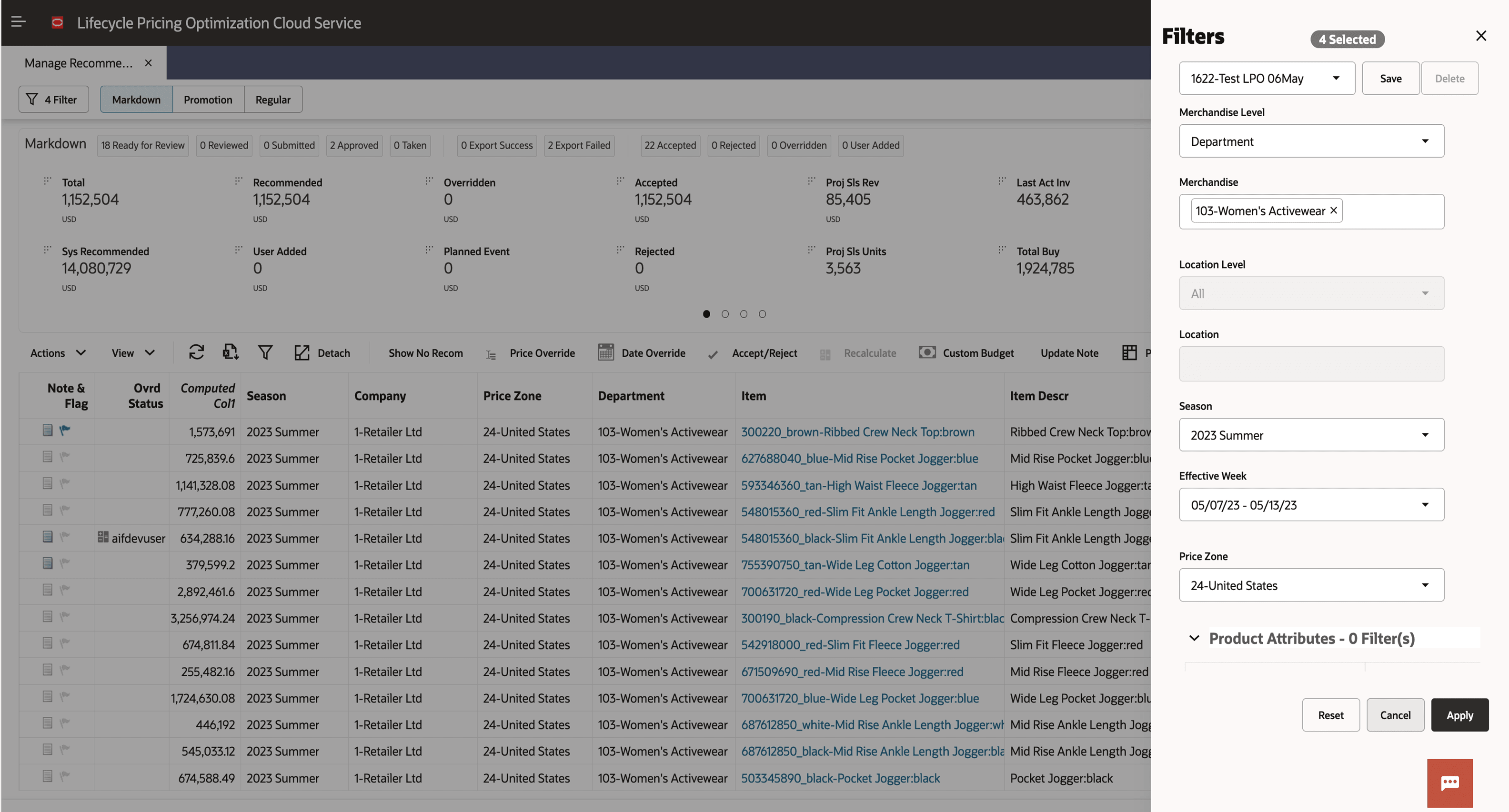
The User Filter (also known as the Big Filter) in the Manage Recommendations screen can now be accessed through the new Filter button in the top left corner of the screen. This button displays the number of filters currently applied (for example, "4 Filters"), giving immediate feedback about the current view.
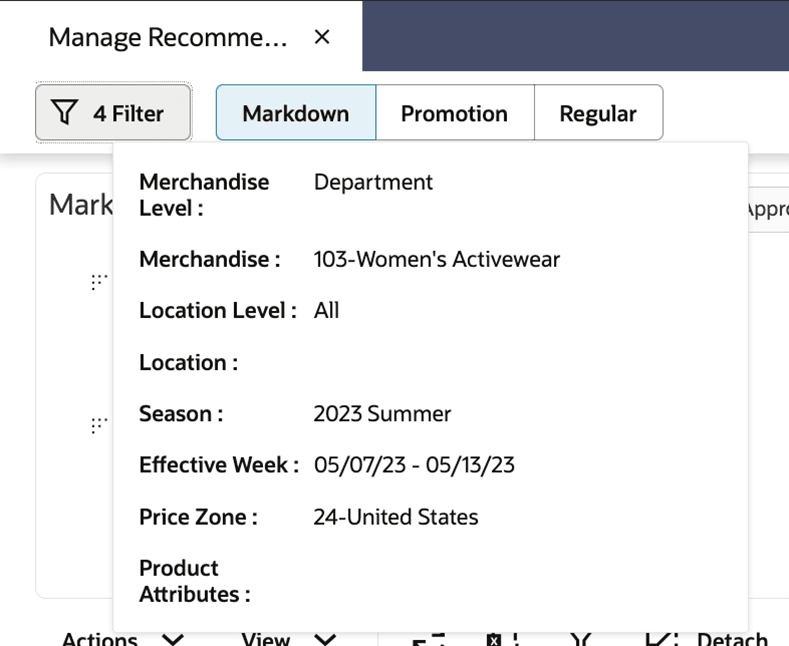
Additionally, when hovering over the filter button, a summary panel appears, listing all selected filter criteria, such as Merchandise Level, Season, Effective Week, Price Zone, and so on, making it much easier to review active filters at a glance without having to open the full filter panel.
To save a filter, the filter name can be entered in the ‘User Filter’ panel, followed by clicking the Save button.
Manage LPO Recommendations: Sidebar Redesign for Key Actions
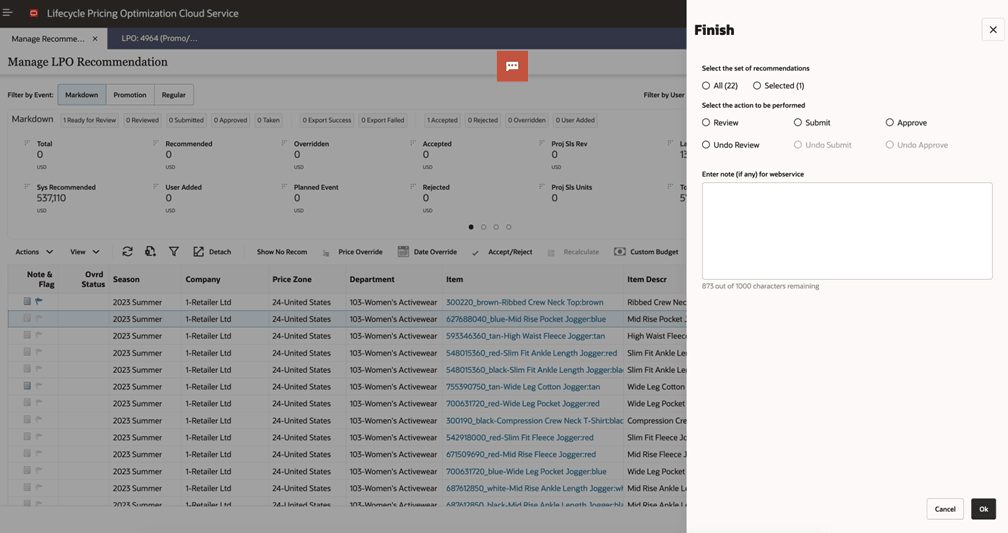
The way key actions such as Price Override, Date Override, Accept/Reject, Custom Budget, and Finish (example screenshot) are accessed from the Manage Recommendations table have been updated. Instead of appearing as pop-up dialogs, these actions are now shown in a contextual panel on the right side of the screen. By making this change, greater visibility to the underlying data is provided while edits are made. The overall user experience is also more streamlined and visually consistent, allowing actions to be completed with fewer interruptions.
Manage LPO Recommendations: Collapsible and Scrollable Summary Panel
The summary panel in the Manage LPO Recommendation screen can now be collapsed to display a single row of key metrics, with the option to scroll vertically to view additional metrics. This enhancement provides a cleaner interface to focus on primary information first when managing recommendations.
Figure 1-1 Summary Panel in Expand Mode

Figure 1-2 Summary Panel in Collapse Mode

Custom Budget: Integration of MFP Budgets in LPO with Price Zones
Previously, MFP budgets for promotions and markdowns could not be ingested directly into LPO when LPO is set up for Price Zones. Instead, users were required to provide budgets through a file interface at the Price Zone level. Because MFP does not offer direct support for Price Zones, this integration has been enhanced. Now, markdown budgets are spread down to the store level within MFP and sent directly to LPO. These store-level budgets are then automatically aggregated by LPO up to the Price Zone or other higher location hierarchies, as needed for pricing optimization.
Please note that support for legacy approach is maintained. The existing W_RTL_PLAN1_PROD1_LC1_T1_FS interface remains available for customers who do not use MFP or require backward compatibility.
To use the new functionality, following configurations must be set:
-
RSE_BDG_PLAN_MFP_INTEGRATION_FLG:
-
Set this flag to Y to indicate that budget data will come directly from MFP.
-
-
RSE_RI_BUDGET_PLAN_SRC:
-
Default value is RI_PLAN1. When the direct MFP integration is turned on, this should be set to RI_PLAN6. All new customers are encouraged to use this new interface.
-
Direct Integration Limitations
-
When integrating MFP budgets at the subclass level or higher, the Price Zone Group must also be mapped at the subclass or higher level. Assigning budgets at the SKU level is not supported.
-
The ability to use item-list based Price Zone Group is disabled when integrating with MFP budgets. This remains available only when using file interface.
-
When the user wants to use budgets in the LPO optimization batch runs, then the budgets should be sent at the product run setup level or lower (above recommendation level).
Custom Budget: Support for Multiple Price Zones and Locations
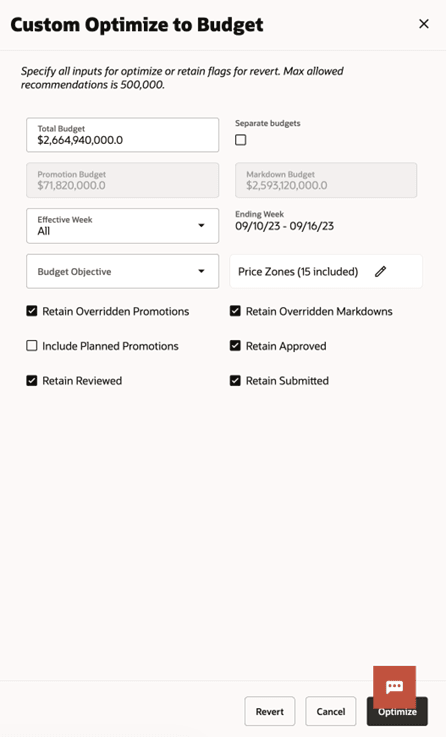
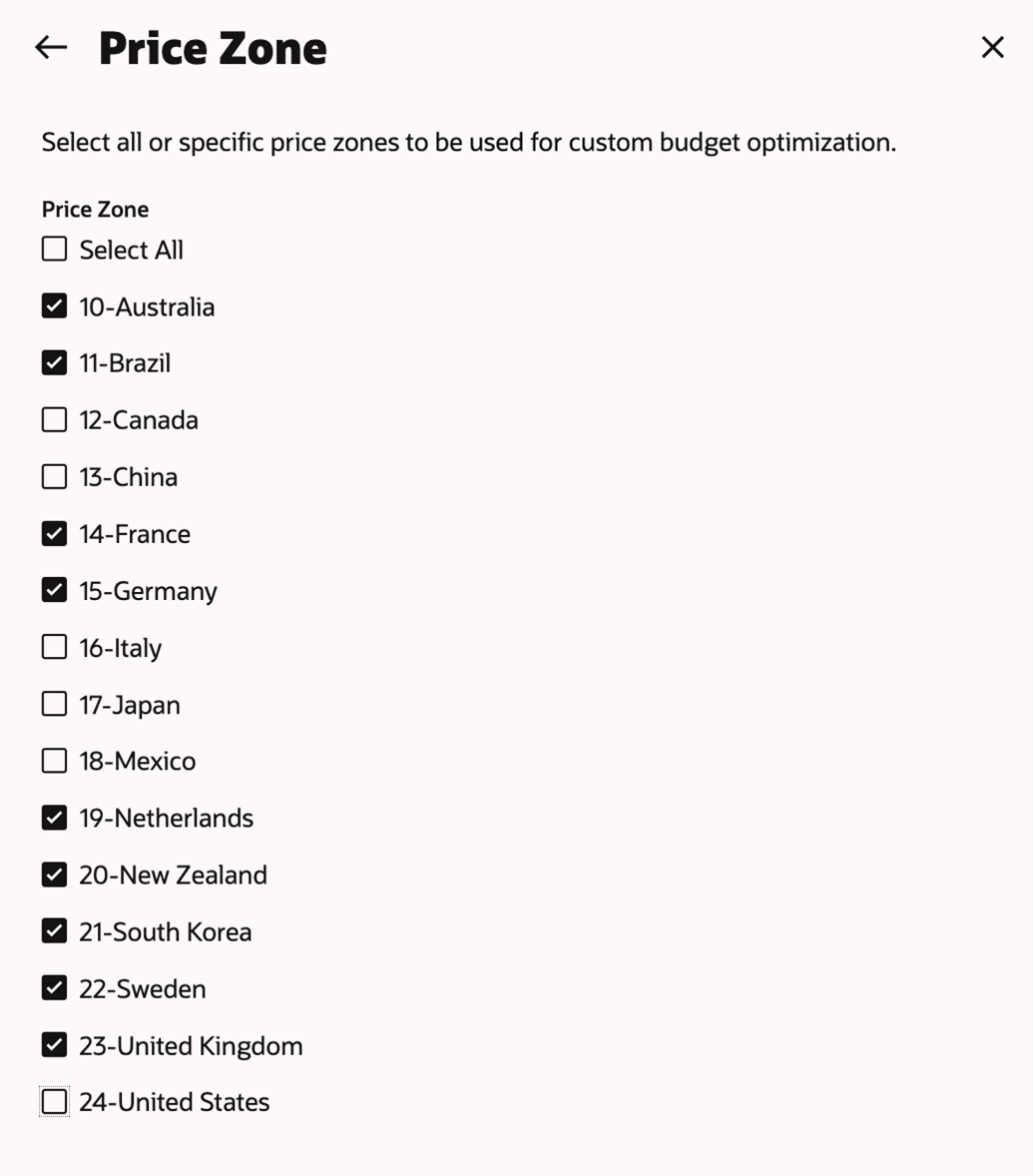
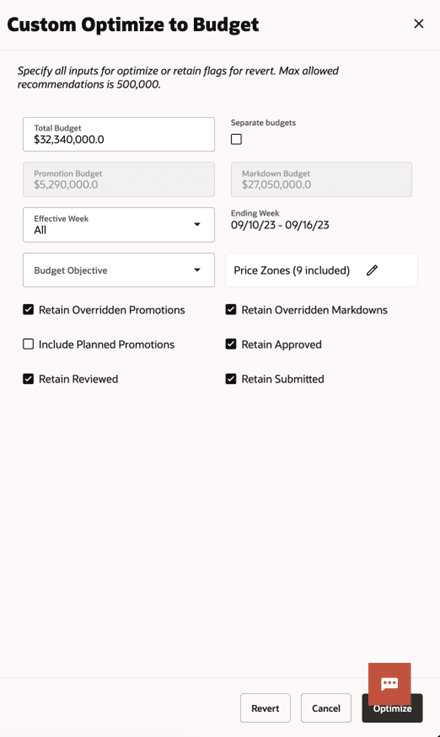
Previously, custom budget used the selection of price zones/locations specified in the 'big' user filter and thus was limiting which price zones or locations are used in the custom budget optimization. With this update, the user can select a subset of price zones or locations in the custom budget screen itself, allowing the user to apply custom budget to a set of price zones or locations, vastly improving efficiency. When a custom budget is submitted for all or selected price zones or locations, the total budget amount is automatically allocated to those selected, streamlining the budget management.
-
Figure 1: Custom Budget Window for all price zones - Total Budget: $229,650,000.00.
-
Figure 2: Only 11 price zones are included.
-
Figure 3: Total Budget is updated to $32,340,000.0 based on the selected price zones.
Manage LPO Recommendations: Pivot Table Enhancements
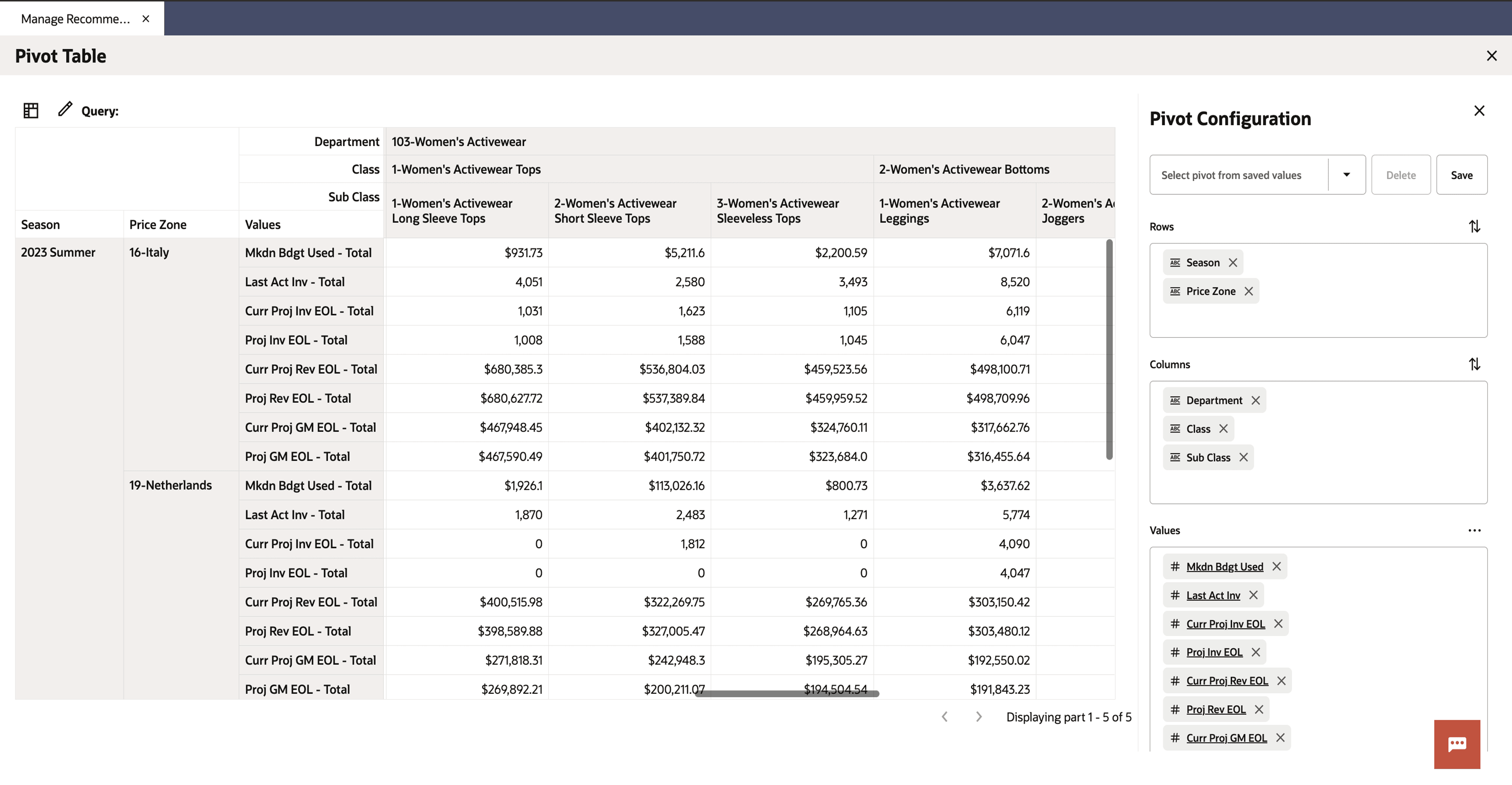
The Pivot action is now available directly from the table toolbar in the Manage Recommendations screen. When opening the pivot table, users will find that default selections for rows, columns, and data are preloaded, giving a helpful starting point and making it faster to begin analysis without needing to set up the structure from scratch. A
Additionally, pagination has been introduced in the pivot table. Rather than showing all rows at once, results are now broken into manageable pages. This makes it much easier to navigate large data sets, improves performance, and reduces load times when working with extensive recommendation data.

Manage LPO Recommendations: Computed Columns Now Included in ‘Export to Excel’
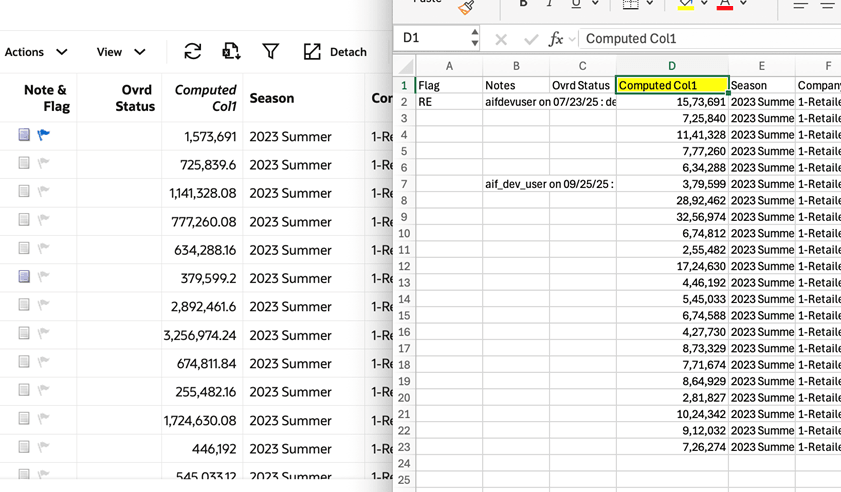
The Manage LPO Recommendations table has been enhanced so that computed columns for Promo, Markdown, and Regular are now included when exporting to Excel. Once a computed column has been created and selected for display in the table using the Manage Columns option, it will automatically be added to the exported Excel file.
Improved Markdown Elasticity Calculation in Lifecycle Forecasting Method
Lifecycle forecasting method now features an enhanced markdown elasticity estimation process to identify when the effect of a markdown is observed. The update introduces a new parameter MKDN_TIMEWINDOW_LAG_TKT_PRICE, which allows this forecasting method to detect markdown windows when price changes occur very late in a week and the price impact is observed in the following week. This will ensure that markdown elasticities are calculated even when there is a lag observing the impact of a markdown.
Rules Management: Displaying Rule Criteria ID and Rule Value ID
The management of rule criteria in the Rules Management of Control and Tactical Center has been improved to enhance efficiency and organization when working with pricing and other rules.
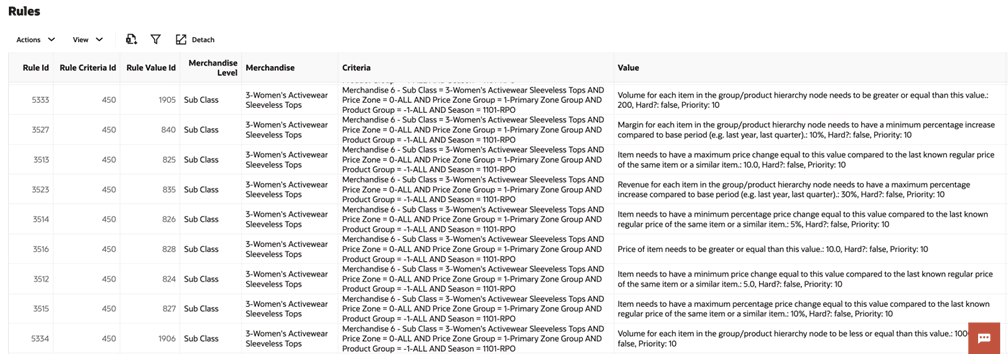
One important update is the display of Rule Criteria ID and Rule Value ID for each rule. With this change, every rule criterion and its associated values can be uniquely identified, making business rules easier to trace and manage. For example, as seen in the screenshot below, a single Rule Criteria ID (such as 450) is now mapped to multiple Rule Value IDs. This allows users to quickly see which sets of criteria are associated with which rule values at a glance, supporting better rule tracking.
Rules Management: Multiple Node Selection for Price Zone in Rule Criteria
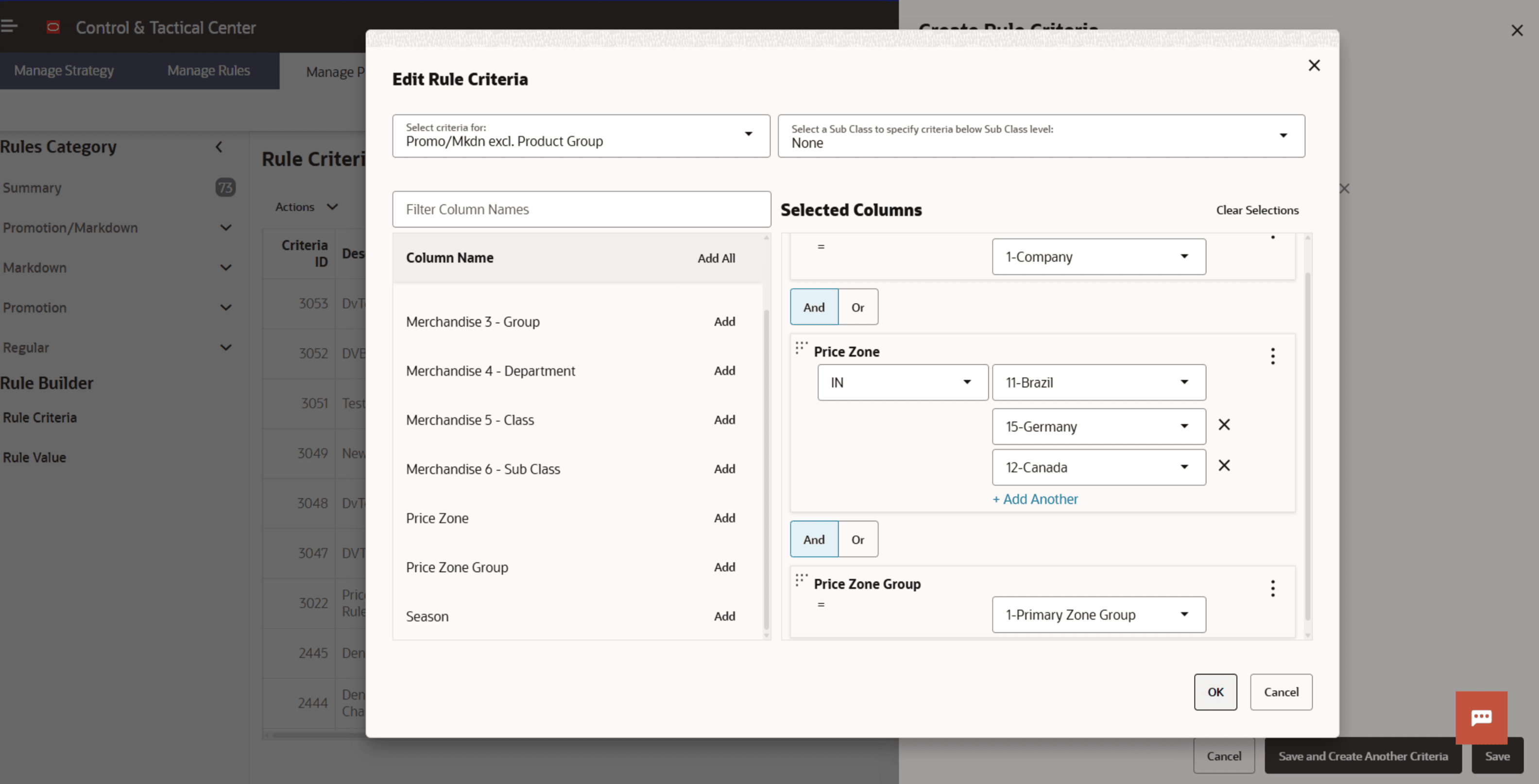
Previously, only one value could be chosen per rule criteria requiring separate rules for each Price Zone that needed to be included. With this enhancement, up to 50 price zones can now be selected at once while creating a rule criterion. This enhancement allows for faster rule setup, reducing manual effort.
Rules Management: Remapping Rule Criteria and Values Directly in the Edit Rule Interface
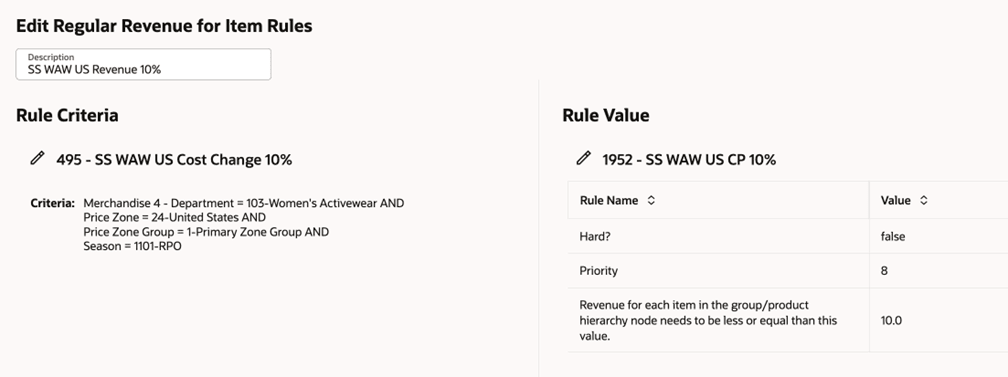
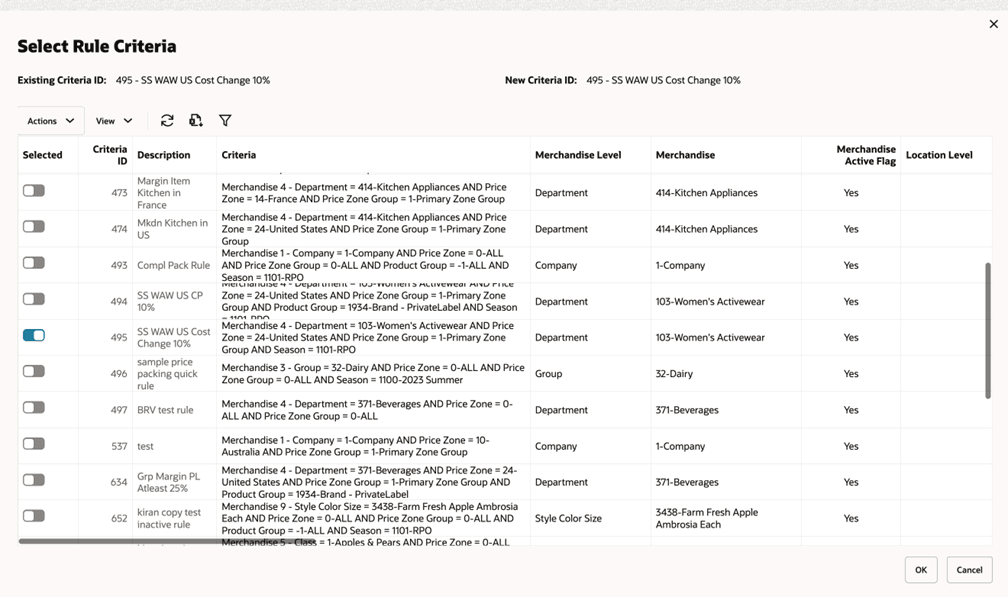
Rule criteria and values assigned to a rule can now be remapped directly within the Edit Rule interface. This means that if a different criterion or value needs to be assigned to a rule, it can be done without deleting and recreating the rule. To perform this action, select the rule, click the edit icon, which will open a selection window where a new option can be chosen and assigned as shown in the below screenshots. This enhancement has been provided to streamline the process of updating rules while ensuring the underlying business logic remains clear and traceable.
Improved Handling of Incomplete Optimization Runs in POM
Previously, if a batch optimization job did not complete and some runs were left unfinished (for example, if an error occurred after 900 out of 1000 runs), users were required to manually invoke the PRO_OPT_ADHOC_JOB with the -recover option to process the remaining runs. With this enhancement, the PRO_OPT_JOB can be retried from the POM application, and any leftover optimization runs will be automatically picked up and processed. Because both PRO_OPT_CREATE_RUNS and PRO_OPT jobs may run in parallel, this enhancement ensures that any runs that are stuck or incomplete are identified and recovered whenever a retry is initiated from the POM application.
Retail Insights Cloud Service Enhancements
Oracle Digital Assistant Updates
The Oracle Digital Assistant (ODA) chatbot used by AI Foundation has a new skill, which allows it to query the entire Retail Insights presentation catalog of metrics and attributes. When you select the AIF DATA context in the chat interface, you can ask questions about anything you have access to in RI and get a natural-language response, giving your users direct access to their business data without having to leave the application or open reports. This feature will only be available in newly provisioned environments that have Oracle Analytics Cloud.
AI Assistant for Oracle Analytics Cloud
The Oracle Analytics Cloud AI Assistant is an AI-powered tool that helps you build and refine visualizations for your workbooks. For Retail Insights, a subset of key metrics and attributes have been indexed for use with the AI Assistant. Current guidelines for Oracle Analytics suggest limiting the indexing strategy to approximately 500 metrics per subject area to ensure optimal performance and accuracy of results. To cover the most use cases, foundational metrics like Net Sales Qty and Net Sales Qty LY are indexed, but other variations such as Net Sales Qty YTD will not be indexed. This allows the AI assistant to form calculations and build visualizations using those base measures which you may then extend yourself by adding the results to the workbook for editing.
For the complete list of metrics and attributes indexed for use with the AI Assistant, refer to the Retail Insights Metrics and Attributes Catalog available in My Oracle Support. This feature will only be available in newly provisioned environments that have Oracle Analytics Cloud.
Assortment Plan Reporting
New metrics have been added to RI’s planning fact for assortment and item plans (the Plan5 folder in the default configuration) to align with the latest Assortment Planning (AP) application workflows. This update exposes the measures added to the default AP plan export in recent releases:
-
Assortment Fit Current Plan (AF CP)
-
Assortment Fit Working Plan (AF WP)
-
Item Flow Current Plan (IF CP)
-
Item Flow Working Plan (IF WP)
-
Recommended Sales Potential Current Plan (RC CP)
The new measures are available in the Plan5 folder in RI and is prefixed with the 4-letter codes noted above. These changes do not affect existing data in the Plan5 interface, as the new AP measures are also added using new version numbers that do not overlap with OP or CP plan versions.
Inventory Replenishment Reporting
When using the Inventory Planning & Optimization (IPO) application to perform replenishment, you may only be operating on a subset of your items and locations, and you want to monitor their performance separately from the rest of the business. Retail Insights has added a new dimension for reporting on these item/locations called Inventory Replenishment Status. The Inventory Replenishment Status attributes are sourced directly from the IPO replenishment results, joining to all major RI facts (sales, inventory, and so on) to automatically limit the scope of the data based on the item/locations that have been optimized by IPO. Some of these attributes were previously located in the Inventory Replenishment fact folder and those have been deleted, since they were redundant with the new dimension.
Unavailable Inventory for Pack Items
The MFCS integration of unavailable inventory data to RI now includes pack item quantities on the existing W_RTL_INVU_IT_LC_DY_FS interface (previously only non-pack items were being extracted). The integration of this data will automatically occur after the upgrade, using standard incremental extract logic. If you have any immediate need for pack item records in RAP, then you may need to perform a full extract of the fact data as part of one nightly batch run to re-sync the data warehouse to MFCS. This is done using the System Options for the AIF DATA schedule in POM, setting the RDE extract parameters to F for full extract for one night only.
Additional Metrics and Attributes
In this release, the following additional changes have been made to various facts and dimensions in Retail Insights:
| Functional Area | Change Summary |
|---|---|
|
Price Optimization Run Alerts |
New logical joins added to the Price Optimization Product and Regular Price Optimization Product dimensions for reporting on alerts at the item level. |
|
Purchase Order |
New attribute added for Order Exchange Rate, which can be integrated from the ORDHEAD table in MFCS. |
|
Sales |
New metrics added for time-phased variations of Known Customer Count, such as Known Customer Count YTD. |
|
Sales Optimization |
New metrics added for regular/promotion sales units from the AIF optimized sales history output view. |
Retail Predictive Application Server Cloud Edition Server Enhancements
Retail Predictive Application Server Client Enhancements
Improved Bulk Selection of Positions in the Wizard
The wizard has been enhanced to support bulk selection of positions. Instead of selecting positions individually, users can now paste the required position labels into the bulk selection dialog, which automatically selects all matching positions. This improvement streamlines the workflow and reduces the time required to select multiple positions.
Assortment Planning Cloud Service Enhancements
Single Store Exception
Assortment Planning workflow has been improved to allow users to work on exception use cases. Users can now set global rules for attribute exceptions, item-store exceptions, and store inventory exceptions.
-
Global Rules for Attribute Exceptions – Users can set global rules for product attribute-Store combination notifying the workflow that the specified stores should not carry any products having the exception attributes.
-
Item-Store Exceptions – With the Assortment Fit workflow, user can exclude chosen item-store combinations so that these item-stores do not receive the assortment. Users can also include chosen item-stores combinations into the assortment, allowing the exception stores alone to receive additional assortment.
-
Store Inventory Exceptions – In Item flow workflow, users can set different receipt parameters for chosen item stores so that these stores receive inventory differently. Users can choose to have early delivery, frequent drops, or additional presentation/safety stock for selected stores.
Cross Category Line Review
The Assortment Planning Workflow enables users to conduct cross‑category reviews to ensure assortments are planned in alignment with how customers shop for complete looks. Approved assortments across multiple departments can be evaluated to confirm that the right products are available in stores at the appropriate time. For example, users can verify that sufficient bottoms are planned to complement assorted tops, or that adequate accessories are included to accompany assorted dresses. The Cross‑Category Line Review provides a holistic view of the assortment, helping to prevent lost sales caused by incomplete product offerings in the store.
Like Item Capability
The Item Flow workflow includes a like‑item capability that allows users to associate newly created items with existing, similar items during the final step of assortment planning. Users can copy plans from a like item into the new item, eliminating the need to return to earlier steps to generate and plan it. This enhancement streamlines the process and ensures new items are efficiently integrated without repeating the full planning sequence.
Merchandise Financial Planning (MFP) Cloud Service
Markdown Export to Lifecycle Planning Optimization (LPO)
With this release, planned markdown budgets can be exported to the Lifecycle Planning Optimization (LPO) solution. Merchandising plan (MP) current plan (CP) markdowns are exported to LPO using the batch process. The MPCP markdowns are spread to sub-class/store/week level during export based on the last year version of metric. Admin users can enable the batch process using the MFP Batch Set-up view.