1 Noteworthy Enhancements
This guide outlines the information you need to know about new or improved functionality in the Oracle Retail Analytics and Planning applications update and describes any tasks you might need to perform for the update. Each section includes a brief description of the feature, the steps you need to take to enable or begin using the feature, any tips or considerations that you should keep in mind, and the resources available to help you.
Important:
Due to the highly extensible nature of the Retail Analytics and Planning suite of cloud services, scheduled updates to its application features can affect your custom scripts, reports, datasets, and other objects added in the Innovation Workbench and Oracle Analytics Server. The customer is solely responsible for regularly backing up all custom objects created across the suite of Retail Analytics and Planning (RAP) cloud services and ensuring that these custom objects continue to function as intended after each major update. Oracle does not maintain backups of custom objects in a way that enables their individual restoration if they are lost or corrupted. For example, if a custom script is deleted by a user or modified in a way that makes it non-functional, Oracle cannot restore it without rolling back the environment to an earlier point in time (before the changes occurred).
Column Definitions
-
Feature: Provides a description of the feature being delivered.
-
Module Impacted: Identifies the module impacted associated with the feature, if any.
-
Scale: Identifies the size of the feature. Options are:
-
Small: These UI or process-based features are typically comprised of minor field, validation, or program changes. Therefore, the potential impact to users is minimal.
-
Medium: These UI or process-based features are typically comprised of field, validation, or program changes. Therefore the potential impact on users is moderate
-
Large: These UI or process-based features have more complex designs. Therefore, the potential impact to users is higher.
-
-
Delivered: Is the new feature available for use immediately after upgrade or must the feature be enabled or configured? If no, the feature is non-disruptive to end users and action is required (detailed steps below) to make the feature ready to use.
-
Customer Action Required: You must take action before these features can be used. These features are delivered disabled and you choose if and when to enable them.
Feature Module Impacted Scale Delivered Customer Action Required? Analytics and Planning (RAP) Enhancements Analytics and Planning
Small
No
Yes
Analytics and Planning
Medium
Yes
Yes
Data Streaming Web Services Analytics and Planning Small Yes No Analytics and Planning
Small
Yes
No
AI Foundation Cloud Service Enhancements Enhanced Handling for Long Running Promotions Forecasting Engine Medium Yes Yes Item Supersession Forecasting Engine Medium Yes No Inventory Planning Optimization (IPO) Cloud Service Enhancements Optimization Calc
Large
Yes
No
Optimization Calc
Medium
Yes
No
Optimization Calc
Small
No
Yes
Optimization Calc
Medium
Yes
No
UI
Medium
Yes
No
UI, AI
Medium
Yes
No
Lifecycle Pricing Optimization (LPO) Cloud Service Enhancements Manage Recommendations and What-If Run Results: Filter and Sort on Computed Columns Manage Recommendations and What-If Run Results Medium Yes No LPO Promotion/Markdown - Optimization Job will Fail when there Is no Forecast Information Available
Forecast Run
Medium
Yes
No
Forecast Run
Medium
Yes
No
User Guide Documentation
Medium
Yes
No
Retail Insights Cloud Service Enhancements Reporting
Small
Yes
No
Reporting
Small
Yes
No
Reporting
Small
Yes
No
Retail Predictive Application Server Cloud Edition Server Enhancements RPAS
Small
Yes
No
Automated Import of Externally Created Placeholders via POM Batch
RPAS
Small
Yes
No
Enhanced Task Dashboard Record Status for RDX Data Imports RPAS Small Yes No Automated Email Notifications for Health Check Status RPAS Small Yes No Retail Predictive Application Server Cloud Edition Client Enhancements
RPAS UI
Small
Yes
No
RPAS UI
Small
Yes
No
Assortment Planning Cloud Service Enhancements
Assortment Strategy and Assortment Fit
Medium
Yes
Yes
Assortment Fit
Small
Yes
Yes
Assortment Strategy
Small
Yes
Yes
In Season Item Flow In Season Item Flow Medium Yes Yes Addition of OP Version All Small Yes Yes
Analytics and Planning Enhancements
Integration and Interface Updates
This release of Retail Analytics and Planning (RAP) applications includes several updates to data integrations and commonly used batch programs in the AIF DATA batch schedule. All customers of RAP applications may be impacted by these changes, so review this content carefully and take action if required.
The Retail Data Extractor (RDE) required job ETLREFRESHGENSDE_JOB has been removed in this release and the following functionality replaces it:
- RDE_ETL_REFRESH_JOB – This job has the same logic and validation as the C_LOAD_DATES portion of the ETLREFRESHGENSDE_JOB. This job checks RDE entries in C_LOAD_DATES and clears out the C_LOAD_DATES table if all RDE entries have PACKAGE_STATUS = ‘Success’. If there is at least one record that is not in ‘Success’ status, then the job will fail with the same error message “Packages are in Failed/InProgress status. Please check C_LOAD_DATES.” This must be enabled if RDE is sourcing data from MFCS or Customer Engagement by way of Golden Gate replication.
- RDE_SET_RA_SRC_CURR_PARAM_G_JOB – This job has the same logic and validation as the RA_SRC_CURR_PARAM_G portion of the ETLREFRESHGENSDE_JOB. This job populates the RA_SRC_CURR_PARAM_G table and updates the RMS_VERS parameter in C_ODI_PARAM based on the version of MFCS. This must be enabled if RDE is sourcing data from MFCS by way of Golden Gate replication. It must be disabled in all other cases, including when Customer Engagement is integrated but MFCS is not.
- Actions Required: If you are using RDE programs to source data from either MFCS or CE, you should review your POM schedule after upgrade to ensure the proper configuration of these two jobs. The jobs come with directives to be enabled or disabled on upgrade depending on your current batch schedule configuration, but the job status should still be confirmed. If the jobs are not configured properly, it may result in batch failures or incorrect parameters used from MFCS.
The POM application has added the ability for batch schedule updates to override user-entered parameters in specific cases where the base parameters have changed, and the AIF DATA schedule has included an override in this release:
- The job RDE_EXTRACT_FACT_P3_POONORDILDSDE_JOB has been updated with new parameters, and any custom options (such as forcing the job to run as full or incremental) will be overwritten.
- Actions Required: If you are using this program and believe you were using custom parameters, those changes will be reverted. By default, the job will go back to using the POM system options for the full/incremental flag setting. If you had a hard-coded value for the system option, start by copying the new base parameters from the job and modifying only the last parameter to re-add your custom setting.
Handling of product reclassifications has been enhanced in this release, with the following changes now available for all customers:
- By default, deleted items are not included in product reclassifications, and history data for such items will remain under their last known hierarchy levels. If you need deleted items to be included in reclassifications, then you must update a new C_ODI_PARAM parameter ITEM_GRP_DIV_RECLASS_ENABLED to a value of 'Y'. When this parameter is enabled, then additional processing of item data will occur to identify high-level reclassifications that would affect deleted items and add those items to the W_RTL_PROD_RECLASS_TMP table that drives reclassification activity in the data warehouse.
- A new table W_RTL_IT_DIV_GRP_RECLASS_TMP has also been introduced to manage the derivation of the additional reclassifications. Deleted items whose hierarchy has already been deactivated/closed cannot be reclassified by this process, nor can deleted items retroactively be reclassified for historical hierarchy changes done before this update. Only large-scale reclassifications such as moving a department to a new group will trigger the logic to move deleted items that exist in that hierarchy structure.
- A new job CLOSED_IT_DP_GP_RECLASS_JOB has been added to the batch schedule to perform some actions relating to reclassifications of deleted items. The job should be enabled if this functionality will be used.
- Actions Required: If you wish to start including deleted items in product reclassification activities, update the ITEM_GRP_DIV_RECLASS_ENABLED parameter value from the Control & Tactical Center in the AI Foundation user interface. Ensure the CLOSED_IT_DP_GP_RECLASS_JOB job is enabled in POM in the AIF DATA schedule.
Other notable job changes made in the AIF DATA batch schedule in this release include:
- New job PDS_DIMENSION_VIEW_JOB is added for generating RUN_IDs associated with dimension views that expose data warehouse data directly to the Planning Data Store. This program is part of architecture updates to support future enhancements to PDS and will not impact existing integrations.
- New jobs RDE_EXTRACT_DIM_P6_ORGGRDSDE_JOB and W_RTL_LOC_GRADE_D_JOB are added for extracting Store Grades from MFCS. They are disabled by default and are not required programs unless you want to use this functionality.
The AIF APPS Schedule in POM has also undergone several changes in this release:
- A new POM job RSE_STREAM_JOB_CHECK_JOB has been added that checks if there are active streaming service jobs and it should be enabled in the nightly batch.
- A new POM job ORASE_PRE_BATCH_END_JOB has been added that signals the end of pre-batch jobs and it should be enabled in the nightly batch.
- A new POM job ORASE_MAINT_KAFKA_QUEUE_CLEANUP_JOB has been added that deletes old Kafka queue data, and it will run as part of the maintenance processes ORASE_MAINT_PURGE_PROCESS and ORASE_MAINT_KAFKA_QUEUE_CLEANUP_ADHOC_PROCESS.
- Optional parameters have been introduced for IO_RUN_ANALYTICS_JOB and IO_RUN_ANALYTICS_ADHOC_JOB jobs. The jobs accept two optional parameters with arguments, e.g.: -r resubmit -R 123, where -r indicates a run type, and -R indicates a run header id.
- New POM jobs RSE_FCST_REPL_ITEM_SETUP_JOB and RSE_FCST_REPL_ITEM_PROCESS_JOB have been added to load replacement and substitute items from the source table W_RTL_SUB_IT_LC_D in the data warehouse. An ad hoc process RSE_FCST_REPL_ITEM_ADHOC_PROCESS is also added to run them outside of batch.
- A new POM job IO_RUN_RANKING_JOB has been added that loads ranked item metrics and ranked location metrics. It should be enabled in the nightly batch for IPO and can also be run from the ad hoc process IO_RUN_RANKING_ADHOC_PROCESS.
Several AIF APPS jobs have had their parameters changed to accommodate Web Service functionality:
| Process | Job | New Parameters |
|---|---|---|
| RSE_SLS_TXN_PROCESS | RSE_SLS_TXN_SETUP_JOB | disJobType=RSE_SRVC_MGR_BATCH_PRE_PROCESS||type=CORE_DB_ETL||name=CORE_DB_SLS_TXN_ETL||cancelFailedSrvcScope=TYPE||UPDT_NUM_WEEKS=2||FORCE_UPDT_EXISTING=Y |
| RSE_SLS_TXN_PROCESS | RSE_SLS_TXN_PROCESS_JOB | disJobType=RSE_SRVC_MGR_PROCESS_QUEUE||type=CORE_DB_ETL||name=CORE_DB_SLS_TXN_ETL |
| RSE_SLS_TXN_ADHOC | RSE_SLS_TXN_SETUP_ADHOC_JOB | disJobType=RSE_SRVC_MGR_BATCH_PRE_PROCESS||type=CORE_DB_ETL||name=CORE_DB_SLS_TXN_ETL||cancelFailedSrvcScope=TYPE||MIN_DATE=YYYYMMDD||MAX_DATE=YYYYMMDD||FORCE_UPDT_EXISTING=Y |
| RSE_SLS_TXN_ADHOC | RSE_SLS_TXN_LOAD_ADHOC_JOB | disJobType=RSE_SRVC_MGR_PROCESS_QUEUE||type=CORE_DB_ETL||name=CORE_DB_SLS_TXN_ETL |
| RSE_WKLY_SLS_PROCESS | RSE_WKLY_SLS_SETUP_JOB | disJobType=RSE_SRVC_MGR_BATCH_PRE_PROCESS||type=RSE_SLS_AGGR||name=RSE_SLS_PR_LC_WK_AGGR||cancelFailedSrvcScope=TYPE||UPDT_NUM_WEEKS=2||FORCE_UPDT_EXISTING=Y |
| RSE_WKLY_SLS_PROCESS | RSE_WKLY_SLS_PROCESS_JOB | disJobType=RSE_SRVC_MGR_PROCESS_QUEUE||type=RSE_SLS_AGGR||name=RSE_SLS_PR_LC_WK_AGGR |
| RSE_WKLY_SLS_ADHOC | RSE_WKLY_SLS_SETUP_ADHOC_JOB | disJobType=RSE_SRVC_MGR_BATCH_PRE_PROCESS||type=RSE_SLS_AGGR||name=RSE_SLS_PR_LC_WK_AGGR||cancelFailedSrvcScope=TYPE||MIN_DATE=YYYYMMDD||MAX_DATE=YYYYMMDD||FORCE_UPDT_EXISTING=Y |
| RSE_WKLY_SLS_ADHOC | RSE_WKLY_SLS_PROCESS_ADHOC_JOB | disJobType=RSE_SRVC_MGR_PROCESS_QUEUE||type=RSE_SLS_AGGR||name=RSE_SLS_PR_LC_WK_AGGR |
| RSE_HOLIDAY_LOAD_PROCESS | RSE_HOLIDAY_LOAD_JOB | disJobType=RSE_LOAD_SRVC_LOAD||name=RSE_HOLIDAY |
| RSE_HOLIDAY_LOAD_ADHOC_PROCESS | RSE_HOLIDAY_LOAD_ADHOC_JOB | disJobType=RSE_LOAD_SRVC_LOAD||name=RSE_HOLIDAY |
Parameters specified here are default parameters. Only some parameters for SETUP jobs may be edited. Parameters defined by disJobType, type, name and cancelFailedSrvcScope must remain as they are. MIN_DATE and MAX_DATE must have date values assigned in the format shown.
Here are parameters that can be modified:
- UPDT_NUM_WEEKS=<Number> - Number of weeks to process
- FORCE_UPDT_EXISTING=<Y/N> - Force update of existing data
- MIN_DATE=YYYYMMDD - Start date in the given format
- MAX_DATE=YYYYMMDD - End date in the given format
- MIN_DAY=<calendar ID> - Start calendar day ID
- MAX_DAY=<calendar ID> - End calendar day ID
Sales Transaction Extracts for GTS
The sales transaction extracts from Merchandising Foundation CS (MFCS) to Analytics & Planning (RAP) applications has been changed in this release, specifically for customers using the Global Tax (GTS) configuration. When the tax type is set to "GTS" in Merchandising, the following logic will be used to derive sales retail, profit, discount, and tax amounts:
- Tax amounts will be provided by Sales Audit into the TOTAL_IGTAX_AMT field on SA_EXPDW_RDWT_HEAD table. RDE extract programs will now read from this field, apply it in all downstream processing, and store it in the tax fields on the target tables.
- The tax amount will be added or subtracted from the sales retail and discount amounts on all transactions based on two configuration points, VAT_INCLUDE_IND on the STORE table in MFCS and RA_SLS_TAX_IND in the C_ODI_PARAM table in RI.
- Profit amounts will always be tax-exclusive, which may mean the tax amount is subtracted from the profit amount (if the retail value is tax-inclusive to start and a tax amount is provided, then it will be removed during the extraction to generate a tax-exclusive profit value).
Actions Required: If you are using the GTS tax type in MFCS, you must validate that the STORE.VAT_INCLUDE_IND flags are aligned to your sales retail amounts and that RA_SLS_TAX_IND is aligned to the desired financial reporting behavior in RAP applications. RA_SLS_TAX_IND uses values of "Y" for tax-exclusive retail amounts and "N" for tax-inclusive retail amounts. Example scenarios for configuring these flags:
- Retail values in the United States are tax-exclusive (VAT_INCLUDE_IND=N) and it is desired to retain tax-exclusive retail amounts in RAP (RA_SLS_TAX_IND=Y).
- Retail values in Brazil are tax-inclusive (VAT_INCLUDE_IND=Y) and it is desired to convert to tax-exclusive retail amounts in RAP (RA_SLS_TAX_IND=Y).
- Retail values in Brazil are tax-inclusive (VAT_INCLUDE_IND=Y) and it is desired to retain tax-inclusive retail amounts in RAP (RA_SLS_TAX_IND=N).
Data Streaming Web Services
This release includes two additional Rest APIs for data streaming into AI Foundation for Calendar and Pricing data. For calendar data, integration with MFCS is also available for directly streaming calendar updates between systems without the use of AIF DATA nightly batch jobs. This integration requires MFCS version 26.1.201.0 or later. For additional details, refer to the RAP Inbound Integration Guide.
Oracle Digital Assistant Updates
Previously, Oracle Digital Assistant (ODA) was placed as an icon on the bottom-right corner and it would open as a pop-up within the application. In this release, it has been placed as a new icon on the right-most edge and on clicking it, it will open as a drawer panel (shifting the application content over). This allows the user to continue working in the application as well as chat with the Assistant from the same screen. This change applies to all AI Foundation applications.
AI Foundation Cloud Service
Enhanced Handling for Long Running Promotions
Promotions are used in retail for a variety of reasons. They can be designed to boost sales or to drive traffic into stores. The duration of a promotion plays an important role in how it impacts demand.
For example, a short promotion—lasting about a week—typically creates a strong uplift in demand for the promoted items.
However, when a promotion runs for multiple consecutive weeks, its effect changes.
Over time, promotion fatigue sets in, and the promotion becomes less effective at driving incremental demand. Instead, it primarily serves as a traffic driver rather than significantly boosting sales of the promoted items.
To address this, the solution has been enhanced to more accurately estimate the impact of long-running promotions.
This leads to a more realistic understanding of demand and, ultimately, more accurate forecasts.
Item Supersession
This functionality covers two use cases.
First, an item has not yet been delivered from the supplier. Rather than leaving a gap on the shelf, a substitute item is used and sold in the meantime to maintain availability.
The key requirement here is that even though a substitute is being sold, all sales, forecasting, and ultimately inventory tracking should be attributed back to the primary item.
Second, an item is being phased out but continues to sell until the remaining stock is depleted. At the same time, the replacement item is introduced and begins selling alongside the discontinued product.
The key requirement here is that from the moment the new item is launched, sales of both the old and new items should be attributed to the new item and reflected in its forecast—even while the old item is still being sold.
Inventory Planning Optimization (IPO) Cloud Service Enhancements
Multi-Tier Cross Docking
IPO will support warehouse-to-warehouse tiers within the cross-docked replenishment route.
IPO will support warehouse-to-warehouse tiers within user-initiated allocations where the route to the chosen destination has cross-docked warehouse rules defined.
To set up cross-docking, define the warehouses that are cross-docked for the items.
The replenishment optimization engine will identify the cross-docked warehouses and generate the necessary allocations. When cross-docking through multiple tiers, this involves linking allocations to each destination. The inventory planner will review only the ‘parent’ allocation from first cross-docked warehouse to final destination.
When the inventory planner/allocator initiates an allocation from any available source-inventory, the user will choose the final destination to allocate against demand. The optimization engine will identify the cross-docked warehouse(s) between the source and destination. The optimization engine will create the necessary linked allocations to each intermediate destination.
Cross-Docking Push Rule
A new business rule will allow the inventory planner to specify whether inventory should be cross-docked against need or all inventory will be pushed out of the warehouse (less holdback and reserved stock).
Alternate Warehouse Source
Alternate warehouses will be used when the primary warehouse source does not have enough inventory to meet demand. The alternate warehouses are defined in the supply chain distribution route as:
- Primary flag set to N (False)
- Source Priority set to 2 or greater
- Assuming Primary source is priority
- Set source in increasing order of preference. I.E. alternate sources will be evaluated for available inventory in increasing priority order.
- A maximum of four alternate warehouses are allowed.
An alternate warehouse will fulfill its primary destinations demand before giving out inventory to alternate destinations.
The optimization engine assumes that lead times are similar or demand is deferred such that lost sales are not a factor. Inventory needs are not re-evaluated from the point of alternate source inventory arrival.
Reserve Stock
Reserve Stock is a quantity of inventory at a source warehouse that is electronically ring-fenced and made available exclusively for a predefined set of destinations. A total quantity is reserved for the grouping of destinations. This functionality prevents the general pool of locations from consuming inventory that is strategically allocated to a specific group of destinations like regions or new stores. IPO reserve stock will be managed through rules that assign primary destinations quantities of reserve stock.
Alerts Dashhboard
The alerts dashboard displays replenishment alerts and metrics in a new tab on the Inventory Planning Optimization landing page. This view begins to migrate alerts from Oracle Analytics reporting into IPO. This keeps the inventory planner in the application where the analysis and resolutions performed.
Lifecycle Pricing Optimization (LPO) Cloud Service Enhancements
Manage Recommendations and What-If Run Results: Filter and Sort on Computed Columns
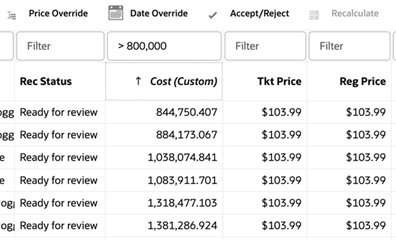
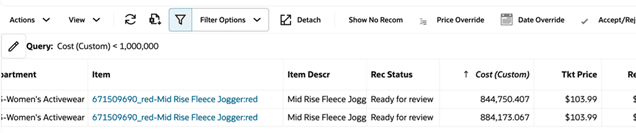
LPO is now enhanced with the ability to filter and sort on computed columns. Computed columns can now be used just like standard columns, allowing users to apply sorting and filtering directly within the Manage Recommendations and What-if Results tables, as well as through the Query Builder.
Computed Column - Filter and Sort
Computed Column - Query Builder
LPO Promotion/Markdown - Optimization Job will Fail when there Is no Forecast Information Available
LPO is now enhanced to improve visibility when no recommendations are generated during optimization due to no forecast information. Previously, such scenarios did not fail the job, delaying issue detection until identified by business users.
With this enhancement, the optimization jobs PRO_OPT_JOB and PRO_OPT_ADHOC_JOB will now fail when no valid forecast run type, forecast run, aggregation, or estimation run is available. This enables early detection and allows monitoring teams to investigate and resolve issues before they impact business users.
LPO Promotion/Markdown - Forecast Run Validation
Previously, if a different forecast run was used for promotion/markdown optimization and later changed and approved, then recalculation could fail silently due to discrepancies in base demand, leading users to believe the recalculation did not work.
With this enhancement, the recalculation process now validates that the forecast runs match. If a mismatch is detected, the process fails with an error and triggers a failed notification, preventing incorrect recalculation attempts.
LPO User Guide Update - Rules Escalation Logic
The rule escalation logic used when multiple conflicting rules are present is now documented in the LPO User Guide. This includes the escalation sequence across season, strategy, product hierarchy, location hierarchy, price zone, and price zone group, with relevant examples. Additional details explain how rule changes impact edits and recalculation, highlighting that rules are fixed at the time of run creation and that a new optimization run is required for updated rules to take effect.
Retail Insights Cloud Service Enhancements
Inventory Tax Reporting
The inventory position fact in RI now supports capturing the tax amounts associated with the item/location for Simple VAT (SVAT) and Global Tax (GTS) configurations in MFCS (excluding Brazil) and exposing it for reporting, giving you more detailed insights into the taxes applied to your merchandise and its effect on profit margins. The Inventory Position folder in Retail Insights subject areas contains new metrics for accessing this data, such as “EOH Tax” and “Inv Unit Tax”. The EOH tax is the total tax amount taken by multiplying the on-hand units by the unit tax, while the unit tax is the amount for a single unit.
For implementers and custom extension purposes, all related interfaces and tables for inventory data have these new columns/fields added:
- INV_UNIT_TAX_AMT_LCL - contains the tax amount for a single unit
- INV_SOH_TAX_AMT_LCL - contains the total tax amount for current stock on hand units
Similar changes are made for pack level inventory tables (INVPK_UNIT_TAX_AMT_LCL and INVPK_SOH_TAX_AMT_LCL columns) since taxes could also apply to sellable pack items.
No historical data updates are performed as part of this enhancement, the new fields will begin to populate only as part of the nightly batch if there is data available from the source system. If you want to refresh the current values for all item/locations and you are using RDE extracts from Merchandising Foundation CS, then update the POM system options to perform a Full (F) extract for one night after upgrade. If you are providing inventory data using file-based integration, then you will need to add these new fields into your context (CTX) files as well as your INVENTORY.csv and INVENTORY_PACK.csv files. If you are currently implementing Retail Insights and want your historical data updated for these new fields, you must either erase and reload your historical data to include the added columns or develop a data migration plan in Innovation Workbench to have the data merged onto your existing data (raising Service Requests with Oracle as needed for assistance).
Store Grades Reporting
In Merchandising Foundation CS, there is a concept of Store Grades which can be used to group store locations together (generally for Allocation purposes). These fields have now been extracted to RI on a new Store Grades interface, providing the ability to aggregate location data to Store Grade level in reporting so users can review data at the same level as they operate at in other applications. Store Grade attributes are available in the existing Organization folder in RI and function similarly to Location Lists and Location Traits (where a store may have 0, 1, or 2+ values depending on the MFCS configuration). This is a direct MFCS to RI integration and there is currently no file-based load for this data, unless you extend the interface using Innovation Workbench.
Sales Liability Reporting
Sales metrics in RI typically capture the final transaction amounts, which means that for customer orders placed through online channels, the sale is only counted once the order is shipped to the customer, with unfulfilled customer orders captured in separate Liability metrics. This release adds new metrics in the Sales folder that combine sales and liability into a single value, giving users a view of their sales data that shows total customer demand for products, which can be a key performance indicator for retailers with significant customer order volumes. The metrics use the prefixes "Net Lia" or "Gross Lia" to uniquely identify them, such as Net Lia Sales Amt or Gross Lia Profit. Additional Liability metrics have also been added to support all of the standard time transformations used in these calculated values, such as last-year and year-to-date.
Retail Predictive Application Server Cloud Edition Server Enhancements
Export Item Location Ranging Information to PDS
This enhancement introduces a native integration to synchronize item/location (item-store) statuses between MFCS and IPO-DF. Item and location status data is now exported from RI directly to the PDS, enabling it to be seamlessly consumed by the IPO-DF workflow.
Automated Import of Externally Created Placeholders via POM Batch
This enhancement enables retailers to seamlessly import product placeholders created in external Product Lifecycle Management (PLM) or design systems directly into Planning using the standard Process Orchestration and Monitoring (POM) batch execution framework.
With this update, administrators can natively embed the placeholder import process directly into the automated batch cycle (via the batch_exec_list.txt parameter file using a newly introduced loadinformal batch task type). This integration ensures that externally generated placeholders are accurately imported, aligned, and formalized without manual intervention, eliminating scheduling dependencies and preventing the creation of duplicate product records during the assortment planning process.
Enhanced Task Dashboard Record Status for RDX Data Imports
This enhancement improves data load visibility by ensuring the "Record Status" column on the Task Dashboard accurately updates when importing hierarchy and fact data from RDX into PDS.
Automated Email Notifications for Health Check Status
This enhancement introduces automated email notifications for Health Check (HC) executions, immediately alerting administrators when a health check task succeeds or fails. Notification preferences for these alerts are managed and configured centrally through Oracle Retail Home.
Retail Predictive Application Server Cloud Edition Client Enhancements
Dynamic Disabling of the Refresh Menu Option
This enhancement resolves a user experience issue where the "Refresh" menu option (and its associated keyboard shortcut) remained active and selectable even when no refresh rules were configured for a given workbook.
To address this, a new Planning Data Store (PDS) environment property (disable_image_refresh_groups) has been introduced. When an administrator explicitly sets this property to true via an OAT task, the system will bypass the default image refresh rule group. Consequently, the Refresh menu option in the UI will now be automatically disabled (grayed out) under two conditions:
- No refresh rule groups are explicitly configured for the workbook.
- Rule groups exist but contain no underlying rules.
This update ensures the application interface accurately reflects functional capabilities, providing a clearer, more intuitive experience for end users and preventing the execution of non-functional actions.
Upgraded Native Oracle Digital Assistant (ODA) Widget
This enhancement replaces the existing Oracle Digital Assistant (ODA) widget with a fully upgraded, natively integrated version. While it continues to provide AI-powered, conversational help based on official product guides for MFP, AP, and RPASCE, this new version delivers a streamlined and significantly improved user experience.
Assortment Planning Cloud Service Enhancements
Nested Location Clusters
Nested location Clusters are now supported for plan review, allowing metrics to be analyzed using hierarchical combinations of store-cluster attributes such as, for example, Performance Group, Climate, and Lifestyle instead of reviewing each attribute independently.
This enhancement gives planners a more flexible and meaningful way to compare performance across store segments. Retailers can now review plans in the way stores are grouped in the business, such as comparing, for example, A-performance stores vs. B-performance stores, then analyzing Hot vs. Cold climates within those groups.
Key Capabilities
- Supports nested review of location-cluster attributes in workbook hierarchies
- Enables aggregated analysis across alternate hierarchy levels for all location types
- Supports cluster definitions with up to three nested attribute levels
Item Ranking Override Capability
Assortment Fit now supports manual item-rank overrides, allowing planners to replace the system-generated ranking when evaluating assortment fit.
This enhancement gives planners greater control over assortment decisions by allowing business judgment to influence item priority instead of relying only on sales potential. It helps retailers fine-tune assortment fit based on merchant strategy, local knowledge, or other planning considerations.
Key Capabilities
- Enables users to override the system-generated item rank in Assortment Fit
- Uses the overridden rank in assortment fit evaluation once entered
- Retains system ranking when no override is provided
Workflow Updates
The Assortment Strategy workflow has been enhanced to provide easier and more intuitive navigation. Small changes were done to the views and steps available.
In Season Item Flow
A new In-Season Item Flow workspace has been added to support planning after the assortment period begins.
This enhancement helps planners respond faster to changing demand, local trends, and supply conditions by providing a dedicated in-season process for reviewing item performance, updating sales and receipt flows, and acting on issues during the selling season.
Key Capabilities
- New In-Season Item Flow workspace for in-season planning
- Supports planning at Style-Color × Store × Week
- Includes alternate hierarchy for Calendar for STD/BTA views
- Supports placeholder creation, Copy from Like Item, and updated sales and receipt planning
- Includes Real Time Alert for Sell Thru Warning %
- Approval to Cp version
Addition of OP Version
A new Original Plan (Op) version has been added to distinguish the approved pre-season plan from the evolving Current Plan (Cp) in season.
This enhancement gives retailers a clearer baseline for comparison by preserving the original pre-season plan while allowing the current plan to update through execution and actualization.
Key Capabilities
- Adds a new Op version alongside Cp
- Updates exports to include Op stored measures
- Pre-Season approval now copies Wp into both Cp and Op
- Cp actualizes in elapsed time frames, while Op remains unchanged
Adds Admin Lock control for Op at Dept × Channel × Week