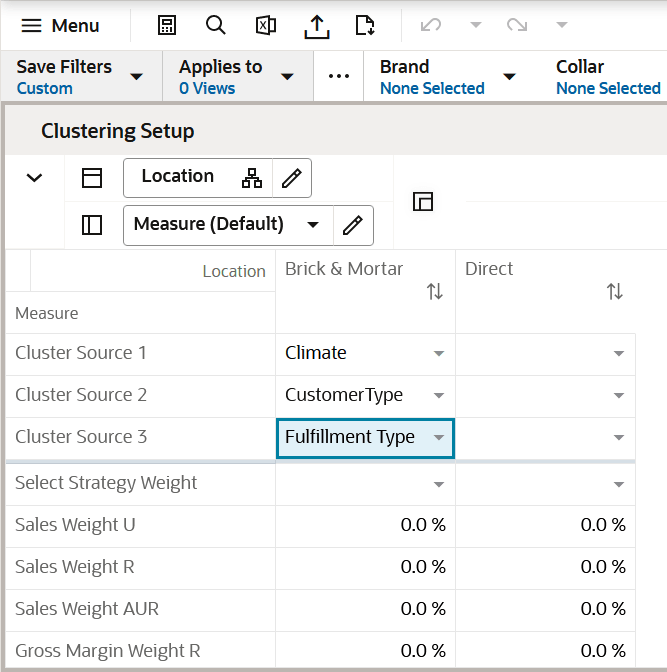
Clustering Setup View
The Clustering Setup view allows you to select up to three location attributes that can be used to create clusters and to seed or assign Strategy Weights for the category, based on business knowledge of the strategy for the category.
Note:
The total sum of the weights assigned to all the metrics should be 100%; if the weights do not sum up to 100%, they are re-normalized upon the next commit and refresh.
Things to consider when choosing the Sales Perf Group attribute:
-
Which performance measure, or combination of performance measures, should I choose? The category strategy should inform this decision. For example, if the category is a traffic driver, then choosing units as the performance metric makes sense. If the category's purpose is to drive profit, then choosing Gross Margin makes sense.
-
How many Performance Groups do I want for this category? You may select from 1 to 5. Selecting 1 is a good option if you do not want to break your clusters down by sales grade. As you select more groups, you will have more clusters to manage, with fewer locations assigned to each cluster.
If the Perf Group Setup is not selected, but at least one other attribute is selected, you can run the Create Cluster Application Action now, since performance and space setups do not need to be created. Keep in mind that as more attributes are selected, more clusters will be created, with a corresponding increase in workload.
Figure 5-5 Clustering Setup View