1 Feature Summary
This chapter describes the feature enhancements in this release.
Noteworthy Enhancements
This guide outlines the information you need to know about new or improved functionality in the Oracle Retail Brand Compliance Management Cloud Service update and describes any tasks you might need to perform for the update. Each section includes a brief description of the feature, the steps you need to take to enable or begin using the feature, any tips or considerations that you should keep in mind, and the resources available to help you.
Note:
Where new fields, User Interface (UI) changes, or glossary entries are introduced as part of a change, the portal owner may need to apply their own translations of the core system text.Column Definitions
-
Feature: Provides a description of the feature being delivered.
-
Module Impacted: Identifies the module impacted associated with the feature, if any.
-
Scale: Identifies the size of the feature. Options are:
-
Small: These UI or process-based features are typically comprised of minor field, validation, or program changes. Therefore, the potential impact to users is minimal.
-
Large: These UI or process-based features have more complex designs. Therefore, the potential impact to users is higher.
-
-
Delivered: Is the new feature available for use immediately after upgrade or must the feature be enabled or configured? If no, the feature is non-disruptive to end users and action is required (detailed steps below) to make the feature ready to use.
- Customer Action Required: You must take action before these features can be used. These features are delivered disabled and you choose if and when to enable them.
Table 1-1 Noteworthy Enhancements
| Feature | Module Impacted | Scale | Delivered | Customer Action Required? |
|---|---|---|---|---|
|
Supplier |
Small |
Yes |
Yes Requires User Role setup |
|
|
Reports |
Small |
Yes |
No |
|
|
Reports |
Small |
Yes |
No |
|
|
Product |
Small |
Yes |
Yes System parameter configuration |
|
|
Project and Reports |
Small |
Yes |
Yes Permissions configuration |
Restricted Auditor Access
A new enhancement to allow auditors to have restrictions on the Audits to which they have access. The access is based on a new user role Restricted Auditor, which is similar to the existing Auditor user role except for a new authority profile. This user role, when used in conjunction with additional configuration, restricts access to only Audits where the user is listed as an auditor in the People Present table.
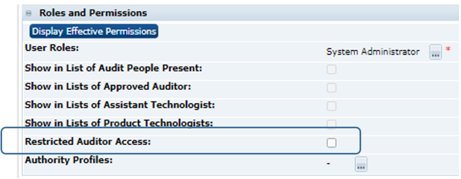
A Restricted Auditor Access checkbox is added to the User record:
Notifications have been updated for this new user role, so if an Auditor user in the People Present table is a user with Restricted Audit Access set against their user record, only then will they receive:
-
Audit Overdue notifications within the Urgent Items.
-
Audit Task App Notifications for Due Audits, Number of Audits In Progress, and Awaiting Corrective Action/Amendment/Sign-Off.
-
Email notifications for Audits due and overdue.
As part of this feature, a new wizard will allow Auditors to be assigned to or deleted from multiple Audit records at once.
Editable Text Filters
The report filters functionality has been extended to cater for Editable Text Selector fields - those where a statement is constructed from a phrase selected from a glossary plus inline variable data.
The phrase and data are stored as separate elements, so new fields have been added for reporting purposes, which contain the full constructed statement as a text string. This allows the text operators to be used on the full statement when applying a report filter.
The statements are stored in the specification’s pack copy language if specified, otherwise in the portal’s default language. No cross-translation of languages is attempted.
The new fields will be automatically populated as part of the upgrade.
Contains Text Filter
The report filters functionality has been extended to provide additional text comparison operators for use when applying filters to certain columns that are selected from a glossary, such as Ingredients. Previously, a separate filter clause had to be added for each glossary item. Now multiple glossary items can be covered by a single text-based search operator.
New Contains Text and Does Not Contain Text operators are added to the set of operators used to apply filters to Report Data Sources, Designs, KPI Templates, and Schedules. They are available for use by the following fields:
-
Activity Name
-
Advanced Packaging Component Material
-
Advanced Packaging Material
-
Ingredient
-
Packaging Component Material
-
Site Activity Name
-
Supplier Activity Name
The new operators are in addition to the existing Contains and Does Not Contain operators, which remain unchanged.
The Contains Text/Does Not Contain Text operators allow the user to enter a text string which will be applied as a wildcard comparison. For example, ‘nut’ to return matches on ingredients that contain the word nut anywhere in their description (such as nut, nuts, walnut, walnuts, chopped walnuts, water chestnut, and so on.) Thus, a single clause can be used instead of having to specify one for each possible ingredient.
If multiple clauses are specified to search for multiple strings, such as ‘nut’ and ‘milk’ together, they are applied as OR logic, regardless of whether AND or OR has been specified on the clause. For example, searching for Contains Text ‘nut’ and Contains Text ‘milk’ will return results that contain either ‘nut’ or ‘milk’.
When used for versioned glossaries, the current and all previous versions of the glossary ID will be included.
The search is also applied to translations for active locales. For example, if the ingredient ‘milk’ has a French translation of ‘lait’, applying the search with either ‘milk’ or ‘lait’ as the text string will return results.
Multiple Country of Origin System Parameter
An enhancement has been made to introduce a system parameter to control whether the Country of Origin fields in the Product Specification’s OLC section allow multiple or single countries to be selected.
The Multiple Country of Origin feature in release 19.3 permitted the selection of multiple countries of origin in the Other Labelling Copy section. This enhancement extends that further by controlling its use with a new Allow Multiple Product Country of Origin system parameter. If enabled, the Country of Origin fields in the OLC section allow multiple countries to be selected; if not enabled, just a single country may be selected. The rule applies to all specification types.
Project & Activity Brief Reporting
An enhancement has been made to provide additional reporting on Project and Activity Briefs.
A data extract of Project and Activity Brief data can be scheduled as a report, utilizing pre-configured criteria for filtering Projects, Activities, and their Brief questions.
The key features are:
-
A new Project & Activity Brief Extracts glossary in the Reporting Admin area for configuring the data extract criteria.
-
A new Project & Activity Brief Extract report type, and selection of the extract criteria from the Project & Activity Brief Extracts glossary are added to the Report Schedule record, for scheduling the Brief Extract as a report.
-
A new Project & Activity Brief Extracts folder is added to the Report Outputs area to group the generated brief extract reports.
-
The new Project & Activity Brief Extract report is created as a spreadsheet, containing columns that represent data from the Project and Activity records, and their Brief questions and answers, as defined by the extract criteria.
The existing Brief Extract data extract facility remains available but is changed:
-
To also output the data extract file to the new folders in the Report Outputs area: Project Brief Extracts or Activity Brief Extracts. The Confirmation Step allows a sub-folder to be selected.
-
On completion, a link to the file is now emailed, instead of the actual data file.
-
The file format is changed from Excel xls to xlsx, to match that of the new Brief Extract file.
-
The extract will include a Section Name Column for each question as a question can be repeated across sections within one brief. This field will not be visible in the Brief Extract confirmation step as the Section Name is not available to select as a List View field.
Post Release Tasks and Impact on Existing Installation
The following post release tasks and impact on an existing installation must be taken into account as part of this release.
Restricted Author Access
A new User Role RESTRICTED AUDITOR should be set up with the following authority profiles as part of the requirement to restrict access to audits for auditors:
-
Library Reader
-
Restricted Auditor
-
Supplier & Site Reader
-
Alert Reader
The AUDIT Authority Profile Group needs to include the RESTRICTED AUDITOR authority profile. The following is the recommended list of authority profiles in priority order:
-
AUDIT ADMINISTRATOR
-
AUDIT EDITOR
-
RESTRICTED AUDITOR
-
AUDIT READER
-
SUPPLIER AUDIT EDITOR
The existing roles for Power User and System Administrator need to be updated to include Restricted Auditor in their list of Grantable Roles.
A new Restricted Audit Access option under the Roles and Permissions section of the User Details tab of a Retailer User record will be available for editing by User Administrators. This should be set to limit visibility, for auditors, to the audits they are listed in the People Present table for an audit, for which they are the approved auditor.
Multiple Country of Origin System Parameter
Set the Allow Multiple Product Country of Origin system parameter according to whether multiple or single countries are to be selectable for the Country of Origin fields in the Product Specification’s Other Labelling Copy section. The parameter is in the Product page of the System Parameters page. By default the parameter is checked, to allow for multiple countries.
Permissions
The Project & Activity Brief Reporting enhancement requires the following to be added to the Permissions spreadsheet.
Add the following entries to the bottom of the Admin page:
| Record (A) | Authority Profile (B) | Menu Option (C) | Sub Menu Option (D) | Action (E) | Data Record (F) | User Mode (L) | Access Level (M) |
|---|---|---|---|---|---|---|---|
|
Admin |
ADVANCED REPORTING ADMINISTRATOR |
Admin |
Manage Extract Criteria |
NORMAL |
Y |
||
|
Admin |
ADVANCED REPORTING ADMINISTRATOR |
EXTRACT CRITERIA |
NORMAL |
F |
|||
|
Admin |
ADVANCED REPORTING ADMINISTRATOR |
SET TO ACTIVE |
EXTRACT CRITERIA |
NORMAL |
Y |
||
|
Admin |
ADVANCED REPORTING ADMINISTRATOR |
SET TO INACTIVE |
EXTRACT CRITERIA |
NORMAL |
Y |
||
|
Admin |
ADVANCED REPORTING ADMINISTRATOR |
NEW VERSION |
EXTRACT CRITERIA |
NORMAL |
Y |
The instructions for downloading and uploading the amended Permissions spreadsheet are as follows:
-
Log in as an Oracle Authorized Administrator user and go to Company > Admin > Roles & Permissions.
-
Open the Permissions page.
-
Download the active spreadsheet by selecting the row with true in the Active Permissions column, click Download Selected, and save locally.
-
Edit the downloaded spreadsheet, make the changes described above, then save the spreadsheet.
-
Upload the edited spreadsheet by clicking Upload Permissions, select the spreadsheet, and click Ok.
-
Apply the changes by selecting the uploaded spreadsheet row, click Process Selected, and then click Ok to confirm.
System Text
The Multiple Country of Origin System Parameter enhancement introduces a new system parameter.
The Project & Activity Brief Reporting enhancement includes new options in the Reporting Admin area and a new folder in the Report Outputs area.
System Text records for the new labels are added automatically during the release process, however any translation overrides must be added manually, by the retailer administrator.
Enabling User Roles
If they do not already exist, configure the Power User, Account Administrator, Assistant Technologist, and Site Inspector user roles, and assign to the appropriate users.
Enabling Artwork with SSO
Artwork is not a core Brand Compliance module, but a third-party add-on application. This process enables the integration with the third-party Artwork application, where it is used.
For existing installations that use the Artwork module, in order to configure single sign on (SSO) between Brand Compliance and the Artwork solution (using IDCS authentication), the following steps must be taken by the Customer or their Partner:
-
Ensure the MYARTWORK external system has been created in Brand Compliance PROD and STAGE.
-
Raise an SR service requesting for creation of the Artwork Application for PROD and STAGE. The call back URLs and IDCS URLs must be provided in the SR.
-
Once created, you will be able to gather the Client ID and Client Secret from IDCS.
Refer to the Artwork chapter in the Oracle Retail Brand Compliance Management Cloud Service Administration Guide for the full process for enabling Artwork with SSO.