Incorporate 3D-Secure Support
The generic payment gateway’s credit card payment method includes optional support for 3D-Secure for shopper verification.

This section applies to Open Storefront Framework
(OSF).
If 3D-Secure is required, then before the merchant authorizes a payment, the shopper is redirected to a page provided by the card issuer for authentication. If the shopper authenticates successfully, the card issuer and merchant then determine whether to authorize the transaction.
Note that whether 3D-Secure is required depends on the merchant and the card issuer, and is not controlled by Retail Digital Commerce. The gateway described in this section invokes 3D-Secure only when it is required, and can process non-3D-Secure payments as well.
Understand 3D-Secure Support
The following diagram illustrates how credit card payments are handled in a generic payment gateway integration that implements 3D-Secure support:
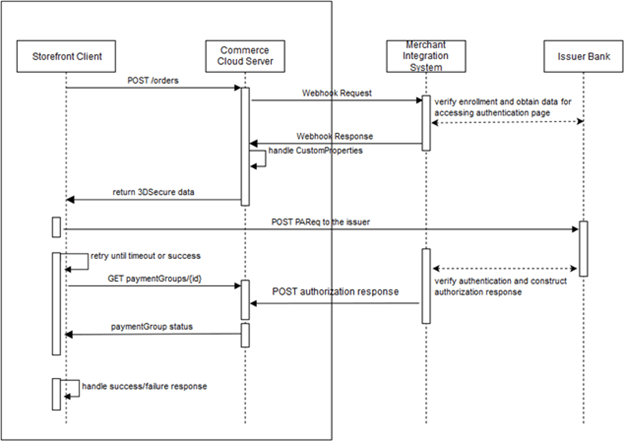
The payment processing involves the following steps:
- When the shopper clicks Place Order, the storefront invokes the
createOrderendpoint of the Store API. The endpoint sends the order information to the Commerce server. - When the server receives the order submission, it invokes the Generic Payment webhook, which posts an authorization request to the merchant.
- The merchant and the card issuer communicate to determine whether 3D-Secure is required, and whether the shopper is enrolled in the card issuer’s 3D-Secure program. If 3D-Secure is required and the shopper is enrolled, the card issuer sends an ACS (access control server) URL to the merchant.
- The merchant sends the webhook response to the Retail Digital
Commerce server. If 3D-Secure is required for the transaction, the
merchant includes the response code
10000 (PAYER_AUTH_REQUIRED). The merchant supplies the ACS URL and other data needed for invoking the 3D-Secure authentication page on the card issuer’s website. - The Retail Digital Commerce server sends the data it receives
in the webhook response, including the 3D-Secure data, to
the storefront in the
createOrderendpoint response. TheuiInterventionproperty for the payment group is set totruein the response to indicate that 3D-Secure authentication is required. - The storefront posts a payment request to the card issuer’s website to invoke the 3D-Secure authentication page. The request includes data returned from the merchant in the webhook response.
- The card issuer displays the authentication page.
- The shopper fills out the authentication form and submits it.
- The card issuer and the merchant communicate to determine if the shopper authenticated successfully, and if so, whether to authorize the transaction.
- The merchant constructs an authorization response and sends it
to the Retail Digital Commerce server using the
POST /ccstore/v1/payment/genericCardResponsesendpoint. - Meanwhile, after posting the payment request to the issuer’s website,
the storefront begins polling the Commerce server using
the
getPaymentGroupendpoint to detect when the server receives the authorization response from the merchant. - When the Retail Digital Commerce server receives the authorization
response from the merchant, the server includes the data
from the merchant in the
getPaymentGroupendpoint response it sends to the storefront.
These steps are described in greater detail below.
Note:
3D-Secure is not applicable to payment requests that originate
from the Retail Digital Commerce Agent Console. If the value of the channel property in a Generic Payment webhook request
is agent, the merchant should map the transaction
appropriately in the gateway so the card issuer bypasses 3D-Secure.
Create the Gateway Extension
The payment and transaction types are specified in the gateway.json file.
For a credit card gateway that supports 3D-Secure, the gateway.json
file should be similar to the following:
{
  "provider": "Generic Card 3DS Provider",
  "paymentMethodTypes": ["card"],
  "transactionTypes": {
    "card": ["authorization", "void", "refund"]
  },
  "processors" : {
    "card": "card3ds"
  }

}
Note that the card3ds processor is
needed to provide 3D-Secure support.
In addition to
configuring user interface controls, the config.json file must include a shared secret key specified by the merchant.
The key is used to generate a signature that the POST /ccstore/v1/payment/genericCardResponses endpoint uses for authentication:
...
    {
      "id": "secretKey3DS",
      "type": "passwordType",
      "name": "secretKey",
      "helpTextResourceId": "secretKeyHelpText",
      "labelResourceId": "secretKeyLabel",
      "defaultValue": "5ad0f437X6af6X4d4eXb08cX729a310843ce",
      "required": true,
      "public": true
    },
...
See Generate the signature for more information about how the secret key is used.
Send the Webhook Response
If 3D-Secure is required for a transaction, the merchant returns
a responseCode value of 10000 (PAYER_AUTH_REQUIRED) when it sends the Generic Payment webhook response to the
Retail Digital Commerce server. The payment group is not updated.
The merchant uses the additionalProperties map
in the webhook response to supply data needed for invoking
the 3D-Secure authentication page on the card issuer’s website.
This data typically includes values such as acsURL (the issuer’s URL to direct the shopper to for authentication), paReq (the payer authentication request), MD (merchant data), and TermURL
(the URL to return the shopper to after authentication). The exact
set of properties, and the names for these properties, may
differ depending on the card issuer. The merchant can also
include maxRetryCount and delayInMillis properties as part of the additionalProperties map to configure the storefront’s polling behavior.
The webhook also returns a customPaymentProperties array that specifies a list of the properties from the additionalProperties map that should be returned to the storefront. For example:
{
  "transactionType": "0100",
  "orderId": "o140451",
  "siteId": "siteUS",
  "channel": "preview",
  "locale": "en",
  "currencyCode": "USD",

  "authorizationResponse": {
      "additionalProperties": {
           "delayInMillis": "10000",
           "payerAuthEnrollReply_proxyPAN": "1078787",
           "amount": "000000003499",
           "orderId": "o140451",
           "channel": "storefront",
           "maxRetryCount": "5",
           "locale": "en",
           "transactionId": "o140451-pg140415-1480662437847",
           "transactionTimestamp": "2016-12-02T07:07:17+0000",
           "transactionType": "0100",
           "payerAuthEnrollReply_paReq": "eNpVkctuNBgiESLAKGWnXGsJiUPcByU/n3thQd",
           "paymentId": "pg140415",
           "payerAuthEnrollReply_acsURL":
              "http://www.example.com/ccstore/v1/genericCardAuth3DS",
           "paymentMethod": "card",
           "displayMessage": "Please wait .....",
           "payerAuthEnrollReply_xid": "Skh0MTRsZGsxYXZPbEd4a2I1VjA=",
           "TermUrl":
              "http://www.example.com/ccstore/v1/payment/genericCardResponses",
           "currencyCode": "USD",
           "gatewayId": "gateway3DS"
            },
      "customPaymentProperties": ["delayInMillis",
          "payerAuthEnrollReply_proxyPAN", "amount", "decision", "orderId",
          "channel", "maxRetryCount", "locale", "transactionId",
          "transactionTimestamp", "transactionType", "payerAuthEnrollReply_paReq",
          "paymentId", "payerAuthEnrollReply_acsURL", "paymentMethod",
          "displayMessage", "reasonCode", "payerAuthEnrollReply_xid", "TermUrl",
          "currencyCode", "gatewayId"],
      "responseCode": "10000"
  }

}
Authorize the Payment
The Retail Digital Commerce server sends the data from the webhook
response, including the 3D-Secure data, to the storefront
in the createOrder endpoint response. The storefront
then posts a payer authentication request to the card issuer’s
website using data received from the merchant. The issuer
displays an authentication page in an inline frame on the Commerce
storefront. (See Create a custom payment authorization widget for
information about how to customize the storefront to do this.)
After the shopper fills out the authentication form and submits
it, the card issuer and the merchant communicate to determine
if the shopper authenticated successfully, and if so, whether
to authorize the transaction. The merchant then sends an authorization
response to the Commerce server, using the POST /ccstore/v1/payment/genericCardResponses endpoint.
The following table describes the POST properties:
| Property | Description |
|---|---|
| transactionType | Match value from webhook request. |
| currencyCode | Match value from webhook request. |
| locale | Match value from webhook request. |
| channel | Match value from webhook request. |
| orderId | Match value from webhook request. |
| signedKeys | A comma-separated list of the properties that are used to generate the signature. See Generate the signature. |
| signature | The Base64 signature returned by the merchant. See Generate the signature. |
| authorizationResponse | A JSON map of key/value pairs containing authorization data |
For example, the body of the POST might
include:
<input id="transactionType" name="transactionType" type="hidden" value="0100"/>
<input id="currencyCode" name="currencyCode" type="hidden" value="USD"/>
<input id="locale" name="locale" type="hidden" value="en"/>
<input id="channel" name="channel" type="hidden" value="preview"/>
<input id="orderId" name="orderId" type="hidden" value="o120419"/>
<input id="signedKeys" name="signedKeys" type="hidden" value="transactionType,
  currencyCode,locale,channel,orderId,paymentId,transactionId,paymentMethod,
  gatewayId,amount,merchantTransactionId,authCodes"/>
<input id="signature" name="signature" type="hidden"
  value="5ad0f437X6af6X4d4eXb08cX729a310843ce"/>
<input id="authorizationResponse" name="authorizationResponse" type="hidden"
  value="authorization_response_JSON_map"/>
The
following table lists the properties of the JSON map that the authorizationResponse property in the POST is set to. All properties are required unless specified otherwise:
| Property | Description |
|---|---|
| paymentId | Match value from webhook request. |
| transactionId | Match value from webhook request. |
| transactionTimestamp | Match value from webhook request. |
| paymentMethod | Match value from webhook request. |
| gatewayId | Match value from webhook request. |
| siteId | Must match the value from the request. |
| amount | The amount authorized. The value of this property
is a positive, 12-digit number that is expressed in
base currency. For example, $125.75 is represented
as 000000012575 |
| merchantTransactionId | The transaction reference ID from the merchant |
| merchantTransactionTimestamp | The timestamp of the transaction from the merchant (in milliseconds) |
| hostTransactionId | The transaction reference ID from the payment gateway (optional) |
| hostTransactionTimestamp | The timestamp of the transaction from the gateway, in milliseconds (optional) |
| responseCode |
The authorization decision from the payment provider as interpreted by the merchant. Must be one of the following values: |
| responseReason | Information about why the authorization succeeded or failed |
| responseDescription | Information from the payment gateway about the response |
| authCode | The authorization code for the transaction |
| token | The payment token used by the payment provider (optional) |
| additionalProperties | Key/value pairs for additional properties sent by the merchant (optional) |
| customPaymentProperties | A list of the properties in the additionalProperties object that should be returned to the storefront (optional) |
The following is an example of the JSON map that is supplied
as the value of the authorizationResponse property
in the POST. Note that you need to use HTML entities
to replace certain characters such as quotation marks before including
the map in the POST:
{
   "paymentId": "pg130411",
   "transactionId": "o120419-pg130411-1478862352044",
   "transactionTimestamp": "2016-08-05T12:24:54+0000",
   "paymentMethod": "card",
   "gatewayId": "gateway3DS",
   "siteId": "siteUS",
   "amount": "000000009349",
   "merchantTransactionId": "mID1470399894815",
   "merchantTransactionTimestamp": "1470399894815",
   "hostTransactionId": "hID1470399894715",
   "hostTransactionTimestamp": "1470399894715",
   "responseCode": "1000",
   "responseReason": "AuthResponseReason",
   "responseDescription": "AuthResponseDescription",
   "authCode": "AUTH-ACCEPT",
   "token": "token-success",
   "additionalProperties":
      {
      "sample-addnl-property-key1": "sample-payment-property-value1",
      "sample-addnl-property-key2": "sample-payment-property-value2"
      },
   "customPaymentProperties": ["sample-addnl-property-key2"]
}
Generate the signature
The merchant uses the shared secret key to generate a signature
that it supplies when it sends the authorization response
using the POST /ccstore/v1/payment/genericCardResponses endpoint. When the Retail Digital Commerce server receives authorization
response, it applies the same logic that the merchant uses
to calculate the signature, and accepts the authorization only if
both signatures match.
The signature is generated on the merchant
server by performing an HmacSHA256 hash of the signedKeys properties using the shared secret key. The minimum
recommended set of properties to include in signedKeys is:
signedKeys=transactionType,currencyCode,locale,channel,orderId,paymentId,
transactionId,paymentMethod,gatewayId,amount,merchantTransactionId,authCode
Using the properties listed in signedKeys, construct
a comma-separated list of key/value pairs. For example, using the signedKeys value from the authorizationResponse data in the example above, the list would be:
transactionType=0100,currencyCode=USD,locale=en,channel=preview,orderId=o120419,
paymentId=pg130411,transactionId=o120419-pg130411-1478862352044,
paymentMethod=card,gatewayId=gateway3DS,amount=000000009349,
merchantTransactionId=mID1470399894815,authCode=AUTH-ACCEPT
Note:
Do not include any URL-encoded characters in the list.
Using the list of key/value pairs and the shared secret key, perform the hash to generate the signature. For example:
...

// secretKey - shared secret Key provided by merchant in the gateway extension
// dataToSign - comma separated key/value string
SecretKeySpec secretKeySpec = new SecretKeySpec(secretKey.getBytes("UTF-8"),
"HmacSHA256");
Mac mac = Mac.getInstance("HmacSHA256");
mac.init(secretKeySpec);
byte[] rawHmac = mac.doFinal(dataToSign.getBytes("UTF-8"));
Base64.getEncoder().encodeToString(rawHmac).replace("\n", "");
Retrieve the authorization response
After posting
the payment request to the issuer’s website, the storefront begins
polling the Commerce server using the getPaymentGroup endpoint to determine if the server has received the authorization
response from the merchant. When the Commerce server receives the
authorization response, it includes the data from the merchant in
the getPaymentGroup endpoint response it
sends to the storefront.
Create a Custom Payment Authorization Widget
In order for your storefront to use 3D-Secure, you need to write a custom widget and use it to replace the CyberSource Payment Authorization Widget on the Payer Authentication Layout. The custom widget must manage various communications between the storefront, the Retail Digital Commerce server, and the credit card issuer.
The widget.json file should be similar to
the following:
{
  "name": "Generic Card 3DS Widget",
  "javascript": "genericCard3DS",
  "jsEditable": true,
  "global": false,
  "i18nresources": "genericCard3DS",
  "imports": [
    "payment",
    "paymentauthorization",
    "order",
    "site"
   ],
  "pageTypes": ["payment"]
}
Write the widget JavaScript
The widget’s JavaScript code should implement the following logic:
- Listen for the
ORDER_AUTHORIZE_PAYMENTevent and initiate payer authentication. - Populate the authentication form and submit it to the issuer’s URL.
- Publish a
PAYMENT_GET_AUTH_RESPONSEevent to trigger polling the Retail Digital Commerce server to detect when it receives the authorization response from the merchant. - Handle timeout and error cases.
This section includes examples of code that implements these operations.
Listening for the ORDER_AUTHORIZE_PAYMENT event and initiating payer authentication:
$.Topic(pubsub.topicNames.ORDER_AUTHORIZE_PAYMENT).subscribe(function(obj) {
  if (obj[0].details) {
    widget.authDetails = obj[0].details;
    widget.createSignatureIfIframeIsLoaded(widget.authDetails, 0);
  }
});
Populating the authentication form and submitting it to the issuer’s URL:
widget.injectFormValuesForPayerAuth(
  uiIntervenedPaymentGroup.customPaymentProperties);
widget.injectActionURL(
  uiIntervenedPaymentGroup.customPaymentProperties.payerAuthEnrollReply_acsURL);
widget.postForm();
Publishing a PAYMENT_GET_AUTH_RESPONSE event to trigger polling the Retail Digital Commerce server to detect
when it receives the authorization response from the merchant:
var messageDetails = [{message: "success",
orderid: authDetails.orderDetails.id,
orderuuid: authDetails.orderDetails.uuid,
paymentGroupId: uiIntervenedPaymentGroup.paymentGroupId,
numOfRetries: uiIntervenedPaymentGroup.customPaymentProperties.maxRetryCount,
delay: uiIntervenedPaymentGroup.customPaymentProperties.delayInMillis
  }];

$.Topic(pubsub.topicNames.PAYMENT_GET_AUTH_RESPONSE).publish(messageDetails);
Handling the error cases, such as being unable to access the issuer URL, or receiving an authentication error from the issuer. For example:
widget.handleErrors = function() {
  try {
    $.Topic(pubsub.topicNames.ORDER_SUBMISSION_FAIL).publish([{message: "fail"}]);
  }
  catch(e) {
    log.error('Error Handling Order Fail');
    log.error(e);
  }
  try {
    widget.handleTimeout();
  }
  catch(e) {
    log.error('Error Handling Timeout');
    log.error(e);
  }
};