EFTLink Server - (static one-to-one)
An EFTLink server consists of multiple EFTLink instances, each communicating over its own TCP socket. This provides a static 1-1 mapping between the POS/Workstation and an EFTLink instance.
Figure 2-1 EFTLink Server - static one-to-one
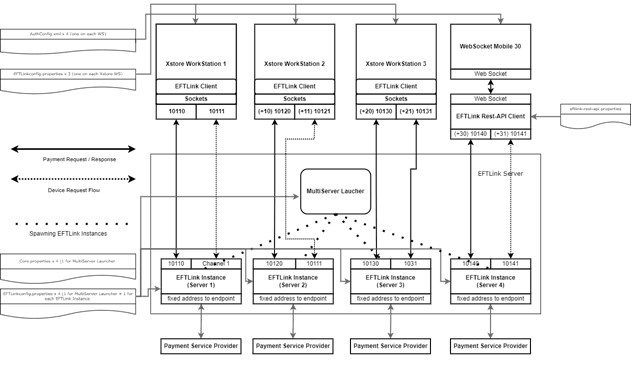
The diagram above shows EFTLink Server running four EFTLink instances, each bridging a POS to a dedicated PSP. This configuration can be achieved by following the steps below.
Within the EFTLink installation directory (for example, c:\eftlink) create four subdirectories, one for each instance. Each subdirectory acts as the working directory for a specific instance.
- C:\eftlink\Server1
- C:\eftlink\Server2
- C:\eftlink\Server3
- C:\eftlink\Server4
The EftlinkConfig.properties file located in the root of the EFTLink Installation directory is used to define the number of EFTLink Instances to start and the configuration values used by those instances. To configure four instances, ensure that the NumServers property is set to 4.
For example, NumServers = 4
Once the root EftlinkConfig.properties file has been configured, copy it to the following locations:
- The root of the "xstore" Installation directory or the "xstoredata\xstore" directory for v22 and later. This file is required by the EFTLink client API library used by xstore to build requests and process EFTLink responses.
- Each Server<n> directory. Once copied, the configuration file within each server directory can be further customised with settings specific to that instance, such as the active core configuration (for example, EPSCore<n> property.
An example (snippet) layout of how each configuration file would be is as follows:
|
Installation root & Xstore (Not applicable for communication over websockets) EFTLinkConfig.properties ServerChannel0 = 10100 NumServers = 4 |
Server 2 EFTLinkConfig.properties EPSCore0 = oracle.eftlink.opiretail.OPIRetailCore
opiretail.properties EPSAddress = 192.168.1.12 EPSPort = 8443
|
|
Xstore (ws1 – ws3) AuthConfig.xml <Host dtype="String">socket://localhost:10110</Host> |
Server 3 EFTLinkConfig.properties EPSCore0 = oracle.eftlink.opiretail.OPIRetailCore LineDisplayEnabled=false opiretail.properties EPSAddress = 192.168.1.13 EPSPort = 8443
|
|
EFTLink Root EFTLink-rest-api.properties ServerChannel0 = 10100 NumServers = 1 Pos30 = 10140 PEDPoolEnabled = false |
Server 4 EFTLinkConfig.properties EPSCore0 = oracle.eftlink.opiretail.OPIRetailCore EPSCore1 = oracle.eftlink.paypal.PayPalCore LineDisplayEnabled=true DelegateLineDisplay = true LineDisplayDelegateList = 0 EwalletCore = 1 opiretail.properties EPSAddress = 192.168.1.14 EPSPort = 8443 |
|
Server 1 EFTLinkConfig.properties EPSCore0 = oracle.eftlink.opiretail.OPIRetailCore
opiretail.properties EPSAddress = 192.168.1.11 EPSPort = 8443
|
The above example illustrates that each server can differ its configuration. For example, Server 1 and 2 only differ in terms of core properties file where both point to their respective providers endpoint address and port.
Server 3 will automatically block any sale state notifications reaching the opiretail core.
Server 4 is configured to route EWallet requests to Core 1.