3 Duties and Privileges
Privileges grant access to specific tasks, links, and actions within the application. The access controlled by a particular privilege is fixed and can only be changed by an enhancement to the application. You can control the functions and features to which a user has access by grouping the desired privileges into duties and assigning the duties to job roles which can then be associated to one or more users.
Duties Provided at Initial Setup
As part of this default security configuration, the system privileges have been logically grouped into duties and the duties have been assigned to an initial set of job roles. The provided duties can be modified or deleted, and new duties created. Administrator users can change the mappings of roles, duties, and privileges. Details about how to manage these application security policies are available in Chapter 2, Manage User Security in the Merchandising Cloud Services Administration Guide.
Duty Types
-
Inquiry – An inquiry duty provides the user with the ability to search for and view the associated entity. The provided inquiry duties are used when a user should have visibility to an area, but no option to create or update any information. Inquiry duties are assigned to viewers of an area.
-
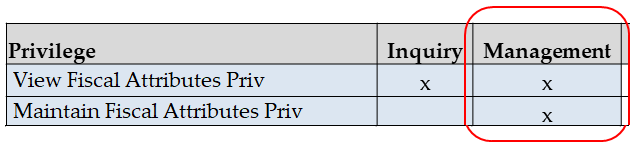
Management – A management duty provides the user with the ability to maintain the associated entity. The provided management duties are used when a user should have the ability to create, update, delete, and, submit information. Management duties always contain the inquiry duty for the same entity. For example, the Fiscal Attributes Management Duty contains the Fiscal Attributes Inquiry Duty along with the additional Maintain Fiscal Attributes Privilege, because for a user to maintain an entity they must also have the ability to search for and view the entity. Management duties are assigned to contributors of an area.
-
Approval – An approval duty is meant for users with the authority to review and approve or reject submissions. Approval duties always contain the management duty for the same entity. For a user to approve an entity they must also have the ability to search for, view, and maintain the entity. Approval duties are assigned to reviewers of an area.
Duties with no Hierarchical Relationships
There are a handful of privileges used within Fiscal Management that do not have a hierarchical set of duties with increasing levels of access, as described by the duty types above. Rather these duties simply grant access to a single area, such as a dashboard, or they grant access to particular information across several functional areas. Therefore, access is either granted or not, there are no access levels. These duties may be classified as management or inquiry duties, depending on if the user can maintain the related data or only view it. For example:
-
Application Global Menu Duties – These duties grant access to links in the Application Navigator which allow users to launch into another application in the Merchandising suite. The default security configuration does not have these duties assigned to any roles.
-
Service Access Duty – Grants access to execute Merchandising ReST services.
Determining Access for Your Organization
When determining access for a given role in your organization, start by categorizing each role with a duty type or access level for each functional area in the application.
Duty Definitions
For ease of mapping privileges to roles, privileges are logically grouped into duties. Duties may contain one or more privileges as well as other duties.
3.1. Duty Definitions list the privileges and nested duties contained in each of the predefined duties provided in the default security configuration:
Table 3-1 Duty Definitions
| Functional Area | Duty | Duty Description | Duties and Privileges Contained Within |
|---|---|---|---|
|
Administration - Application Navigator |
Allocation Global Menu Duty |
This duty is used to grant access to the Allocation link in the Application Navigator in the sidebar menu. There are no privileges within the duty, associating this duty to a role will grant access. |
No duties or privileges are contained in this duty Assigning the duty to a role grants the user access |
|
Administration - Application Navigator |
Fiscal Management Global Menu Duty |
This duty is used to grant access to the Fiscal Management link in the Application Navigator in the sidebar menu. There are no privileges within the duty, associating this duty to a role will grant access. |
No duties or privileges are contained in this duty Assigning the duty to a role grants the user access |
|
Administration - Application Navigator |
Invoice Matching Global Menu Duty |
This duty is used to grant access to the Invoice Matching link in the Application Navigator in the sidebar menu. There are no privileges within the duty, associating this duty to a role will grant access. |
No duties or privileges are contained in this duty Assigning the duty to a role grants the user access |
|
Administration - Application Navigator |
Merchandising Global Menu Duty |
This duty is used to grant access to the Merchandising link in the Application Navigator in the sidebar menu. There are no privileges within the duty, associating this duty to a role will grant access. |
No duties or privileges are contained in this duty Assigning the duty to a role grants the user access |
|
Administration - Application Navigator |
Pricing Global Menu Duty |
This duty is used to grant access to the Pricing link in the Application Navigator in the sidebar menu. There are no privileges within the duty, associating this duty to a role will grant access. |
No duties or privileges are contained in this duty Assigning the duty to a role grants the user access |
|
Administration - Application Navigator |
Sales Audit Global Menu Duty |
This duty is used to grant access to the Sales Audit link in the Application Navigator in the sidebar menu. There are no privileges within the duty, associating this duty to a role will grant access. |
No duties or privileges are contained in this duty Assigning the duty to a role grants the user access |
|
Administration - Web Service Access |
Service Access Duty |
This duty can execute ReST services in the Fiscal Management application. |
Fiscal Management Service Access Priv |
|
Fiscal Attributes |
Fiscal Attribute Inquiry Duty |
This duty can search for and view fiscal attributes via the Item Attributes and Entity Attributes screens. |
View Fiscal Attributes Priv |
|
Fiscal Attributes |
Fiscal Attribute Management Duty |
This duty can create and maintain fiscal attributes via the Item Attributes and Entity Attributes screens. This duty is an extension of the Fiscal Attribute Inquiry Duty. |
Fiscal Attribute Inquiry Duty Maintain Fiscal Attributes Priv |
Duty to Role Mappings
The job roles provided in the default security configuration have the following duties assigned to control their levels of access:
Table 3-2 Application Administrator
| Functional Area | Access Level | Duty Assigned |
|---|---|---|
|
Administration – Web Service Access |
Access Granted |
Service Access Duty |
|
Fiscal Attributes |
Management |
Fiscal Attribute Management Duty |
Table 3-3 Financial Analyst
| Functional Area | Access Level | Duty Assigned |
|---|---|---|
|
Administration – Web Service Access |
No Access |
|
|
Fiscal Attributes |
Inquiry |
Fiscal Attribute Inquiry Duty |
Table 3-4 Financial Manager
| Functional Area | Access Level | Duty Assigned |
|---|---|---|
|
Administration – Web Service Access |
No Access |
|
|
Fiscal Attributes |
Management |
Fiscal Attribute Management Duty |
Privileges
For each functional area in the application, there is an associated set of privileges. The privileges build upon each other. For example, to be able to maintain fiscal attributes, the user must also be able to search for and view fiscal attributes. Therefore, the Fiscal Attributes Management Duty contains the View Fiscal Attributes and Maintain Fiscal Attributes privileges.
Figure 3-1 Privileges for Users
Privileges Available in Fiscal Management
3.13. Privileges Available in Fiscal Management lists all of the privileges available in Fiscal Management, along with the duty type they are assigned to in the default configuration.
Table 3-5 Privileges Available in Fiscal Management
| Functional Area | Privilege | Privilege Description |
|---|---|---|
|
Administration – Web Service Access |
Fiscal Management Service Access Priv |
This privilege grants users the ability to execute Fiscal Management ReST services. |
|
Fiscal Attributes |
View Fiscal Attributes Priv |
A privilege for viewing fiscal attributes via the Item Attributes and Entity Attributes screens. |
|
Fiscal Attributes |
Maintain Fiscal Attributes Priv |
A privilege for creating and maintaining fiscal attributes via the Item Attributes and Entity Attributes screens. Users with this privilege must also have the View Fiscal Attributes Priv. |