12 Digital Assistant
The Digital Assistant, available through Ask Oracle, helps users analyze LPO information and find product guidance using natural-language questions. Depending on the request, the assistant can provide a written summary, display interactive components such as dropdown lists, tables, and graphs, or open a dashboard for further analysis.
The assistant can also answer questions about LPO functionality and workflows using available Oracle documentation. Documentation-based answers include links to the relevant sources.
Review generated responses for accuracy and do not share sensitive information with the assistant.
Accessing and Using the Digital Assistant
Select the Oracle O icon in the left navigation. Ask Oracle opens in a left sidebar, allowing you to keep the conversation visible while continuing to work in LPO.
Figure 12-1 Digital Assistant
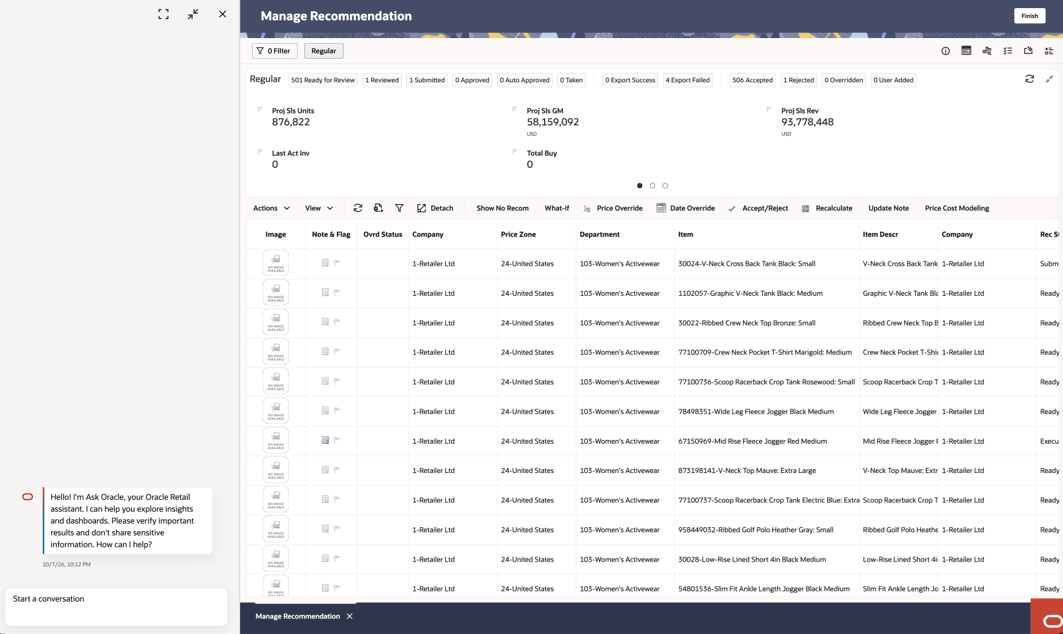
Enter your question in the conversation area. Include the business scope and the information you want to review. For example, specify the applicable department, price zone, pricing group, item, location, optimization type, measure, or timeframe.
The assistant determines how to process the request. You do not need to select an agent or analysis method. Depending on the question, the response can include:
- A written summary of the results.
- Dropdown lists or other controls for refining the request.
- Tables containing supporting details.
- Graphs that show trends or comparisons.
- An Open Dashboard action for additional analysis.
- Product guidance with links to supporting documentation.
You can ask follow-up questions in the same conversation to refine the scope, request another view, or obtain additional explanation.
Analyzing Pricing Data
Use the Digital Assistant to summarize available business data and present results in tables, charts, or dashboards. Include the item, department, price zone, pricing group, measure, or threshold relevant to your question. For example, you can ask:
- Show net sales by department for the latest available fiscal periods in a table and chart.
- Show net sales for Women’s Activewear by fiscal month in a table and trend chart.
- Show markdown budget used by department in a table and bar chart.
- Show optimal revenue for item 310200_black by price zone in a table and chart.
- For the selected pricing group, summarize recommendations by status and show the available projected performance metrics.
- For Women’s Activewear, show locations where sell-through is below 10%.
You can follow up on a result with a specific request, such as: “For Women’s Activewear, which five fiscal months had the highest net sales? Show the fiscal year, month, and amount.
For an analytical question, the assistant reviews the request, retrieves the relevant information, and presents a summary. Based on the result, it can also display supporting tables, graphs, or other interactive components.
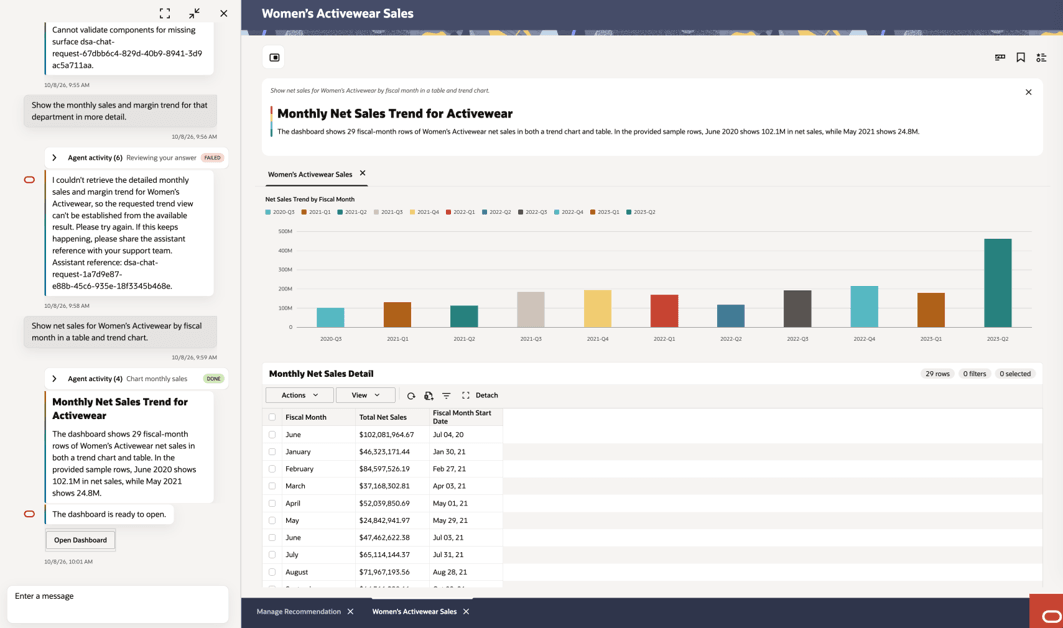
When Open Dashboard is available, select it to open the related dashboard in the workspace. The dashboard presents key metrics, trend charts, and supporting details for the requested business scope. This allows you to move from the conversational summary to a visual review of the results without leaving LPO.
Agent Activity:Expand the Agent Activity panel to review how the request is being processed. The displayed steps depend on the question and can include reviewing the request, planning the approach, running the appropriate analysis, preparing the response, and checking the result. Each step displays its current status, such as In Progress or Done.
Agent Activity provides visibility into the processing of the request. It does not require you to select or manage the underlying tools.
To obtain a focused answer:
- State the business question or task clearly.
- Include the applicable business scope, such as department, item, location, price zone, or pricing group.
- Specify the measure, timeframe, or comparison you need.
- Use the exact business-rule name or code when asking about a specific rule.
- Indicate whether you want a summary, table, graph, or dashboard.
- Use follow-up questions to refine or expand the response.
Digital Assistant responses support analysis and product guidance. Review the supporting information before making or approving a pricing decision.
Note:
Each agent understands Regular Pricing terminology. Use hierarchy names precisely - department, class, subclass, style, item, price zone - and use exact rule codes, such as RPO_COMP_MATCH_LOWER_PCT, when asking about a specific rule. Also specify the desired output format, timeframe, and business objective. Review responses for accuracy and do not share sensitive information.Sample Conversations
Figure 12-2 Digital Assistant - Analytical Response
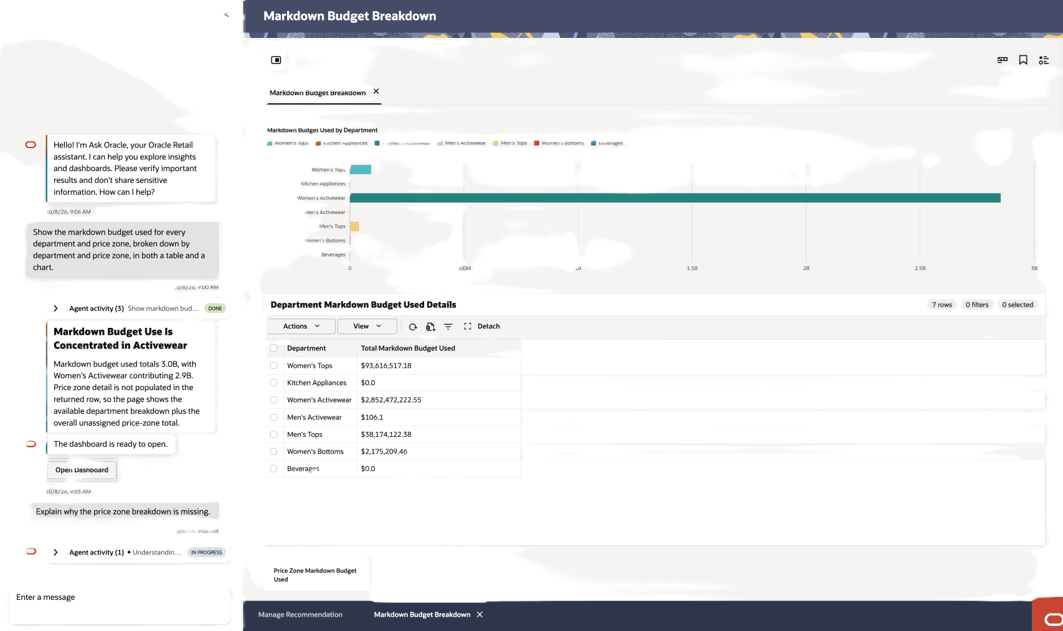
Figure 12-3 Digital Assistant - Analytical Response 2
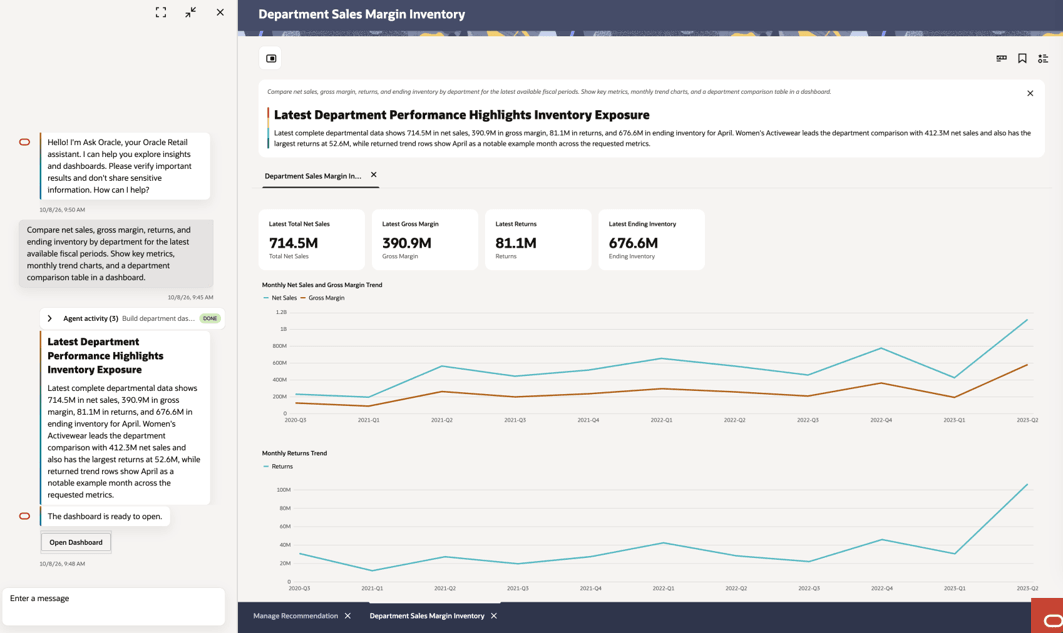
Figure 12-4 Digital Assistant - Analytical Response 2 - Continued
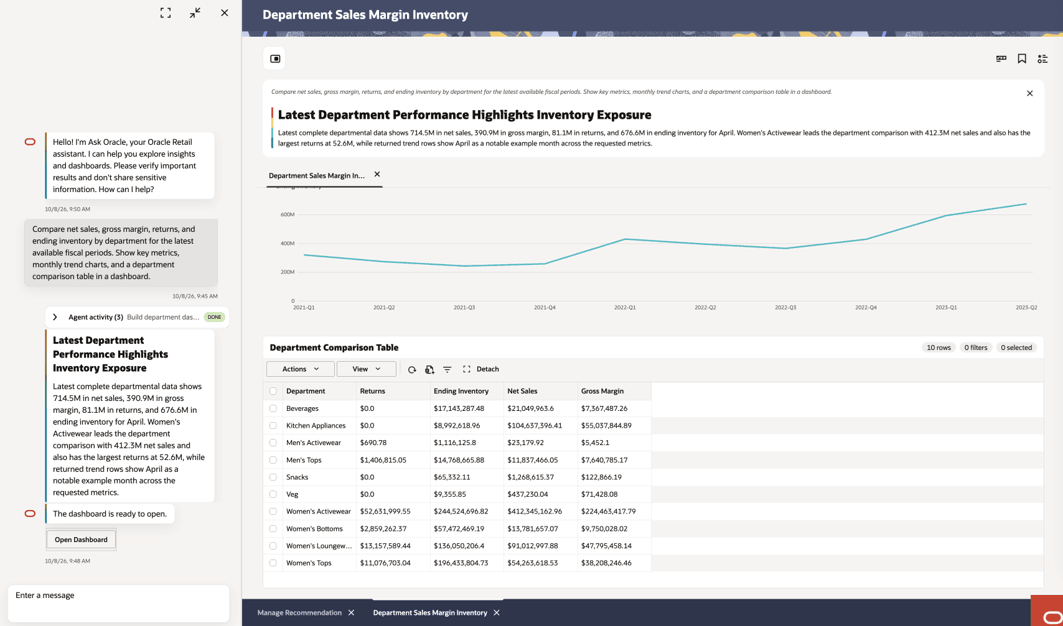
Figure 12-5 Digital Assistant - Analytical Response 2 - Follow Up Questions
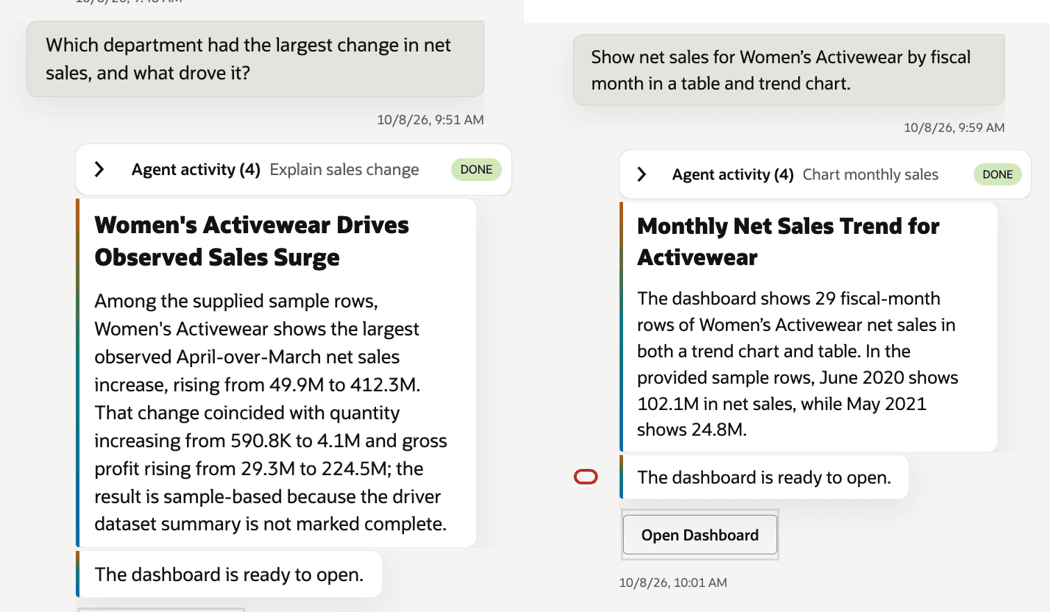
Figure 12-6 Digital Assistant - Analytical Response 2 - Follow Up Question with Sample Dashboard and Failure Message
Finding Product and Workflow Guidance
Use the Digital Assistant to ask questions about LPO concepts, application behavior, workflows, and configuration. For these questions, the assistant searches the available Oracle documentation, provides a concise answer, and includes links to its sources.
For example, you can ask:
- What is LPO?
- How do I create a Promotion or Markdown run?
- Which permissions and run statuses determine whether I can delete a run?
- What should I check when a run is not optimized?
- How do I finalize a What-If run?
- How can I see which rules affected a Regular Pricing recommendation?
- What are the steps to override, accept, or reject a recommendation?
- How do I set and review budgets for promotions and markdowns?
- What exceptions does LPO Forecasting support?
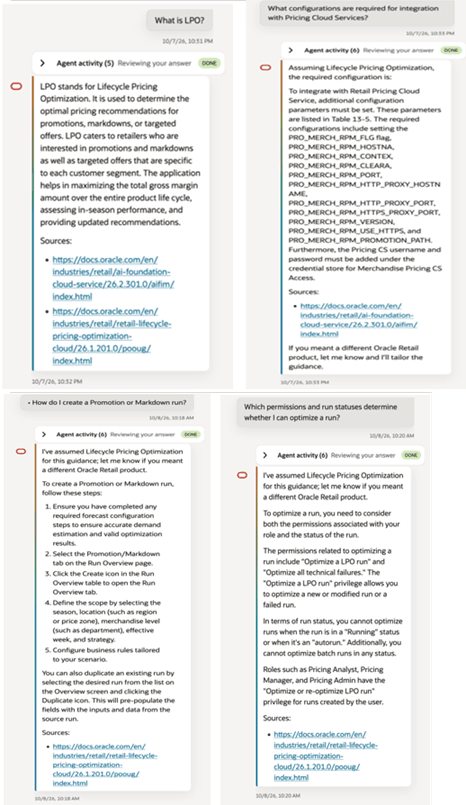
- What configurations are required for integration with Pricing Cloud Services?
- What is PRO_MERCH_RPM_FLG & whats the default value?
- Which Foundation jobs in POM load the product hierarchy?
You can follow up with a more specific question, such as: “What should I check first when a Promotion run is not optimized?”
Use the source links to open the supporting documentation when you need complete procedural or configuration details. Verify configuration-specific guidance against your environment and the applicable product documentation.
The Agent Activity panel can also be expanded for documentation questions. It shows the steps used to understand the question, locate relevant documentation, prepare the answer, and check the response.
Sample Conversations
The following examples show how the Digital Assistant responds to product and workflow questions. Unlike analytical questions that retrieve business data, these questions ask the assistant to explain LPO concepts, describe application behavior, or provide procedural guidance. For this type of question, the assistant searches the available Oracle documentation, provides a concise answer in the conversation, and includes links to the relevant source pages. Use the source links when you need complete procedural or configuration details beyond the summary provided.
Figure 12-7 Digital Assistant - Product Guidance Response