3 Duties and Privileges
Privileges grant access to specific tasks, links, and actions within the solution. The access controlled by a particular privilege is fixed and can only be changed by an enhancement to the application. You can control the functions and features to which a user has access by grouping the desired privileges into duties, and assigning the duties to job roles which can then be associated to one or more users.
Duties Provided at Initial Setup
As part of this default security configuration, the system privileges have been logically grouped into duties and the duties have been assigned to an initial set of job roles. The provided duties can be modified or deleted, and new duties created. Administrator users can change the mappings of roles, duties and privileges in the Oracle Retail Application Administration Console’s User Interface which is accessed from the Locations Destination’s Home Experience.
Details about how to manage these application security policies are available in the Manage User Security chapter in the Oracle Retail Merchandising Administration Guide.
Duty Types
Duties provided in the default security configuration follow a general naming convention to
indicate the type of privileges grouped within and the level of access provided. In Merchandising’s Location Destination, the provided duties are one of the following duty types:
-
Inquiry
An inquiry duty provides the user the ability to search for and view the associated entity. The provided inquiry duties are used when it is desirable for a user to have visibility to an area, but no option to create or update any information. Inquiry duties are assigned to viewers of an area.
-
Management
A management duty provides the user the ability to maintain the associated entity. The provided management duties are used when it is desirable for a user to have the ability create, update, delete, and, typically, submit information. Management duties always contain the inquiry duty for the same entity. For example, the Purchase Order Management Duty contains the Purchase Order Inquiry Duty along with the additional Maintain Purchase Orders Privilege and Submit Purchase Orders Privilege, because in order for a user to maintain an entity they must also have the ability to search for and view the entity. Management duties are assigned to contributors of an area.
-
Approval
An approval duty is meant for users with the authority to review and approve or reject submissions. Approval duties should always be granted along with the management duty for the same entity. In general, this is supported by nesting the management duty within the approval duty, as is the case with the Purchase Order Approval Duty which contains the Purchase Order Management Duty. Therefore, only the Purchase Order Approval Duty needs to be mapped to a user because due to nested duties, the Purchase Order Approval Duty will grant search, view, maintain, submit and approval access. However, there are some exceptions to this nested structure, in which case you should ensure both the management and approval duty are assigned to the role to which you wish to grant approval level access. Approval duties are assigned to reviewers of an area.
Limited Use Duties
In the Merchandising Cloud Services Suite, there are limited use duties which provide access, but only to the application administrator role provided in the default security configuration. In the Locations Destination, there is only one such duty. This duty cannot be mapped to any other roles.
-
Administrator Security Console Duty
Grants access to the Application Administration Console link in the Location Destination’s Home experience. This link provides the user with access to the Oracle Retail Application Administration Console (RAAC), where security roles, duties and privileges are managed. The Location Destination’s default security configuration has this duty assigned to the Application Administrator role.
Determining Access for your Organization
When determining access for a given role in your organization, start by categorizing each role with a duty type for each functional area in the solution. For example, a Supply Chain Analyst may have no access to the Application Administration Console, but may be a contributor of store and warehouse definitions.
Duty Definitions
For ease of mapping privileges to roles, privileges are logically grouped into duties. Duties may contain one or more privileges as well as other duties. Table 3-1 lists the privileges and nested duties contained in each of the predefined duties provided in the default security configuration:
Table 3-1 Duty Definitions
| Functional Area | Access Level | Duty | Duty Description | Duties and Privileges Contained Within |
|---|---|---|---|---|
|
Administration – Settings Administrator Console |
Access Granted |
Administrator Security Console Duty |
A duty for accessing the Application Administration Console (RAAC) suggestion link in the Foundation solution’s Home experience. Within the Application Administration Console, this duty also grants access to the Security folder and tasks under this folder in the Settings menu in the Oracle Retail Application Administration Console (RAAC). |
No duties or privileges are contained in this duty. Assigning the duty to a role grants the user access. |
| Data Loading – Company | Inquiry | Company via Spreadsheet Inquiry Duty | A duty for viewing company information via downloaded spreadsheets. | View Company via Spreadsheet Priv |
| Data Loading – Company | Management | Company via Spreadsheet Management Duty | A duty for maintaining company information via spreadsheet downloads and uploads. This duty is an extension of the Company via Spreadsheet Inquiry Duty. |
Company via Spreadsheet Inquiry Duty Maintain Company via Spreadsheet Priv |
| Data Loading – Company Closings | Inquiry | Company Closing via Spreadsheet Inquiry Duty | A duty for viewing company closings via downloaded spreadsheets. | View Company Closings via Spreadsheet Priv |
| Data Loading – Company Closings | Management | Company Closing via Spreadsheet Management Duty | A duty for maintaining company closings via spreadsheet downloads and uploads. This duty is an extension of the Company Closing via Spreadsheet Inquiry Duty. |
Company Closing via Spreadsheet Inquiry Duty Maintain Company Closings via Spreadsheet Priv |
| Data Loading – Location Closings | Inquiry | Location Closing via Spreadsheet Inquiry Duty | A duty for viewing location closings via downloaded spreadsheets. | View Location Closings via Spreadsheet Priv |
| Data Loading – Location Closings | Management | Location Closing via Spreadsheet Management Duty | A duty for maintaining location closings via spreadsheet downloads and uploads. This duty is an extension of the Location Closing via Spreadsheet Inquiry Duty. |
Location Closing via Spreadsheet Inquiry Duty Maintain Location Closings via Spreadsheet Priv |
| Data Loading – Banners and Channels | Inquiry | Banner and Channel via Spreadsheet Inquiry Duty | A duty for viewing banners and channels via downloaded spreadsheets. | View Banners and Channels via Spreadsheet Priv |
| Data Loading – Banners and Channels | Management | Banner and Channel via Spreadsheet Management Duty | A duty for maintaining banners and channels via spreadsheet downloads and uploads. This duty is an extension of the Banner and Channel via Spreadsheet Inquiry Duty. |
Banner and Channel via Spreadsheet Inquiry Duty Maintain Banners and Channels via Spreadsheet Priv |
| Data Loading – Countries | Inquiry | Country via Spreadsheet Inquiry Duty | A duty for viewing countries via downloaded spreadsheets. | View Countries via Spreadsheet Priv |
| Data Loading – Countries | Management | Country via Spreadsheet Management Duty | A duty for maintaining countries via spreadsheet downloads and uploads. This duty is an extension of the Country via Spreadsheet Inquiry Duty. |
Country via Spreadsheet Inquiry Duty Maintain Countries via Spreadsheet Priv |
| Data Loading – States | Inquiry | State via Spreadsheet Inquiry Duty | A duty for viewing states via downloaded spreadsheets. | View States via Spreadsheet Priv |
| Data Loading – States | Management | State via Spreadsheet Management Duty | A duty for maintaining states via spreadsheet downloads and uploads. This duty is an extension of the State via Spreadsheet Inquiry Duty. |
State via Spreadsheet Inquiry Duty Maintain States via Spreadsheet Priv |
| Data Loading – Store Formats | Inquiry | Store Format via Spreadsheet Inquiry Duty | A duty for viewing store formats via downloaded spreadsheets. | View Store Formats via Spreadsheet Priv |
| Data Loading – Store Formats | Management | Store Format via Spreadsheet Management Duty | A duty for maintaining store formats via spreadsheet downloads and uploads. This duty is an extension of the Store Format via Spreadsheet Inquiry Duty. |
Store Format via Spreadsheet Inquiry Duty Maintain Store Formats via Spreadsheet Priv |
| Data Loading – Store Grades | Inquiry | Store Grade via Spreadsheet Inquiry Duty | A duty for viewing store grades via downloaded spreadsheets. | View Store Grades via Spreadsheet Priv |
| Data Loading – Store Grades | Management | Store Grade via Spreadsheet Management Duty | A duty for maintaining store grades via spreadsheet downloads and uploads. This duty is an extension of the Store Grade via Spreadsheet Inquiry Duty. |
Store Grade via Spreadsheet Inquiry Duty Maintain Store Grades via Spreadsheet Priv |
| Data Loading – Store Traits | Inquiry | Store Trait via Spreadsheet Inquiry Duty | A duty for viewing store traits via downloaded spreadsheets. | View Store Traits via Spreadsheet Priv |
| Data Loading – Store Traits | Management | Store Trait via Spreadsheet Management Duty | A duty for maintaining store traits via spreadsheet downloads and uploads. This duty is an extension of the Store Trait via Spreadsheet Inquiry Duty. |
Store Trait via Spreadsheet Inquiry Duty Maintain Store Traits via Spreadsheet Priv |
| Data Loading – Transfer Zones | Inquiry | Transfer Zone via Spreadsheet Inquiry Duty | A duty for viewing transfer zones via downloaded spreadsheets. | View Transfer Zones via Spreadsheet Priv |
| Data Loading – Transfer Zones | Management | Transfer Zone via Spreadsheet Management Duty | A duty for maintaining transfer zones via spreadsheet downloads and uploads. This duty is an extension of the Transfer Zone via Spreadsheet Inquiry Duty. |
Transfer Zone via Spreadsheet Inquiry Duty Maintain Transfer Zones via Spreadsheet Priv |
| Data Loading – Transfer Entities | Inquiry | Transfer Entity via Spreadsheet Inquiry Duty | A duty for viewing transfer entities via downloaded spreadsheets. | View Transfer Entities via Spreadsheet Priv |
| Data Loading – Transfer Entities | Management | Transfer Entity via Spreadsheet Management Duty | A duty for maintaining transfer entities via spreadsheet downloads and uploads. This duty is an extension of the Transfer Entity via Spreadsheet Inquiry Duty. |
Transfer Entity via Spreadsheet Inquiry Duty Maintain Transfer Entities via Spreadsheet Priv |
| Data Loading – Org Units | Inquiry | Org Unit via Spreadsheet Inquiry Duty | A duty for viewing organizational units via downloaded spreadsheets. | View Org Units via Spreadsheet Priv |
| Data Loading – Org Units | Management | Org Unit via Spreadsheet Management Duty | A duty for maintaining organizational units via spreadsheet downloads and uploads. This duty is an extension of the Org Unit via Spreadsheet Inquiry Duty. |
Org Unit via Spreadsheet Inquiry Duty Maintain Org Units via Spreadsheet Priv |
| Data Loading – Outside Locations | Inquiry | Outside Location via Spreadsheet Inquiry Duty | A duty for viewing outside locations via downloaded spreadsheets. | View Outside Locations via Spreadsheet Priv |
| Data Loading – Outside Locations | Management | Outside Location via Spreadsheet Management Duty | A duty for maintaining outside locations via spreadsheet downloads and uploads. This duty is an extension of the Outside Location via Spreadsheet Inquiry Duty. |
Outside Location via Spreadsheet Inquiry Duty Maintain Outside Locations via Spreadsheet Priv |
| Data Loading – Primary Ports | Inquiry | Primary Port via Spreadsheet Inquiry Duty | A duty for viewing primary ports via downloaded spreadsheets. | View Primary Ports via Spreadsheet Priv |
| Data Loading – Primary Ports | Management | Primary Port via Spreadsheet Management Duty | A duty for maintaining primary ports via spreadsheet downloads and uploads. This duty is an extension of the Primary Port via Spreadsheet Inquiry Duty. |
Primary Port via Spreadsheet Inquiry Duty Maintain Primary Ports via Spreadsheet Priv |
| Data Loading – Status | Inquiry | Data Loading Status Inquiry Duty | A duty for viewing data loading status. | View Data Loading Status Priv |
| Data Loading – Status | Management | Data Loading Status Management Duty | A duty for maintaining data loading status. This duty is an extension of the Data Loading Status Inquiry Duty. |
Data Loading Status Inquiry Duty Maintain Data Loading Status Priv |
| Department Up Charges | Management | Department Up Charge Management Duty | A duty for initiating the copying of department up charges from one location to another via the Copy Up Charges drawer accessed from the Copy Up Charges card on the Locations destination landing page, or from the Store or Warehouse screens. | Copy Department Up Charges Priv |
|
Locations - Organizational Hierarchy |
Inquiry |
Organizational Hierarchy Inquiry Duty |
A duty for searching for and viewing the organizational hierarchy, stores and warehouses via the Organizational Hierarchy screen. This includes viewing all grouping levels of the hierarchy, Company, Chain, Area, Region, and District. |
View Organizational Hierarchy Priv View Company Priv View Stores Priv |
|
Locations - Organizational Hierarchy |
Management |
Organizational Hierarchy Management Duty |
A duty for creating and maintaining the grouping levels of the Organization Hierarchy. This includes all grouping levels of the hierarchy, Company, Chain, Area, Region, and District. This duty is an extension of the Organizational Hierarchy Inquiry Duty. |
Organizational Hierarchy Inquiry Duty Maintain Company Priv Maintain Chains Priv Maintain Areas Priv Maintain Regions Priv Maintain Districts Priv |
| Locations - Location Closings | Inquiry | Location Closing Inquiry Duty | A duty for viewing location closing and location exceptions to company-wide closings. | View Location Closings Priv |
| Locations - Location Closings | Management | Location Closing Management Duty |
A duty for creating and maintaining location closings and location exceptions to company-wide closings. This duty is an extension of the Location Closing Inquiry Duty. |
Location Closing Inquiry Duty Maintain Location Closings Priv |
|
Locations |
Inquiry |
Location Inquiry Duty |
A duty for searching for stores and warehouses via the Stores and Warehouses screen, and viewing store and warehouse definitions. |
Search Stores and Warehouses Priv View Stores Priv View Warehouses Priv |
|
Locations |
Management |
Location Management Duty |
A duty for maintaining stores and warehouses. This duty is an extension of the Location Inquiry Duty. |
Location Inquiry Duty Maintain Stores Priv Maintain Warehouses Priv |
|
Locations – Stores |
Inquiry |
Store Inquiry Duty |
A duty for viewing store definitions. |
Search Stores and Warehouses Priv View Stores Priv |
|
Locations – Stores |
Management |
Store Management Duty |
A duty for maintaining store definitions. This duty is an extension of the Store Inquiry Duty. |
Store Inquiry Duty Maintain Stores Priv |
|
Locations – Warehouses |
Inquiry |
Warehouse Inquiry Duty |
A duty for viewing warehouse definitions. |
Search Stores and Warehouses Priv View Warehouses Priv |
|
Locations – Warehouses |
Management |
Warehouse Management Duty |
A duty for maintaining warehouse definitions. This duty is an extension of the Warehouse Inquiry Duty. |
Warehouse Inquiry Duty Maintain Warehouse Priv |
Duty to Role Mappings
The job roles provided in the default security configuration have the following duties assigned to control their levels of access:
Application Administrator
| Functional Area | Access Level | Duty Assigned |
|---|---|---|
| Administration – Settings Administrator Console | Access Granted |
Administrator Security Console Management Duty |
| Data Loading – Company | Management | Company via Spreadsheet Management Duty |
| Data Loading – Company Closings | Management | Company Closing via Spreadsheet Management Duty |
| Data Loading – Location Closings | Management | Location Closing via Spreadsheet Management Duty |
| Data Loading – Banners and Channels | Management | Banner and Channel via Spreadsheet Management Duty |
| Data Loading – Countries | Management | Country via Spreadsheet Management Duty |
| Data Loading – States | Management | State via Spreadsheet Management Duty |
| Data Loading – Store Formats | Management | Store Format via Spreadsheet Management Duty |
| Data Loading – Store Grades | Management | Store Grade via Spreadsheet Management Duty |
| Data Loading – Store Traits | Management | Store Trait via Spreadsheet Management Duty |
| Data Loading – Transfer Zones | Management | Transfer Zone via Spreadsheet Management Duty |
| Data Loading – Transfer Entities | Management | Transfer Entity via Spreadsheet Management Duty |
| Data Loading – Org Units | Management | Org Unit via Spreadsheet Management Duty |
| Data Loading – Outside Locations | Management | Outside Location via Spreadsheet Management Duty |
| Data Loading – Primary Ports | Management | Primary Port via Spreadsheet Management Duty |
| Data Loading – Status | Management | Data Loading Status Management Duty |
| Department Up Charges | Management | Department Up Charge Management Duty |
| Locations – Organizational Hierarchy | Management | Organizational Hierarchy Management Duty |
| Locations - Location Closings | Management | Location Closing Management Duty |
| Locations | Management | Locations Management duty |
Data Steward
| Functional Area | Access Level | Duty Assigned |
|---|---|---|
| Administration – Settings Administrator Console | Access Granted |
Administrator Security Console Management Duty |
| Data Loading – Company | Management | Company via Spreadsheet Management Duty |
| Data Loading – Company Closings | Management | Company Closing via Spreadsheet Management Duty |
| Data Loading – Location Closings | Management | Location Closing via Spreadsheet Management Duty |
| Data Loading – Banners and Channels | Management | Banner and Channel via Spreadsheet Management Duty |
| Data Loading – Countries | Management | Country via Spreadsheet Management Duty |
| Data Loading – States | Management | State via Spreadsheet Management Duty |
| Data Loading – Store Formats | Management | Store Format via Spreadsheet Management Duty |
| Data Loading – Store Grades | Management | Store Grade via Spreadsheet Management Duty |
| Data Loading – Store Traits | Management | Store Trait via Spreadsheet Management Duty |
| Data Loading – Transfer Zones | Management | Transfer Zone via Spreadsheet Management Duty |
| Data Loading – Transfer Entities | Management | Transfer Entity via Spreadsheet Management Duty |
| Data Loading – Org Units | Management | Org Unit via Spreadsheet Management Duty |
| Data Loading – Outside Locations | Management | Outside Location via Spreadsheet Management Duty |
| Data Loading – Primary Ports | Management | Primary Port via Spreadsheet Management Duty |
| Data Loading – Status | Management | Data Loading Status Management Duty |
| Department Up Charges | No Access | – |
| Locations – Organizational Hierarchy | Management | Organizational Hierarchy Management Duty |
| Locations - Location Closings | Management | Location Closing Management Duty |
| Locations | Management | Locations Management duty |
Buyer
| Functional Area | Access Level | Duty Assigned |
|---|---|---|
| Administration – Settings Administrator Console | No Access | – |
| Data Loading – Company | No Access | – |
| Data Loading – Company Closings | Inquiry | Company Closing via Spreadsheet Inquiry Duty |
| Data Loading – Location Closings | Inquiry | Location Closing via Spreadsheet Inquiry Duty |
| Data Loading – Banners and Channels | Inquiry | Banner and Channel via Spreadsheet Inquiry Duty |
| Data Loading – Countries | Inquiry | Country via Spreadsheet Inquiry Duty |
| Data Loading – States | Inquiry | State via Spreadsheet Inquiry Duty |
| Data Loading – Store Formats | Inquiry | Store Format via Spreadsheet Inquiry Duty |
| Data Loading – Store Grades | Inquiry | Store Grade via Spreadsheet Inquiry Duty |
| Data Loading – Store Traits | Inquiry | Store Trait via Spreadsheet Inquiry Duty |
| Data Loading – Transfer Zones | Inquiry | Transfer Zone via Spreadsheet Inquiry Duty |
| Data Loading – Transfer Entities | No Access | – |
| Data Loading – Org Units | No Access | – |
| Data Loading – Outside Locations | Inquiry | Outside Location via Spreadsheet Inquiry Duty |
| Data Loading – Primary Ports | Inquiry | Primary Port via Spreadsheet Inquiry Duty |
| Data Loading – Status | Management | Data Loading Status Management Duty |
| Department Up Charges | No Access | – |
| Locations - Organizational Hierarchy | No Access | – |
| Locations - Location Closings | No Access | – |
| Locations | Inquiry | Location Inquiry Duty |
Inventory Analyst
| Functional Area | Access Level | Duty Assigned |
|---|---|---|
| Administration – Settings Administrator Console | No Access | |
| Data Loading – Company | No Access | – |
| Data Loading – Company Closings | Inquiry | Company Closing via Spreadsheet Inquiry Duty |
| Data Loading – Location Closings | Inquiry | Location Closing via Spreadsheet Inquiry Duty |
| Data Loading – Banners and Channels | Inquiry | Banner and Channel via Spreadsheet Inquiry Duty |
| Data Loading – Countries | Inquiry | Country via Spreadsheet Inquiry Duty |
| Data Loading – States | Inquiry | State via Spreadsheet Inquiry Duty |
| Data Loading – Store Formats | Inquiry | Store Format via Spreadsheet Inquiry Duty |
| Data Loading – Store Grades | Inquiry | Store Grade via Spreadsheet Inquiry Duty |
| Data Loading – Store Traits | Inquiry | Store Trait via Spreadsheet Inquiry Duty |
| Data Loading – Transfer Zones | Inquiry | Transfer Zone via Spreadsheet Inquiry Duty |
| Data Loading – Transfer Entities | No Access | – |
| Data Loading – Org Units | No Access | – |
| Data Loading – Outside Locations | Inquiry | Outside Location via Spreadsheet Inquiry Duty |
| Data Loading – Primary Ports | Inquiry | Primary Port via Spreadsheet Inquiry Duty |
| Data Loading – Status | Management | Data Loading Status Management Duty |
| Department Up Charges | No Access | – |
| Locations - Organizational Hierarchy | No Access | – |
| Locations - Location Closings | No Access | – |
| Locations | Inquiry | Location Inquiry Duty |
Inventory Manager
| Functional Area | Access Level | Duty Assigned |
|---|---|---|
| Administration – Settings Administrator Console | No Access | |
| Data Loading – Company | No Access | – |
| Data Loading – Company Closings | Inquiry | Company Closing via Spreadsheet Inquiry Duty |
| Data Loading – Location Closings | Inquiry | Location Closing via Spreadsheet Inquiry Duty |
| Data Loading – Banners and Channels | Inquiry | Banner and Channel via Spreadsheet Inquiry Duty |
| Data Loading – Countries | Inquiry | Country via Spreadsheet Inquiry Duty |
| Data Loading – States | Inquiry | State via Spreadsheet Inquiry Duty |
| Data Loading – Store Formats | Inquiry | Store Format via Spreadsheet Inquiry Duty |
| Data Loading – Store Grades | Inquiry | Store Grade via Spreadsheet Inquiry Duty |
| Data Loading – Store Traits | Inquiry | Store Trait via Spreadsheet Inquiry Duty |
| Data Loading – Transfer Zones | Inquiry | Transfer Zone via Spreadsheet Inquiry Duty |
| Data Loading – Transfer Entities | No Access | – |
| Data Loading – Org Units | No Access | – |
| Data Loading – Outside Locations | Inquiry | Outside Location via Spreadsheet Inquiry Duty |
| Data Loading – Primary Ports | Inquiry | Primary Port via Spreadsheet Inquiry Duty |
| Data Loading – Status | Management | Data Loading Status Management Duty |
| Department Up Charges | No Access | – |
| Locations - Organizational Hierarchy | No Access | – |
| Locations - Location Closings | No Access | – |
| Locations | Inquiry | Location Inquiry Duty |
Corporate Inventory Control Analyst
| Functional Area | Access Level | Duty Assigned |
|---|---|---|
| Administration – Settings Administrator Console | No Access | |
| Data Loading – Company | No Access | – |
| Data Loading – Company Closings | Inquiry | Company Closing via Spreadsheet Inquiry Duty |
| Data Loading – Location Closings | Inquiry | Location Closing via Spreadsheet Inquiry Duty |
| Data Loading – Banners and Channels | Inquiry | Banner and Channel via Spreadsheet Inquiry Duty |
| Data Loading – Countries | Inquiry | Country via Spreadsheet Inquiry Duty |
| Data Loading – States | Inquiry | State via Spreadsheet Inquiry Duty |
| Data Loading – Store Formats | Inquiry | Store Format via Spreadsheet Inquiry Duty |
| Data Loading – Store Grades | Inquiry | Store Grade via Spreadsheet Inquiry Duty |
| Data Loading – Store Traits | Inquiry | Store Trait via Spreadsheet Inquiry Duty |
| Data Loading – Transfer Zones | Inquiry | Transfer Zone via Spreadsheet Inquiry Duty |
| Data Loading – Transfer Entities | No Access | – |
| Data Loading – Org Units | No Access | – |
| Data Loading – Outside Locations | Inquiry | Outside Location via Spreadsheet Inquiry Duty |
| Data Loading – Primary Ports | Inquiry | Primary Port via Spreadsheet Inquiry Duty |
| Data Loading – Status | Management | Data Loading Status Management Duty |
| Department Up Charges | No Access | – |
| Locations - Organizational Hierarchy | No Access | – |
| Locations - Location Closings | No Access | – |
| Locations | Inquiry | Location Inquiry Duty |
Inventory Control Manager
| Functional Area | Access Level | Duty Assigned |
|---|---|---|
| Administration – Settings Administrator Console | No Access | |
| Data Loading – Company | No Access | – |
| Data Loading – Company Closings | Inquiry | Company Closing via Spreadsheet Inquiry Duty |
| Data Loading – Location Closings | Inquiry | Location Closing via Spreadsheet Inquiry Duty |
| Data Loading – Banners and Channels | Inquiry | Banner and Channel via Spreadsheet Inquiry Duty |
| Data Loading – Countries | Inquiry | Country via Spreadsheet Inquiry Duty |
| Data Loading – States | Inquiry | State via Spreadsheet Inquiry Duty |
| Data Loading – Store Formats | Inquiry | Store Format via Spreadsheet Inquiry Duty |
| Data Loading – Store Grades | Inquiry | Store Grade via Spreadsheet Inquiry Duty |
| Data Loading – Store Traits | Inquiry | Store Trait via Spreadsheet Inquiry Duty |
| Data Loading – Transfer Zones | Inquiry | Transfer Zone via Spreadsheet Inquiry Duty |
| Data Loading – Transfer Entities | No Access | – |
| Data Loading – Org Units | No Access | – |
| Data Loading – Outside Locations | Inquiry | Outside Location via Spreadsheet Inquiry Duty |
| Data Loading – Primary Ports | Inquiry | Primary Port via Spreadsheet Inquiry Duty |
| Data Loading – Status | Management | Data Loading Status Management Duty |
| Department Up Charges | No Access | – |
| Locations - Organizational Hierarchy | No Access | – |
| Locations - Location Closings | No Access | – |
| Locations | Inquiry | Location Inquiry Duty |
Sourcing Analyst
| Functional Area | Access Level | Duty Assigned |
|---|---|---|
| Administration – Settings Administrator Console | No Access | |
| Data Loading – Company | No Access | – |
| Data Loading – Company Closings | Inquiry | Company Closing via Spreadsheet Inquiry Duty |
| Data Loading – Location Closings | Inquiry | Location Closing via Spreadsheet Inquiry Duty |
| Data Loading – Banners and Channels | Inquiry | Banner and Channel via Spreadsheet Inquiry Duty |
| Data Loading – Countries | Inquiry | Country via Spreadsheet Inquiry Duty |
| Data Loading – States | Inquiry | State via Spreadsheet Inquiry Duty |
| Data Loading – Store Formats | Inquiry | Store Format via Spreadsheet Inquiry Duty |
| Data Loading – Store Grades | Inquiry | Store Grade via Spreadsheet Inquiry Duty |
| Data Loading – Store Traits | Inquiry | Store Trait via Spreadsheet Inquiry Duty |
| Data Loading – Transfer Zones | Inquiry | Transfer Zone via Spreadsheet Inquiry Duty |
| Data Loading – Transfer Entities | No Access | – |
| Data Loading – Org Units | No Access | – |
| Data Loading – Outside Locations | Inquiry | Outside Location via Spreadsheet Inquiry Duty |
| Data Loading – Primary Ports | Inquiry | Primary Port via Spreadsheet Inquiry Duty |
| Data Loading – Status | Management | Data Loading Status Management Duty |
| Department Up Charges | No Access | – |
| Locations - Organizational Hierarchy | No Access | – |
| Locations - Location Closings | No Access | – |
| Locations | Inquiry | Location Inquiry Duty |
Supply Chain Analyst
| Functional Area | Access Level | Duty Assigned |
|---|---|---|
| Administration – Settings Administrator Console | No Access | |
| Data Loading – Company | No Access | – |
| Data Loading – Company Closings | Inquiry | Company Closing via Spreadsheet Inquiry Duty |
| Data Loading – Location Closings | Inquiry | Location Closing via Spreadsheet Inquiry Duty |
| Data Loading – Banners and Channels | Inquiry | Banner and Channel via Spreadsheet Inquiry Duty |
| Data Loading – Countries | Inquiry | Country via Spreadsheet Inquiry Duty |
| Data Loading – States | Inquiry | State via Spreadsheet Inquiry Duty |
| Data Loading – Store Formats | Inquiry | Store Format via Spreadsheet Inquiry Duty |
| Data Loading – Store Grades | Inquiry | Store Grade via Spreadsheet Inquiry Duty |
| Data Loading – Store Traits | Inquiry | Store Trait via Spreadsheet Inquiry Duty |
| Data Loading – Transfer Zones | Inquiry | Transfer Zone via Spreadsheet Inquiry Duty |
| Data Loading – Transfer Entities | No Access | – |
| Data Loading – Org Units | No Access | – |
| Data Loading – Outside Locations | Inquiry | Outside Location via Spreadsheet Inquiry Duty |
| Data Loading – Primary Ports | Inquiry | Primary Port via Spreadsheet Inquiry Duty |
| Data Loading – Status | Management | Data Loading Status Management Duty |
| Department Up Charges | Inquiry | Location Closing Inquiry Duty |
| Locations – Organizational Hierarchy | No Access | |
| Locations - Location Closings | Inquiry | Location Closing Inquiry Duty |
| Locations | Management | Locations Management duty |
Financial Analyst
| Functional Area | Access Level | Duty Assigned |
|---|---|---|
| Administration – Settings Administrator Console | No Access | |
| Data Loading – Company | No Access | – |
| Data Loading – Company Closings | Inquiry | Company Closing via Spreadsheet Inquiry Duty |
| Data Loading – Location Closings | Inquiry | Location Closing via Spreadsheet Inquiry Duty |
| Data Loading – Banners and Channels | Inquiry | Banner and Channel via Spreadsheet Inquiry Duty |
| Data Loading – Countries | Inquiry | Country via Spreadsheet Inquiry Duty |
| Data Loading – States | Inquiry | State via Spreadsheet Inquiry Duty |
| Data Loading – Store Formats | Inquiry | Store Format via Spreadsheet Inquiry Duty |
| Data Loading – Store Grades | Inquiry | Store Grade via Spreadsheet Inquiry Duty |
| Data Loading – Store Traits | Inquiry | Store Trait via Spreadsheet Inquiry Duty |
| Data Loading – Transfer Zones | Inquiry | Transfer Zone via Spreadsheet Inquiry Duty |
| Data Loading – Transfer Entities | Management | Transfer Entity via Spreadsheet Management Duty |
| Data Loading – Org Units | Management | Org Unit via Spreadsheet Management Duty |
| Data Loading – Outside Locations | Inquiry | Outside Location via Spreadsheet Inquiry Duty |
| Data Loading – Primary Ports | Inquiry | Primary Port via Spreadsheet Inquiry Duty |
| Data Loading – Status | Management | Data Loading Status Management Duty |
| Department Up Charges | No Access | – |
| Locations - Organizational Hierarchy | No Access | – |
| Locations - Location Closings | No Access | – |
| Locations | Inquiry | Location Inquiry Duty |
Financial Manager
| Functional Area | Access Level | Duty Assigned |
|---|---|---|
| Administration – Settings Administrator Console | No Access | |
| Data Loading – Company | No Access | – |
| Data Loading – Company Closings | Inquiry | Company Closing via Spreadsheet Inquiry Duty |
| Data Loading – Location Closings | Inquiry | Location Closing via Spreadsheet Inquiry Duty |
| Data Loading – Banners and Channels | Inquiry | Banner and Channel via Spreadsheet Inquiry Duty |
| Data Loading – Countries | Inquiry | Country via Spreadsheet Inquiry Duty |
| Data Loading – States | Inquiry | State via Spreadsheet Inquiry Duty |
| Data Loading – Store Formats | Inquiry | Store Format via Spreadsheet Inquiry Duty |
| Data Loading – Store Grades | Inquiry | Store Grade via Spreadsheet Inquiry Duty |
| Data Loading – Store Traits | Inquiry | Store Trait via Spreadsheet Inquiry Duty |
| Data Loading – Transfer Zones | Inquiry | Transfer Zone via Spreadsheet Inquiry Duty |
| Data Loading – Transfer Entities | Management | Transfer Entity via Spreadsheet Management Duty |
| Data Loading – Org Units | Management | Org Unit via Spreadsheet Management Duty |
| Data Loading – Outside Locations | Inquiry | Outside Location via Spreadsheet Inquiry Duty |
| Data Loading – Primary Ports | Inquiry | Primary Port via Spreadsheet Inquiry Duty |
| Data Loading – Status | Management | Data Loading Status Management Duty |
| Department Up Charges | Management | Department Up Charge Management Duty |
| Locations - Organizational Hierarchy | No Access | – |
| Locations - Location Closings | No Access | – |
| Locations | Inquiry | Location Inquiry Duty |
Privileges
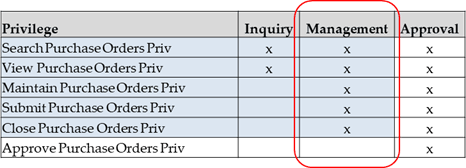
For each functional area in the Locations Destination, there is an associated set of privileges. The privileges build upon each other. For example, in order to be able to maintain a store, the user must also be able to search for and view stores. Therefore, the Store Management Duty contains the Search Stores and Warehouses, View Stores, Maintain Stores privileges. Similarly, when granting a user approval privileges, they must also have the privileges associated with inquiry and management of the entity.
Figure 3-1 Privileges by Level of Access for Users
Privilege Definitions
This table lists all of the privileges available in Merchandising's Location Destination, along with the duty type to which they are assigned in the default configuration.
Table 3-2 Privilege Definitions
| Functional Area | Privilege | Privilege Description |
|---|---|---|
| Data Loading – Company | View Company via Spreadsheet Priv | A privilege for viewing company information via downloaded spreadsheets. |
| Data Loading – Company | Maintain Company via Spreadsheet Priv | A privilege for maintaining company information via spreadsheet downloads and uploads. Users with this privilege must also have the View Company via Spreadsheet Priv. |
| Data Loading – Company Closings | View Company Closings via Spreadsheet Priv | A privilege for viewing company closings via downloaded spreadsheets. |
| Data Loading – Company Closings | Maintain Company Closings via Spreadsheet Priv | A privilege for maintaining company closings via spreadsheet downloads and uploads. Users with this privilege must also have the View Company Closings via Spreadsheet Priv. |
| Data Loading – Location Closings | View Location Closings via Spreadsheet Priv | A privilege for viewing location closings via downloaded spreadsheets. |
| Data Loading – Location Closings | Maintain Location Closings via Spreadsheet Priv | A privilege for maintaining location closings via spreadsheet downloads and uploads. Users with this privilege must also have the View Location Closings via Spreadsheet Priv. |
| Data Loading – Banners and Channels | View Banners and Channels via Spreadsheet Priv | A privilege for viewing banners and channels via downloaded spreadsheets. |
| Data Loading – Banners and Channels | Maintain Banners and Channels via Spreadsheet Priv | A privilege for maintaining banners and channels via spreadsheet downloads and uploads. Users with this privilege must also have the View Banners and Channels via Spreadsheet Priv. |
| Data Loading – Countries | View Countries via Spreadsheet Priv | A privilege for viewing countries via downloaded spreadsheets. |
| Data Loading – Countries | Maintain Countries via Spreadsheet Priv | A privilege for maintaining countries via spreadsheet downloads and uploads. Users with this privilege must also have the View Countries via Spreadsheet Priv. |
| Data Loading – States | View States via Spreadsheet Priv | A privilege for viewing states via downloaded spreadsheets. |
| Data Loading – States | Maintain States via Spreadsheet Priv | A privilege for maintaining states via spreadsheet downloads and uploads. Users with this privilege must also have the View States via Spreadsheet Priv. |
| Data Loading – Store Formats | View Store Formats via Spreadsheet Priv | A privilege for viewing store formats via downloaded spreadsheets. |
| Data Loading – Store Formats | Maintain Store Formats via Spreadsheet Priv | A privilege for maintaining store formats via spreadsheet downloads and uploads. Users with this privilege must also have the View Store Formats via Spreadsheet Priv. |
| Data Loading – Store Grades | View Store Grades via Spreadsheet Priv | A privilege for viewing store grades via downloaded spreadsheets. |
| Data Loading – Store Grades | Maintain Store Grades via Spreadsheet Priv | A privilege for maintaining store grades via spreadsheet downloads and uploads. Users with this privilege must also have the View Store Grades via Spreadsheet Priv. |
| Data Loading – Store Traits | View Store Traits via Spreadsheet Priv | A privilege for viewing store traits via downloaded spreadsheets. |
| Data Loading – Store Traits | Maintain Store Traits via Spreadsheet Priv | A privilege for maintaining store traits via spreadsheet downloads and uploads. Users with this privilege must also have the View Store Traits via Spreadsheet Priv. |
| Data Loading – Transfer Zones | View Transfer Zones via Spreadsheet Priv | A privilege for viewing transfer zones via downloaded spreadsheets. |
| Data Loading – Transfer Zones | Maintain Transfer Zones via Spreadsheet Priv | A privilege for maintaining transfer zones via spreadsheet downloads and uploads. Users with this privilege must also have the View Transfer Zones via Spreadsheet Priv. |
| Data Loading – Transfer Entities | View Transfer Entities via Spreadsheet Priv | A privilege for viewing transfer entities via downloaded spreadsheets. |
| Data Loading – Transfer Entities | Maintain Transfer Entities via Spreadsheet Priv | A privilege for maintaining transfer entities via spreadsheet downloads and uploads. Users with this privilege must also have the View Transfer Entities via Spreadsheet Priv. |
| Data Loading – Org Units | View Org Units via Spreadsheet Priv | A privilege for viewing organizational units via downloaded spreadsheets. |
| Data Loading – Org Units | Maintain Org Units via Spreadsheet Priv | A privilege for maintaining organizational units via spreadsheet downloads and uploads. Users with this privilege must also have the View Org Units via Spreadsheet Priv. |
| Data Loading – Outside Locations | View Outside Locations via Spreadsheet Priv | A privilege for viewing outside locations via downloaded spreadsheets. |
| Data Loading – Outside Locations | Maintain Outside Locations via Spreadsheet Priv | A privilege for maintaining outside locations via spreadsheet downloads and uploads. Users with this privilege must also have the View Outside Locations via Spreadsheet Priv. |
| Data Loading – Primary Ports | View Primary Ports via Spreadsheet Priv | A privilege for viewing primary ports via downloaded spreadsheets. |
| Data Loading – Primary Ports | Maintain Primary Ports via Spreadsheet Priv | A privilege for maintaining primary ports via spreadsheet downloads and uploads. Users with this privilege must also have the View Primary Ports via Spreadsheet Priv. |
| Department Up Charges | Copy Department Up Charges Priv | A privilege for initiating the copying of department up charges from one location to another via the Copy Up Charges drawer accessed from the Copy Up Charges card on the Locations destination landing page, or from the Store or Warehouse screens. |
|
Locations - Organizational Hierarchy |
View Organizational Hierarchy Priv |
The View Organization Hierarchy Priv provides access to the Organizational Hierarchy screen in the Locations module, to view all levels of the Organizational Hierarchy. |
|
Locations - Organizational Hierarchy |
View Company Priv |
A privilege for viewing the Company definition via the Organizational Hierarchy screen in the Locations module.Users with this privilege must also have the View Organizational Hierarchy Priv. |
|
Locations - Organizational Hierarchy |
Maintain Company Priv |
A privilege for editing the Company definition via the Organizational Hierarchy screen in the Locations module.Users with this privilege must also have the View Organizational Hierarchy Priv. |
|
Locations - Organizational Hierarchy |
Maintain Areas Priv |
A privilege for creating and editing Areas.Users with this privilege must also have the View Organizational Hierarchy Priv. |
|
Locations - Organizational Hierarchy |
Maintain Chains Priv |
A privilege for creating and editing Chains.Users with this privilege must also have the View Organizational Hierarchy Priv. |
|
Locations - Organizational Hierarchy |
View Company Priv |
A privilege for editing the Company definition.Users with this privilege must also have the View Organizational Hierarchy Priv. |
|
Locations - Organizational Hierarchy |
Maintain Districts Priv |
A privilege for creating and editing Districts.Users with this privilege must also have the View Organizational Hierarchy Priv. |
|
Locations - Organizational Hierarchy |
Maintain Regions Priv |
A privilege for creating and editing Regions.Users with this privilege must also have the View Organizational Hierarchy Priv. |
| Locations - Location Closings | View Location Closings Priv |
A privilege for viewing the location closings and location exceptions to company-wide closings via the Location Closings drawer from the Warehouse and the Store screens. In order to access the Location Closings screen, users must be able to search for and view the location for which they want to maintain location closings. Therefore, users with this privilege must also have the Search Stores and Warehouses Priv, and either the View Stores Priv or the View Warehouses Priv. |
| Locations - Location Closings | Maintain Location Closings Priv |
A privilege for creating and maintaining the location closings and location exceptions to company-wide closings via the Location Closings drawer from the Warehouse and the Store screens. In order to access the Location Closings screen, users must be able to search for and view the location for which they want to maintain location closings. Therefore, users with this privilege must also have the View Location Closings Priv, Search Stores and Warehouses Priv, and either the View Stores Priv or the View Warehouses Priv. |
|
Locations |
Search Stores and Warehouses Priv |
A privilege for searching for stores and warehouses. This allows access to the Stores and Warehouses search screen, but does not allow users to view details of any stores or warehouses or perform actions against the locations. |
|
Locations |
View Stores Priv |
A privilege for viewing store definitions, including addresses, store services, store conditions, store traits and walk-through stores and custom flexible attributes (CFAS).Users with this privilege must also have the Search Stores and Warehouses Priv. |
|
Locations |
Maintain Stores Priv |
A privilege for creating and editing store definitions, including addresses, store services, store conditions, store traits and walk-through stores and custom flexible attributes (CFAS).Users with this privilege must also have the Search Stores and Warehouses Priv, and the View Stores Priv. |
|
Locations |
View Warehouses Priv |
A privilege for viewing physical and virtual warehouse definitions, including addresses and custom flexible attributes (CFAS).Users with this privilege must also have the Search Stores and Warehouses Priv. |
|
Locations |
Maintain Warehouses Priv |
A privilege for creating and editing physical and virtual warehouse definitions, including addresses and custom flexible attributes (CFAS).Users with this privilege must also have the Search Stores and Warehouses Priv, and the View Warehouses Priv. |