1 Feature Summary
The enhancements below are included in this release.
Noteworthy Enhancements
This guide outlines the information you need to know about new or improved functionality in the Oracle Retail Order Management Suite Cloud Service update and describes any tasks you might need to perform for the update. Each section includes a brief description of the feature, the steps you need to take to enable or begin using the feature, any tips or considerations that you should keep in mind, and the resources available to help you.
Column Definitions
-
Feature: Provides a description of the feature being delivered.
-
Module Impacted: Identifies the module associated with the feature, if any.
-
Scale: Identifies the size of the feature. Options are:
-
Small: These UI or process-based features are typically comprised of minor field, validation, or program changes. Therefore, the potential impact to users is minimal.
-
Medium: These UI or process-based features are typically comprised of field, validation, or program changes. Therefore the potential impact on users is moderate.
-
Large: These UI or process-based features have more complex designs. Therefore, the potential impact to users is higher.
-
-
Delivered: Is the new feature available for use immediately after upgrade or must the feature be enabled or configured? If no, the feature is non-disruptive to end users and action is required (detailed steps below) to make the feature ready to use.
-
Customer Action Required: You must take action before these features can be used. These features are delivered disabled and you choose if and when to enable them.
| Feature | Module Impacted | Scale | Delivered | Customer Action Required? |
|---|---|---|---|---|
| New and Updated Features | ||||
| Order Administration Cloud Service | ||||
|
Order Administration |
Large |
Yes |
Yes |
|
|
Order Administration |
Small |
Yes |
No |
|
|
Order Administration - Merchandising Integration |
Small |
No |
Yes |
|
|
Order Administration - Merchandising Integration |
Small |
No |
Yes |
|
|
Order Administration - Payment Processing |
Medium |
No |
Yes |
|
|
Automatic Release of Online Banking Overpayment Refunds on Order Close or Cancellation |
Order Administration – Payment Processing |
Small |
No |
Yes |
|
Order Administration |
Small |
Yes |
No |
|
|
Order Orchestration Cloud Service |
||||
|
Order Orchestration and Store Connect |
Small |
No |
Yes |
|
|
Order Orchestration |
Small |
Yes |
No |
|
Order Administration Enhancements
Order Administration: User Interface Performance Improvements
Significant performance improvements have been made to the Order Administration user interface, with a primary focus on optimizing the Modern View experience. Internal testing demonstrated substantial gains in responsiveness, particularly during initial screen load and common user interactions.
These improvements were achieved through a series of backend optimizations, including:
- Reduced unnecessary session processing, avoiding repeated loading of large session data during user interactions.
- Improved caching and reuse of data, minimizing redundant requests and processing between screens.
- Optimized serialization and memory usage, reducing overhead during data transfer and session handling.
- Elimination of inefficient operations, such as repeated external calls and object creation.
For example, enhancements were made to prevent repeated session reloads during user validation and navigation, which previously introduced latency due to large, cached session data being repeatedly accessed.
Overall, these changes result in a faster and more efficient user experience, especially in high-usage flows such as Modern View navigation and order processing.
Order Administration: Expanded Order Notes and Messages
This update introduces expanded support for Order Notes, Order Ship-To Messages, and Order Line Messages, increasing the maximum supported length to up to 4000 characters. This enhancement enables retailers to capture more detailed information within orders, improving communication across fulfillment, customer service, and integration flows.
Order Notes are automatically expanded to support the increased length. For Order Ship-To and Order Line Messages, this functionality is controlled through the Use Expanded Order Message Length (M94) system control value.
- When SCV M94 is enabled, messages can store up to 4000 characters in a single record.
- When SCV M94 is disabled, the system continues to use existing logic and limits for backward compatibility of 60 characters.
This approach ensures that customers can adopt the enhanced message capabilities at their own pace without impacting existing integrations or downstream processes.
These updates are supported across Order Administration APIs and integrations, allowing expanded message content to be passed, stored, and returned consistently across inbound and outbound flows.
Note:
Important Considerations- Order Orchestration Cloud Service (OOCS) integrations that consume or store message content.
- Xstore and other downstream systems that may receive order or gift messages.
- Printed documents such as pick tickets and invoices, where message length may impact formatting or usability.
- Any custom integrations or services that assume existing message length limits.
While the system supports longer messages, downstream systems or processes may continue to impose their own constraints and should be reviewed accordingly.
Order Administration: Merchandising Location Category
To support more accurate integration with Merchandising and downstream systems such as Oracle Retail Sales Audit (ReSA), a new Merchandising Location Category on the Store Cross Reference (WSCR) has been introduced. This enhancement addresses a key gap where Order Administration could previously only infer location types (such as store or warehouse) based on delivery logic, which did not always reflect the true fulfillment source—particularly for supplier-driven fulfillment scenarios.
With this update, customers can explicitly define the location category (Store, Warehouse, or Supplier) for each location. When configured, this value is used in transaction processing—specifically in RTLog generation—ensuring the correct location type is passed to Merchandising systems. This improves data accuracy and prevents downstream processing issues, such as transaction rejections caused by mismatched or missing location type identifiers.
If the Merchandising Location Category is not populated, the system will continue to default existing logic, maintaining backward compatibility.
Note:
The location category value defined in Order Administration must match the location type in Merchandising (for example, MFCS/ReSA). If there is a mismatch, RTLog transactions may fail to process as this value is used to populate the Location Type Identifier field.
Order Administration: Merchandising VAT Tax Codes and Tax-Inclusive Pricing
This update introduces expanded support for Value-Added Tax (VAT) processing across integrations withOracle Retail Merchandising Foundation Cloud Service (MFCS)andRetail Sales Audit (ReSA).
MFCS must be configured for Simple VAT (SVAT) or Global Tax Service (GTS) to support VAT processing and ensure tax-inclusive pricing and tax data are correctly provided.
Tax-Inclusive Pricing
Order Administration now supports the ingestion and processing of tax-inclusive pricing from MFCS. When the Tax Included in Price (E70) system control value is enabled, pricing received through the Merchandising item import (OCDSITM) is stored in a dedicated tax-inclusive price field, allowing the system to accurately represent VAT-based pricing models where tax is embedded in the item price.
If E70 is not enabled, pricing continues to be stored in the standard price field, preserving existing behavior.
Note:
After enabling E70, customers should perform a full price reload, as incremental loads will not populate historical records with tax-inclusive pricing until there is a change.
Switching E70 on or off does not clear previously populated price or tax-inclusive price fields.
Merchandising Tax Code and RTLog Mapping
To support downstream financial processing, a Merchandising Tax Code can now be defined at the country level. This tax code is used when generating RTLog transactions for integration with ReSA.
- The Merchandising Tax Code is configured on the Country (WCTY) record.
- During RTLog generation, this value is mapped to the IGTAX_CODE for each transaction line.
- If no tax code is defined, a default value of TOTAX is used.
For VAT-enabled transactions:
- Tax is derived from VAT-specific charge records and associated directly to item-level transactions.
- IGTAX records are generated to represent tax amounts tied to each item line.
- TTAX records are no longer generated for VAT scenarios, ensuring alignment with ReSA expectations for item-level tax reporting.
This approach improves accuracy in downstream systems by ensuring tax is properly associated with individual items rather than aggregated at the order level.
Order Administration: Configurable Payment Authorization Void Behavior
This enhancement introduces new flexibility in how payment authorizations are handled when an order total is reduced.
Previously, when an order decreased before fulfillment, the system would always void the existing authorization(s) and request a new one. This could result in customers temporarily seeing higher amounts held on their account.
With this update, retailers can now control how authorizations are handled when an order total decreases through new System Control Values (SCVs):
Together, these settings allow retailers to choose between always voiding authorizations or only voiding them when the order decrease is significant.
How It Works
When an order total decreases, the system compares:
- The new order total
- The open (not voided/deactivate) authorized and prepaid amounts
It then calculates how much of the authorization and prepaid amounts are still in use.
- If most of the amount is still needed, it is kept
- If a large portion is no longer needed, it can be voided (based on your threshold)
Simple Use Cases
Use Case 1: Void Logic Disabled
- Void Authorization for Partial Order Decrease = No
- Order: $100 → reduced to $60
- Result: Authorization is not voided
- (Configuration prevents voiding regardless of order change)
Use Case 2: Always Void (Current Behavior)
- Void Authorization for Partial Order Decrease = Yes
- Threshold = 0%
- Order: $100 → reduced to $90
- Result: Authorization is voided
- (Threshold of 0% means always void unused authorization)
Use Case 3: Small Decrease (No Void)
- Void Authorization for Partial Order Decrease = Yes
- Threshold = 70%
- Order: $100 → reduced to $90
- Result: Authorization is not voided
- (Most of the authorization is still being used)
Use Case 4: Large Decrease (Void Triggered)
- Void Authorization for Partial Order Decrease = Yes
- Threshold = 70%
- Order: $100 → reduced to $60
- Result: Authorization is voided
- (Utilization drops below threshold, triggering void)
Use Case 5: Mixed Payments (Selective Void)
- Void Authorization for Partial Order Decrease = Yes
- Threshold = 75%
- Order: $120 → reduced to $70
- Payments: Gift Card ($50) + Credit Card (catch-all) ($70)
- Result:
- Gift Card: kept (fully used)
- Credit Card: voided (low utilization)
Important:
Important Considerations- This logic applies only before fulfillment begins (before picks/broker records are created).
- Fully canceled or sold-out orders will continue to always void authorizations.
- A payment activity message is recorded to explain when and why a void occurred.
- When a void is triggered, the system will identify which authorizations should be voided; however, the original authorization will only be updated to a voided status and a reversal record will only be created if the “Send Reversal” flag is enabled on the Authorization Service / Merchant Account for Credit Card and Stored Value Card.
Order Administration: Automatic Release of Online Banking Overpayment Refunds on Order Close or Cancellation
This update introduces streamlined handling of overpayment refunds for Online Banking (Advance Capture) payments. Previously, all overpayment refunds were created and maintained in a held status, requiring manual intervention to release them.
With this update, the system will now automatically evaluate and release eligible refunds when an order is closed or canceled.
When an order transitions to a Closed or Canceled status, the system checks for any overpayment refund records that are still on hold. If the refund amount is below the configured Refund Check Maximum for the originating payment method (or its alternate refund type, if applicable), the refund will be automatically released. This logic applies across all processes that result in order closure or cancellation, including APIs, Order Orchestration updates, fulfillment, and maintenance flows.
Refunds that meet these criteria will follow the standard release process, including:
- Updating the refund status from Held to Open
- Generating the associated credit invoice
- Writing appropriate order activity history messages
If the refund amount is greater than or equal to the defined Refund Check Maximum, or if no maximum is defined, the refund will remain in a held status and continue to require manual release.
Exceptions:
- If a credit invoice has already been generated and the overpayment refund is placed on a manual hold, those refunds will not be automatically released and will continue to require manual intervention.
- During a cancel, if the reason code selected is configured to put the refund on hold status, the system will put this overpayment refund onto a Manual Hold instead of automatically releasing it.
This enhancement reduces manual effort while still allowing retailers to control refund release thresholds through existing configuration.
Note:
Online banking overpayment refunds are still initially created in a Held status to allow for order maintenance activities (such as adjustments or corrections) prior to finalization.
Order Orchestration Enhancements
Order Orchestration: Email Out API Enhancements for Store Connect Cancellations
This update introduces support for generating customer-facing cancel notification emails through the Email Out API when orders are canceled in Store Connect.
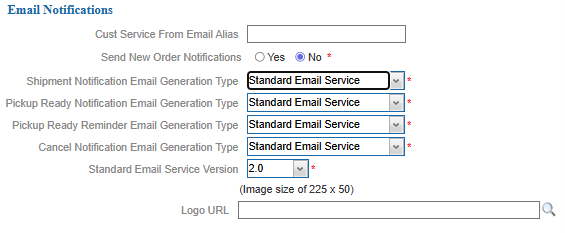
Retailers can now configure whether cancel notifications are generated when cancellations occur in Store Connect using a new preference in Store Connect Preferences > Email tab. When enabled, the system will create a cancel notification record and generate a corresponding JSON message via the Email Out API for downstream processing.
In addition, enhancements to the Email Out API JSON structure (version 2.0) introduce the ability to include cancel reason code and description in cancel notifications, providing greater context to downstream systems and customer communications.