1 Feature Summary
The enhancements below are included in this release.
Noteworthy Enhancements
This guide outlines the information you need to know about new or improved functionality in the Oracle Retail Order Management Suite Cloud Service update and describes any tasks you might need to perform for the update. Each section includes a brief description of the feature, the steps you need to take to enable or begin using the feature, any tips or considerations that you should keep in mind, and the resources available to help you.
Column Definitions
-
Feature: Provides a description of the feature being delivered.
-
Module Impacted: Identifies the module associated with the feature, if any.
-
Scale: Identifies the size of the feature. Options are:
-
Small: These UI or process-based features are typically comprised of minor field, validation, or program changes. Therefore, the potential impact to users is minimal.
-
Medium: These UI or process-based features are typically comprised of field, validation, or program changes. Therefore, the potential impact to users is moderate.
-
Large: These UI or process-based features have more complex designs. Therefore, the potential impact to users is higher.
-
-
Delivered: Is the new feature available for use immediately after upgrade or must the feature be enabled or configured? If no, the feature is non-disruptive to end users, and action is required to make the feature ready to use.
-
Customer Action Required: You must take action before these features can be used. These features are delivered disabled, and you choose if and when to enable them.
| Feature | Module Impacted | Scale | Delivered | Customer Action Required? |
|---|---|---|---|---|
| New and Updated Features | ||||
| Order Administration Cloud Service | ||||
|
Order Administration - Payment Processing |
Large |
No |
Yes |
|
|
Order Administration - Merchandising Integration |
Small |
Yes |
No |
|
|
Order Administration |
Small |
No |
Yes |
|
|
Order Administration |
Small |
Yes |
No |
|
|
Order Administration |
Small |
Yes |
No |
|
|
Order Administration - Web Services |
Small |
Yes |
No |
|
|
Order Administration |
Small |
Yes |
No |
|
|
Order Administration |
Large |
No |
Yes |
|
| Order Orchestration Cloud Service | ||||
|
Order Orchestration |
Large |
No |
Yes |
|
|
Order Orchestration |
Small |
Yes |
No |
|
Order Administration Enhancements
Order Administration: Split Capture to Match Authorizations
This enhancement introduces support for splitting payment captures (deposits) across multiple existing authorizations for External Payment Service credit card transactions. Previously, when a deposit amount was greater than any open authorization amount, Order Administration would void all existing authorizations and request a new authorization and deposit request.
With this update, Order Administration can use open authorizations with remaining balances by splitting the capture across one or more approved authorizations. This helps reduce unnecessary authorization activity, avoids replacing valid open authorizations, improves payment processing efficiency, and helps minimize temporary authorization holds on customer payment methods.
Payment processing screens, rejected deposit processing, deposit history, and deposit reporting have also been updated to support split capture activity. Deposit reporting reflects confirmed and unconfirmed partial deposit activity accurately.
How It Works
When enabled, the system evaluates open payment authorizations with remaining balances during deposit processing. If multiple authorizations are available, the capture amount can be distributed across those authorizations without requiring a replacement authorization.
Rejected partial deposits are presented as a single rejected deposit record for review and resubmission, while retaining the partial deposit details needed for follow-up processing and deposit history.
Retailers continue to manage payment processing using existing workflows while benefiting from improved authorization utilization.
Simple Use Cases
Split Across Open Authorizations
Split With Remaining Balance
Partial Failure
Important:
-
Applies only to external payment service credit card integrations.
-
Retailers must set Split Deposit Across Auths to Yes in the Work with Authorization Services (WASV) screen before split capture processing becomes active.
-
Existing payment processing remains unchanged until the feature is enabled.
Order Administration: ReSA RTLog Reference Field Removal
Updated the ReSA RTLog generation to stop populating several reference fields that are no longer used by the standard Order Administration and ReSA integration. The change helps align the RTLog output with the agreed integration format and avoids sending custom reference values that are no longer needed for downstream ReSA processing.
With this update, the affected RTLog fields are no longer populated with the prior custom values, but their positions remain in the RTLog file so later fields are not impacted.
The removed mappings include THEAD reference fields 26 through 30, TITEM reference fields 5 through 7, TTEND reference field 9, and selected IDISC discount and coupon reference values.
Important:
-
The RTLog file layout is preserved. Only the custom data mapping into the affected fields is removed.
-
Existing RTLog generation and ReSA integration processing continue to use the same file structure.
Order Administration: Fiscal e-Invoicing Support for Simple VAT Countries
This enhancement expands fiscal e-invoicing support for countries that require VAT invoice reporting. The change provides additional customer tax exemption information in the outbound invoice message so system integrators and third-party fiscal providers can use CWInvoiceOut to produce fiscal documents such as e-invoices and e-receipts.
With this update, CWInvoiceOut version 10.0 is available for the INVOIC_OUT process. Version 10.0 adds customer tax exemption certificate data to the CustomerSoldTo information, including sold-to tax exemption ID, sold-to tax exemption expiry date, sold-to VAT exemption ID, and customer state tax exemption details such as country, state, tax exemption code, tax exemption ID, and tax exemption expiry date.
Important:
-
For upgrades, the outbound invoice version is not changed automatically. Retailers who need the new customer tax exemption data must manually select version 10.0 for the INVOIC_OUT process.
-
This enhancement supports simple VAT e-invoicing scenarios. It does not provide full e-waybill or pre-shipment fiscal authorization support.
Order Administration: Customer History API Performance Enhancement
This enhancement improves the performance of Customer History API processing for customer history and order inquiry requests involving large volumes of historical data.
Backend processing has been optimized to improve response times while preserving existing request and response structures. Current integrations continue to operate without modification while benefiting from improved performance and scalability.
Order Administration: Stored Value Card Ship-for-Pickup Processing
Physical Stored Value Cards added to Ship-for-Pickup orders now continue through the intended Order Administration flow for stored value card processing. This applies regardless of how the physical Stored Value Card is added to the order, such as through purchase or refund processing.
Existing processes for card assignment, shipment confirmation, activation, billing, and invoicing remain unchanged.
Important:
-
Applies only to physical Stored Value Card items on Ship-for-Pickup orders.
-
Delivery and Store Pickup processing are unchanged.
-
For physical Stored Value Cards configured with Early Notification (SVC Type), notifications are sent to the Sold To email address.
Order Administration: CWMessageIn Web Service Queue Targets Redirected to Interactive Processing
This update redirects eligible CWMessageIn queue-based targets to the corresponding interactive processing targets while preserving the existing web service request format.
The redirected targets include:
-
CUST_HIST to CUSTHISTIN for customer history
-
CUST_SRCH to CWCUSTSRCH for customer search
-
CUSTOMER_IN to CUSTCRT_IN for customer create
-
INV_INQURY to CWINVINQRY for inventory inquiry
-
ORDER_IN to CWORDERIN for order create
-
WORKFLOW to CWWORKFLOW for workflow
-
RETURN_IN to CWRETURNIN for return
This allows existing inbound messages that use older queue-based target values to continue processing through the appropriate interactive target.
Order Administration: Database and Retail Data Store Updates
The Data Dictionaries include changes related to this update of Order Administration Cloud Service.
Order Administration: Oracle Analytics Cloud Update
This update requires a migration for all customers to move from Oracle Analytics Server (OAS) to Oracle Analytics Cloud (OAC) that are used in the application for reports and forms using BI Publisher. Moving from OAS to OAC involves a one-time migration activity that requires customer action. When requesting the July update of Order Administration, make sure to account for any additional time needed to perform these customer actions. For details on customer actions required for this migration and more information, see the Order Administration Cloud Service Administration Guide on the Oracle Help Center and the Oracle Analytics Cloud Migration for Existing Customers reference paper in the Order Management Suite Documentation Library.
Important:
Customers are required to make appropriate changes to avoid interruption in report generation. Coordinate these actions along with the OAS to OAC migration. If you have other Oracle applications, this will occur at the same time, and you will want to coordinate with your Oracle Representative.
Contact your Oracle Representative for more information on this migration.
Order Orchestration Enhancements
Order Orchestration: Suspension Rules for Recent Location Rejections
This enhancement introduces configurable suspension rules that temporarily exclude product locations from automated shopping after a recent location rejection. This helps prevent Order Orchestration from repeatedly selecting the same product location immediately after it has rejected fulfillment for a product.
A new Time to Suspend preference is available under the Fulfillment tab in Order Orchestration Preferences. The preference is configured in minutes and follows the standard organization preference hierarchy. When a rejection is received, Order Orchestration always updates Last Rejected on the product location and calculates Suspended Until using the resolved Time to Suspend value when suspension is configured.
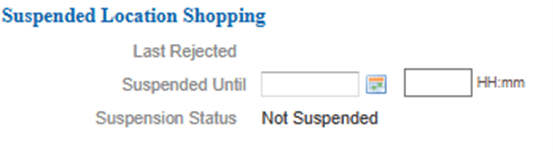
The Edit Product Location screen now includes suspension information, including Last Rejected, Suspended Until, and Suspension Status. Last Rejected is display-only and is not changed by manual suspension updates. Users with access to the Edit Product Location screen can manually clear or manually set Suspended Until from this screen.
Edit Product Location screen showing suspension information.
Figure 1-1 Edit Product Location Screen
Configure a probability rule to use Suspended Until to exclude suspended product locations from automated shopping.
An active suspension for a specific product location is cleared when inventory increases and available to promise becomes greater than 0.
Simple Use Case
A product location rejects an order at 10:00 AM because inventory is temporarily unavailable or the location has not been restocked. The resolved Time to Suspend value is 120 minutes, so Order Orchestration calculates Suspended Until as 12:00 PM. If a probability rule is configured to exclude locations when Suspended Until is after the current date and time, the product location is excluded from automated shopping until 12:00 PM.
If inventory increases above zero before 12:00 PM, or an authorized user manually clears Suspended Until, the product location becomes eligible for automated shopping again.
Important:
Changes to Time to Suspend apply only to future suspensions. Existing product location Suspended Until values are not recalculated.