Payment Enhancements
Create Pay Type in Classic View: Removed the Create option from the Select Pay Type screen in Classic View. This option was previously available in Classic View when you prompted on the Pay Type field, such as at the Enter Payment Method screen in order entry. The Work with Pay Types (WPAY) should be used to create pay types.
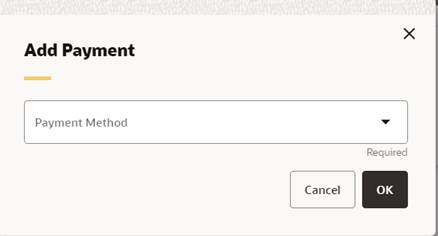
Add Payment Changes in Modern View: Changed the Add Payment window in Modern View (Contact Center Order Entry, as well as from the Order Summary page) to use a two-step process for adding payment method information:
-
The Add Payment window now opens initially with just the Payment Method field displayed.
-
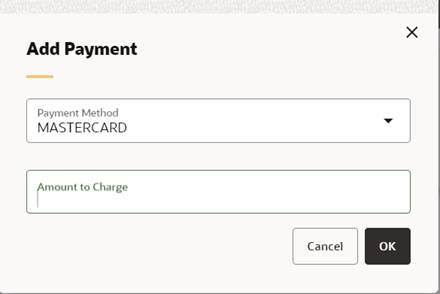
When you select a payment method, the Amount to Charge field is displayed. This is an optional field.
-
When you select OK, the Add Payment window then displays the additional fields related to the selected payment method. For example, a credit card payment method might display the Card Number, Expiration Date, and CVV/CID fields, depending on the options defined for the payment method (WPAY). The Manual Authorization field is also available for a credit card payment method.
The selected Payment Method and Amount to Charge are displayed at the top of the window, where an Edit option is also available.
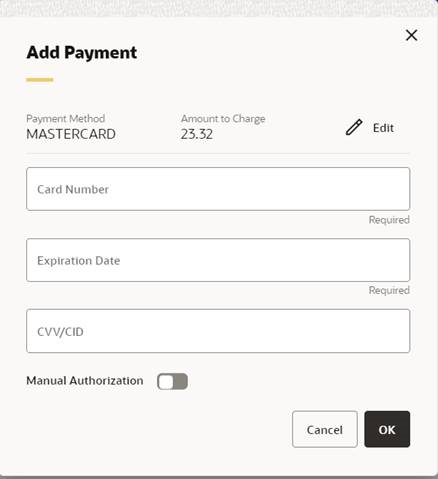
If you select Edit, you return to the initial view of the Add Payment window, with just the Payment Method and Amount to Charge retained.
Payment Method Details: With this update, the Payment Method Details window within Contact Center Order Summary was enhanced with the following changes:
-
The Transactions table has been updated to provide additional information:
-
An Authorization Expiration Date columns was added.
-
Payment Process Response and Card Verification Response columns were renamed from Vendor Response 1 and 2.
-
An Authorization Request Identification column was added.
-
-
Payment Activity transactions are now displayed with the descriptive note:
-
Credit Card Number Changed (A)
-
Billing (B)
-
Credit check (C)
-
Deposit (D)
-
Maintenance (M)
-
Net (N)
-
Reauthorization (R)
-
Payment Reauthorization Response: Updated the Authorization Response layer button labels to Accept Order and Edit Order during Online Authorization through Modern View Order Entry and Order Summary.
Saving the Authorization Transaction ID for CyberSource Deposit Processing: With this update, the Authorization Transaction ID provided by CyberSource during authorization will now be stored on the Invoice Payment Record, and Deposit processing will now use this ID, if it is populated, to retrieve the original authorization record; otherwise, Deposit processing will use the Authorization Code.