15 RPASCE Health Check and System Tasks
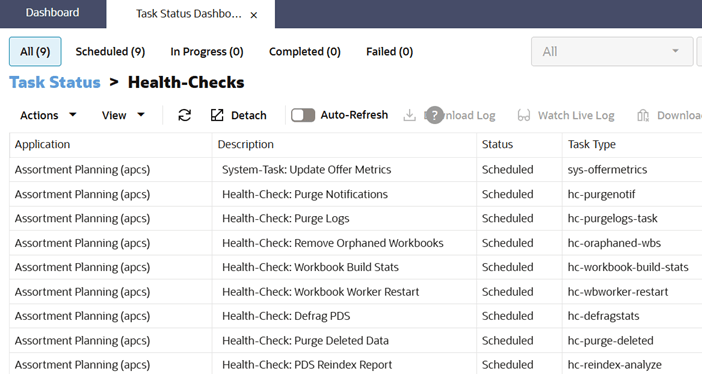
RPASCE provides a health-check framework that automatically runs diagnostic tasks every week on Saturday default timings (3AM UTC ) to ensure that the application is in a healthy state. These tasks include the following:
-
Purge Notifications
-
Purge Logs
-
Defrag PDS
-
System Task for updating Offer Metrics
-
PDS Reindex Report
-
Purge Deleted Data
-
Workbook Worker Restarts
-
Purge Workbooks
These tasks are listed only for information purposes. An Admin user cannot configure the health check tasks but can reschedule the timing of their preferences.
Figure 15-1 Online Administration Dashboard (Health-Checks)
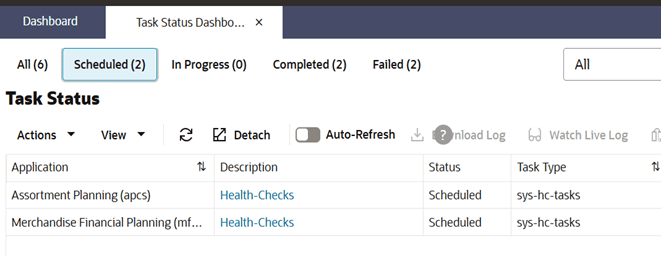
Figure 15-2 Online Administration Dashboard (Health-Check Lists)
System Task for Updating Offer Metrics
Offer metrics are metrics calculated for each implementation that typically show the Annual Sales Units for each implemented planning solutions; customers may be charged for their application-level usage based on these metrics and these usage metrics data posted to the reporting tool. Also, the reporting tool does not overwrite subscription information automatically and is used only for reporting and validating the metrics. The Application Dashboard in Retail Home allows customers to view the usage metrics for their subscriptions. This system task is scheduled to run on a weekly basis to calculate the offer metrics and update the database used by Retail Home.
Purge Notifications
This task purges RAF notifications in the database periodically to ensure the notification service runs smoothly and efficiently. Notifications older than 90 days are purged on a weekly basis.
PDS Reindex Report
The reindex analyze task provides the report for dimension levels in PDS describing last id, bit size and its state with message with CRITICAL/WARNING/CONFIG_UPDATE, and so on. Also, if any of the dimension is in critical/warning state for the highest last id value, the reindex PDS task will be auto-scheduled immediately when this report is executed to reindex that dimension.
Purge Workbooks
The Purge Workbook task is a full purge-and-recovery lifecycle for workbooks. Stale workbooks can now be moved into a purged state based on the retention age which is 30 days by default and can be reset to 7, 14, 30, 45, and 60 days using List/set/unset PDS Environment Variables OAT task and RPAS_WB_RETENTION_PERIOD property used to set/unset retention period, with related shared child references handled together with the parent workbook. If any shared child reference was recently used, the parent purge is skipped to avoid deleting an actively used shared workbook. Also, when the purge task runs, it looks for workbooks whose last-used timestamp is older than the retention window and moves them into the purged state and does not delete them immediately.
Purged workbooks remain recoverable for the configured recovery period which is 7 days. After the recovery period expires, the cleanup flow permanently deletes the workbook data once from the parent segment, clears any shared child references, and removes the empty parent/child segment configs. In the Manage purged workspace OAT task, workbooks can restore purged workbooks by workbook list, user, template, or all selections, and it also recovers related child references.