Health Checks Dashboard
The Health Checks Dashboard enables advanced administrators to check for issues or misconfigurations in the application across supported functional areas. Health checks are organized into functional groups and can be executed on demand. Each execution is recorded, allowing administrators to review previous results and investigate any failed validations.
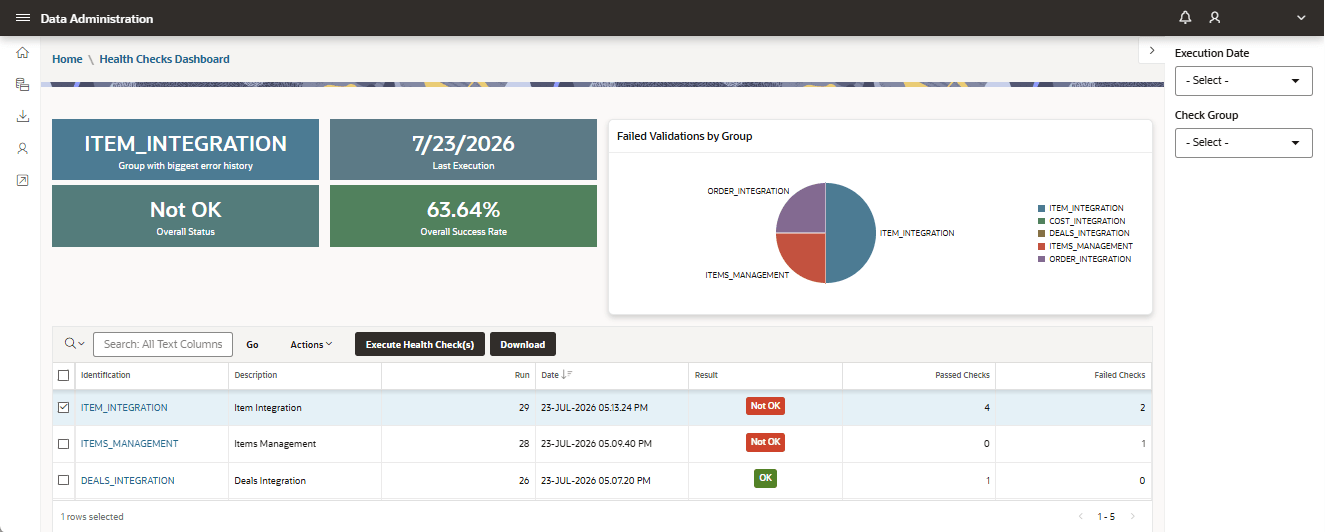
When the page is opened for the first time, no execution is selected. The execution history shows:
- Run Date
- Result
- Number of Passed/Failed checks
The execution history is ordered by run date, with the most recent execution shown first. When an execution is selected, the page displays the selected run details, including the Last Time Run badge.
The page supports the following actions:
- Execute a new run.
- Download the selected health check list.
- View issues for failed checks.
- Select previous runs.
- Filter by group and result.
The Execution filter displays the process identifier and execution timestamp.