1 Self Checkout Register
To avoid queues at a manned register, Xstore has a fixed Self Checkout register. The Xstore Self Checkout register allows the customer to scan items and pay without the need for an associate to be present. The Self Checkout will accept Credit cards, Debit cards, Oracle Retail Customer Engagement Gift Cards, Oracle Retail EFTLink Gift cards, and Digital wallets as Tender types. Self Checkout is available for retailers using register and till accountability mode in their stores. When a store operates in till accountability mode the Self Checkout still operates without cash.
These Xstore Self Checkout registers allow:
-
Self-scanning of items by customers
-
Non-barcoded items to be added to the sale via lookup
-
Manual entry/keying of barcodes and SKUs
-
Coupon scanning
-
Loyalty card scanning
-
Grab and Go Items
-
Payment by debit, credit, Oracle Retail Customer Engagement gift card, Oracle Retail EFTLink gift cards, and digital wallet
-
Receipt printing and/or email receipt
-
Prompt for the number of carrier bags used to include in purchase
-
Prompt for charity round up
-
Airside
For more information, see the Oracle Retail Xstore Suite Country Accelerator User Guide and Oracle Retail Xstore Country Accelerator Technical Guide
When configured with a Self Checkout country pack, the Self Checkout register can apply country-specific prompts and fiscal behavior during the standard sale. Country packs are available for India, France, Germany, Poland, and Italy, including Italy RT Server configurations. Follow the prompts displayed at the register; country-specific fiscal, tax, receipt, or compliance behavior is controlled by the store configuration.
-
Joining Loyalty
The Self Checkout supports a standard sale and the associate functions for the standard sale.
To accommodate self checkout in tourist areas, the system language in the Self Checkout home screen can be changed to another pre-set language by selecting the appropriate language. Up to nine languages may be shown on the Self Checkout home screen. Please see Change Language for more information.
Figure 1-1 Self Checkout Home Screen
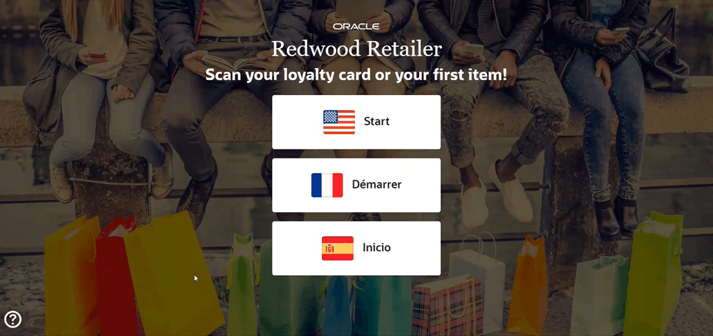
The home screen is the screen that is displayed before a customer has begun a transaction. The Home Screen also supports a retailer configured short video that would play on a loop.
Occasionally a customer issue needs resolving at the register during a sale. This may be to verify the sale of age restricted items, change price to match a competitor, to cancel an item or sale, or to suspend a transaction. Please see Associate Functions for more information.