Numbered Steps
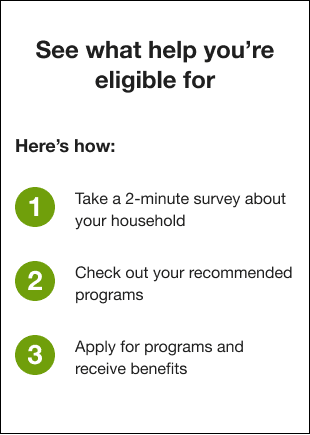
The Numbered Steps module for Billing Triggered Alerts shows three easy steps for the process of finding financial assistance through the Savings Hub survey.
Requirements and Limitations
The requirements and limitations for this module are listed in Requirements and Limitations.
User Experience
The user experience for the Numbered Steps module in Billing Triggered Alerts includes the following components:
- Header: The header prepares the customer to learn what help they are eligible for.
- Step 1: Tells the customer to take the household survey.
- Step 2: Tells the customer to get informed on the programs recommended for them.
- Step 3: Encourages the customer to apply for programs.
The following is an example of the Numbered Steps module for Billing Triggered Alerts:
Numbered Steps Variations
The user experience for the Numbered Steps module in Billing Triggered Alerts varies depending on the status of the customer's Savings Hub survey.
Unstarted Survey
When the customer has not yet accessed to the Savings Hub survey, the header in this module tells the customer to check out the programs they are eligible for, but does not mention Savings Hub explicitly.
In Progress Survey
Once the customer has already started, but not yet completed, the Savings Hub survey, the header in this module makes explicit mention of the survey, and the text for the first step encourages the customer to complete it.