Print Introduction AMI Customer Education Report - Residential
The print Introduction Customer Education Report is the first report sent to residential customers in the program. By default, it is delivered 30 days after smart meter installation. It provides an introduction to smart meters as well as personalized hourly and daily energy use insights. It also encourages customers to engage with other AMI programs and communications offered by the utility.
Report Front
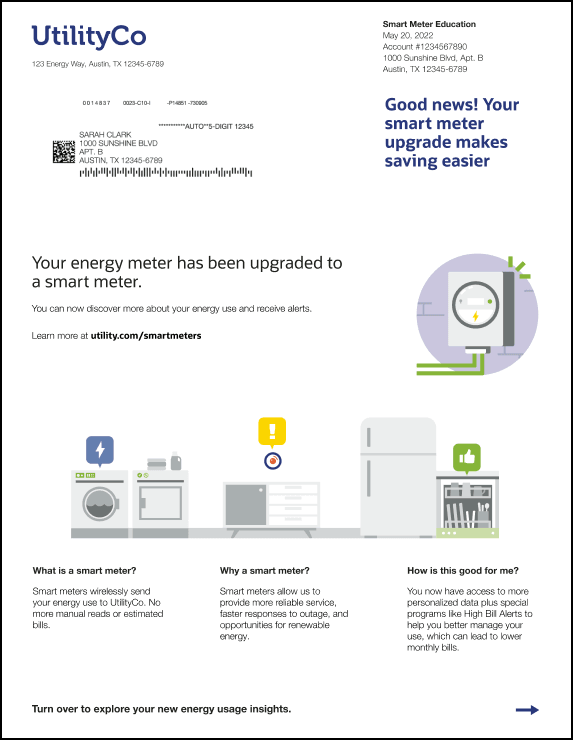
The front page of the Introduction Report includes:
- Header and greeting
- Introduction module
- Smart meter FAQs
This image shows an example of the front page of the report:
Header and Footer
The header appears in the top section of the front of every report and includes:
- The left side of the header contains the utility logo and the customer service address. Below this is the customer's mailing address and postal information that appears when the report is inserted into an envelope.
- The right side of the header contains the customer mailing address and customer account number.
- Below this information is a greeting statement, which reads "Good news! Your smart meter upgrade makes saving easier".
The footer on the front page of the report contains a prompt telling the customer to turn over the report. For example, "Turn over to explore your new energy usage insights." The statement is followed by an arrow.
Introduction Module
The Introduction module notifies customers that their meter has been upgraded to a smart meter, and tells them where they can go to find out more information.
The module includes:
Header: A header that reads, "Your energy meter has been upgraded to a smart meter."
Graphic: A graphic that depicts a smart meter.
Smart Meter Text: Text that tells the user where they can go to get more information. For example, "You can now discover more about your energy use and receive alerts. Learn more at <utility URL>."
Smart Meter FAQs
At the bottom of the front page, the Smart Meter FAQs module provides answers to frequently asked questions (FAQs) about smart meters. The module includes three side-by-side FAQs that help explain what smart meters are and why they are beneficial.
Each FAQ includes:
- A graphic at the top of the FAQ
- A question that appears as a header below the graphic. For example, "What is a smart meter?"
- The answer. For example, "Smart meters wirelessly send your energy use to <Utility Name>. No more manual reads or estimated bills."
Report Back
The back page of the report contains personalized smart meter insights and a URL where customers can enroll in other Oracle Utilities AMI communications. The back page is the same for both the Introduction and the Engagement report, and can include a mix of the following modules:
- Day by Day Breakdown
- Hourly Breakdown
- Smart Meter Explainer
- Space to insert a Marketing Module, if needed
- Footer
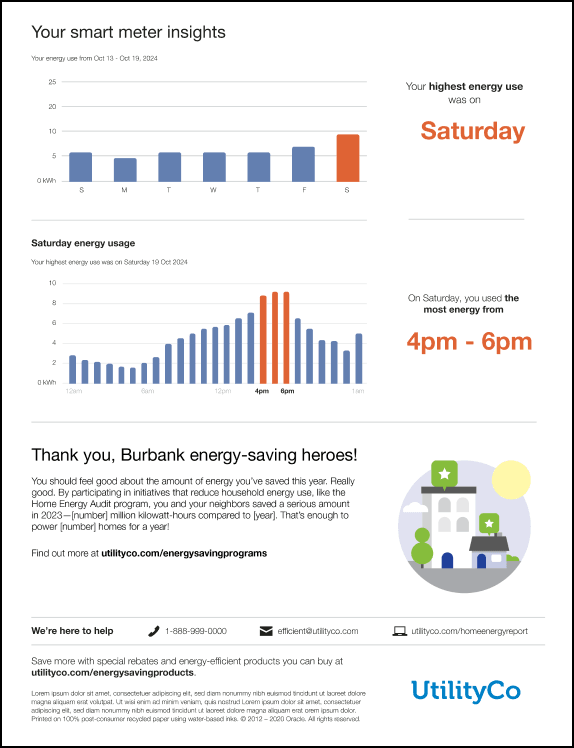
This image shows an example of the back of the report using the Day by Day Breakdown, Hourly Breakdown, and Marketing Modules.
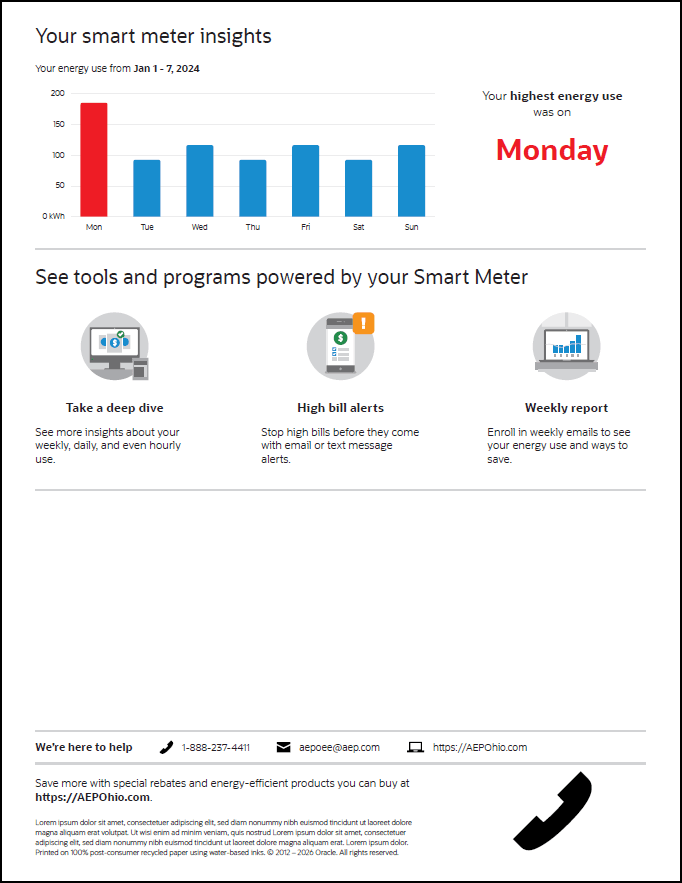
This image shows an example of the back of the report with the Day by Day Breakdown, the Smart Meter Explainer, and no Marketing Module.
See the module details below for additional information.
Day by Day Breakdown
The Day by Day Breakdown module shows daily energy use for the past week and identifies the highest-use day. The module includes:
Date Range: The date range associated with the graph is displayed above the graph. For example, "Your energy use from Oct 13 - Oct 19, 2024.
Graph: A graph displays one bar for each day that shows kilowatt-hours (kWh) used. The highest-usage day is displayed in a different color.
Highest Usage Statement: Text specifies which day was the highest-usage day. For example, "Your highest energy use was on Saturday". The day is displayed in large letters in a contrasting color to make it easy to see at a glance.
Hourly Breakdown
The Hourly Breakdown module show a 24-hour breakdown of the customer’s highest-use day from the past week, and highlights the highest-use period during that day. For example, if a customer used the most electricity on Saturday, an hourly breakdown for Saturday is shown.
The module includes:
Header: The heading identifies which day is included in the graph. For example, "Saturday energy use".
Energy Use Statement: A statement identifies the date of the highest energy use day. For example, "Your highest energy use was on Saturday 19 Oct 2024."
Graph: The graph includes a bar for each hour of the day, and uses a different color to highlight the bars that make up the highest usage period during that day.
Highest Usage Statement: Text beside the graph specifies the highest-usage period during the selected day. For example, "On Saturday, you used the most energy from 4pm - 6pm". The time period is displayed in large letters in a contrasting color to make it easy to see at a glance.
Smart Meter Explainer
The Smart Meter Explainer module introduces customers to the programs that they are now eligible for because they have a smart meter. The module includes:
Header: The module begins with the heading, "See tools and programs powere by your Smart Meter".
Deep Dive: This section of the module includes an image, the heading "Take a deep dive", and the statement, "See more insights about your weekly, daily, and even hourly use."
High Bill Alerts: This section of the module includes an image, the heading "High bill alerts", and the statement, "Stop high bills before they come with email or text message alerts."
Weekly Report: This section of the module includes an image, the heading "Weekly report", and the statement, "Enroll in weekly emails to see your energy use and ways to save."
Marketing Module
A custom marketing module can be inserted in the report to promote AMI-related tools and programs available to customers and guide them to clear next steps. For example, utilities can provide information about AMI tools available on the Oracle Utilities web portal or encourage customers to enroll in other Oracle Utilities AMI communications, such as Weekly Energy Updates. These modules typically include both text and a graphic.
Footer
The Footer appears at the bottom of the back page of the report, and includes:
Contact Information: The statement "We're here to help" is followed by the utility's phone number, email address, and website.
Configuration Text: Use this space to include any additional text you want the reader to know, or that you need to include for legal reasons.
Logo: The utility's logo appears as the last item on the report.