Business Flows
The integration scope supports the following business processes:
Process Activity (Oracle Utilities Customer Cloud Service Initiated)
This integration process is used to accept request from Oracle Utilities Customer Cloud Service to create, update, or cancel activities in Oracle Fusion Field Service. The information is sent synchronously from Oracle Utilities Customer Cloud Service, regardless of the activity type, and Oracle Fusion Field Service sends back a response.
The following diagram shows a graphical representation of the Process Activity integration process.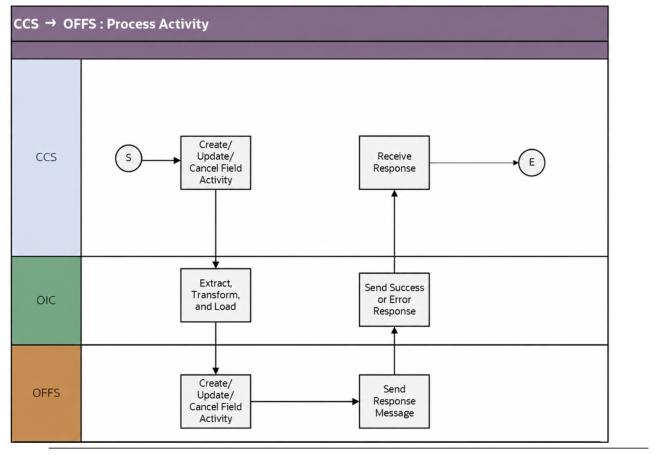
Business Processing
The integration process includes the following activities:
1. Oracle Utilities Customer Cloud Service sends the create/update/cancel activity request to the Oracle Utilities CCS OFSC Activity Process integration process deployed on Oracle Integration Cloud.
2. Oracle Utilities CCS OFSC Activity Process transforms the create/update/cancel activity request message from Oracle Utilities Customer Cloud Service to the request message format in Oracle Fusion Field Service and invokes bulkUpdate API.
3. Oracle Utilities CCS OFS Activity Process handles the cancel request in a way that it first gets the Oracle Fusion Field Service Activity ID by using Search API with query parameters “From” and “To” dates. The Activity ID will be passed to Cancel API to cancel the activity in Oracle Fusion Field Service.
4. The process also synchronizes the downtime reason values to OFFS and invokes OFFS Metadata API.
5. Oracle Fusion Field Service sends the success or failure response to the integration transformed and sent to Oracle Utilities Customer Cloud Service.
6. Any errors are reported back to Oracle Utilities Customer Cloud Service through the global fault handler.
7. An optional email notification with error details is sent to the users configured in the SOMOFSC_Email_ID lookup, based on the email.flag value in the SOMOFSC_ConfigProps lookup.
Technical Details
The following table describes the integration processes and the respective Oracle Utilities Customer Cloud Service and Oracle Fusion Field Service artifacts used in this integration process:
Artifacts | Value |
|---|---|
Integration Process Name | Oracle Utilities CCS OFSC Activity Process |
Integration Project Name | OU CCS OFFS |
OFFS BO/Operation | Activity/Bulk Update Activity |
OFFS API | bulkUpdate |
OFFS REST URI | To update or replace enumeration values for a property: • Method: PUT • URI: /rest/ofscMetadata/v1/properties/{label}/ enumerationList To create or update an activity type: • Method: PUT • URI: /rest/ofscMetadata/v1/activityTypes/{label} To search Activity API: • Method: GET • URI: /rest/ofscCore/v1/activities/custom-actions/search Cancel Activity API: • Method : POST • URI : /rest/ofscCore/v1/activities/{activityId}/custom-actions/cancel |
CCS BO | D1-FieldActivityOBComm D1-ActivityModifyOBComm |
Appointment Window Request (Oracle Utilities Customer Cloud Service Initiated)
This integration process provides a list of available appointments.
Oracle Utilities Customer Cloud Service sends the activity start and end date times from the Appointment portal and Oracle Fusion Field Service sends back the list of appointments available during that time window.
The following diagram shows a graphical representation of the Appointment Window Request integration process. 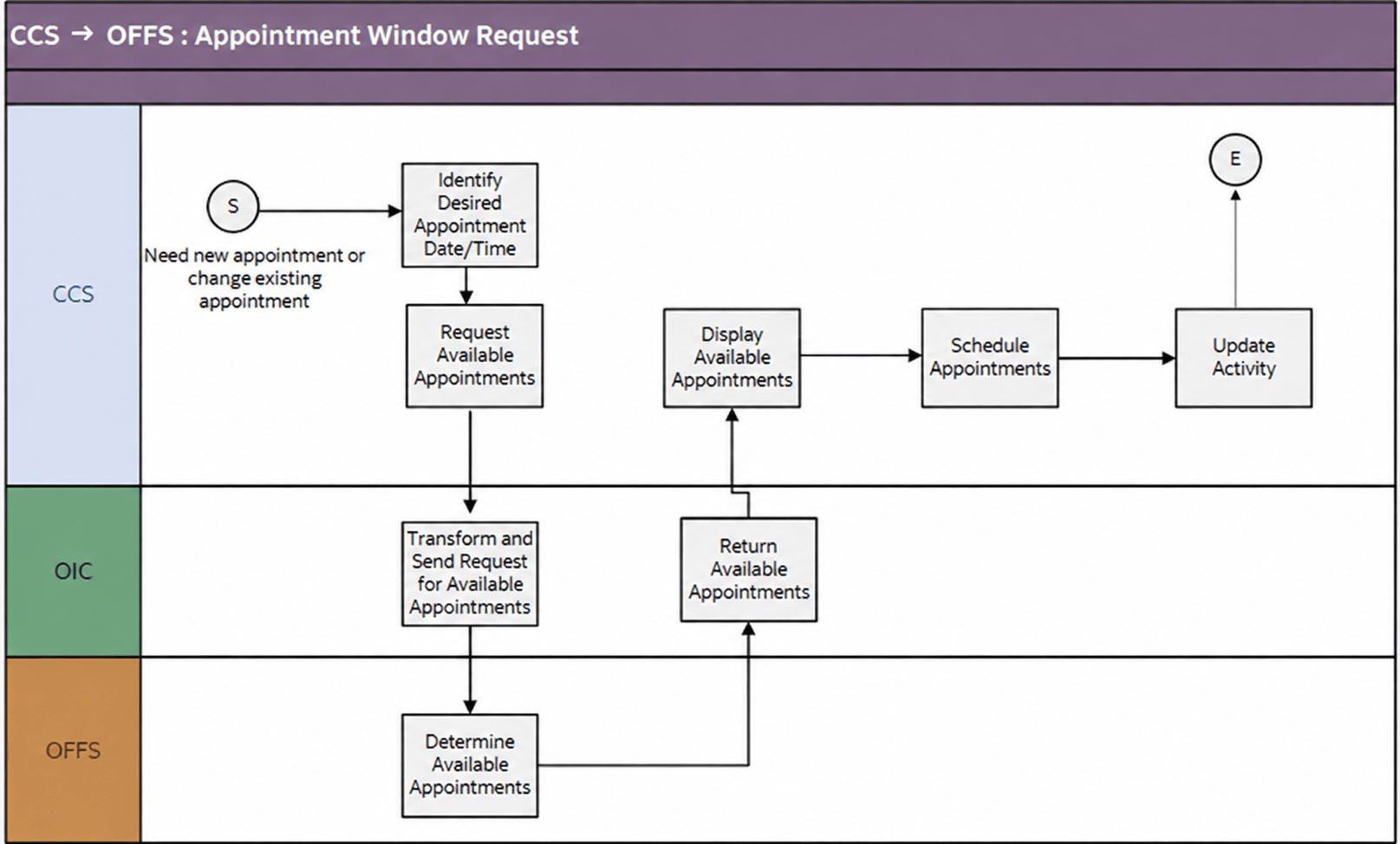
Business Processing
The integration process includes the following activities:
1. Oracle Utilities Customer Cloud Service sends the get available appointment request to Oracle Utilities CCS OFSC Appointment Get integration process deployed on Oracle Integration Cloud.
2. Oracle Utilities CCS OFSC Appointment Get process gets the resource offset, converts it into minutes, and appends it to the data time elements before responding back to Oracle Utilities Customer Cloud Service.
3. Oracle Utilities CCS OFSC Appointment Get process transforms the request message from Oracle Utilities Customer Cloud Service to the request message format in Oracle Fusion Field Service and invokes the activityBookingOptions REST API.
4. Oracle Fusion Field Service sends the success or failure response to the integration transformed and sent to Oracle Utilities Customer Cloud Service.
5. Any errors are reported back to Oracle Utilities Customer Cloud Service through the global fault handler.
6. An optional email notification with error details is sent to the users configured in the SOMOFSC_Email_ID lookup, based on the email.flag value in the SOMOFSC_ConfigProps lookup.
Technical Details
The following table describes the integration processes and the respective Oracle Utilities Customer Cloud Service and Oracle Fusion Field Service artifacts used in this integration process.
Artifacts | Value |
|---|---|
Integration Process Name | Oracle Utilities CCS OFSC Appointment Get |
Integration Project Name | OU CCS OFFS |
OFFS API/Method | • activityBookingOptions/GET • /rest/ofscCore/v1/resources/{resourceId} |
CCS BO | D1-ApptOBMessage |
Interim Activity Status (Oracle Utilities Customer Cloud Service Initiated)
Oracle Utilities Customer Cloud Service synchronously sends the requests for the interim activity status of the field activities and Oracle Fusion Field Service sends back the status.
The following diagram shows a graphical representation of the Interim Activity Status integration process. 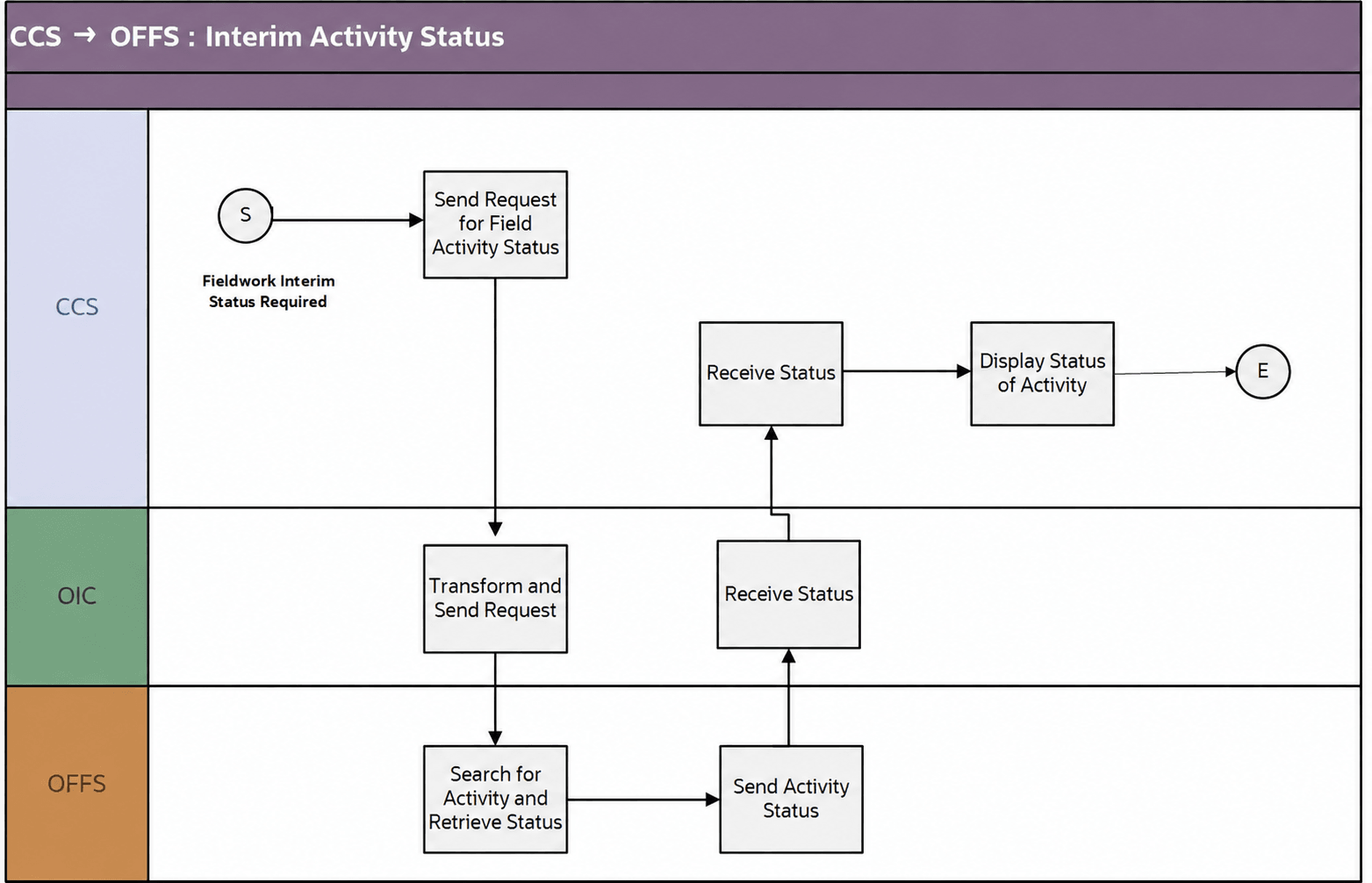
Business Processing
The integration process includes the following activities:
1. Oracle Utilities Customer Cloud Service sends the interim activity status request to the Oracle Utilities CCS OFSC Activity Get Status integration process deployed on Oracle Integration Cloud.
2. Oracle Utilities CCS OFSC Activity Get Status integration process sends the request to Oracle Fusion Field Service to find if the activity exists in Oracle Fusion Field Service.
3. If the activity is not found or if there are any issues in invoking the OFFS REST API, an optional email notification with the error details is sent to the users configured in the SOMOFSC_Email_ID lookup.
4. If the activity is found, the integration process sends the “get Activity” request to Oracle Fusion Field Service.
5. Oracle Fusion Field Service sends the activity details response to the integration that is transformed and sent to Oracle Utilities Customer Cloud Service.
6. Any errors are reported back to Oracle Utilities Customer Cloud Service through the global fault handler.
7. An optional email notification with error details are sent to the users configured in the SOMOFSC_Email_ID lookup, based on the email.flag value in the SOMOFSC_ConfigProps lookup.
Technical Details
The following table describes the integration processes and the respective Oracle Utilities Customer Cloud Service and Oracle Fusion Field Service artifacts used in this integration process.
Artifacts | Value |
|---|---|
Integration Process Name | Oracle Utilities CCS OFSC Activity Get Status |
Integration Project Name | OU CCS OFFS |
OFFS BO/Operations | • Activity/Bulk Update Activity • Activity/Get Activity |
CCS BO | D1-InterimStatusRequest |
Device Verification (Oracle Fusion Field Service Initiated)
This integration process is used to verify if the item/device/equipment is present in Oracle Utilities Customer Cloud Service. Oracle Fusion Field Service synchronously sends the requests for device verification with the device’s badge number and Oracle Utilities Customer Cloud Service sends back the details, such as device configuration type and verification status.
The following diagram shows a graphical representation of the Device Verification integration process. 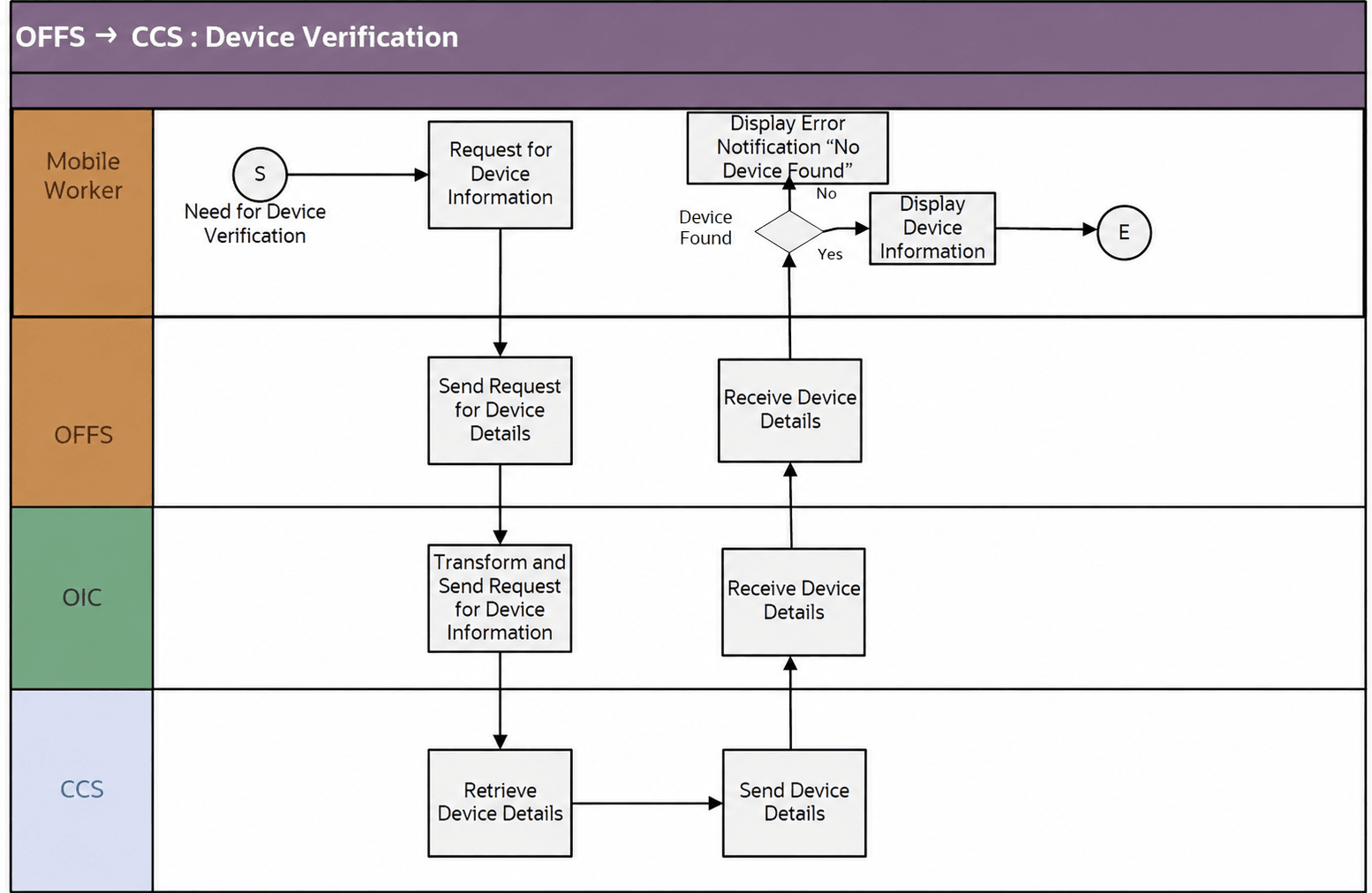
Business Processing
The integration process includes the following activities:
1. Oracle Fusion Field Service sends the device verification request to the Oracle Utilities OFSC CCS Device Verification integration process deployed on Oracle Integration Cloud.
2. The Oracle Fusion Field Service mobile worker has the option to request for device information using the badge number and serial Number. The serial number is optional.
3. The Oracle Utilities OFSC CCS Device Verification process transforms the request message from Oracle Fusion Field Service to the request message format in Oracle Utilities Customer Cloud Service and invokes either D1-DeviceVerificationService or D1-ItemVerificationService inbound web service if the device type is Meter/Equipment or Item respectively.
4. If the response returned from Oracle Utilities Customer Cloud Service has any DownTimeReason data, transforms it and invokes the OFFS Metadata REST API to synchronize the enumeration values for downtime reason property in Oracle Fusion Field Service.
5. Oracle Utilities Customer Cloud Service sends the success or failure response to the integration transformed and sent to Oracle Fusion Field Service.
6. Any errors are handled by the custom plug-in hosted on Oracle Fusion Field Service. A pop-up blocker appears in Oracle Fusion Field Service with the respective error details.
Technical Details
The following table describes the integration processes and the respective Oracle Utilities Customer Cloud Service and Oracle Fusion Field Service artifacts used in this integration process.
Process | Value |
|---|---|
Integration Process Name | Oracle Utilities OFSC CCS Device Verification |
Integration Project Name | OU CCS OFFS |
OFFS Entity | Custom Plugin: Device Verification |
OFFS REST URI | To update or replace enumeration values for a property: • Method: PUT • URI: /rest/ofscMetadata/v1/properties/{label}/ enumerationList |
CCS IWS | • D1-DeviceVerificationService • D1-ItemVerificationService |
Create Activity (Oracle Fusion Field Service Initiated)
This integration process is used to create an activity in an external system. Oracle Fusion Field Service sends a request to create activity in Oracle Utilities Customer Cloud Service.
The same flow is used to create both related and unrelated pickup activities from Oracle Fusion Field Service.
The following diagram shows a graphical representation of the Create Activity integration process.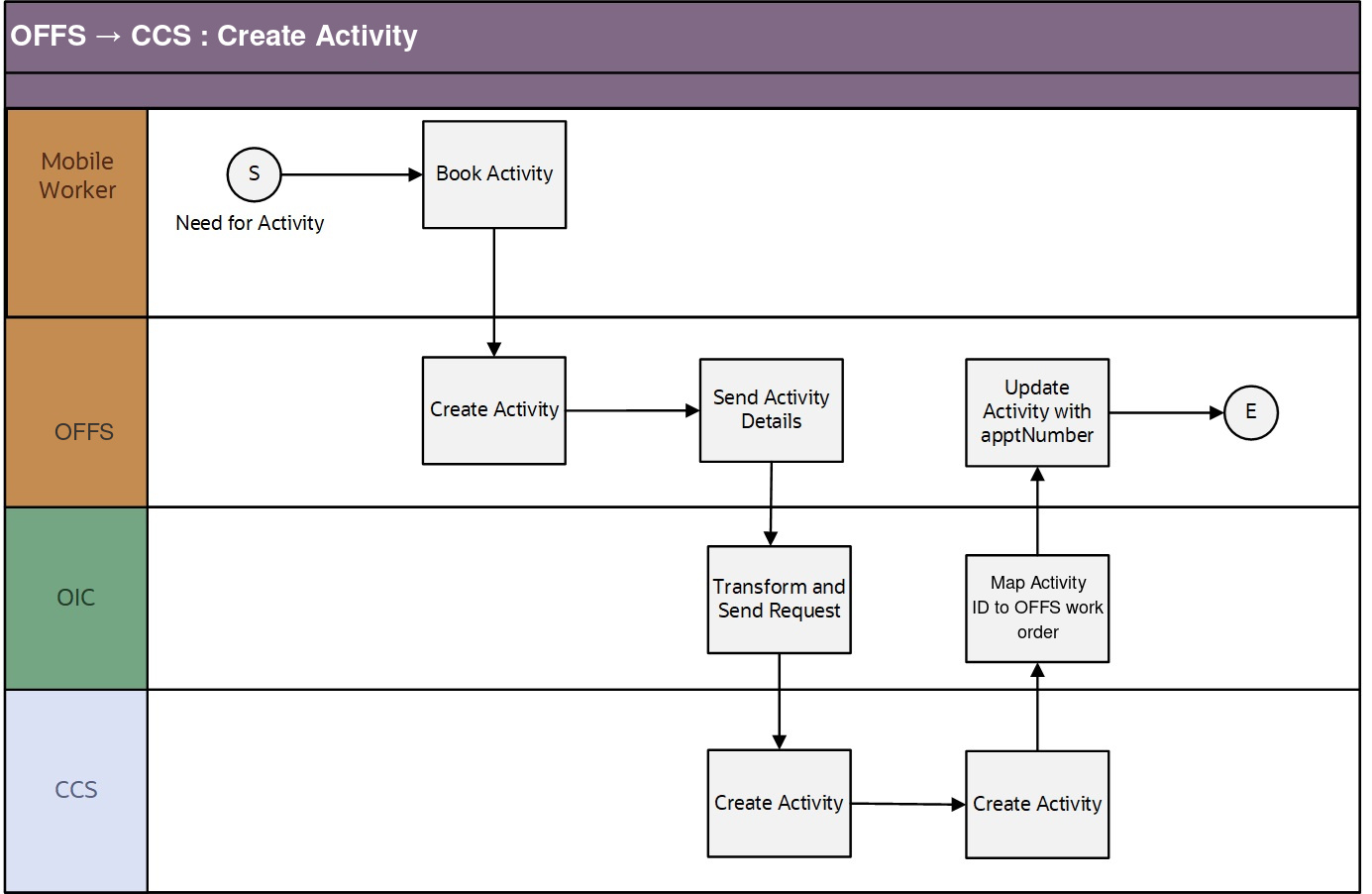
Business Processing
The integration process includes the following activities:
1. Oracle Fusion Field Service sends the create activity request the Oracle Utilities OFSC CCS Activity Create integration process deployed on Oracle Integration Cloud.
2. Oracle Utilities OFSC CCS Activity Create process is triggered when ou_work_type==’PICKUP’.
3. Oracle Utilities OFSC CCS Activity Create process checks for the activity status.
4. If the status is not “suspended”, it sends request to “Get Activity” details in Oracle Fusion Field Service.
5. The Oracle Utilities OFSC CCS Activity Create process transforms the request message from Oracle Fusion Field Service to the request message format in Oracle Utilities Customer Cloud Service and invokes the D1-FARequestSynchronous inbound web service (IWS).
6. The integration process sends the Oracle Utilities Customer Cloud Service Activity ID from Oracle Utilities Customer Cloud Service response to Oracle Fusion Field Service work order using Update Patch.
7. Any errors are captured through the global fault handler.
8. An optional email notification with error details is sent to the users configured in the SOMOFSC_Email_ID lookup, based on the email.flag value in the SOMOFSC_ConfigProps lookup.
Technical Details
The following table describes the integration processes and the respective Oracle Utilities Customer Cloud Service and Oracle Fusion Field Service artifacts used in this integration process:
Artifacts | Value |
|---|---|
Integration Process Name | Oracle Utilities OFSC CCS Activity Create |
Integration Project Name | OU CCS OFFS |
OFFS BO/Operation | • Activity/Activity Created • Activity/Update Activity |
CCS IWS | D1-FARequestSynchronous |
Activity Completion/Cancellation (Oracle Fusion Field Service Initiated)
This integration process is used to send the field activity completion/cancellation details from Oracle Fusion Field Service to Oracle Utilities Customer Cloud Service. Oracle Fusion Field Service sends the activity completion/cancellation details, along with the completion/cancellation status, to complete/cancel the activity in Oracle Utilities Customer Cloud Service.
The following diagram shows a graphical representation of the Activity Completion integration process: 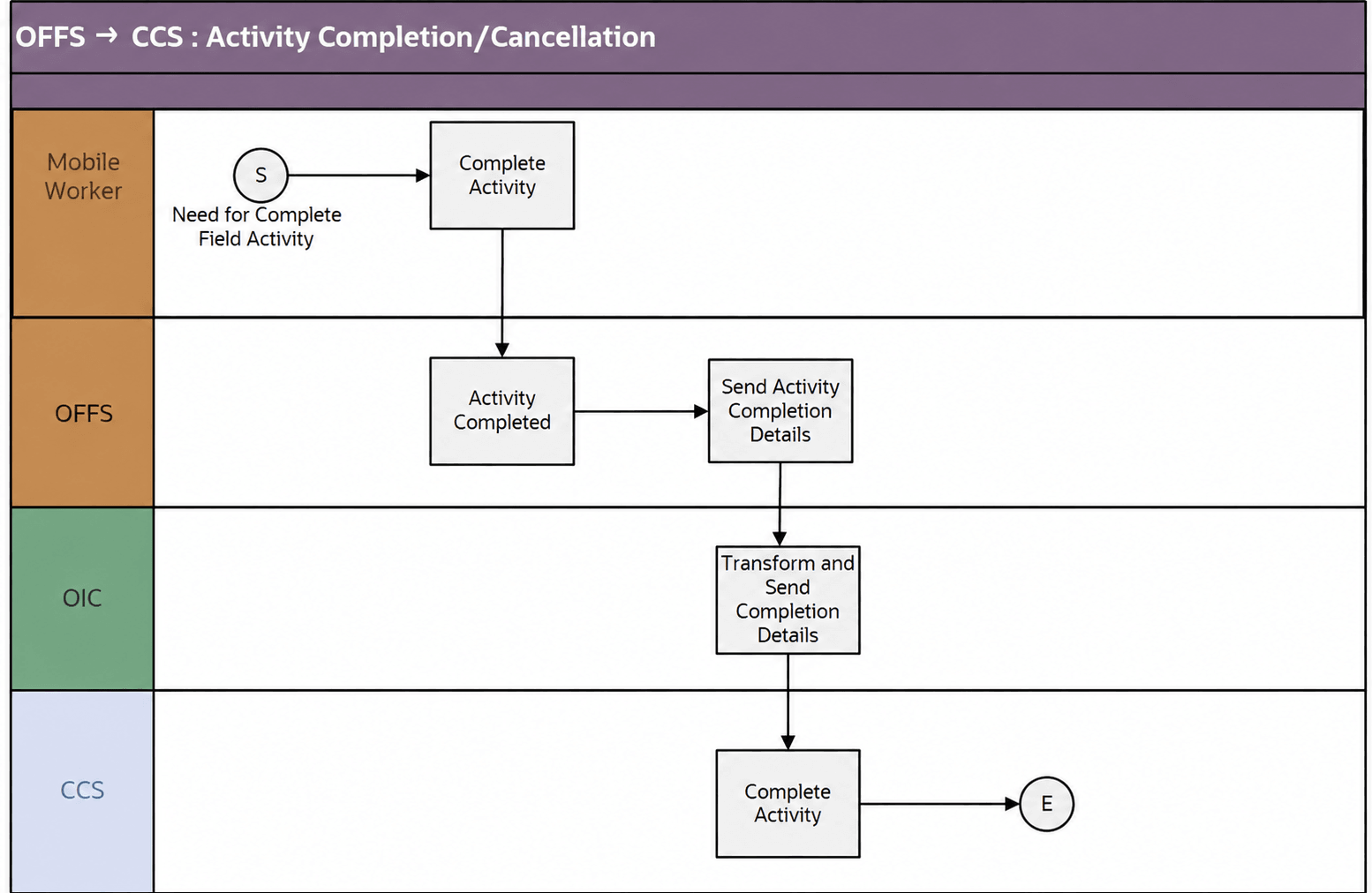
Business Processing
The integration process includes the following activities:
1. In Oracle Fusion Field Service, when the activity is completed by the mobile worker, Oracle Fusion Field Service triggers the “Activity Complete” event and sends the activity completion details to the Oracle Utilities OFSC CCS Activity Complete integration process deployed on Oracle Integration Cloud.
2. Oracle Utilities OFSC CCS Activity Complete integration process requests OFFS Get Activity to get the activity details.
3. Invoke Oracle Fusion Field Service to get the inventory data (customer, installed, and de-installed inventory).
4. The Oracle Utilities OFSC CCS Activity Complete process transforms the message from Oracle Fusion Field Service to the message format in Oracle Utilities Customer Cloud Service and invokes the D1-FieldActivityIBComm inbound web service.
5. When the Activity Not Done event is triggered, the data is not processed further from Oracle Integration Cloud to Oracle Utilities Customer Cloud Service. And, the ‘Not Done’ status update is handled in the Interim Activity Status (Oracle Utilities Customer Cloud Service Initiated) integration flow.
6. Any errors are captured through the global fault handler.
7. An optional email notification with error details are sent to the users configured in the SOMOFSC_Email_ID lookup, based on the email.flag value in the SOMOFSC_ConfigProps lookup.
Technical Details
The following table describes the integration processes and the respective Oracle Utilities Customer Cloud Service and Oracle Fusion Field Service artifacts used in this integration process.
Artifacts | Value |
|---|---|
Integration Process Name | Oracle Utilities OFSC CCS Activity Complete |
Integration Project Name | OU CCS OFFS |
OFFS API/Event | • Activity/Activity Completed • Activity/Activity Cancelled • Activity/Activity Not Done |
OFFS BO/Operation | Activity/Get Activity |
CCS IWS | D1-FieldActivityIBComm |
Query Service Point (Oracle Fusion Field Service Initiated)
The Query Service Point integration process is used to query the service point information.
The integration process sends request from Oracle Fusion Field Service to Oracle Utilities Customer Cloud Service to identify a service point. Oracle Fusion Field Service crew sends either the address and city, or latitude and longitude, or postal code, or all of them to Oracle Utilities Customer Cloud Service. Oracle Utilities Customer Cloud Service performs the service point search based on the above criteria and sends back the list of service points and other details, such as service point type and service point source status.
The following diagram shows a graphical representation of the Query Service Point integration process. 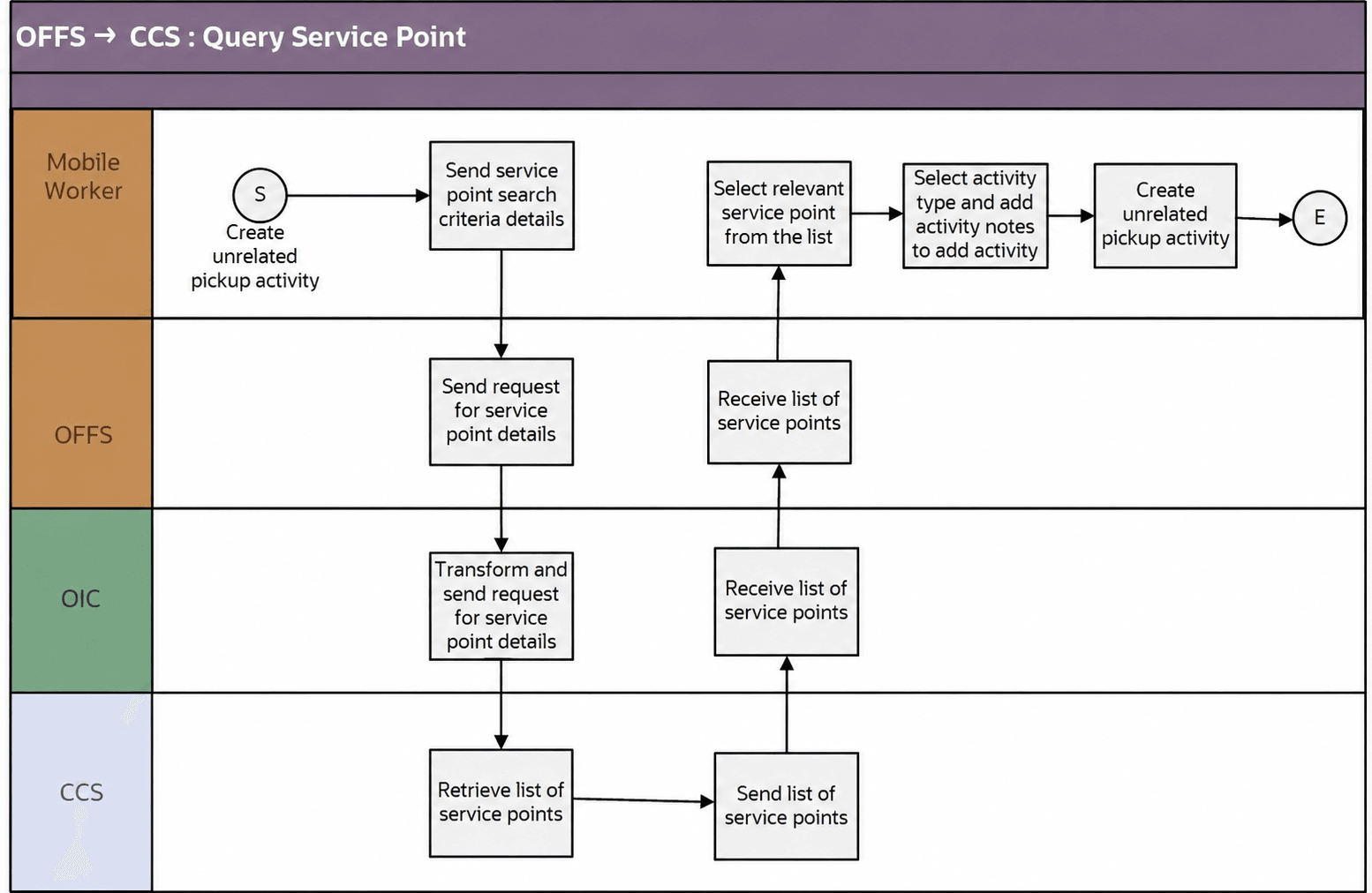
Business Processing
The integration process includes the following activities:
1. Oracle Fusion Field Service mobile worker requests for service point information to create an unrelated pickup activity.
2. Oracle Fusion Field Service sends the query service point request to the Oracle Utilities OFSC CCS ServicePoint Query integration process deployed on Oracle Integration Cloud.
3. The Oracle Utilities OFSC CCS ServicePoint Query process transforms the request message from Oracle Fusion Field Service to the request message format in Oracle Utilities Customer Cloud Service and invokes the D1-FieldWorkSPQuery inbound web service.
4. Oracle Utilities Customer Cloud Service sends the success or failure response to the integration transformed and sent to Oracle Fusion Field Service.
5. In case of success response, a list of service points is returned to Oracle Fusion Field Service.
6. Oracle Fusion Field Service mobile worker selects the relevant service point from the list, selects the activity type, and adds activity notes to create an activity.
7. This creates an unrelated pickup activity in Oracle Fusion Field Service and a text message with the Oracle Fusion Field Service activity ID is displayed on mobile screen.
8. If Oracle Utilities Customer Cloud Service invocation fails due to invalid input data, the global fault handler captures the invocation error and the error details are returned to Oracle Fusion Field Service using the Unrelated Customer Pickup custom plugin.
9. Other errors are handled by the Unrelated Customer Pickup custom plug-in hosted on Oracle Fusion Field Service. A text message appears on Oracle Fusion Field Service mobile screen with the respective error details.
Technical Details
The following table describes the integration processes and the respective Oracle Utilities Customer Cloud Service and Oracle Fusion Field Service artifacts used in this integration process.
Artifacts | Value |
|---|---|
Integration Process Name | Oracle Utilities OFSC CCS ServicePoint Query |
Integration Project Name | OU CCS OFFS |
OFFS Entity | Custom Plugin: Unrelated Customer Pickup |
CCS IWS | D1-FieldWorkSPQuery |
Admin Sync (Oracle Integration Cloud Initiated)
The Admin Sync integration process is used to get administration (admin) data from Oracle Utilities Customer Cloud Service and send it to Oracle Fusion Field Service.
The integration process sends request from Oracle Integration Cloud to Oracle Utilities Customer Cloud Service to get the admin data which includes service point data, activity data, activity types, device data and register data and sends these data to Oracle Fusion Field Service.
The following diagram shows a graphical representation of the Admin Sync integration process. 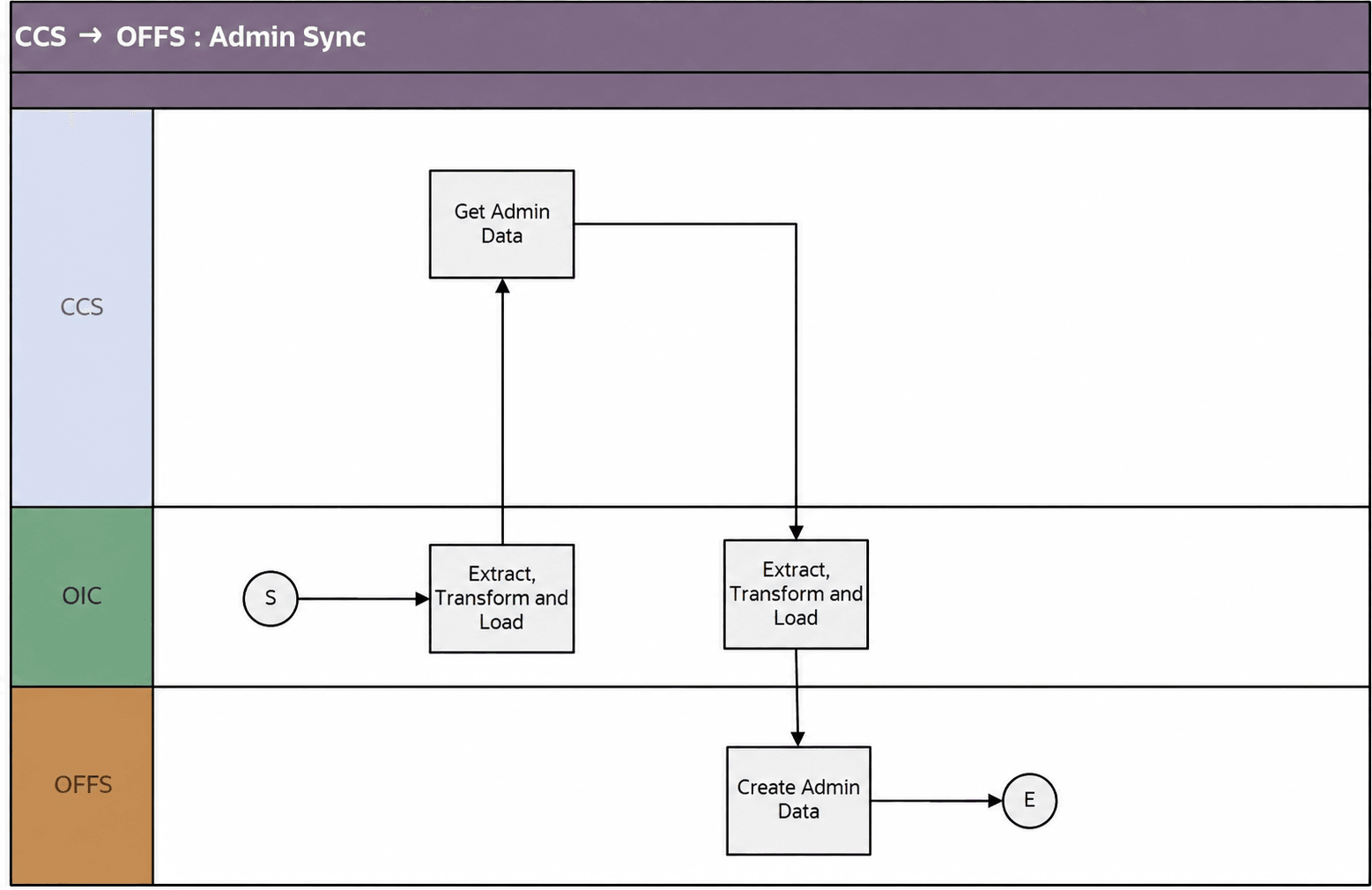
Business Processing
The integration process includes the following activities:
1. Oracle Integration Cloud sends request to Oracle Utilities Customer Cloud Service. This includes codes and descriptions of selected admin entities, characteristic type valid values and extendable lookup values. It also includes the activity types.
2. Run this integration sync process manually from Oracle Integration Cloud by scheduling the integration process to run on a scheduled date or selecting Submit Now from the menu of the activated sync integration process to initiate an instance of the integration.
3. It populates the enumeration values for the following Oracle Fusion Field Service properties.
• Service Point Details
• Service Instructions
• Disconnect Location
• Service Point Warnings
• Service Type
• Premise Type
• Activity Types
• Activity Data
• Customer Contact Type
• Remarks Type
• FA Cancel Reason
• Meter Details
• Manufacturer
• Model
• Device Type
• Device Configuration Type
• Head End System
• Register Details
• Unit Of Measure
• Time Of Use
• Service Quantity Identifier
4. Oracle Utilities Customer Cloud Service sends the success or failure response to the integration transformed and sent to Oracle Fusion Field Service.
5. In case of success response, the admin sync data is sent to Oracle Fusion Field Service.
6. If Oracle Utilities Customer Cloud Service invocation fails due to invalid input data, the global fault handler captures the invocation error and the error details are sent to configured email ID in the SOMOFSC_Email_ID lookup.
7. Other errors are handled by the respective scope fault handlers and the error details will be sent to email ID configured in SOMOFSC_Email_ID lookup.
Technical Details
The following table describes the integration processes and the respective Oracle Utilities Customer Cloud Service and Oracle Fusion Field Service artifacts used in this integration process.
Artifacts | Value |
|---|---|
Integration Process Name | Oracle Utilities CCS OFSC Admin Sync |
Integration Project Name | OU CCS OFFS |
OFFS REST URI | To update or replace enumeration values for a property: • Method: PUT • URI: /rest/ofscMetadata/v1/properties/{label}/enumerationList To create or update an activity type: • Method: PUT • URI: /rest/ofscMetadata/v1/activityTypes/{label} |
CCS IWS | X1-RequestAdminData |
Note: Before synchronizing activity types, ensure that the "ou_service" Activity Group is created in Oracle Fusion Field Service
Refer to the Activity Types section in the Oracle Fusion Field Service Configurations for Oracle Utilities Customer Cloud Service to Oracle Fusion Field Service Setup Guide included in this release for creating an Activity group.
As part of Admin Sync, if the activity type exists in Oracle Fusion Field Service, no changes will be done in the activity type. Else, new activity type will be created in Oracle Fusion Field Service.
By default, the activity types synchronization will not happen as part of Admin Sync. To synchronize the activity types, update the “som.adminsync.activitytypes.sync” config property available in the SOMOFSC_ConfigProps lookup to ‘true’.