Custom Java in Oracle Utilities Cloud Services
Java is one of the supported extension technologies for on-premises implementations using the Oracle Utilities SDK to build and maintain Java code. Traditionally, the Oracle Utilities SDK also includes a set of utilities to transfer the extensions from the developer's environment to a target environment on-premises.
For customers with investments in existing Java-based extensions, the Oracle Utilities SDK and selected Oracle Utilities cloud services have been enhanced to allow the cloud as a target from the Oracle Utilities SDK to allow customers to transition to Oracle Utilities cloud services.
This sections provides details related to the migration of custom Java code (CM Java) to Oracle Utilities cloud services. This includes:
- Restrictions
- Code Migration Process
- Upload and Process API
- Preparing and Deploying
- Advanced Operations
- Allow and No Allowlist Of Java Classes
- Migration using Content Migration Assistant
- Additional Step After Major Upgrades
Restrictions
To allow the custom Java extensions to operate within Oracle Utilities cloud service the code must comply with the following:
- Oracle Utilities SDK Support:The java code must be developed using the Oracle Utilities SDK and the extraction utilities used to provide to the cloud.
- No Compiled Code: Only uncompiled code is accepted to be loaded onto Oracle Utilities cloud services to be assessed as part of the migration process and ongoing maintenance. Only source JAR files will be accepted as part of the process.
- No External Libraries: To ensure compliance and reduce risk, no third-party libraries, other than those provided by the service will be permitted.
- Code Location: The custom code must only exist in the com\splwg\cm\domain directory of the JAR file. No other directories or subdirectories are acceptable.
- Only Java Files are Accepted: Only .java files are accepted by the interface. All other file types are ignored and not uploaded into the service.
- Allowlist Compliance: The Java code will be assessed against the Oracle Utilities cloud service and Oracle Cloud Infrastructure allowlists to ensure code is compliant with the cloud service. Code requiring direct access to memory, database, disk, or threads will not be permitted.
- Development Environments Only: The process used to transfer, verify, and build the deployment for the custom Java code can only be performed on development environments only. This feature is disabled, by default, in other non-production environments. This feature cannot be used on Production environments. It is expected to use Content Migration Assistant to migrate deployments across environments.
- Limited Scope for Change: In line with Oracle policy, the relative amount of change on the custom content is limited and is checked as part of compliance. This capability is a load and maintain capability only. It is not intended to allow continual extension of the product using Java, just to retain the investment in existing extensions. Partners and customers are expected to use existing cloud friendly capabilities to extend those services past the initial load and maintain levels.
Non-compliance with these restrictions or because of the compliance checking process will result in code being rejected by the Oracle Utilities cloud service and subject to remediation by partners and customers.
Code Migration Process
The cloud migration process has been designed to allow customers to reuse existing development tools and processes but use the cloud as the target environment. The process to migrate code is as follows:
- Develop Code: Using the Oracle Utilities SDK, develop Java code against a development version of the product. Once complete, use the SDK utilities as described in the SDK documentation to extract the source in a package for implementation on the cloud. The following additional requirements must be adhered to:
- Only code in the
com/splwg/cm/domainnamespace is permitted - A manifest file should not be provided in the source JAR
- Only code in the
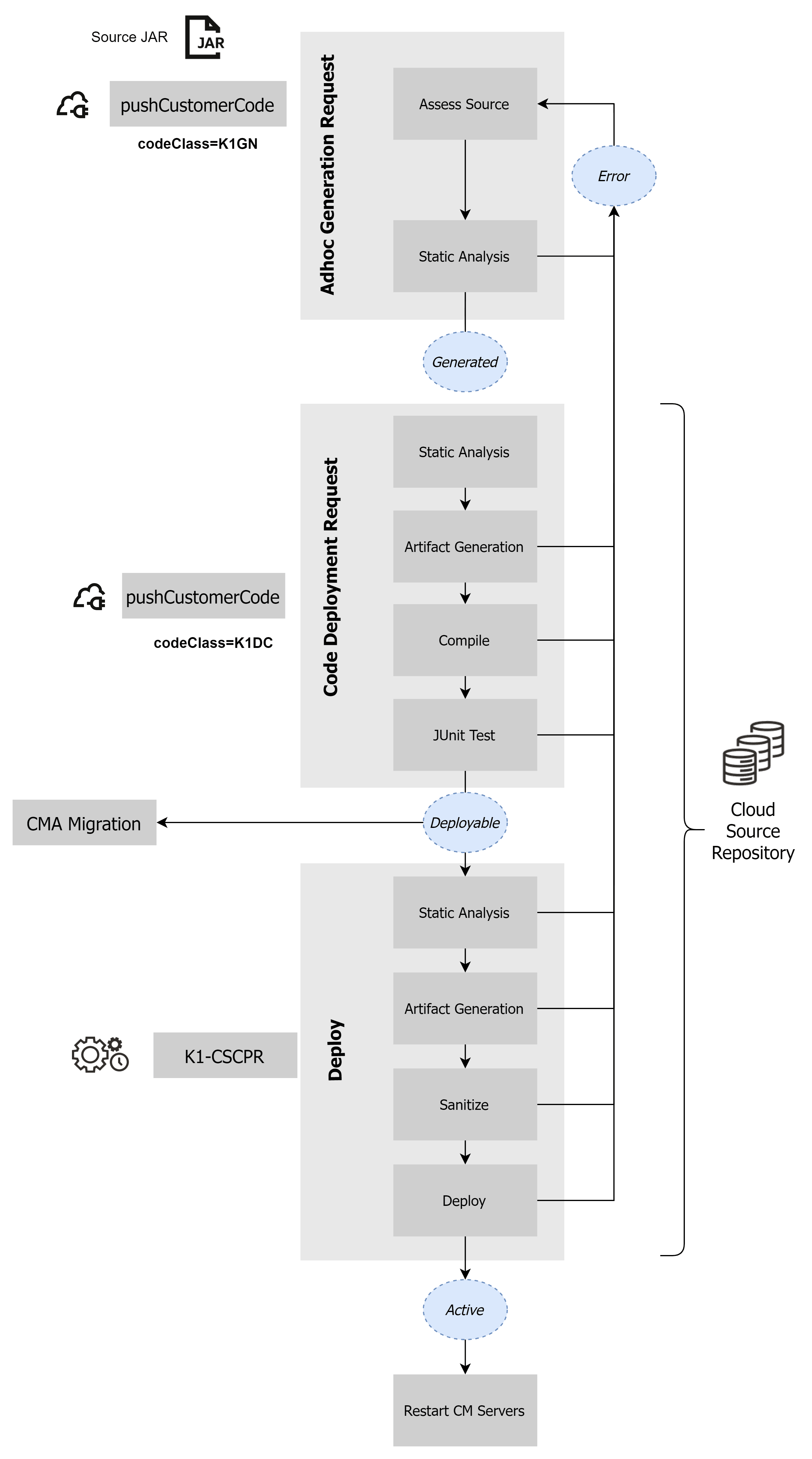
- Ad Hoc Generation Request: Upload the source using the provided REST API. This will assess the source against the service. This can be used to assess the source prior to uploading to the service. You must assign a Code Id which identifies the upload. The Code Id must only contain alphanumeric characters, dashes, or underscores. Credentials for the cloud service need to be provided with the command. The uploaded source is set to the "Generated" state if the assessment is successful. The source is assessed against several standards which include:
- Allowlist Compliance: The code is assessed against classes and methods maintained for the Oracle Cloud Infrastructure. This assesses class usage to ensure manipulation of memory, network and file access are within tolerances.
Note:
Refer to the Groovy class allowlist for a list of the common classes available. - Malicious Code Checks: The code will be checked for malicious code within tolerances set by the Oracle Cloud Infrastructure.
- Allowlist Compliance: The code is assessed against classes and methods maintained for the Oracle Cloud Infrastructure. This assesses class usage to ensure manipulation of memory, network and file access are within tolerances.
- Code Deployment Request: This step reassesses, compiles, and assembles the source code into the deployable module that is stored in the database ready for the deployment to the server. This also makes the deployment module available to be migrated using Content Migration Assistant (CMA) to make available to other environments. This step is independent of the Ad Hod Generation Request and loads the code into the cloud source repository. The Code Id used for this step must be unique for each upload.
- Deployment: This is the final step of the process that deploys the compiled code into the cloud infrastructure and made available to the service.
The diagram below illustrates the Java code migration and maintenance process.
Figure 9-3 Java Migration and Maintenance Process
Upload and Process API
To upload the source JAR file the following command must be issued from your Oracle Utilities SDK client machine:
curl -F "codeClass=<class>" -F "sourceCodeContent=<source>" -i -X POST https://<serviceurl>/rest/customerCode/pushCustomerCode/<codeid> -u <user>:<password>
The parameters used in this command are as follows:
| Parameter | Description |
|---|---|
| <class> | Process to use for call:•K1GN - Adhoc Generation Request•K1DC - Code Deployment Request |
| <source> | Provide the value "@cm.jar" |
| <serviceurl> | Fully qualified URL for development environment to upload source to. Note: Only development environments can be used to upload source. This interface will not be available in non-development environments for security reasons. |
| <codeid> | Code Identifier. The identifier must only contain alphanumerical, dashes, and underscores |
| <userid> | User Id to use to connect to the cloud service |
| <password> | Password for user to connect to the cloud service |
Additionally provide the following payload information:
| Parameter | Comments |
|---|---|
| sourceCodeContent | Upload the JAR file into this element using a REST client. |
| commitReference | Commit reference from source control system used in Oracle Utilities SDK.•This should be provided for the initial Adhoc Generation Request (K1GN) to identify the source.•This is required for the Code Deployment Request (K1DC) to identify the source to process. |
| branchName | Branch name where the code is to be deployed. Only the value main is supported at this time. |
| changeReference | Optional. Change reference for traceability purposes only. This can be a release identifier for the custom code if necessary. |
| comments | Optional. Additional comments to be attached to the upload for documentation purposes. |
Note:
These parameters maybe provided in the REST client used to connect to the service or on the curl command line using the-F "<parameter>=value" option.
Preparing and Deploying
Note:
Required for every major upgrade: If CM Java was disabled during an upgrade, the customer must complete the restoration procedure described in Additional Step After Major Upgrades, including the deployment and restart steps below, after the upgrade is complete and the environment has been handed back.Once the code has been uploaded, checked, and verified, deploy the custom Java code (CM Java) into its isolated area and enable the new deployment.
To deploy and enable CM Java:
- Run the K1-CSCPR job to deploy all the customizations in the PRIVILEGED threadpool. K1-CSCPR is a batch job used for ingestion that processes code in pending status. This must be performed after the Code Deployment Request has been successful. This process will deploy the customizations to the service.
Note:
The PRIVILEGED threadpool is the only threadpool supporting Java deployment and can only run this process. Other processes cannot be run in this threadpool. - Once the job has successfully completed, restart the CM servers where the deployment has occurred. To do this, start the browser interface with the
?debug=trueoption as the suffix on the URL. Use the Restart CM Jar Servers to initiate the restart.
Advanced Operations
There are additional operations supported for Java developers that may be useful during development.
Downloading Generated Code from the Cloud
In most cases source code is housed in the Oracle Utilities SDK but it is also possible to get a copy of the generated code artifacts run on the cloud using the following command:
curl -X GET https://<serviceurl>/rest/customerCode/getGeneratedCustomerCode/<codeid> -u <userid>:<password> -J -ONote:
Use of the-O will output to stdout. Redirect to a file name to save locally.
The parameters used in this command are as follows:
| Parameter | Description |
|---|---|
| <serviceurl> | Fully qualified URL for development environment to upload source to. Note: Only development environments can be used to upload source. This interface will not be available in non-development environments for security reasons. |
| <codeid> | Code Identifier. The identifier must only contain alphanumerical, dashes, and underscores |
| <userid> | User Id to use to connect to the cloud service |
| <password> | Password for user to connect to the cloud service |
Downloading API Jar files
It is possible to get a copy of the API Jar files used on the cloud using the following command:
curl -X GET https://<serviceurl>/rest/customerCode/getApiJars -u <userid>:<password> -J -ONote:
Use of the -O will output to stdout. Redirect to a file name to save locally.
The parameters used in this command are as follows:
| Parameter | Description |
|---|---|
| <serviceurl> | Fully qualified URL for development environment to upload source to. Note: Only development environments can be used to upload source. This interface will not be available in non-development environments for security reasons. |
| <userid> | User Id to use to connect to the cloud service |
| <password> | Password for user to connect to the cloud service |
Allow and No Allowlist Of Java Classes
Oracle Utilities cloud service uses prebuilt allowlists to distinguish which classes that are permitted and not-permitted as part of the service. These lists are maintained by Oracle in conjunction with the Oracle Security team in line with Oracle Cloud policy. A full up to date list can be extracted using the API Jar files associated with your release of the service.
In general terms the following types of classes are automatically supported in the Oracle Utilities cloud services:
- Entity classes such as entity data transfer objects (DTO), id classes, language classes, language id classes, and collection classes.
- Lookups
- Algorithm Spot interfaces
- JOBOL record classes
Other classes will be available via the API Jar extract for reference purposes. Any class that is not listed is not available for use in the Oracle Utilities cloud services.
Note:
These API's change regularly and therefore is it is recommended to be extracted on a regular basis.Migration using Content Migration Assistant
After the deployment is built, complete the following steps to migrate and deploy the custom Java code to your target environments:
- Migrate the custom Java code using Content Migration Assistant (CMA). It is highly recommended you use the Approve capability during the import process to manually review and approve changes before applying them to the target environment.
- After the migration has been applied, run the deployment batch process and restart the CM servers described in Preparing and Deploying. Migration using CMA alone does not complete deployment. The deployment batch process and CM server restart are required to complete the implementation of the new release.
Additional Step After Major Upgrades
During a major upgrade, the system may disable custom Java code (CM Java) if it causes conflicts or failures during the upgrade. Please carefully review the Status Page completion email from the Oracle Cloud Operations team, as it will indicate whether any custom Java code was disabled during the upgrade and whether action is required to re-enable it.
If CM Java was disabled, the customer must restore it after the upgrade is complete and the environment has been handed back. CM Java remains unavailable until the customer completes the restoration procedure.
To restore CM Java:
- Follow the steps outlined in Migration using Content Migration Assistant to migrate the custom Java code using Content Migration Assistant (CMA).
- Complete the deployment batch process and CM server restart as described in Preparing and Deploying.
- Verify that the custom Java functionality works as expected in the upgraded environment.