
Page Title Area
The Page Title Area displays the page title and the page actions toolbar.
For certain portal pages in the system, the page title may have additional information.
-
If a portal-based page displays a single record, its information string may be displayed after the page title. This information is only visible if the portal has been configured to display the primary key’s information string. Typically only “stand alone” maintenance portals are configured to show the information string, whereas “all-in-one” portals are not configured this way.
Fastpath: Refer to Common Base Portals and Zones for more information about standard base product portals.Note: If an information string is long and would interfere with a page actions button, the information string will automatically be truncated and suffixed by an ellipsis, “…”, indicating that more information is available. In this situation, the missing text can be viewed if the user hovers their mouse over the string. -
A portal based page may be configured to show enhanced information, including a subtitle, information in 'badge' format and context name / value pairs, which may also allow you to click and drill into more information.
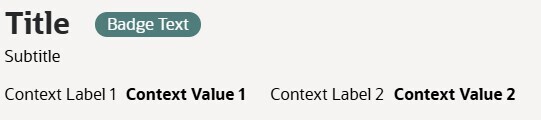 Note: Refer to Advanced Configuration for Portal Title / Tabs for details on how to configure this capability.
The Page Actions Toolbar displays standard control options, such as Save and Duplicate. More detail about the actions that may appear are described in the following section.