Setting Billing Preferences
You can add or update billing preferences for the people who are associated with a billing account. Billing preferences enable you to specify how billing-related communications are handled for a contact and billing account combination.
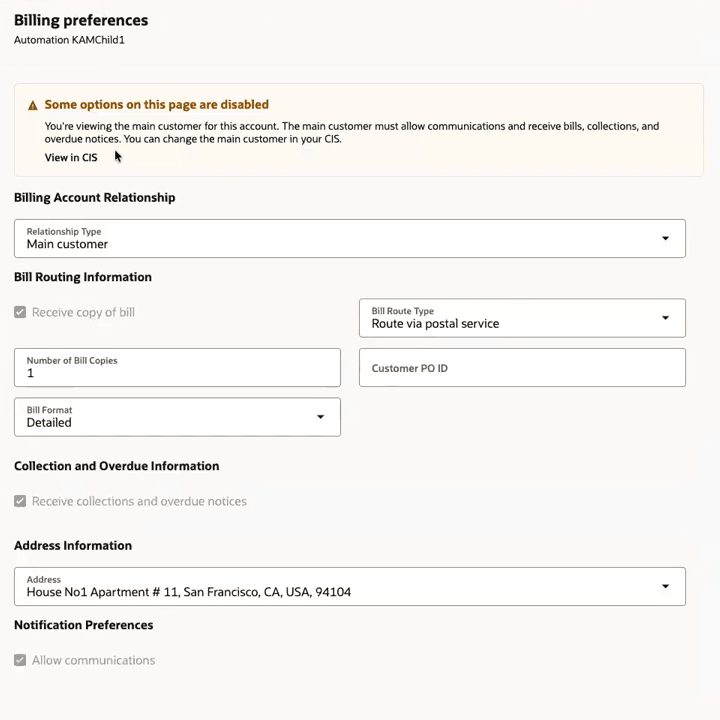
Using billing preferences, you can specify:
- The contact's relationship to the billing account.
- Whether the contact receives a copy of the bill, and if so, specifics about the number of copies, routing, and format of the bill.
- The purchase order ID that displays on the bill. This field is enabled only if the contact receives a copy of the bill.
- Whether the contact receives collections and overdue notices for the billing account.
- Address information.
- Whether notifications are allowed.
Note:
The information that displays in the Billing preferences drawer comes from your CIS. If this contact is specified as the main customer or a financially responsible person for this billing account in the CIS, some options are disabled, as they can't be changed. To enable these options, you must update the account in your CIS.For information about how billing preferences are defined in your CIS, see "Account - Person Information" in the Business User Guide of your CIS system, which is available in the Oracle Utilities Help Center.
This image shows an example of the Billing preferences drawer:
Updating Billing Preferences
To update billing preferences for a contact, complete these steps:
- To access the billing preferences, complete one of these steps:
- From the Customer Dashboard, select Update Billing Preferences from the action menu.
- From the Customer Dashboard, select View Related Party - <Name> from the action menu, and then select Update Billing Preferences from the action menu on the Related Persons form.
- During the Create Related Persons process flow, access the Update billing preferences drawer.
- In the Billing Account Relationship section, select a the type of relationship the person has with the account. Note that if this is the main customer, several fields on the form are disabled, and can only be changed in your CIS.
- In the Bill Routing Information section, specify whether this person should receive a copy of the bill, and if so, complete these fields:
- Bill Route Type
- Number of Bill Copies
- Customer PO ID
- Bill Format
- In the Collection and Overdue Information section, specify whether the person should receive collections and overdue notices.
- In the Address Information section, select the address that should be used for billing communications that are mailed.
- In the Notification Preferences, specify whether this person is allowed to receive notifications. Be aware that if this option is not selected, you can't set up communication preferences for this person/billing account combination.
- Click Save.
Parent topic: Using the Account Header