Self-Comparison
The Self-Comparison module provides a concise, personalized explanation of why a customer's current bill may be higher, lower, or similar to a previous one. It includes a comparison of the customer's current energy use to their past usage, along with context for any differences, such as weather or billing period changes. The module may also highlight improvements and include a moment of recognition to reinforce positive behavior.
In the Solar Report, the Self-Comparison module features solar-specific messaging and design variations of the comparison graph to reflect scenarios such as negative net energy and net zero energy.
Appears in: Progress Report, Solar Report
Requirements
Utility Requirements
| Category | Description |
|---|---|
| Required Cloud Service | Energy Efficiency Cloud Service |
| Scale | Not applicable. |
Customer Requirements
| Category | Description |
|---|---|
| Billing Frequency | Monthly, bi-monthly, or quarterly. |
| Data Delivery Frequency | Monthly, bi-monthly, or quarterly. |
| Data Requirements | Not applicable. |
| Data History |
Data History:
|
| Data Coverage | Not applicable. |
| Supported Fuels |
|
User Experience
Progress Report
This image shows an example of the Self-Comparison module design for the Progress Report.
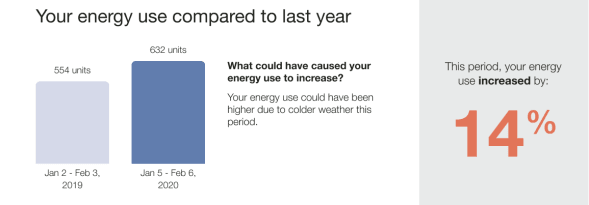
Header: Introduces a different type of comparison, focusing on how the customer's current usage compares to their own past usage rather than to neighbors or the Efficiency Zone.
Self-comparison bar chart: Displays the customer's energy use relative to their previous usage. The default view is a year-over-year comparison. If there is not enough data for a year-over-year view, the module compares the current bill to the most recent bill.
Explainer: Provides context to help the customer understand why their energy use may have changed or remained the same. Possible explanations include:
- Increased usage due to warm weather
- Increased usage due to cool weather
- Other factors not covered by the above scenarios
Insight:Quantifies the change in energy use, making it easy to understand at a glance. It uses established color cues, with orange indicating higher usage and green indicating lower usage, so customers can quickly interpret whether the change is positive or negative without relying solely on text or numbers.
Solar Report
This image shows an example of the Self-Comparison module design for the Solar Report.
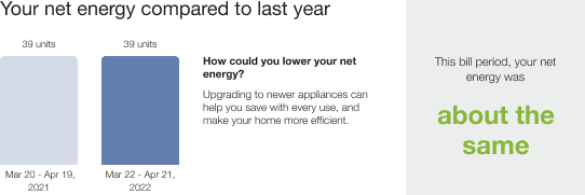
Header: Identifies the module as a comparison of the customer's net energy use relative to the previous year.
Self-comparison bar chart: Shows the customer's current energy use compared to their past usage.
Explainer: Provides context to help the customer understand why their energy use may have changed or remained the same. Possible solar states include usage increased, usage decreased, or usage stayed the same. Each state can represent scenarios such as all net negative, all net positive, net zero, or a mix of net positive and net negative within the same graph.
Insight: Quantifies the change in energy use, making it easy to understand at a glance. It uses established color cues, with orange indicating higher usage and green indicating lower usage, so customers can quickly interpret whether the change is positive or negative without relying solely on text or numbers.
User Experience Variations
Headline and Body Text: The explainer headline and body text vary based on the customer's energy use, fuel type, and whether the comparison is year over year or bill over bill.
Available data - Solar Report: If a customer has fewer than 13 months of data, the module uses a fallback experience that compares the current bill period to the previous bill period.