Peak Focused Normative Comparison
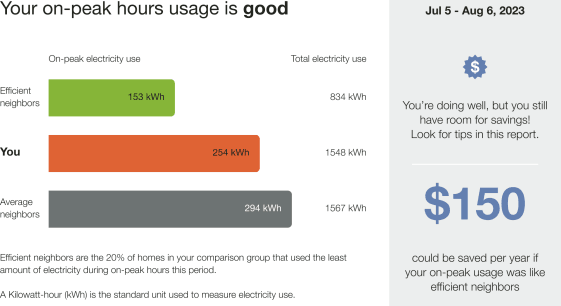
The Peak Focused Normative Comparison module educates customers about their energy use relative to other homes during on-peak periods. The module compares the customer (“You”) to their neighbors, “Efficient Neighbors” and “Average Neighbors,” and provides them with a comparison state (such as fair, good, or great) to help them measure how their electricity use is compared their neighbors. The results are displayed in a horizontal bar graph. Total electricity usage values are also displayed so the customer can have a better understanding of what their on-peak use compared to their total use during the bill period. An informational text below the bar graph explains that "Efficient Homes" represent the 20% of similar homes in the customer's comparison group that used the last amount of energy in the billing period, and provides information about how the graph works. Depending on the customer's comparison state, the insight statement below the graph either gently informs the customer that savings are still within reach or informs them that they are leading their neighbors in savings.
Peak Focused Normative Comparison Example
The image below is an example of the Peak Focused Normative Comparison for a customer with a good data state.
Configuration Options
| Configuration Option | Input Value |
|---|---|
|
Efficient Homes Color This bar displays a usage value for the most efficient 20% of the customer's neighbors. Default: Green |
Optional
|
|
Similar Homes Color This bar indicates how all the customer's neighbors are doing. Default: Grey |
Optional
|
|
Efficient Homes Label This bar displays a usage value for the most efficient 20% of the customer's neighbors. Default: Efficient Neighbors |
Optional
|
|
Similar Homes Label This bar indicates how all the customer's neighbors are doing. Default: Average Neighbors |
Optional
|
|
You Label This bar indicates how the customer is doing. Default: You |
Optional
|
|
Short Explainer The explainer text appears below the bar chart and includes an efficient homes description that defines efficient neighbors that the customer is being compared to. Default: Efficient neighbors are the 20% of homes in your comparison group that used the least amount of electricity during on-peak hours this period. |
Optional
|
|
Fuel Explainer The fuel units used in the comparison are defined below the efficient neighbors description. Default: A Kilowatt-hour (kWh) is the standard unit used to measure electricity use. |
Optional
|
|
Smiley Icons If smileys icons are configured, the icon set appears beside the main insight heading. Icon set options include:
Default: No icons (Off) |
Optional
|
|
Threshold When the cost/savings are not greater than the threshold, the fallback is used. Default: $100 |
Optional
|
|
Bottom Insight The utility may opt for a financial or percentage version of the bottom insight.
Default: Financial |
Optional
|
User Experience Variations
The user experience of the feature may vary for customers and utilities depending on their service types (gas, electricity, dual fuel, and so on), available data, costs, locale, and other factors. For more information, see the Peak Focused Normative Comparison description for Home Energy Reports v3 in the Oracle Utilities Opower Energy Efficiency Cloud Service Overview and go to the User Experience Variations section.