Seasonal Normative Comparison
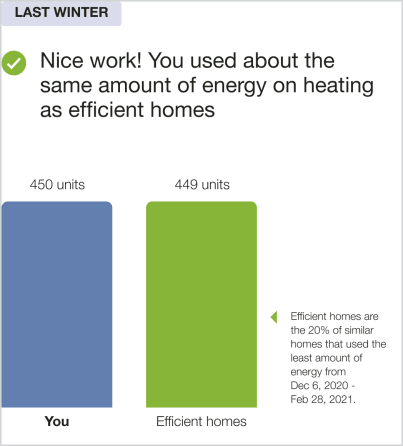
The Seasonal Normative Comparison module is a vertical bar graph that display's the customer's aggregate total energy use from the previous season compared to other homes. The comparison motivates them to reduce their heating or cooling energy use during the upcoming extreme weather season. The user experience varies depending on available customer data and whether the customer's program includes a Neighbor Comparison or Efficiency Zone.
The neighbor comparison in Digital Self Service - Energy Management mirrors the customer's report experience. For example, a customer that receives the Efficiency Zone in their report will also see an Efficiency Zone in Digital Self Service - Energy Management. For more information about the web version of the neighbor comparison, see Digital Self Service Energy Management Neighbor Comparison.
Appears in:Seasonal Report
Seasonal Normative Comparison Example
This image is an example of the Seasonal Normative Comparison module for a dual fuel customer in the Winter Seasonal Report.
Configuration Options
For each element listed in the table, indicate the desired configuration in the Input Value column. If you do not provide an input for optional configurations, the default will be used.
| Configuration Option | Input Value |
|---|---|
|
Primary and Secondary Colors Default: Based on utility branding guidelines |
Optional Choose one of the following:
|
User Experience Variations
The user experience of the feature may vary for customers and utilities depending on their service types (gas, electricity, dual fuel, and so on), available data, costs, locale, and other factors. For more information, see the Seasonal Normative Comparison in Oracle Utilities Opower Energy Efficiency Cloud Service Overview and go to the User Experience Variations section.