Utility Info
The Utility Info module appears at the bottom of the back page of the Home Energy Report. The module contains sections for utility contact information, legal disclaimers, and additional resources.
Appears in: All Report Types.
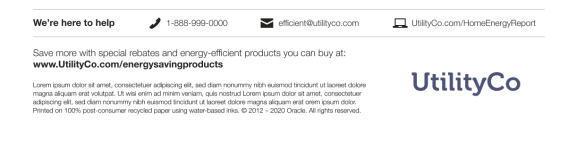
Configuration Options
For each element listed in the table, indicate the desired configuration in the Input Value column. If you do not provide an input for optional configurations, the default will be used.
| Configuration Option | Input Value |
|---|---|
|
Contact Message A maximum of 18 characters may be used in the contact message. Default: "We're here to help" |
Optional Choose one of the following:
|
|
Phone Icon Default: The icon in the example represents the default icon. |
Optional Choose one of the following:
|
|
Phone Number A maximum of 14 characters (11 numbers and three dashes) may be used for the phone number. |
Required Provide a phone number. |
|
Email Icon Default: The icon in the example represents the default icon. |
Optional Choose one of the following:
|
|
Email Address A maximum of 25 characters may be used for the email address. |
Required Provide an email address. |
|
Web URL The URL should be as concise as possible in print to eliminate barriers for the customer. A maximum of 30 characters may be used. Default: UtilityCo.com/HomeEnergy/report |
Optional Choose one of the following:
|
|
Web Icon Default: The icon in the example represents the default icon. |
Optional Choose one of the following:
|
|
Postal Compliant Message This line of text is required to meet postal compliance. A maximum of 80 characters may be used. Default: Save more with special rebates and energy-efficient products you can buy at: |
Required Choose one of the following:
|
|
Postal Compliant Message URL URLs should be as concise as possible in print to eliminate barriers for the customer. A maximum of 30 characters may be used. Default: www.UtilityCo.com/energysavingsproducts |
Required Choose one of the following:
|
|
Colors The colors can be customized to match the utility's branding. Default: The colors in the example represent the default colors. |
Required Choose one of the following:
|
|
Legalese The legal language is limited to 5 lines of text. |
Required Contact Your Delivery Team to specify the legal text. |
User Experience Variations
The user experience of the feature may vary for customers and utilities depending on their service types (gas, electricity, dual fuel, and so on), available data, costs, locale, and other factors. For more information, see the Utility Info module description in the Energy Efficiency Cloud Services Overview Guide and go to the User Experience Variations section.