What Uses Most
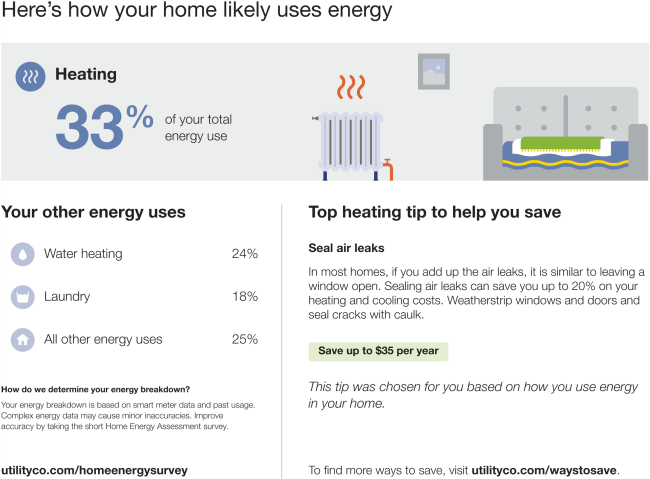
The What Uses Most module educates customers about the top three energy uses in their home for the report period. One of the customer's top energy uses is highlighted at the top of the module. Highlighted energy uses must meet one of the following criteria:
-
It is the customer’s highest energy use.
-
It is the customer’s second-highest energy use.
-
The energy use for that category is significantly above the regional average.
The highlighted usage category heading varies depending on the highlighted category and module state (highest energy use, second highest energy use, most above regional average), and is paired with a related energy-savings tip.
Appears in: Limited Income Report,Electric Vehicle Report
Note: While this module was designed for the limited income and electric vehicle customer experiences, it can be used for other audience segments as well. Contact Your Delivery Team to discuss module options.
What Uses Most Example
This image is an example of the What Uses Most module for a customer with heating as the highest energy use in the billing period.
Configuration Options
For each element listed in the table, indicate the desired configuration in the Input Value column. If you do not provide an input for optional configurations, the default will be used.
| Configuration Option | Input Value |
|---|---|
| Call to Action URL
The call to action button redirects customers to the [ where they can provide more details about their home to improve their report accuracy. Default:The URL redirects the customer to the Home Energy Analysis and must be configured. |
Required Contact Your Delivery Team about altering the URL destination. |
| Disaggregtion Explainer Header Heading that prepares the customer to learn ow the categories are calculated. Default: "How do we determine your energy breakdown?" Default: "How do we determine your energy breakdown?" |
Optional Choose one of the following:
|
|
Disaggregtion Explainer Text An explanatory note that clarifies that these categorizations are derived from data science model estimates, and reminds customers that they can improve their report accuracy by completing their Home Energy Analysis. Default:"Your energy breakdown is based on smart meter data and past usage. Complex energy data may cause minor inaccuracies. Improve accuracy by taking the short Home Energy Assessment survey." |
Optional
|
|
Call to Action Text The call to action button redirects customers to the [ where they can provide more details about their home to improve their report accuracy. Default: "Update my home profile" |
Optional Choose one of the following:
|
User Experience Variations
The user experience of the feature may vary for customers and utilities depending on their service types (gas, electricity, dual fuel, and so on), available data, costs, locale, and other factors. For more information, see the What Uses Most description for in the and go to the User Experience Variations section.