5 Authorization
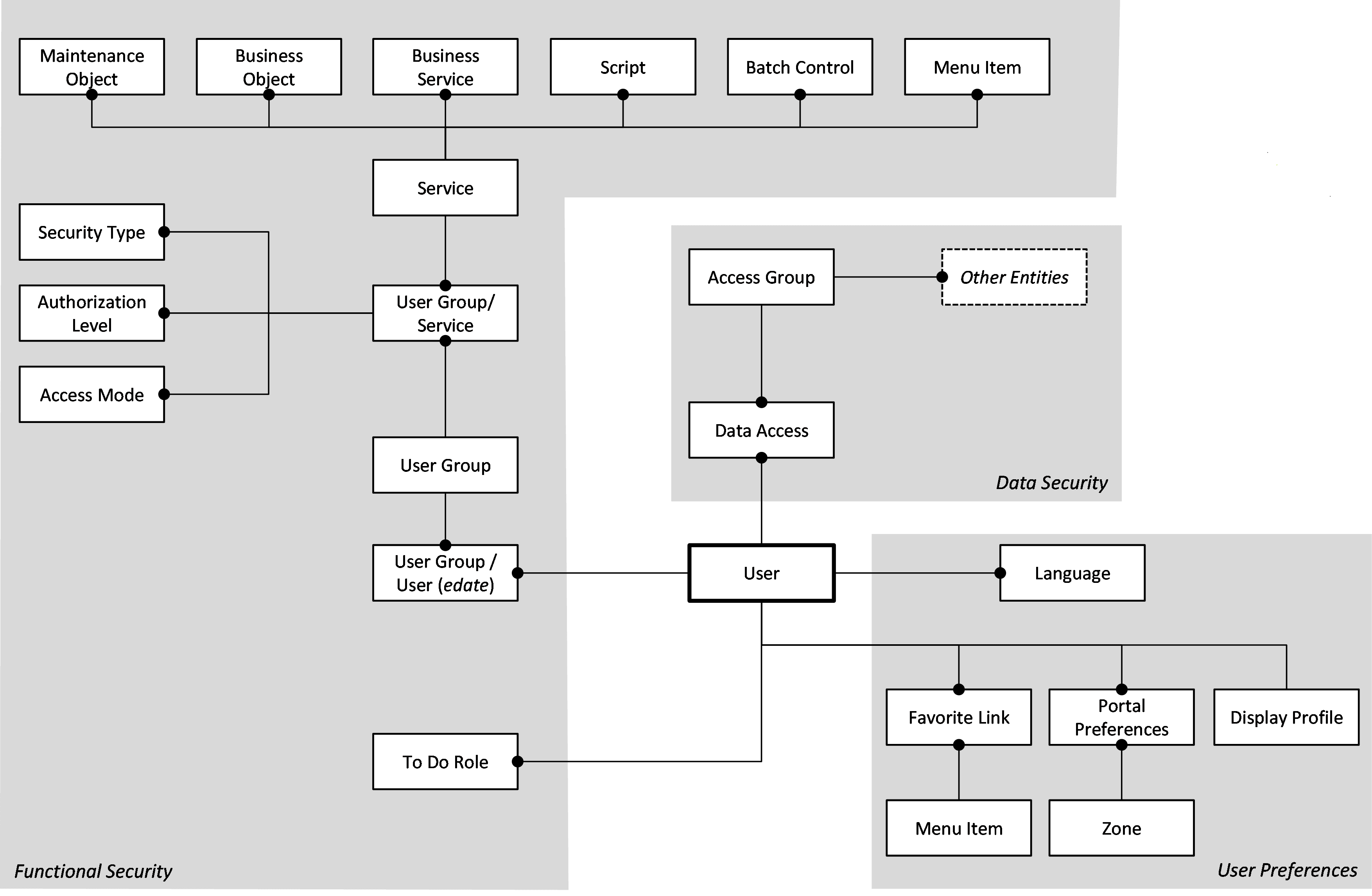
Once a user is identified, they must be authorized to specific functions and data within Oracle Utilities Application Framework, which uses an inbuilt security model for authorization. This model contains all the data necessary for the definition of authorizations to function and data.
Authorization Model
Figure 5-1 Authorization Model
Users
A record of each user is stored in the User entity, which defines the attributes of the user including identifier, name, Portal preferences, Favorites, Display Profile (such as format of dates and so on), and Language used for screens and messages, and other attributes. Users are attached to To Do Roles that allow the user to process any error records for background processes. For example, if a particular background process produces an error, it is possible to define the users that will process and address the error.
User Groups
User Groups are a mechanism for grouping users, usually around job roles. Users are attached to User Groups through a relationship that is effective-dated, which means that the date period it is active across is also defined. This can be useful for the attachment of temporary employees such as contractors or for people who change roles regularly.
Each User Group is authorized to access certain Application Services, which are the functions within your application. Loosely, these correspond to each of the accessible screens. Application Services have valid Access Modes with standards being Add, Modify, Read and Delete.
Additionally, it is possible to define the authorization level of the User Group to that function. For example, you may find that a certain group of users can only approve payments of a certain level unless authorization is obtained. The Authorization Level is associated with a Security Type that defines the rules for the Application Service.
Note:
To use security types, the implementation must develop server side or client-side user exits to implement code necessary to implement the security level.Services can be attached to individual Menus, Batch Controls, Maintenance Objects, Business Objects, Business Services, and Scripts to denote the service to be used to link user groups to access these objects. In this case, Business Object security overrides an Maintenance Object security. The same applies to Business Services security overriding the Application Service it is based on.
The Oracle Utilities Application Framework allows you to limit user access to specific data entities to prevent users without the appropriate rights from accessing specific data. By granting a user access rights to an account, you are granting the user access rights to the account’s bills, payments, adjustments, orders, and so on.
Access Groups
Access Groups define a group of accounts that have the same type of security restrictions. A Data Access Role defines a group of users that have the same access rights (in relation to access to entities that include access roles). When you grant a data access role with rights to an access group, you are giving all users in the data access role rights to all entities in the access group.
The following points summarize the data relationships involved with data security:
- Entities reference a single access group. An access group may be linked to an unlimited number of relevant entities.
- A data access role has one or more users associated with it. A user may belong to many data access roles.
- A data access role may be linked to one or more access groups. An access group may be linked to one or more data access roles.
- Information in the security model can be manually entered using online transactions and also can be imported and synchronized using a LDAP import function provided with the Web Services Adapter. The latter is typically used with customers who have lots of online users to manage.
- The authorization model is used by all modes of access to the product. Native interfaces (java classes) are used by all objects and a PL/SQL procedure is provided for reporting interfaces.
Note:
The product includes the ALL_SERVICES user group that system administrators can use to create user groups. It is recommended not to assign ALL_SERVICES to any user other than system administrators.