6 Managing Security
Once the security definitions are established, these must be managed from the application itself, using security infrastructure and security repositories.
Online User Management
To manage online users, several facilities must be configured:
- The security repository and rules must be configured in Oracle WebLogic to enable authentication. Refer to Oracle WebLogic Administration Guides for more information.
-
The product group used to connect users to Oracle WebLogic resources should be created in the security repository and configured in the product configuration. The default value for this setting is cisusers. Refer to the Server Administration Guide for more information on this setting.
- Users need to be connected to the product group within the security repository to indicate that they can access the Oracle WebLogic resources.
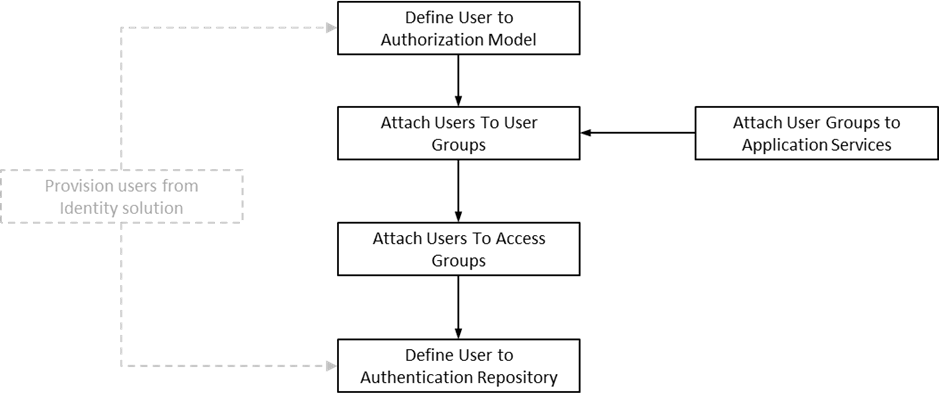
The process for managing online users is outlined in the following process:
Figure 6-1 Online User Management Process
-
Users should be defined to the authorization model to define their profile and permissions within the application. Refer to the Application Framework Administrative User Guide for information about defining users and user permissions.
Managing Batch Users
Each time a batch process is executed, the security components of your application must authenticate the user against a security repository and authorize the user to access the components the batch process needs to complete its operations.
The Batch component of the architecture uses the following security mechanisms:
| Security Mechanism | Description |
|---|---|
| Authentication | Any batch users must be defined to the operating system configured security repository and be a member of the operating system group assigned to your application.Note: The Userid does not have to match the authorization user. |
| Authorization | The authorization user is defined within the application as per the Online Users and is specified as a job parameter at execution time or in configuration files supplied for the batch process. Refer to the Server Administration Guide for details of the parameters used for batch processing. |
To manage Batch Users therefore the following is recommended:
- Add the authentication user used to initiate the thread pool and submitter processes for a batch process to the configured operating system repository.
- Specify a valid user authorization identifier as a parameter for the batch process. This identifier must be authorized to the valid actions against the main objects used in the batch process. Refer to the product functional documentation on the objects used in each of the product batch processes. By default, the user used for authorization is the same as the submission user. The authorization user may be overridden to alternative values if the submission user as the User Override permission for Batch Job Submission.
Managing Web Services Users
From a product perspective, a Web Service is a channel into the objects within your application. Any of the objects, services and scripts available in the product can be exposed as JAX-WS 2.0 based Web Service. From a security perspective Web Services uses the following security mechanisms:
| Security Mechanism | Description |
|---|---|
| Authentication | The Web Services component of Oracle Utilities Application Framework uses the Web Services support native to Oracle WebLogic. This allows security tokens supporting many standards to be used to authenticate individual web service calls. |
| Authorization | The Web Services component uses the same authorization model as the Online Users and the Batch component.
Note: The Authorization User within the User object is mapped through the Authentication User in the same way that Online Users are mapped. |
To manage Web Services security users the following is recommended:
- Users for authentication are added to the security repository configured with Oracle WebLogic. This should match the Login Id used for the authorization model.
- Security Policies need to be attached to Web Services using Oracle WebLogic. For Oracle WebLogic the security policies available using Oracle Web Services Manager are available for use with individual Web Services. Multiple policies are supported. Refer to the Securing WebLogic Web Services for Oracle WebLogic Server for more information and the policies available.
- Users must be defined to the authorization model with appropriate access to underlying services used by the Web Service. For Web Services based upon business objects, services and scripts, users need appropriate access to the Application Service defined on these objects.
- Transaction Types in the Web Services translate to Access Modes within the Application Service calls.
For more information about Inbound Web Services, refer to Web Services Best Practices for Oracle Utilities Application Framework (KB704711).
User Authentication
There are two different user identifiers with distinct roles in the User object: Userid and Login Id.
| Identifier | Characteristics |
|---|---|
| Userid | •Used internally for authorization.•Passed to the database connection as the CLIENT_IDENTIFIER on the database connection.•Used for record ownership in some objects and in auditing, whereby it cannot be changed after the creation of any records by the user.•The maximum length of Userid is 8 characters.
|
| Login Id | •Used for authentication to the security repository configured on Oracle WebLogic domain.•It can match the Userid or differ to reflect site standards. Unlike the Userid, the Login Id can be changed at any time to reflect changes in the organization such as name changes or acquisition.•The maximum length of Login Id is 256 characters.Note: The Login Id must match, in the same case, as the entry in the configured security repository for Oracle WebLogic. |
When maintaining a user, it is important that the Login Id is only changed using the maintenance function, LDAP Import or any Inbound Web Service based upon the User object and not directly using other means (such as direct SQL). This due to the fact that a security hash is generated at maintenance time and is checked at login time. At application login time, if the security hash does not match, the user is not authorized to access your application. To ensure security hashes are correct, use the Synchronize Data Encryption function to reset the user security hash.