7 Advanced Security
While the default Security settings are adequate for most sites, there are several additional Advanced Settings that can be configured to support a wider range of security requirements. This section outlines the various security settings available and the configurations supported.
Domain Authentication Group
The default installation of your application includes a default Authentication Group(role-name) defined within the Web Application descriptor (web.xml). This role name is used by the Web Application to link the authorized users within the application to the associated domain physical resources (pages and configuration files) within Oracle WebLogic. The specification of the group in the web descriptor is in the security section.
Note:
The security role is used in several sections of the Web Application descriptor.Figure 7-1 Sample web.xml file
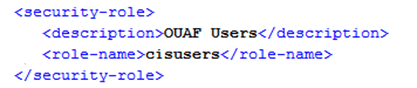
By default, this group is set to cisusers, which is configurable for each web component. When the product is deployed to Oracle WebLogic, this group is instantiated ready to be allocated to individual users. Users of the product must be attached to this group to use it.
From a configuration point of view there are several options for this setting:
- The default group may be changed at installation and configuration time using the configuration settings as shown below as outlined in the Server Administration Guide. The group name should have no embedded blanks.
Component Principal Name Role Name Online/Help WEB_PRINCIPAL_NAME WEB_ROLE_NAME AppViewer WEB_APPVIEWER_PRINCIPAL_NAME WEB_APPVIEWER_R OLE_NAME - If Oracle WebLogic is configured to use an external security repository the configured administration group must exist in the security repository and the users must be connected to this group.
Note:
If the domain administration group is changed after installation time, users will need to be migrated to the new domain administration group either manually, using tools provided with the security repository or through Oracle WebLogic.
Logon Configuration
The default configuration for Online Authentication is using a logon screen for the online product, online help and online AppViewer applications. The product supplies a prebuilt logon screen for all three components preconfigured.
At logon it detects that a user has not logged on before (the presence of a JSESSIONID cryptographically-secure session cookie issued by the Web Application Server is used). Depending on the configuration (in the web.xml) of the applications, housed in Oracle WebLogic, the following is performed:
- FORM - This is the default setting to support a logon screen with an associated error screen in case of unsuccessful logon. Your application provides a pre-built logon screen but can be replaced with custom logon screens by setting the following configuration settings appropriately for each web component as outlined in the Server Administration Guide:
Component Login Screen Login Error Screen Online WEB_FORM_LOGIN_PAGE WEB_FORM_LOGIN_ ERROR_PAGE Help WEB_HELP_FORM_LOGIN_PAGE WEB_HELP_FORM_L OGIN_ERROR_PAGE AppViewer WEB_APPVIEWER_FORM_LOGIN_PAGE WEB_APPVIEWER_F ORM_LOGIN_ERROR _PAGE Note:
Custom logon screens should be placed in the cm directory of the Web Application Server as outlined in the Oracle Utilities SDK. - BASIC - The browser will issue a call to the operating system to display the default logon dialog supplied with the operating system. No logon dialog is supplied.
Note:
BASIC authentication is considered a relatively weak authentication scheme, and therefore is not recommended for use. - CLIENT-CERT - This is an advanced configuration to allow for certificated (one way or two way) to be used. Refer to the Administering Security for Oracle WebLogic Server documentation for more details on the additional configuration required.
Data Ownership Rules
On each of the objects (and on selected child objects) an owner flag is included to determine the origin of the data. The owner flag is used by the application to determine the maintenance owner of key data as well as to protect from accidental deletion important data shipped with the product.
The value of the flag is displayed on maintenance screens to visually indicate the data owner. The location of the information varies from the top left of maintenance pages, within lists of information (to apply to individual rows) and within sections of maintenance pages.
| Value | Description |
|---|---|
| Base | This is crucial information shipped with your application and cannot be deleted or modified through the Delete or Medication functions and regardless of user permissions. This value is reserved for use by the application to ship and protect key information.
Note: To delete this information directly from a product database will cause unexpected results. |
| Product Name | The name of the product that owns the data. This value is similar to the Base value but indicates which component the data is applicable to. All the rules that apply with the Base value apply to this value. |
| Customer Modification | This indicates that the data was added by the implementation using the various methods and that it is owned by the implementation.
Note: Deletion of data is permitted using the valid deletion functions for authorized users. |
Note:
In general, sites can only maintain Customer Modification owned records. Other ownership values are reserved to protect product installation supplied data.Configuring JMX Security
The operations interface is based upon Java Management Extensions (JMX), which allows components of the application to be managed and monitored from JSR160 compliant consoles including jconsole or Oracle Enterprise Manager.
Refer to the Server Administration Guide for more details of the JMX operations interface.
By default, the JMX implementation and configuration uses the default simple file based security as outlined in the JMX Specification.
Default Simple File-Based Security
The default configuration is based upon a properties file containing name/value pairs corresponding to role/password pairs and authorization can be also based on a properties file containing name/value pairs corresponding to role/access pairs where access can be any of readonly access which grants read access to any remote operation and readwrite access which grants access to read and update operations in the interface.
Note:
Note: By default, the user (BSN_JMX_SYSUSER) and password (BSN_JMX_SYSPASS) for the administrator are automatically added to the configuration files.
To use this facility the following file should be maintained using an appropriate editor located in $SPLBASE/scripts directory:
ouaf.jmx.access.file– This file contains the Userid and access Permissions in the format separated by a blank space:Field Comments Userid Authentication user to access JMX. Permission Permission assigned to user. Valid values are: readonly– No update access.readwrite– Update and update operations access.ouaf.jmx.password.file- This file contains Userid and Password in the format separated by a blank space:Field Comments Userid Authentication user to access JMX. Password Password in plain text or encrypted. Note:
These files are also tailored theouaf.jmx.access.file.templateandouaf.jmx.password.file.templatecustom templates.
SSL-Based Security
To secure communications for JMX using the Java SSL support the following process must be performed:
- Security has to be setup using the Default Simple File-Based Security or Other Security Sources.
- A key pair and certificate need to be setup on your server. Refer to the Monitoring and Management Using JMX Technology or to the Oracle WebLogic Administration documentation for details and utilities available for this process.
- Set additional java parameters using the
WEB_ADDITIONAL_OPTfor the online/ Web Services andBATCH_MEMORY_ADDITIONAL_OPTfor Batch. Refer to the Server Administration Guide for details of these parameters. The following additional system properties must be set:System Property Comments javax.net.ssl.keyStore Keystore location javax.net.ssl.keyStoreType Default keystore type javax.net.ssl.keyStorePassword Default
keystore password
javax.net.ssl.trustStore Truststore location javax.net.ssl.trustStoreType Default truststore type javax.net.ssl.trustStorePassword Default truststore password com.sun.management.jmxremote.ssl Set to true com.sun.management.jmxremote.registry.ssl Set to true com.sun.management.jmxremote.ssl.need.client.auth Set to true Note:
For a full description of additional options and SSL setup refer to Monitoring and Management Using JMX Technology.Note:
Specification of system properties for java are as per the java command line.Note:
For sites using Oracle WebLogic in native mode, configuration of SSL requires Configuring SSL in WebLogic Server and altering the startup scripts for Oracle WebLogic to include the above options.Note:
In line with industry standards either HTTP or HTTPS can be used. They cannot be used simultaneously.
Other Security Sources
While by default the file-based repository is supported, it is possible to configure the authentication of JMX to use an alternative data source such as an LDAP Server. This involves changing the Java Authentication and Authorization Service (JAAS) configuration stored in the java.login.config file $SPLEBASE/splapp/config directory.\
In the JAAS configuration file there is a default jmxrealm that contains the default JMX LoginModule. This can be changed, using custom templates, to support an alternative source for authentication. Refer to the LdapLoginModule documentation for information and examples of login configurations.
Note:
To implement the custom security source custom templates forjava.login.config must be implemented according to the process outlined in the Server Administration Guide.
Menu Security Guidelines
By default, a menu option is displayed whenever a user has access to the underlying Application Service definition attached to objects that are indirectly linked to a menu entry. While this behavior is enough for most needs, it is possible to place an override on an individual menu item to override the lower level security levels. This is particularly useful where implementations intend to replace base-supplied menu items with custom menu items.
By linking a menu item to a new service that can reference the underlying objects and specifying an Application Service (optionally also including an Access Mode) would override the permissions on the underlying objects.
It is possible to specify the Application Service on a menu item on the Menu Items tab on the Menu option on the Administration menu.
Security Types
Refer to the Application Framework Administrative User Guide for information and details regarding security types.
Default Generic Application Services
By default, a whole set of Application Services are defined against base functions. In line with Data Ownership Rules, some of these records can be altered and new functions added. A set of generic Application Services are also shipped with your application to provide a mechanism for defining new zones, new objects or new menu items for rapid deployment.
There is a single generic Application Services that can be used to secure objects, zones and menu items:
F1-DFLTS- This is a generic maintenance Application Service which is designed to secure business objects. It supports the Add, Modify, Delete, Inquire, and Execute Access Methods.
Note:
The use of this generic Application Service is optional.Administration Delegation
By default, your application provides a single administration account, as configured in the SPLADMIN configuration setting, in the ENVIRON.INI configuration file, to manage the operational aspects of the product. This operating system user is the owner of the product when it is installed and is typically used for all operational aspects of the product.
Note:
It is not possible to change the product administration account after installation. If this is desired, it is recommended to remove the product and reinstall using the alternative administration account.While the single administration account is enough for most needs it is possible to provide additional administration accounts to delegate administration tasks. To delegate administration the following must be configured:
- Any administration user must be a member of the operating system group allocated to the product as outlined in the
SPLADMINGROUPconfiguration setting in theENVIRON.INIconfiguration file. - If you are using Oracle WebLogic in native mode, then the console will execute the native facilities to start and stop the product. It is recommended that the user allocated to Oracle WebLogic at installation time be a member of the operating system group outlined in
SPLADMINGROUPconfiguration setting in the ENVIRON.INI configuration file.Note:
Customers using Oracle Enterprise Manager, with or without Application Management packs, should use the administration delegation and credential management capabilities of that product to manage administration delegations.
Secure Communications (SSL)
By default, your application uses HTTPS to communicate to the browser and across the tiers. The transport protocol can be encrypted using SSL/TLS to secure transmission of data across networks.
Note:
Oracle strongly recommends that customers use SSL to secure transmission for production environments.To implement SSL the following process must be completed:
- Configure Oracle WebLogic to use the SSL protocol. For Oracle WebLogic customers refer to Configuring SSL in Oracle Fusion Middleware Securing Oracle WebLogic Server.
- Set the SSL Port Number using the
WEB_WLSSLPORTconfiguration parameter as outlined in the product Server Administration Guide. - Once the setup has been tested and verified refer to the console documentation on disabling insecure protocols.
Data Masking Support
Refer to the Application Framework Administrative User Guide for information about configuration data masking.
Securing Files
Note:
The utilities mentioned in this section apply to Linux and Unix environments only.The file structure of your application is protected by permissions set at the operating system level. By default, the settings provided upon installation comply with Oracle standards in respect to permissions. For more details of the individual user permissions on product directories and subdirectories, refer to the Server Administration Guide.
You can use the following process to reset the environment permissions to the default settings:
- Execute the
splenviron.shutility to set the environment variables for the product environment to reset. Refer to the Server Administration Guide for details of this process. - Execute the
setpermissions.shutility to reset the environment permissions back to the defaults.
Password Management
Your application requires several passwords, which must be changed on a regular basis to conform with security best practices:
| Password Owner | Location | Comments |
|---|---|---|
| Online User | Domain Authentication Source | No configuration changes. User changes password in security repository directly or indirectly using security products. Security repository is configured in Oracle WebLogic.WEB_SPLPASS specifies the default password for the initial user. If this user is used past the installation the password may need to be changed. Refer to the Server Administration Guidefor more details.
|
| Web Service User | Domain Authentication Source | No configuration changes. User changes password in security repository directly or indirectly using security products. Security repository is configured in Oracle WebLogic. |
| Batch User | Operating System | No configuration changes. User changes password in security repository directly or indirectly using security products. Security repository is configured in Oracle WebLogic. |
| Database Users | BATCH_DBPASSDBPASSXAI_DBPASS |
The database users are stored in ENVIRON.INI. Refer to the Server Administration Guide on process to change values. New Passwords need to be re-encrypted.
|
| JMX Users | BSN_JMX_SYSPASS |
The default JMX user is stored in ENVIRON.INI. Refer to the Server Administration Guide on process to change values. New Passwords need to be re-encrypted.
|
| Administration Account | WLS_WEB_WLSYSPASSWEB_WLSYSPASS |
The default administration users are stored in ENVIRON.INI. Refer to the Server Administration Guide on process to change values. New Passwords need to be re-encrypted.
|
Secure Online Debug Mode
Your application features an online debug mode which is used for problem solving and development personnel to trace their code or to diagnose problems. As with other functions within the product the debug function is security-controlled.
To use this facility any of the User Groups an individual user must include Inquire access to the F1DEBUG Application Service. This will enable the debug facility from the URL.
For more information about the Debug facility refer to the Server Administration Guide.
Secure Online Cache Management
The online cache management function resets the online cache to force new values to be loaded. As with other features within the product, it is security-controlled.
To use this facility on any of the User Groups, you must include Change access to the F1ADMIN Application Service, which enables the cache management facility from the URL.
For more information about the cache management facility refer to the Server Administration Guide.
Web Services Security
Note:
This section outlines the Inbound Web Services security facility only.Note:
Refer to Migrating from XAI to IWS Oracle Utilities Application Framework (KB226523) for more information.Inbound Web Services allows external web service-based integrations to access functionality within the application. The security settings for the Inbound Web Services can be summarized as follows:
- Inbound Web Services rely on Web Services standards supported by Oracle WebLogic for authentication support.
- Inbound Web Services supports the WS-Policy standards supported by Oracle WebLogic to provide both transport and message security. Refer to the Oracle WebLogic documentation for details of the WS-Policies supported. The following rules apply to those policies:
- Oracle WebLogic policies are supported if the corresponding setup is performed within Oracle WebLogic. For example, encryption is supported if keystores are configured for encryption keys.
- WS-Policies are attached within the Oracle WebLogic console or Oracle Fusion Middleware Control after deployment. These policies are maintained independently as per the console documentation.
- Element Level policies are not supported in the current release.
- Security policies at the operation level are not supported directly but are supported via authorization.
- The product ships an internal policy for backward compatibility (UserToken).
- Inbound Web Services uses the underlying business objects, maintenance objects, business services and service scripts to determine authorization of records. This includes authorization for specific operations.
- Inbound Web Services can use Oracle Web Service Manager for additional WS-Policy support and web service access controls.
- Security policies can vary between individual Inbound Web Services.
- Multiple WS-Policies are supported per Web Service. The clients calling these services must conform to at least one of the policies attached.
By default, the WS-Client calling the product must supply an authentication token in the format configured on the WS-Policy on individual web services. By default, there is no default user on Inbound Web Services transactions. A default user may be configured on the ouaf.ws.defaultUser setting in the spl.properties file for the Inbound Web Services. Refer to the Server Administration Guide for details of the process.
Note:
Setting of a default user is not recommended for implementations unless backward compatibility is required for older XML Application Interface-based services.| Setting | Comments |
|---|---|
ouaf.ws.defaultUser |
Default user for authorization of Web Services calls |
ouaf.ws.superusers |
Delimited set of effective users to translate calls from authentication users not known to the system. |
ouaf.ws.deploy.user |
Administration user for deployment activities. This setting is only specified if differs from the administration settings. |
Message Driven Bean Security
Note:
Refer to the Oracle WebLogic JMS documentation for detailed information about JMS facilities provided.Note:
Refer to the Oracle WebLogic JMS Integration and Oracle Utilities Application Framework (KB394396) technical reference paper for details of the JMS integration implementation.The Message Driven Bean (MDB) within the Inbound Web Services implementation allows JMS resources (such as JMS Queues or JMS Topics) to be read using the MDB and sent to an Inbound Web Service to be processed.
By default, the Message Driven Bean, uses the JMS (JMSX) message property fields for authentication and authorization purposes such as JMSXUserid.
If the JMS message security is not used then a default user can be set in the ouaf.ws.defaultUser parameter in the spl.properties file.
SOAP Security
| Facility | Description |
|---|---|
| SOAP Insert Time Stamp | A set of timestamps can be added to the transaction to support WS-Security to avoid replay attacks. |
| Additional SOAP Security inbuilt | The SOAP Header can now have inbuilt support for TEXT and DIGEST headers in addition to the BASIC support provided in past releases. This feature can be replaced using Oracle Web Services Manager with WS-Policy support for other advanced security configurations. |
| SOAP Expiration Delay | It is possible to set a transaction expiration, in seconds, to control resource usage of the transaction. |
Refer to the online documentation for a more detailed description of these settings.
Note:
The only HTTP/HTTPS method supported in this release is POST.Groovy Support
Your application supports Groovy for extensions via the script engine.This support was added to augment the Java and Scripting support to offer an alternative. The implementation of Groovy has some limitations for security reasons:
- Groovy APIs with direct access to operating system functions have been block listed for security reasons and therefore cannot be used. Alternative functions are provided to provide safe access to selected operating system functions.
- It is possible to implement a custom allow list for non-cloud implementations. Refer to the Server Administration Guide for more information.
Refer to the online documentation for more details of Groovy support.
Oracle Cloud Object Storage Support
Note:
Prior to using this capability, the Oracle Cloud Object Storage Service must be purchased and configured. Networking between on-premise or other cloud services must be installed, configured and operational before using this facility.
By default, use of the FILE-BATCH variable was restricted to local mounted storage where it is possible to use network storage via mapped directories. It is also possible to use Oracle Cloud Object Storage as a source of import files or locations to write files.
To use this feature, Oracle recommends the following:
- Create or edit a lookup value for the
F1-FileStorageextendable lookup for each cloud object storage locatio used with the following Connection Details:Connection Details Comments File Adapter Use Oracle Cloud Object Storage. Tenancy OCI Tenancy for Oracle Cloud Object Storage Compartment Object Storage Compartment Namespace Object Storage Namespace Key Ring Key associated with Oracle Cloud Object Storage Region Oracle Cloud Infrastructure Region Bucket Name Prefix Prefix to use for Bucket Reporting Configuration Whether this setting is for BI Publisher files (Oracle Utilities Cloud Services use only) - To use the definition, use the parameter in the
FILE-PATHvariable in the Batch Control definition or batch configuration file for relevant batch controls in the following format:file-storage://<ExtendableLookupValue>where
<ExtendableLookupValue>is the name of the lookup value configured in theF1-FileStorageextendable lookup.
Additional settings may be added to FILE-PATH to support virtual folders if necessary.
HTTP Proxy Support
If HTTP Proxies are used for networking these can be configured at the JVM level for all JVMS using the Java Networking and Proxy settings. These settings can be set in the following areas:
- For online, Inbound Web Services, REST and outbound messages, the settings may be specified on the Oracle WebLogic Server settings or using the
GLOBAL_JVMARGSconfiguration parameter. - For Batch in Oracle Coherence, the settings may be specified using the
GLOBAL_JVMARGSconfiguration parameter.
Refer to the Server Administration Guide for additional information.
SYSUSER Account
The installation of your application supplies an initial account SYSUSER by default. This account is defined by default in the default security realm in the provided templates, is provided as the initial User object in the authorization model and is used as the default user in some transactions.
You cannot physically remove the SYSUSER account as this is used by the initial installation and owned by the application, but it can diabled under the following conditions:
- Alternative identities have been configured for the authentication and authorization components of the product.
- Every facility in the implementation that uses the
SYSUSERaccount as the default identity has been changed to an alternative to prevent misconfiguration of the facility.Note:
Oracle recommends that you use the appropriate alternatives for transactions instead of theSYSUSERaccount.
The following facilities use SYSUSER as the default identity, if used:
| Facility | Comments |
|---|---|
| Default User in Message Option | This is used for XAI and MPL (older releases only). |
| HTTP Login User context type on Message Sender | Used for Utilities P2P integrations. Ensure HTTP User Password is also set correctly for alternative. |
WEB_IWS_SUPER_USERS in ENVIRON.INI file
|
Used for supporting IWS user proxy connections |
WEB_IWS_MDB_RUNAS_USER in ENVIRON.INI file
|
Used to support user proxy connections in Message Driven Bus. |
| Batch Controls | Replace SYSUSER as the user used for submission of any batch controls in batch control configuration files, batch edit configuration files or in the Oracle Scheduler configuration.
|
You can deactivate the SYSUSER account by:
- Removing
SYSUSERfrom configured security realms for authentication, preventing the user from authenticating. - Setting the User Enable attribute (
SYSUSERuser object) to Disable, deactivating the account from any unauthorized activity in your application.
Embedded User Experience
The product supports embedding application and being embedded in applications. To use this facility several settings must be configured appropriately including:
- Set embedded behavior. Set the following values in the
spl.propertiesfile used for the online:Setting Comments com.oracle.ouaf.web.csp.enable Set to true com.oracle.ouaf.web.allowCORS Set to true com.oracle.ouaf.web.csp.allowedFrameAnsMaxNumber Set to 2 or more com.oracle.ouaf.web.disableSecureCookie Set to false com.oracle.ouaf.uriSubstitutionVariables.file Set to location of substitution file - Set the URI substitutions. Set the substitution variables for your embedded or embedding application to avoid hardcoding in the file indicated in the
com.oracle.ouaf.uriSubstitutionVariablesfile. For example:<?xml version="1.0" encoding="UTF-8"?> <substitutionVariables> … <uriVariable> <name>CSP_FRAME_ANS_HOST1</name> <value>https://[FRAMING-HOST-URL]</value> </uriVariable> <uriVariable> <name>CSP_FRAME_ANS_HOST2</name> <value>https://[FRAMING-HOST-URL]</value> </uriVariable> </substitutionVariables>