8 Audit Facilities
Your application’s inbuilt, configurable auditing facility provides the capability to register accesses to data from online and Web Services users. Batch processing is not audited by default but can be enabled using the Oracle Utilities SDK using programmatic methods.
Auditing allows for the configurable tracking of changes to key data and allows authorized users to track changes on an individual user. Use of this facility is optional and can be switched on or off at any time.
Audit Configuration
Note:
This section covers the soft-table implementation of auditing. There is a specialist Audit algorithm support on Business and Maintenance objects to add information to log entries attached to these objects. Refer to the Oracle Utilities SDK and online Administration documentation for a description of programmatic implementation of auditing.Audit configuration for Oracle Utilities Application Framework is performed at the table level. Enable auditing on each table by navigating to the Administration menu then the Table menu option, and configuring the following field settings:
- Audit Table: You need to configure a database table to store the audit information. By default, the CI_AUDIT table can be used for this purpose. When using a custom table, make sure that the structure of this table is similar to CI_AUDIT to ensure compatibility.
- Audit Program: You must configure a class or program that will record and process the audit information. By default, serveral pre- built audit programs are available for use:
-
com.splwg.base.domain.common.audit.DefaultTableAuditor- This is the default java-based audit class provided by the product. It audits any changes to fields configured to track auditing information. -
com.splwg.base.domain.common.audit.ModifiedTableAuditor- This is an alternative to the DefaultTableAuditor class. However, it does not audit inserts or deletions of empty string field data. For example, changes from null values to empty spaces or empty spaces to null values are not logged.
Note:
It is possible to implement custom Audit handlers using the base classes as parent classes. Refer to the Oracle Utilities SDK documentation on how to extend the product. -
- Audit Conditions: A set of switches are configurable on each field you wish to include in auditing to determine the conditions of auditing. At least one of these switches must be enabled for auditing to be registered:
- Audit Delete Switch: Enable this switch to audit delete operations against this field.
- Audit Insert Switch: Enable this switch to audit insert operations against this field.
- Audit Update Switch: Enable this switch to audit update operations against this field.
To maintain the audit information, navigate to the Table menu option on the Administration menu and specify the table to enable auditing against.
Specify the Audit Table, Audit Program (and associated type) and configure the Audit Switches on the fields you wish to track.
Note:
To enable Auditing on a running version of the product, the online data cache must be flushed, or the product restarted. Refer to the Server Administration Guide for more details.
Read Audit
While the inbuilt Audit facility is mainly used to register changes in data, it can also be used to register whenever data is accessed for auditing purposes. Read Auditing is different from the standard auditing as it focuses on zones. On the zone configuration there is an ability to configure an Audit Service Script which is called whenever the zone is displayed to determine which criteria and result records are displayed. In the current release, Read Auditing is available for the following zone types:
- F1-DE
- F1-DE-QUERY
- F1-DE-SINGLE
- F1-MAPDERV
- F1-MAPEXPL
The information audited can be determined by using programs and logged based on your requirements. Refer to the online help for descriptions and samples for Read Auditing.
Note:
Products are shipped with sample generic Audit query codes that are specific to the product.These can be reused or altered to suit your needs. Refer to the product documentation for details of these samples.
Integrating to Audit Vault
Note:
Customers using Oracle 12.x and above, should use Unified Auditing to ensure consistent capture of audit information.Note:
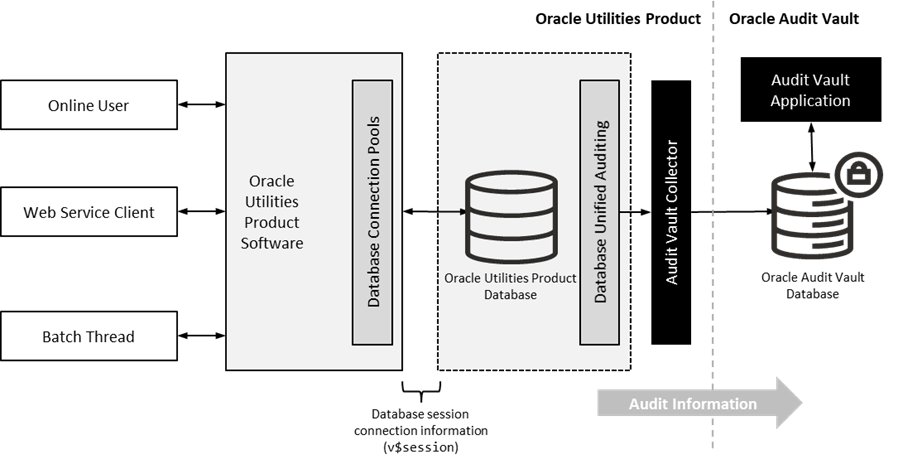
Refer to the Technical Best Practices For Oracle Utilities Application Framework Based Products (KB679040)available from My Oracle Support for additional advice.The Oracle Utilities Application Framework contains an internal audit facility that provides a basic audit facility for recording changes and optionally, inquiring, data by online users. Whilst this facility is enough for most needs it may be replaced with using Oracle Audit Vault to provide an enterprise wide audit facility.
Oracle Utilities Application Framework supports the use of Audit vault in association or as a complete replacement for the inbuilt Auditing feature.
Audit Vault collects audit information at the database level, using the Database Auditing features of the Oracle Database, and loads them into a separate Audit Vault database.
The information in that database can be queried, reported and managed using the Audit Vault front end.
Figure 8-1 Audit Vault Integration
To use Audit Vault, the following must be configured:
| Configuration | Description |
|---|---|
| Setup Database Auditing | The Database auditing feature must be enabled to store the relevant audit information. The level of auditing information and the location of the audit information is configurable. Refer to the Oracle Database Security Guide for a discussion of Database Auditing and Best Practices for Auditing for a discussion of the various methods available. |
| Design Database Auditing | The tables, users and SQL statements to audit need to be specified on the product database. This typically done by the database administrator using the AUDIT statement. |
| Install and Configure Audit Collector | On the host holding the product database an Audit Vault Agent needs to be configured to pass audit information to Audit Vault and implement data retention policies for audit information. |
| Configure Audit Vault | Audit Vault can be configured to implement policies, alerts and reports on the Audit data. Audit Vault can be configured to set an Audit Data Retention Policy for its internal audit information. |