Business Application Server Configuration
It is possible for the business application server’s logic to be separated from the Web Application Server component. Essentially, your application has been split into TWO distinct EAR files:
- SPLWeb.ear (SPLWEBAPP - Name of Web Application Server Application)– This contains the Web application server component for the product.
- SPLService.ear (SPLSERVICEAPP - Name of Business Application Server Application) – This contains the business application server component for the product.
There are two modes of installation:
Figure 6-6 Installation Modes
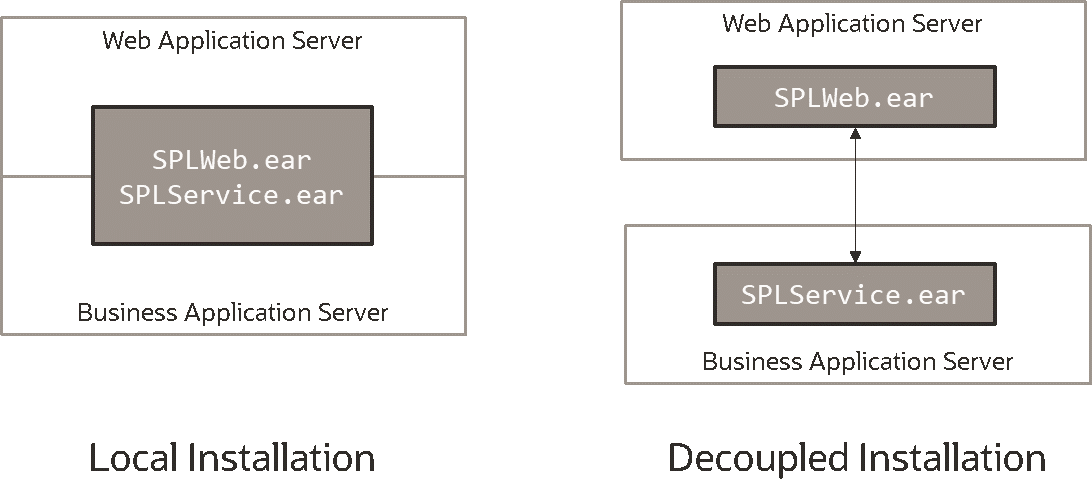
- Local Installation (also applicable to expanded installations for Development environments) - The Web application server and Business Application are on the same instance of the JEE Web application server. This is the default behavior of the product for backward compatibility. If this is the mode installed then for configuration the process is a combination of the Web Application Server Configuration and Business Application Server Configuration configuration and deployment process.
Note:
Local installations are recommended for all environments. - Decoupled Installation – The business application server is on a separate instance of the JEE web application server. This may be the same machine or different machines. In this case the Web Application Server Configuration and Business Application Server Configuration are managed and configured separately. To perform a decoupled installation the following must be performed:
- The product is installed on the machines housing the Web Application Server and Business Application Server Configuration
- A set of servers within one or more instances of the JEE Web Application Server must be created to house the Web Application Server Configuration and the Business Application Server Configuration separately. This can be on the same machine or across machines.
- The web and business application servers are configured as outlined in Web Application Server Configuration and Business Application Server Configuration.
- The WAR/EAR files generated are deployed separately with the
SPLWeb.ear(or set by SPLWEBAPP - Name of Web Application Server Application) EAR file deployed to the web application server as outlined in Web Application Server Deployment Process andSPLService.earEAR file (or set by SPLSERVICEAPP - Name of Business Application Server Application) deployed to the Business Application Server Configuration as outlined in Business Application Server Deployment Process.Note:
For customers using Oracle ExaLogic, Oracle highly recommend that local installations be used for performance reasons.
Business Application Server Concepts
As previously mentioned, the Business Application Server component can be deployed within a separate instance of the JEE Web Application Server software. This effectively allows the business application server to be on separate hardware for architectures where this is a requirement. Typically this separation is implemented for a number of reasons:
- The site has an architectural principle for separating the web and the business application servers.
- The site prefers to optimize the individual servers for the individual tiers rather than having to compromise when two or more tiers are on the same platform.
The Business Application Server was designed to fit within the same concepts as the Web Application Server. The main differences are:
- Enterprise Java Beans (stateless) are used in the business application server instead of the Java Server Pages, which are used in the web application server. The name of the EJB is
spl-servicebean-<version>.jar(where<version>is the version of the product, for example: 2.0.0). - Database connectivity is configured in the business application server.
The rest of this section will outline the differences specifically for the business application server.
Business Application Server Configuration Files
Each JEE web application within the JEE web application server has its own configuration files. These files are typically embedded within the WAR/EAR files deployed with the product following the JEE specification (refer the discussion of allowing the externalization of configuration settings for alternative methods). In terms of configuration, your application’s structure within the WAR/EAR file is as follows:
| Configuration Files | Content |
|---|---|
| ejb-jar.xml - Enterprise Java Server Beans Configuration | Enterprise Service Bean configuration |
| hibernate.properties - Database Connectivity Settings | Database connectivity |
| log4j2.properties – Product Logging Configuration | Logging configuration |
| spl.properties – Product Behaviour Settings | Behavior configuration |
| web.xml – JEE Deployment Descriptor | Deployment Descriptor |
| weblogic.xml – Oracle WebLogic Extensions | WebLogic extensions |
| weblogic-ejb-jar.xml - WebLogic Extensions for Enterprise Java Server Beans | WebLogic extensions for Enterprise Service Bean configuration |
Business Application Server Configuration Process
Figure 6-7 Business Application Server Configuration Process
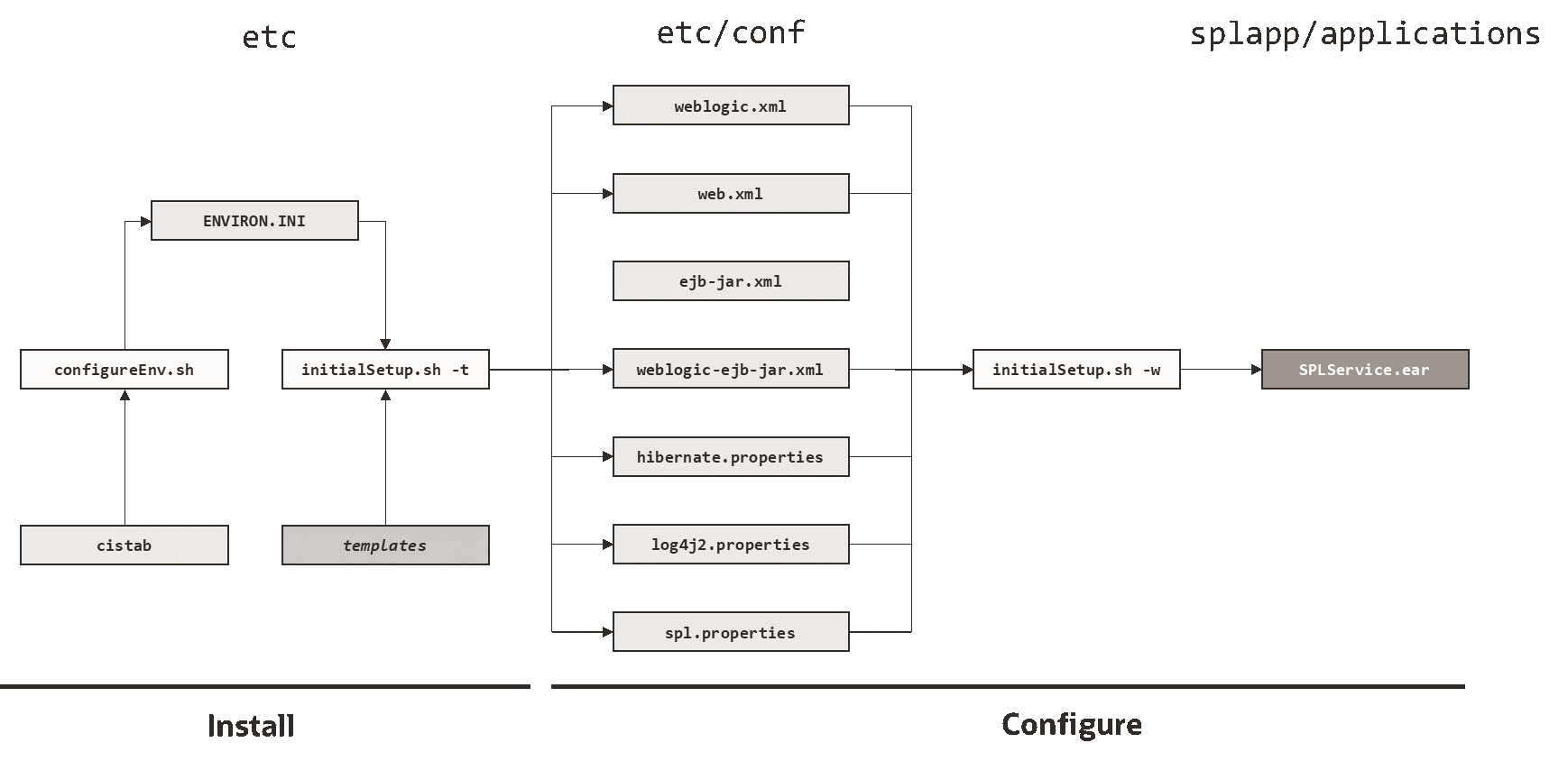
- The configureEnv – Set up Environment Settings utility is used during installation time and can be used post implementation to set parameters in the ENVIRON.INI. If any parameters are derived or set from the ENVIRON.INI (see the Source column in the relevant section) then the ENVIRON.INI utility should be used to maintain them.
Note:
The configureEnv – Set up Environment Settings utility should be used to make ANY changes to the ENVIRON.INI. Manual changes to this configuration file are not recommended. - After the ENVIRON.INI has been set or altered, the settings must be reflected in the relevant configuration files used by the business application server by running the
initialSetup(see for details):- log4j2.properties – Product Logging Configuration
- spl.properties – Product Behaviour Settings
- hibernate.properties - Database Connectivity Settings
- web.xml – JEE Deployment Descriptor
- weblogic.xml – Oracle WebLogic Extensions
- ejb-jar.xml - Enterprise Java Server Beans Configurationejb-jar.xml
- weblogic-ejb-jar.xml - WebLogic Extensions for Enterprise Java Server Beans
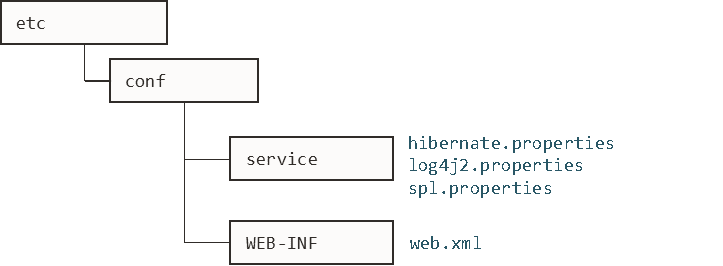
- The utility uses the templates from the templates directory to create substituted copies of these files in a standard location:
Configuration File Destination Service Bean web.xml – JEE Deployment DescriptorTemplate: web.xml.template$SPLEBASE/etc/conf/WEB-INFspl.properties – Product Behaviour SettingsTemplate: spl.properties.service.template$SPLEBASE/etc/conf/service$SPLEBASE/splapp/businessapp/propertieslog4j2.properties – Product Logging ConfigurationTemplate: log4j2.properties.service.template$SPLEBASE/etc/conf/service$SPLEBASE/splapp/businessapp/propertieshibernate.properties - Database Connectivity SettingsTemplate: hibernate.properties.web.template$SPLEBASE/etc/conf/serviceejb-jar.xml - Enterprise Java Server Beans ConfigurationTemplate: ejb-jar.xml.template$SPLEBASE/splapp/businessapp/config/META-INFweblogic-ejb-jar.xml - WebLogic Extensions for Enterprise Java Server BeansTemplate: weblogic-ejb-jar.xml.template$SPLEBASE/splapp/businessapp/config/META-INFThe locations of the configuration files can be summarized in the following figure:Figure 6-8 Locations of configuration files
- At this point you may perform manual changes to the above files to parameters not implemented in the ENVIRON.INI.
Note:
Any manual changes are overwritten after running theinitialSetuputility unless the change is reflected in the appropriate template (see initialSetup – Maintain Configuration Settings for more information). Backups should be made of any changes and then manually reapplied to reinstate all manual changes. - To reflect configuration changes into the product Business EJB Applications the initialSetup utility, with the –w option, must be executed (see initialSetup – Maintain Configuration Settings). This will build the necessary
spl-servicebean-<version>.jar(where<version>is the version of the product used) and theSPLService.earEAR file (or name set by SPLSERVICEAPP - Name of Business Application Server Application) to be deployed into the Oracle Weblogic Domain. This step is optional if configuration overrides are in use (refer the discussion of allowing the externalization of configuration settings for alternative methods). - Depending on the architecture used, the
initialSetupwill generate one or more EAR files.
At this point the product business applications are ready for deployment into the Oracle Weblogic Domain.
Quick Reference Guide for Business Application Server Configuration
To make configuration changes to the business application server component, use the following Quick Reference Guide to identify which process should be used:
- If the change is to any setting contained in the ENVIRON.INI for the business application server, then you must run the following utilities in the order indicated:
- Execute the configureEnv – Set up Environment Settings utility to reflect the parameter change in the ENVIRON.INI.
- Execute the
initialSetuputility (using the–toption) to rebuild the configuration files using the ENVIRON.INIand provided template files. This will reset the configuration to the contents of the base template files or custom template (if used). See initialSetup – Maintain Configuration Settings for details. - Any configuration changes that are overridden by templates (base or custom) must be manually reapplied (if necessary).
- Execute the
initialSetuputility (with the–woption) to implement the configuration files in the product business application files. This step is not necessary of you are using configuration overrides.
- If the change is to any setting not contained in the ENVIRON.INI for the business application server, but is in the configuration files for the business application server, then you must run the following utilities in the order indicated:
- Make any manual changes to the relevant configuration files.
- Execute the
initialSetuputility (with the-woption) to implement the configuration files in the business application server files. This step is not necessary of you are using configuration overrides.
Business Application Server Deployment Process
After the configuration of the business application server is complete (as outlined in Business Application Server Configuration Process), the final step to implement your application is to deploy the product within the JEE Web application server.
There are three methods of deploying the product within the JEE web application server:
- Use the deployment utilities provided on the console of the JEE web application server. The WAR/EAR files that are available under
$SPLEBASE/splapp/applicationscan be manually deployed using the console. Refer to the Installation Guide for specific platform instructions, and to the Administration Guide for the JEE web application server. - Use the deployment utilities provided on the command line of the JEE Web application server. The WAR/EAR files that are available under
$SPLEBASE/splapp/applicationscan be manually deployed using the JEE Web application server vendor supplied deployment command line utilities. Refer to the Installation Guide for specific platform instructions and the administration guide for the JEE Web application server. - Several specific utilities for JEE Web Application are provided with the product to deploy the EJB Application to the JEE Web application server. These call the same utilities provided in the previous option but are provided with the product.
This section will outline the latter option.
Figure 6-9 Business Application Server Deployment Utilities
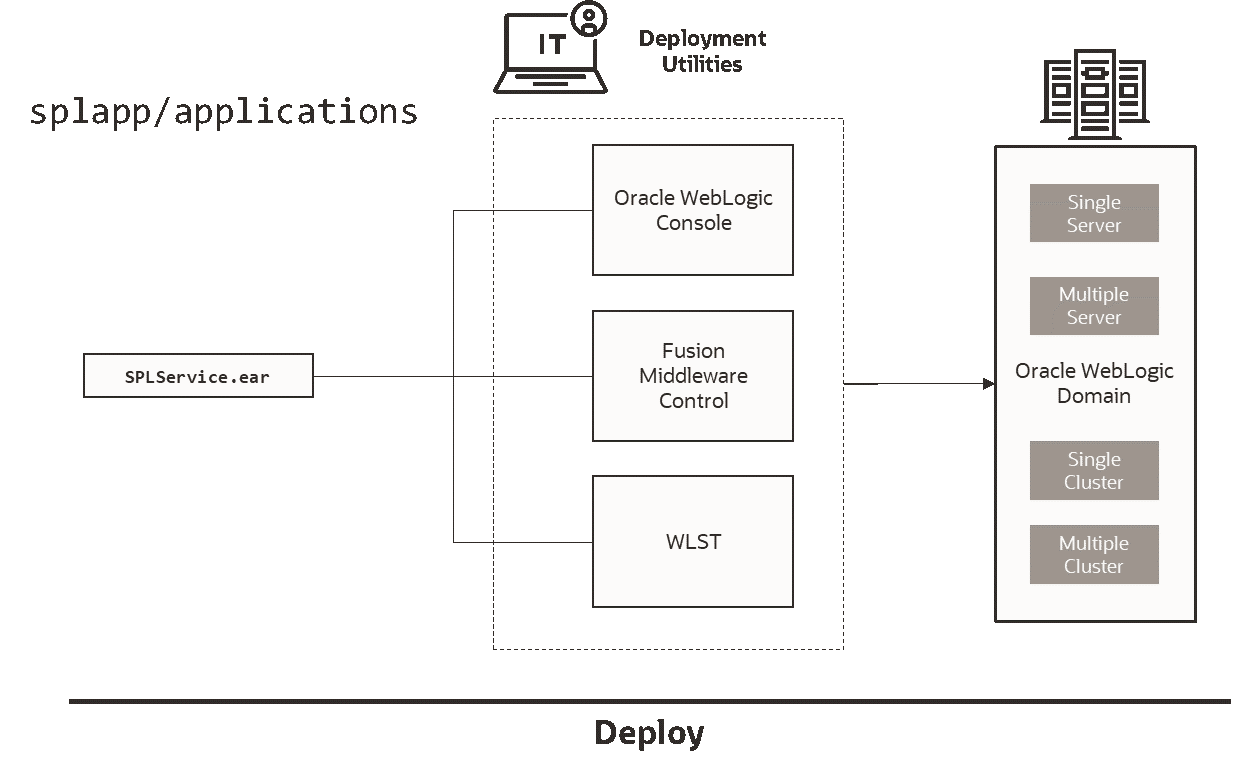
- Use the WebLogic console, Fusion Middleware Control or WLST to deploy/redeploy the EAR files.