Batch Server Configuration
The batch component contains several configuration files and utilities to manage the configuration of the cluster, threadpools, and submitters. This section outlines the configuration files and configuration process for configuring batch.
Batch Configuration Files
As with the online component of the Oracle Utilities Application Framework there are a number of configuration files that control the performance and behaviour of the batch component.
The batch component houses the configuration files differently to the online and web services component. The online and web services are housed within a JEE Web Application Server and therefore the configuration files are located according to the JEE standards.
In the batch component the configuration is housed in directories as the batch component is housed as a standalone process that is clustered using Oracle Coherence. Therefore, during the configuration process, the configuration files used by the batch component are built using templates using the initialSetup utility. This utility deposits the configuration files in the $SPLEBASE\splapp\standalone\config directory. See initialSetup – Maintain Configuration Settings for details.
Figure 6-15 Batch Configuration Files Directory Structure
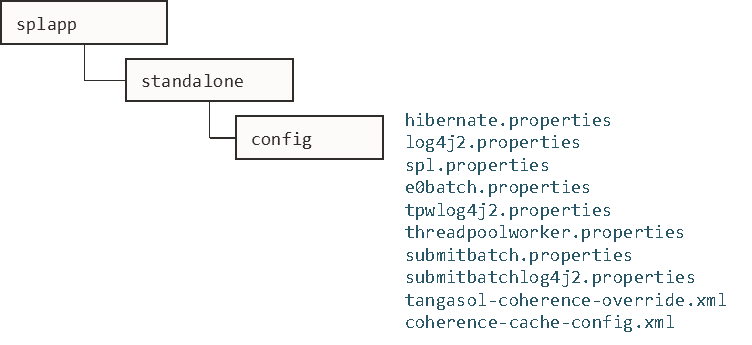
The table below outlines the main batch configuration files:
| Configuration File | Content |
|---|---|
| e0Batch.properties - General Batch Properties | General environment settings |
| hibernate.properties - Database Connectivity Settings | Database connectivity |
| log4j2.properties – Product Logging Configuration | Login settings
|
| spl.properties – Product Behaviour Settings | Application behaviour |
| submitbatch.properties - Submitter Configuration (BATCH) | submitjob default settings
|
| threadpoolworker.properties - Threadpool Configuration (BATCH) | threadpoolworker configuration
|
| coherence-cache-config.xml - Oracle Coherence Configuration (BATCH) | Cache settings for cluster |
| tangosol-coherence-override.xml - Coherence Overrides (BATCH) | Override setting for cluster |
General Configuration Process
Figure 6-16 Batch Application Server Configuration Process
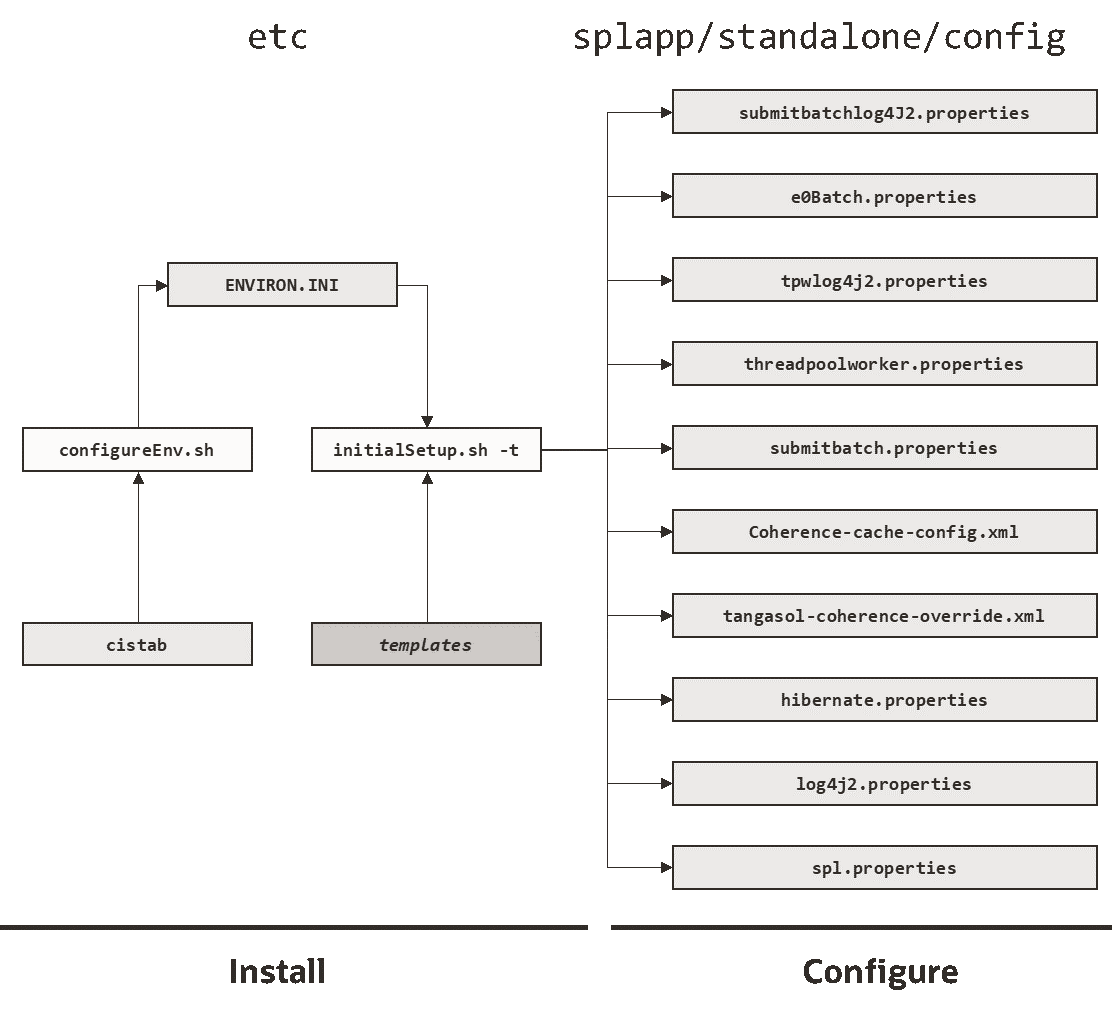
- The
configureEnvutility is used during installation time and can be used post installation to set parameters in the ENVIRON.INI. See configureEnv – Set up Environment Settings for details.Note:
TheconfigureEnvutility should be used to make any changes to the ENVIRON.INI. Manual changes to this configuration file are not recommended. - After the ENVIRON.INI has been set or altered, the settings must be reflected in the relevant configuration files used by the batch component using the
initialSetuputility. TheinitialSetuputility takes the relevant templates, builds the configuration files and deposits them in the$SPLEBASE\splapp\standalone\configdirectory. See initialSetup – Maintain Configuration Settings for details.
The configuration files are now ready to be used for the batch component. Additional
configuration can be performed using bedit. See Configuring Batch
Using Bedit for details.
Configuring Batch Using Bedit
The bedit - Batch Edit utility is a set of wizards that allow a batch configuration to be built for an implementation using simple commands. The utility uses a set of templates to build a complete set of configuration files for the cluster, its threadpools and submitters at a global and individual level.
For guidelines and scenarios using this facility, refer to the Batch Best Practices (KB504761) document available from My Oracle Support.
Batch Configuration Overview Using Bedit
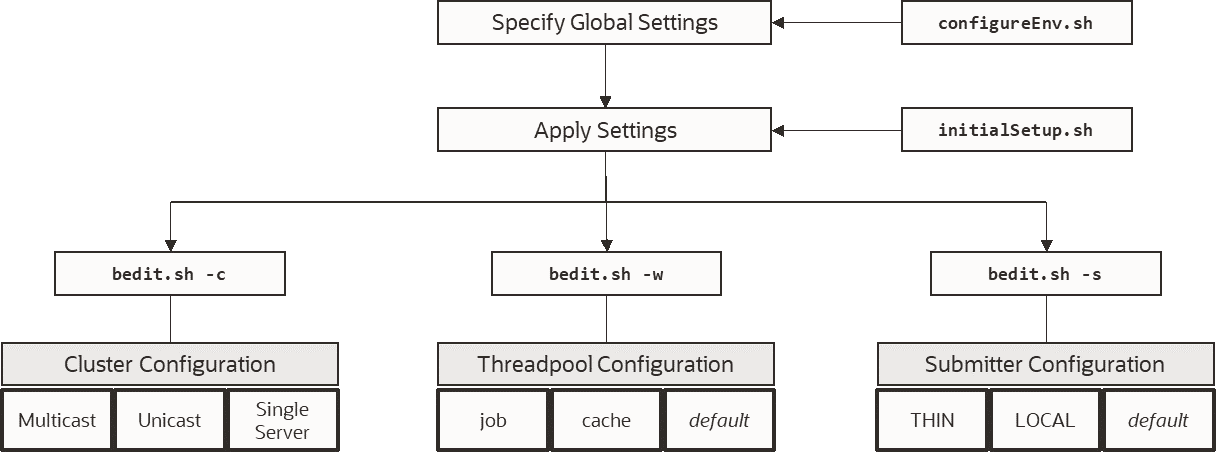
The bedit utility allows for a set of configuration files to be built on top of the global configuration setting managed using the Batch Configuration Guidelines. The following process should be used:
- Global Settings - Specify global batch settings using the
configureEnvutility to set the defaults in the ENVIRON.INI. See configureEnv – Set up Environment Settings for details. - Apply Settings - Apply any configuration settings to the global templates and default configuration files using the
initialSetuputility. See initialSetup – Maintain Configuration Settings for details.Note:
Use the-toption to allow templates to be rebuilt only. Using other options may affect online. - Perform Cluster Configuration - Configure the desired cluster configuration using bedit utility. Clusters are set up once per environment in either using multicast, unicast or single server optimized configurations. See Cluster Configuration using bedit for details.
- Perform Threadpoolworker Configuration - Configure the desired threadpoolworker configuration using bedit. Threadpoolworkers can be created on an individual basis with unique configurations or labelled to share configurations. See Threadpoolworker Configuration Using Bedit for details.
- Perform Submitter Configuration - Configure the desired submitter configuration using bedit. Submitters can be set up for specific development execution modes (
THINorLOCAL), generic configuration or project specific jobs. See Submitter Configuration using bedit for details.
Figure 6-17 Batch Setting Process
Note:
At any time, the file name and location of the generated file is determined at the start of the edit session or using thewhat
command.
Batch Edit Usage Guidelines
The bedit utility is available to simplify the creation and maintenance of these files to promote stability and flexibility whilst minimizing maintenance mistakes (see bedit - Batch Edit for details). The following guidelines apply when using the utility:
- The command line options specify the configuration file to be modified. The specific configuration file or the shortcut option can be used to set the scope of the command.
- Pre-optimized specialist templates (with the
.beextension) are used to decide the parameters applicable to the setting or command used in the configuration file being edited. The template name is displayed at the start of execution to confirm the configuration file edited. - Configuration settings can be added, modified or deleted using interactive commands. The following commands are supported:
Command Usage add <group>Add a group <group>with all its sub-elements. Values for the variables are defaulted from the template.del <group>Delete the group <group>and all its sub-elements.exitExit the editor. If changes have been made, confirmation may be required. help <topic>Show online help for command or setting. Without a topic a list of topics for the configuration file and commands are listed saveSave any changes to the configuration file. set <var> <value>This command to update a variable's <var>to value<value>. If there are multiple sub-elements for a group, the variable name must be fully qualified by its parent group(s) - for exampleset pool.2 poolname DEFAULT. If there is only one group, the variable does not need to be qualified - for exampleset poolname DEFAULT.whatThis command shows which file is being edited and the template on which it is based. - The templates will generate the necessary settings based upon the scope of the command. Use the online help to determine valid settings for your configuration.
- User preferences for labels and cluster types are stored in the
be.prefsfile. - Using the
savecommand will reflect your changes to the configuration file directly. - If exit command is issued and changes have been detected, then a confirmation message will be issued. Press
yto save,nto quit without saving orcto cancel out of exit command.
Each subsection will outline specific settings within the scope of each configuration.
Cluster Configuration using bedit
Oracle Coherence is used to define and manage the batch cluster. The cluster must be configured to decide how the cluster will operate on the network and the scope of the cluster. The major decision for this step in the process is the type of cluster to implement. There are three styles of cluster supported:
- Multicast cluster (default) - A batch cluster based upon the multicast network protocol. The protocol requires a multicast address and common port. This protocol supports dynamic clustering.
- Unicast cluster - A batch cluster based upon unicast network protocol. Each host and port in the cluster must be explicitly configured and each server must be.
- Single Server cluster - A batch cluster confined to a single server using unicast. This is designed for use in non-production environments to simplify the configuration.
The templates for these cluster types are as follows:
| Template | Usage |
|---|---|
tangosol-coherence-override.mc.be
|
Multicast cluster |
tangosol-coherence-override.ss.be
|
Single Server cluster (useful for non-production environments) |
tangosol-coherence-override.wka.be
|
Unicast (or wka) cluster |
To configure the cluster use one of the example commands:
| Command | Description |
|---|---|
bedit.sh -c -t <type>
|
Create or edit Cluster configuration. The -t option is used to
set the cluster type as specified (mc - Multicast,
wka - Unicast or ss - Single Server). Specifying
the -t option on an already defined cluster may change the
type
|
bedit.sh -c
|
Maintain the cluster configuration. Cluster type is defaulted from
be.prefs.
|
bedit.sh tangosol-coherence-override.xml
|
Edit the tangosol-coherence-override.xml file.
|
Once the configuration is opened the following settings need to be configured:
| Variable | ss | wka | mc | Recommendations |
|---|---|---|---|---|
cluster
|
■ | ■ | ■ | Unique cluster name for environment. This must be unique for the cluster. Typically use the environment name or database name. |
address
|
■ | ■ | ■ | IP address or host name for this node in the cluster. Use localhost if possible, to minimize maintenance across hosts. |
port
|
■ | ■ | ■ | Unique port used for cluster. This must be unique per cluster per host. It use will vary from cluster t ype to cluster type. Refer to the online help for more information. |
loglevel
|
■ | ■ | ■ | The logging level associated with cluster operations. Refer to the online help to decide the amount of information you wish to log. The higher the value the more that is logged. High values are used by developers typically. |
mode
|
■ | ■ | ■ | The Coherence mode that the cluster is to be scoped to. Refer to the online help for more information. |
socket
|
■ | This is a section for each of the hosts in the Well Known Address format. Each host is a separate socket entry. Refer to the online help for more information. | ||
wkaaddress
|
■ | The IP address or host name of the member of the cluster assigned to this socket. | ||
wkaport
|
■ | The port number assigned of the member of the cluster assigned to this socket.
This value ideally is the same across all hosts in the cluster but can be overridden
to overcome port conflicts. The port number on each node must match the number
assigned to the port value.
|
For unicast implementations a socket section must be created per host/port combination defined in the file using the following commands:
- Use the
add socketcommand to add a new socket group. The group name generated will be in the formsocket.<number>where<number>is the sequence number. For example:
> add socket
…
socket.2
wkaaddress (localhost)
wkaport (42020)- Set the
wkaaddressandwkaportusing theset socket.<number> <variable> <value>where<number>is the sequence number,<variable>iswkaaddressorwkaportand<value>is the desired value. For example:
>set socket.2 wkaport 6402
…
socket.2
wkaaddress (localhost)
wkaport (6402)- Repeat for each node in the cluster.
Threadpoolworker Configuration Using Bedit
Once a cluster is defined, the threadpools that will execute across that cluster must be defined with their name and attributes. Oracle Utilities Application Framework applications support different types of threadpools that can execute batch processes with the following:
- Cache Threadpools - Threadpoolworkers that do not execute jobs but act as co-ordination node for network traffic. It is recommended that there be at least one cache threadpool per physical host per cluster. For a discussion of cache threadpools, see the Batch Best Practices (KB504761) document available from My Oracle Support. This threadpool type has tangosol.coherence.distributed.localstorage - DistributedCache Storage set to
true. - Job Threadpools - Threadpoolworkers that are optimized to run batch threads with support for additional java options and other cluster specific optimization settings.
- Default Threadpools - For backward compatibility, the default template used is pre-optimized with settings from past releases. It is recommended to migrate from this template to job template.
The templates for these threadpool types are as follows:
| Template | Usage |
|---|---|
threadpoolworker.be.template
|
Default template |
threadpoolworker.cache.be.template
|
Cache Threadpool template |
threadpoolworker.job.be.template
|
Job Threadpool templates |
To configure the cluster use one of the example commands:
| Command | Description |
|---|---|
bedit.sh -w -l <type> |
Create or edit threadpool configuration. The -l option is used
to set the label type as specified (cache - cache or
job - Job).
|
bedit.sh -w |
Maintain the default threadpool configuration. |
bedit.sh threadpoolworker.properties |
Edit the threadpoolworker.properties file.
|
Once the configuration is opened the following settings need to be configured:
| Parameter | Recommendations |
|---|---|
minheap
|
Minimum JVM Heap size |
maxheap
|
Maximum JVM Heap size |
maxperm
|
Maximum JVM permgen size |
daemon
|
Whether the threadpool should run the online submission daemon. This value should be set to false for production environments. |
dkidisabled
|
Key insert behavior |
storage
|
Whether local storage is enabled. Used for cache threadpools. |
distthds
|
Number of internal threads used for cache threadpools. |
invocthds
|
Number of internal threads used for invocation services. |
role
|
Information role for the threadpools used for monitoring |
jmxstartport
|
JMX Start Port |
pool
|
Group section for each threadpool |
poolname
|
Name of threadpool |
threads
|
Maximum number of threads for the threadpool per instance |
For multiple threadpools per configuration use the following process:
- Use the
add poolcommand to add a new pool group. The group name generated will be in the formpool.<number>where<number>is the sequence number. For example:
> add pool
…
pool.2
wkaaddress (localhost)
wkaport (42020)- Set the
poolnameandthreadsusing theset pool.<number> <variable> <value>where<number>is the sequence number,<variable>ispoolnameorthreadsand<value>is the desired value.
Submitter Configuration using bedit
The last step in configuration is to configure the submitters. A submitter is a JVM that submits jobs or threads of jobs to a threadpoolworker and waits for the thread to complete. It is responsible for interfacing to the threadpoolworker and also provides an interface to the process that submits the jobs in the first place (e.g. a third party batch scheduler or Oracle Scheduler).
A submitter needs one or more of the following pieces of information:
- It needs a configuration file that defines the parameters to be used for the individual batch process being executed. These can be global configuration files or individual configuration files optimized for a batch process.
- Command line options to set or override configuration parameters that define the execution parameters for the individual process or thread.
The single execution of a submitter can run a single threaded batch job, a single individual thread of a multi-threaded batch job or all threads of a multi-threaded job.
To create a specific configuration file for a batch job any of the following commands can be used:
| Command | Description |
|---|---|
bedit.sh -l <type>
|
Create or edit submitter configuration. The -l option is used
to set the label type for development purposes as specified (THIN -
THIN mode or LOCAL- local mode).
|
bedit.sh -b <batch_cd>
|
Create or edit submitter configuration for job
<batch_cd>.
|
bedit.sh -s
|
Edit default submitter configuration |
Once the configuration is opened the following settings need to be configured:
| Parameter | Recommendations |
|---|---|
poolname
|
Name of threadpool to execute this submitter within. |
threads
|
Thread limit of submitter. The number of threadsmust be equal to or less than the number of threads allocated to executing instances of the threadpool. |
commit
|
Default commit interval. This overrides the commit interval defined internally for the batch job. |
user
|
The userid, defined to the User record, to be used to determine execution permissions and is used for records updated and created by this process. This MUST be a valid defined used. |
lang
|
The language pack used for the batch process (the default is ENG). |
storage
|
This sets whether this node is a storage node. Used for submitters that use THIN mode (for developers). This value is recommended to be set to false for all other submitter types.
|
role
|
The role used for this submitter. This is used for the JMX monitoring interface as a filter. By default the batch code used for this value. |
soft
|
Group section for soft parameters. One section per parameter. |
parm
|
Parameter name as outlined on Batch Control. |
value
|
Value assigned to the parameter. |
For multiple parameters per configuration use the following process:
- Use the
add softcommand to add a new parameter group. The group name generated will be in the formsoft.<number>where<number>is the sequence number. For example:
> add soft
…
  soft.2
      parm (maxErrors)
value (500)- Set the
parmandvalueusing theset pool.<number> <variable> <value>where where<number>is the sequence number,<variable>isparmorvalueand<value>is the desired value. For example:
> set soft.2 parm fred
…
  soft.2
      parm (fred)
      value (500)
Batch Configuration Guidelines
The following sections outline general guidelines for batch configuration.
Cache Threadpools
One of the new facilities in the batch architecture is the ability to define cache or storage nodes in your architecture. By default a batch cluster communicates across the cluster elements such as threadpools the state of other elements in the cluster. While this has benefits, as any element in the cluster can be queried, through JMX, to find out the global status of all active processes in that cluster, it can generate a large amounts of network traffic and cause instability as the cluster is performing a large amount of maintenance operations. To address this, your application now allows you to create cache or storage threadpools. These act as conduits with the architecture and greatly reduce the network traffic and overheads in managing the cluster. This translates to more stable clusters.
Figure 6-18 Cache Threadpool Communications
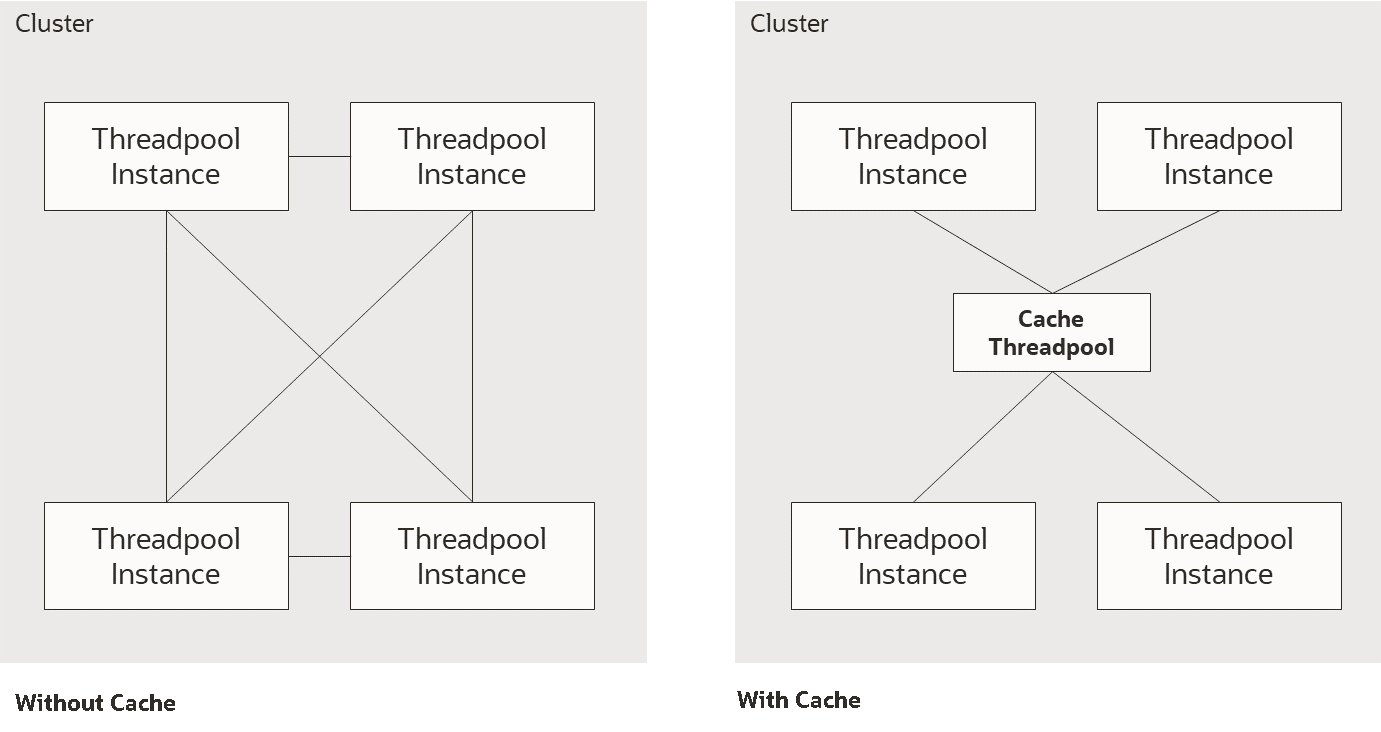
The performance advantages of the cache increases with the number of elements the cluster must manage and cache threadpools have the following implementation recommendations:
- Cache threadpools do not execute any threads of any jobs within them. They are exclusively used for administration, a storage node for the cluster state and a conduit for cluster management.
- Cache threadpools act as Coherence local storage nodes to maintain the integrity of the cluster and allow cluster management.
- Cache threadpools are ideally suited to allow JMX connections to monitor the performance of the cluster using the Batch JMX Referenceinterface.
At least one cache threadpool per cluster per host is recommended. Multiple cache threadpools can be implemented where high availability is required or there are a large number of submitters, threads and/or threadpools to manage.
If a cache threadpool, is shut down and no cache threadpools are active at any time, the cluster will not revert to individual elements communicating across other elements.
To create cache clusters, use the bedit.sh -l cache command. A prebuilt template is created for the cache where storage is enabled, distthds, invocthds and the number of threads is set to 0 (to prevent jobs from running in the cache). See bedit - Batch Edit for details.
Adding Custom JMX Information to Jobs
f1.jmxInfo for filtering purposes or additional documentation. For example:
Figure 6-19 Adding Custom JMX Information
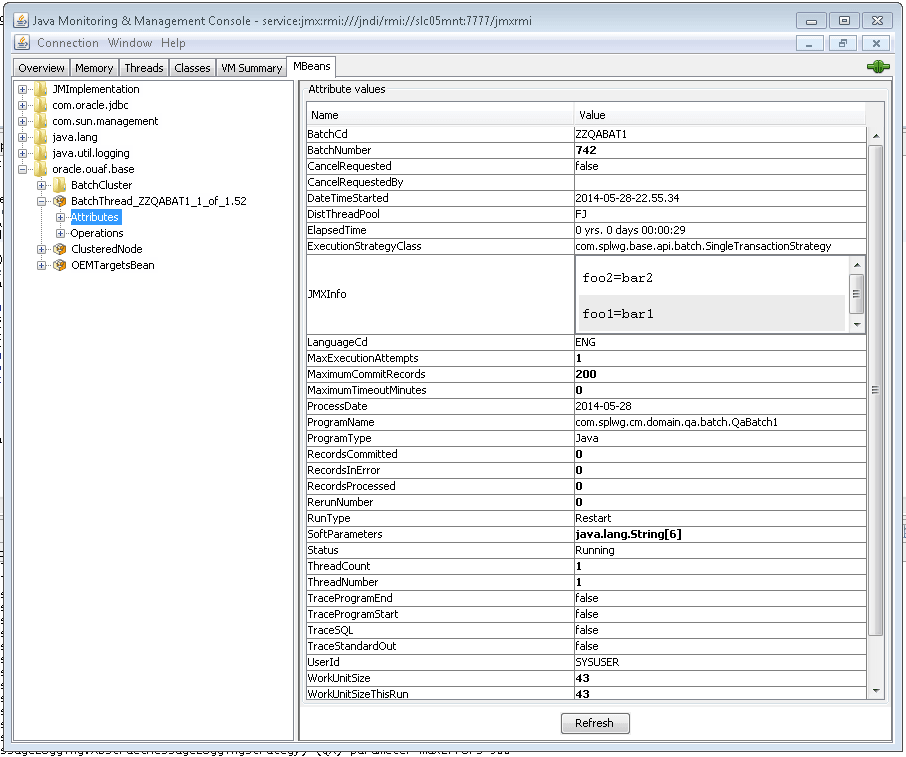
The submitbatch.properties file for the particular job should have the
following additional parameter:
com.splwg.batch.submitter.softParameter.f1.jmxInfo.<tag>=<value>
where:
<tag> |
Additional JMX information identifier |
<value> |
Value for parameter |
Multiple parameters of this type are supported within a single configuration file.
For example:
com.splwg.batch.submitter.softParameter.f1.jmxInfo.foo=barWhen using bedit the command sequence to use this facility is:
- Add a soft parameter section for each desaired tag/value pair using the command (a section
soft.<sequence>is created where<sequence>is a generated sequence number):add soft - Specify the parm property as
f1.jmxInfo.<tag>where<tag>is the desired tag using the command:set soft.<sequence> parm f1.jmxInfo.<tag> - Specify the value property as the desired value for the tag using the command:
set soft.<sequence> value <value>
It is possible to specify this setting on the submitjob.sh command using the -x option (see submitjob.sh - Submit Batch Threads (Legacy Method of Batch Submission)). For example:
submit.sh … -x f1.jmxInfo.foo=bar