5 Building Queries and Exploring Data
A demonstration area can be accessed at https://api.us.opower.com/util/graphql for users who have retrieved the required credentials and account-scoped access tokens as described in Requirements and Limitations. With Access to this GraphQL Integrated Development Environment (IDE), you can begin to build your queries or mutations, and explore the available data. Along with using the IDE, you can also use curl to query the GraphQL environment.
Note:
For more information on the GraphQL standard, refer to https://graphql.orgUsing the GraphiQL IDE
GraphiQL is the IDE available for reviewing and discovering the GraphQL APIs. For information on the user interface, the link in the top-right corner of the interface redirects to the applicable Github repository that includes documentation resources on GraphiQL.
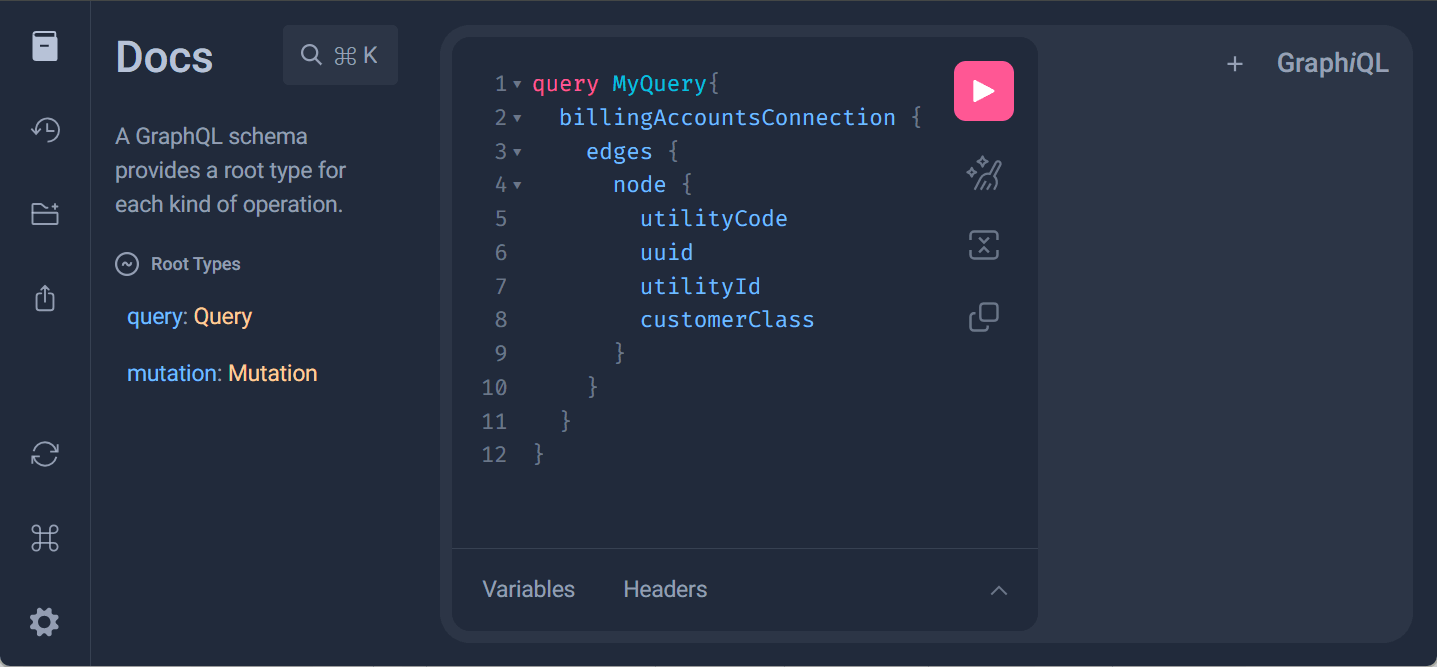
Reviewing the Schema
From the GraphiQL IDE at https://api.us.opower.com/util/graphql, you can select to Show Documentation Explorer to review the schema definition. The Documentation Explorer allows you to traverse through the schema. A search field is also available to search for schema definitions of interest.
Note:
Schema definitions can include links to Oracle and third-party resources. Be aware that navigating to these resources can redirect your active window away from the GraphiQL IDE. You can use various methods to open these resources is separate browser windows and tabs to avoid this redirection.Building a Query
The GraphiQL IDE allows you to easily build a query and expand on the query to explore available data. You can select to Show GraphiQL Explorer to display the Explorer area. This area allows you to browse through the schema and select elements to add to your query.
For example, since all queries use the
billingAccountsConnection entry point, you can select
it to include it in a new query tab. This query creation can
continue by Reviewing the Schema to learn
about subfields to include in your query, and typing in the new
elements or selecting them from the Explorer.
As you continue to build your query, the IDE validates the syntax of your query. As you complete query definitions you can confirm that your query is valid by ensuring there are no syntax errors. The GraphQL protocol uses the concepts of edges and nodes to structure the queries. Refer to third-party GraphQL documentation if you are unfamiliar with query structure and design in GraphQL.
Building a Mutation
While queries in GraphQL allow for retrieving data, mutations provide the capability of modifying data. Be aware of the following GraphQL standards related to mutations:
- Mutations and queries cannot be included in a single request. Each style of request must be done separately.
- The order of your mutations impacts the processing of the mutation. While queries are executed in parallel, mutations are executed in series to avoid update race conditions.
You can build your mutation query by Reviewing the Schema to learn about subfields to include in your mutation, and typing in the new elements or selecting them from the Explorer. The IDE validates the syntax of your query. As you complete mutation definitions you can confirm that your mutation is valid by ensuring there are no syntax errors. Refer to third-party GraphQL documentation if you are unfamiliar with mutation structure and design in GraphQL.
Running a Query or Mutation
As part of running a query or mutation, you must supply the authorization context, which is accomplished through an access token which can be done using the following methods.
Running a Query or Mutation Using Account-Scoped Access Tokens
Request an account-scoped access token from Oracle Utilities
through a service request. After retrieving an access token, the
access token must be included in the HTTP header for authorization
purposes. You can include the access token in the Headers
area when building your query, using the following syntax and
replacing the access token in the AccessToken placeholder:
Note:
Be aware that access tokens expire and no longer provide access 60 minutes after their creation.{
"Authorization": "Bearer AccessToken"
}When you are ready to run your query, you can select the Execute query option. Results are displayed directly within the IDE. After you are able to validate expected results from the query you can integrate the query into your system as required.
Running a Query or Mutation Using Utility-Scoped Access Tokens
Complete the process described in Obtaining a Utility-Scoped Access Token. Be aware that when using utility-scoped tokens, an applicable utility code and account numbers must be supplied as parameters of the query. For mutations, an applicable urn must be supplied as parameters of the mutation. A valid urn for use in mutations can be retrieved through queries on the entity to modify with a mutation. These parameters are further described in Example Queries.
Be aware that while reviewing the schema and building queries using https://api.us.opower.com/util/graphql is open to all users, running queries in this location requires account-scoped access tokens. The schema review is identical regardless of the style of access token being used. Additionally, the queries used are also identical aside from the inclusion of a utility code and account numbers, or an urn for mutations, when using utility-code access tokens. For this reason, if you plan to use utility-scoped access tokens, you can use https://api.us.opower.com/util/graphql to review the schema and build your query. To successfully run a query with utility-scoped access tokens, you must do so from https://api.us.opower.com/graphql.
Using Curl
While the GraphiQL IDE provides an easy way to browse the schema and build queries or mutations, queries or mutations can also be run using curl. This can be helpful if you are building off of a known query or mutation, or sharing a query or mutation with a collaborator to test or confirm expected results.
The basic syntax for a curl command for GraphQL is as follows:
curl '[baseURL]' \
-X [method] \
-H '[header]' \
-d '{[query]}'
Where:
-
[baseURL]is the base URL to query the GraphQL resources. The demonstration area which supports account-scoped access tokens uses a base URL ofhttps://api.us.opower.com/util/graphql. For more information on constructing the base URL, refer to:- Utility-Scoped Access Token: Refer to Constructing the Base URL.
- Account-Scoped Access Token: Refer to Constructing the Base URL.
-
[method]is the method for the query, such as POST. -
[header]can include required header information, such as supplying an access token. For information on retrieving this required access token:- Utility-Scoped Access Token: Complete the process described in Obtaining a Utility-Scoped Access Token. Be aware that when using utility-scoped tokens, an applicable utility code and account numbers, or an urn for mutations, must be supplied as parameters of the query. These parameters are further described in Example Queries.
-
Account-Scoped Access Token: Request an account-scoped access token from Oracle Utilities through a service request.
-
[query]is the query or mutation to execute against the GraphQL environment. You can build a query or mutation from scratch or use the IDE as described in Using GraphiQL to build the query or mutation.
After you are able to validate expected results from the query you can integrate the query into your system as required.
Example Queries and Mutations
The data retrieved from queries or modified from mutations requires and is based on the supplied authorization context. Methods to supply the authorization context are described in Using the GraphiQL IDE and Using Curl above.
In addition to that authorization context, the following parameters are required when using utility-scoped access tokens:
- Queries:
- accountNumbers: This parameter is an array of one or more account numbers to retrieve data for using the query.
- utilityCode: This parameter is a three or four-character code that identifies the utility. The applicable value can be confirmed by your Delivery Team.
- Mutations:
- urn: This parameter is a Uniform Resource Name, which designates the customer or account-premise edge. Refer to the Documentation Explorer for specific syntax required for urn values. A valid urn for use in mutations can be retrieved through queries on the entity to modify with a mutation.
Billing Account Example
Billing Account includes details related to the customer account including a list of service agreements, associated service points, and premise details.
Query Using Account-Scoped Access Tokens
query GetPremiseAndServiceDetails {
  billingAccountsConnection {
    edges {
      node {
        serviceAgreements {
          servicePointsConnection {
            edges {
              node {
                premise {
                  address {
                    addressLines
                    country
                    postalCode
                  }
                }
              }
            }
          }
          ratePlan {
            code
          }
          serviceType
        }
      }
    }
  }
}
Query Using Utility-Scoped Access Tokens
Note: You must replace the
accountNumbers value with a relevant account number
for the query to provide a valid response.
query GetPremiseAndServiceDetails {
  billingAccountsConnection(
    accountNumbers: ["123456"]
    utilityCode: "util"
  ) {
    edges {
      node {
        serviceAgreements {
          servicePointsConnection {
            edges {
              node {
                premise {
                  address {
                    addressLines
                    country
                    postalCode
                  }
                }
              }
            }
          }
          ratePlan {
            code
          }
          serviceType
        }
      }
    }
  }
}
Response
The response includes data related to the service agreements, service points, rate plans, and service types.
{
  "data": {
    "billingAccountsConnection": {
      "edges": [
        {
          "node": {
            "serviceAgreements": [
              {
                "servicePointsConnection": {
                  "edges": [
                    {
                      "node": {
                        "premise": {
                          "address": {
                            "addressLines": [
                              "5933 Hackett BLVD"
                            ],
                            "country": "US",
                            "postalCode": "21784"
                          }
                        }
                      }
                    }
                  ]
                },
                "ratePlan": {
                  "code": "D"
                },
                "serviceType": "GAS"
              },
              {
                "servicePointsConnection": {
                  "edges": [
                    {
                      "node": {
                        "premise": {
                          "address": {
                            "addressLines": [
                              "5933 Hackett BLVD"
                            ],
                            "country": "US",
                            "postalCode": "21784"
                          }
                        }
                      }
                    }
                  ]
                },
                "ratePlan": {
                  "code": "R_PTR"
                },
                "serviceType": "ELECTRICITY"
              }
            ]
          }
        }
      ]
    }
  }
}
Bill Example
Bill data includes the customer's utility bill and includes a breakdown of bill segments and bill line items. Billing data can be returned for up to 25 bills in a single request. Data is available for the last two years preceding the time of the API request. If the active utility account is associated with multiple service points of the same fuel type, billed usage per service point is returned.
Query Using Account-Scoped Access Tokens
The following query uses the last pagination
technique to return the last two available bills, which can also be
thought of as the most recently received two bills.
query GetLast2Bills {
  billingAccountsConnection {
    edges {
      node {
        bills(last: 2) {
          billDate
          segments {
            lineItems {
              calculatedAmount {
                currency
                value
              }
            }
            serviceQuantities {
              serviceQuantity {
                unit
                value
              }
            }
          }
        }
      }
    }
  }
}
Query Using Utility-Scoped Access Tokens
The following query uses the last pagination
technique to return the last two available bills, which can also be
thought of as the most recently received two bills.
Note:
You must replace theaccountNumbers value with a relevant account number for the query to provide a valid response.
query GetLast2Bills {
  billingAccountsConnection(
    accountNumbers: ["123456"]
    utilityCode: "util"
  ) {
    edges {
      node {
        bills(last: 2) {
          billDate
          segments {
            lineItems {
              calculatedAmount {
                currency
                value
              }
            }
            serviceQuantities {
              serviceQuantity {
                unit
                value
              }
            }
          }
        }
      }
    }
  }
}
Response
Data and information related to the two applicable bills are provided in the response.
{
  "data": {
    "billingAccountsConnection": {
      "edges": [
        {
          "node": {
            "bills": [
              {
                "billDate": 2023-03-24,
                "segments": [
                  {
                    "lineItems": [
                      {
                        "calculatedAmount": {
                          "currency": "USD",
                          "value": 185.77
                        }
                      }
                    ],
                    "serviceQuantities": [
                      {
                        "serviceQuantity": {
                          "unit": "KWH",
                          "value": 1150
                        }
                      }
                    ]
                  },
                  {
                    "lineItems": [
                      {
                        "calculatedAmount": {
                          "currency": "USD",
                          "value": 28.75
                        }
                      }
                    ],
                    "serviceQuantities": [
                      {
                        "serviceQuantity": {
                          "unit": "TH",
                          "value": 11
                        }
                      }
                    ]
                  }
                ]
              },
              {
                "billDate": 2023-02-23,
                "segments": [
                  {
                    "lineItems": [
                      {
                        "calculatedAmount": {
                          "currency": "USD",
                          "value": 139.84
                        }
                      }
                    ],
                    "serviceQuantities": [
                      {
                        "serviceQuantity": {
                          "unit": "KWH",
                          "value": 853
                        }
                      }
                    ]
                  },
                  {
                    "lineItems": [
                      {
                        "calculatedAmount": {
                          "currency": "USD",
                          "value": 31.52
                        }
                      }
                    ],
                    "serviceQuantities": [
                      {
                        "serviceQuantity": {
                          "unit": "TH",
                          "value": 14
                        }
                      }
                    ]
                  }
                ]
              }
            ]
          }
        }
      ]
    }
  }
}
Utility Information Example
Utility information can be returned as part of a query.
Tips Examples
Energy saving tip information and actions are available through GraphQL APIs. This includes detailed information on available tips, along with the ability to modify tip status for customers through tip actions. The examples below demonstrate how to return various tip data and update tip actions.
Multiple Tips Query Using Utility-Scoped Access Tokens
The following query returns tip data and information for the first two tips related to the provided account number.
query getTipDetails {
  billingAccountsConnection(
        utilityCode: "util"
        accountNumbers: ["ZWzgpeKL"]
  ) {
    edges {
      node {
        premisesConnection {
          edges {
            urn
            tipsConnection (first: 2) {
              edges {
                node {
                  name
                  costCategory
                }
              }
            }
          }
        }
      }
    }
  }
}
Multiple Tips Response
The following response is the tip data and information for the first two tips related to the provided account number. Notice there is a name field which can be used to retrieve tip data and information on a specific tip.
{
  "data": {
    "billingAccountsConnection": {
      "edges": [
        {
          "node": {
            "premisesConnection": {
              "edges": [
                {
                  "urn": "urn:opower:v1:account-premise:util:uuids:b87dcb80-34a7-11ef-ab76-020017084ca7,71208d75-34a7-11ef-ab76-020017084hu9",
                  "tipsConnection": {
                    "edges": [
                      {
                        "node": {
                          "name": "tip545_smb_install_programmable_thermostat",
                          "costCategory": "SMART_PURCHASE"
                        }
                      },
                      {
                        "node": {
                          "name": "tip503_smb_install_window_treatments",
                          "costCategory": "SMART_PURCHASE"
                        }
                      }
                    ]
                  }
                },
                {
                  "urn": "urn:opower:v1:account-premise:bce1:uuids:b87dcb80-34a7-11ef-ab76-020017084ca7,7120ad1a-34a7-11ef-ab76-020017084hu9",
                  "tipsConnection": {
                    "edges": [
                      {
                        "node": {
                          "name": "tip519_smb_buy_efficient_servers",
                          "costCategory": "GREAT_INVESTMENT"
                        }
                      },
                      {
                        "node": {
                          "name": "tip516_smb_buy_energy_star_computers",
                          "costCategory": "SMART_PURCHASE"
                        }
                      }
                    ]
                  }
                }
              ]
            }
          }
        }
      ]
    }
  }
}
Single Tip Query Query Using Utility-Scoped Access Tokens
The following query returns tip data and information for the specified tip related to the provided account number.
query TipDetails {
  billingAccountsConnection (utilityCode: "util"
  accountNumbers: ["6726308534"])  {
    edges {
      node {
        premisesConnection {
          edges {
            tipsConnection(id: "tip162_EV_rates") {
              edges {
                node {
                  name
                  costCategory
                }
              }
            }
          }
        }
      }
    }
  }
}
Single Tip Response
The following response is the tip data and information for the specified tip related to the provided account number.
{
  "data": {
    "billingAccountsConnection": {
      "edges": [
        {
          "node": {
            "premisesConnection": {
              "edges": [
                {
                  "tipsConnection": {
                    "edges": [
                      {
                        "node": {
                          "name": "tip162_EV_rates",
                          "costCategory": "FREE"
                        }
                      }
                    ]
                  }
                }
              ]
            }
          }
        }
      ]
    }
  }
}
Tip Mutation Using Utility-Scoped Access Tokens
The following mutation modifies the tip action state for a
specific tip and a specific customer based on the supplied urn
value. In the example below, the tip action is modified to the
ALREADY_DO_IT state. The required urn values can be
retrieved from queries that retrieve tip data.
mutation performAction{
    performTipAction(urn:  "urn:opower:v1:account-premise:util:uuids:b87dcb80-34a7-11ef-ab76-020017084ca7,7120ad1a-34a7-11ef-ab76-020017084ca7"
    tipId: "tip545_smb_install_programmable_thermostat",
    action: ALREADY_DO_IT){
        isDone
        isIgnored
        isSaved
        allowedActions
    }
}
Tip Mutation Response
The following response confirms the modifications completed for
the tip action definition for the tip. In this example, modifying a
tip to the ALREADY_DO_IT state marks the tip as
done, which is confirmed with the "isDone": true
response shown below.
{
  "data": {
    "performTipAction": {
      "isDone": true,
      "isIgnored": false,
      "isSaved": false,
      "allowedActions": [
        "SAVE",
        "UNDO"
      ]
    }
  }
}
Disaggregation Analysis Examples
Dissaggregated energy use and associated costs information can be retrieved as shown in the following examples.
Most Recent Bill Query Using Account-Scoped Access Tokens
The following query retrieves the disaggregated energy use and associated costs during the most recent bill.
query GetBillDisaggregation {
  billingAccountsConnection(first:10) {
    edges {
      cursor
      node {
        utilityId
        uuid
        customerClass
        bills(last:1) {
          timeInterval
          billDateTime
          consumptionCategories {
            name
            ratio
            cost {value, currency}
            usage {value, unit}
          }
        }
      }
    }
  }
}
Response
Disaggregated energy use and associated costs during the most recent bill are included in the response.
{
  "data": {
    "billingAccountsConnection": {
      "edges": [
        {
          "cursor": "ZTYyYjIwZjQtMmI5ZS0xMWU2LTlhYmQtZDJhNDJhNzZiMGQ2",
          "node": {
            "utilityId": "123456",
            "uuid": "e62b20f4-2b9e-11e6-9abd-d2a42a76b0d6",
            "customerClass": "RESIDENTIAL",
            "bills": [
              {
                "timeInterval": "2024-10-04T00:00:00-04:00/2024-11-05T00:00:00-05:00",
                "billDateTime": "2024-11-04T00:00:00-05:00",
                "consumptionCategories": [
                  {
                    "name": "APPLIANCES",
                    "ratio": 0.17,
                    "cost": {
                      "value": 17.17,
                      "currency": "USD"
                    },
                    "usage": {
                      "value": 83,
                      "unit": null
                    }
                  },
                  {
                    "name": "ELECTRONICS",
                    "ratio": 0.18,
                    "cost": {
                      "value": 18.76,
                      "currency": "USD"
                    },
                    "usage": {
                      "value": 91,
                      "unit": null
                    }
                  },
                  {
                    "name": "LIGHTING",
                    "ratio": 0.05,
                    "cost": {
                      "value": 5.33,
                      "currency": "USD"
                    },
                    "usage": {
                      "value": 26,
                      "unit": null
                    }
                  },
                  {
                    "name": "OTHER",
                    "ratio": 0.1,
                    "cost": {
                      "value": 10.36,
                      "currency": "USD"
                    },
                    "usage": {
                      "value": 50,
                      "unit": null
                    }
                  },
                  {
                    "name": "TOTAL",
                    "ratio": 1,
                    "cost": {
                      "value": 70.01,
                      "currency": "USD"
                    },
                    "usage": {
                      "value": 263,
                      "unit": null
                    }
                  },
                  {
                    "name": "WATER_HEATING",
                    "ratio": 0.5,
                    "cost": {
                      "value": 18.39,
                      "currency": "USD"
                    },
                    "usage": {
                      "value": 13,
                      "unit": null
                    }
                  }
                ]
              }
            ]
          }
        }
      ]
    }
  }
}
Yearly Query Using Account-Scoped Access Tokens
The following query retrieves disaggregated consumption categories between November 8, 2023 and November 8, 2024.
query GetDisaggregation {
  billingAccountsConnection(first:10) {
    edges {
      node {
        utilityId
        serviceAgreementsConnection(first:10) {
          edges {
            node {
              utilityId
              serviceType
              consumptionCategories(timeInterval: "2023-11-08T00:00:00Z/2024-11-08T00:00:00Z") {
                name
                ratio
                cost {value, currency}
                usage {value, unit}
              }
            }
          }
        }
      }
    }
  }
}
Response
The name of the category, the ratio of total usage attributed to that category, and the total cost and energy use attributed to that category are included in the response. The query also returns the ID of the billing account and service agreement.
{
  "data": {
    "billingAccountsConnection": {
      "edges": [
        {
          "node": {
            "utilityId": "123456",
            "serviceAgreementsConnection": {
              "edges": [
                {
                  "node": {
                    "utilityId": "1614570777",
                    "serviceType": "ELECTRICITY",
                    "consumptionCategories": [
                      {
                        "name": "APPLIANCES",
                        "ratio": 0.16,
                        "cost": {
                          "value": 87.61,
                          "currency": "USD"
                        },
                        "usage": {
                          "value": 386,
                          "unit": "KWH"
                        }
                      },
                      {
                        "name": "COOLING",
                        "ratio": 0.13,
                        "cost": {
                          "value": 72.28,
                          "currency": "USD"
                        },
                        "usage": {
                          "value": 318,
                          "unit": "KWH"
                        }
                      },
                      {
                        "name": "ELECTRONICS",
                        "ratio": 0.36,
                        "cost": {
                          "value": 198.99,
                          "currency": "USD"
                        },
                        "usage": {
                          "value": 876,
                          "unit": "KWH"
                        }
                      },
                      {
                        "name": "LIGHTING",
                        "ratio": 0.1,
                        "cost": {
                          "value": 56.51,
                          "currency": "USD"
                        },
                        "usage": {
                          "value": 249,
                          "unit": "KWH"
                        }
                      },
                      {
                        "name": "OTHER",
                        "ratio": 0.25,
                        "cost": {
                          "value": 132.18,
                          "currency": "USD"
                        },
                        "usage": {
                          "value": 581,
                          "unit": "KWH"
                        }
                      },
                      {
                        "name": "REFRIGERATOR",
                        "ratio": 0.16,
                        "cost": {
                          "value": 87.61,
                          "currency": "USD"
                        },
                        "usage": {
                          "value": 386,
                          "unit": "KWH"
                        }
                      },
                      {
                        "name": "TOTAL",
                        "ratio": 1,
                        "cost": {
                          "value": 547.57,
                          "currency": "USD"
                        },
                        "usage": {
                          "value": 2410,
                          "unit": "KWH"
                        }
                      }
                    ]
                  }
                },
                {
                  "node": {
                    "utilityId": "5441650371",
                    "serviceType": "GAS",
                    "consumptionCategories": [
                      {
                        "name": "TOTAL",
                        "ratio": 1,
                        "cost": {
                          "value": 210.99,
                          "currency": "USD"
                        },
                        "usage": {
                          "value": 19,
                          "unit": "TH"
                        }
                      },
                      {
                        "name": "WATER_HEATING",
                        "ratio": 1,
                        "cost": {
                          "value": 210.99,
                          "currency": "USD"
                        },
                        "usage": {
                          "value": 19,
                          "unit": "TH"
                        }
                      }
                    ]
                  }
                }
              ]
            }
          }
        }
      ]
    }
  }
}
Bill Forecast Example
Bill forecast information can be retrieved as shown in the following example.
Upcoming Bill Forecast Query Using Account-Scoped Access Tokens
The following query retrieves the upcoming bill forecast, including forecasts for the segments of the upcoming bill.
query GetBillForecast {
  billingAccountsConnection(first:10) {
    edges {
      node {
        utilityId
        uuid
        customerClass
        billForecast {
          timeInterval
          currentDateTime
          estimatedUsage {value, unit}
          estimatedUsageCharges {value, currency}
          estimatedUsageChargesUpperBound {value, currency}
          soFarUsage {value, unit}
          soFarUsageCharges {value, currency}
          priorYearUsage {value, unit}
          priorYearUsageCharges {value, currency}
          segments {
            serviceAgreement {
              serviceType
            }
            estimatedUsage {value, unit}
            estimatedUsageCharges {value, currency}
            estimatedUsageChargesUpperBound {value, currency}
            soFarUsage {value, unit}
            soFarUsageCharges {value, currency}
            priorYearUsage {value, unit}
            priorYearUsageCharges {value, currency}
          }
        }
      }
    }
  }
}
Response
The response includes energy use and costs that have been incurred so far, and also estimated energy use and costs based on projected energy use through the remaining portion of the bill period. Historical energy use and costs for the bill that occurred during the same time period in the previous year is also included.
{
  "data": {
    "billingAccountsConnection": {
      "edges": [
        {
          "node": {
            "utilityId": "123456",
            "uuid": "e62b20f4-2b9e-11e6-9abd-d2a42a76b0d6",
            "customerClass": "RESIDENTIAL",
            "billForecast": {
              "timeInterval": "2024-11-05T00:00:00-05:00/2024-12-03T00:00:00-05:00",
              "currentDateTime": "2024-11-23T00:00:00-05:00",
              "estimatedUsage": {
                "value": 225,
                "unit": "EI"
              },
              "estimatedUsageCharges": {
                "value": 33,
                "currency": "USD"
              },
              "estimatedUsageChargesUpperBound": null,
              "soFarUsage": {
                "value": 122,
                "unit": "EI"
              },
              "soFarUsageCharges": {
                "value": 18,
                "currency": "USD"
              },
              "priorYearUsage": {
                "value": 129,
                "unit": "EI"
              },
              "priorYearUsageCharges": {
                "value": 43,
                "currency": "USD"
              },
              "segments": [
                {
                  "serviceAgreement": {
                    "serviceType": "ELECTRICITY"
                  },
                  "estimatedUsage": {
                    "value": 157,
                    "unit": "KWH"
                  },
                  "estimatedUsageCharges": {
                    "value": 25,
                    "currency": "USD"
                  },
                  "estimatedUsageChargesUpperBound": null,
                  "soFarUsage": {
                    "value": 98,
                    "unit": "KWH"
                  },
                  "soFarUsageCharges": {
                    "value": 15,
                    "currency": "USD"
                  },
                  "priorYearUsage": {
                    "value": 72,
                    "unit": "KWH"
                  },
                  "priorYearUsageCharges": {
                    "value": 20,
                    "currency": "USD"
                  }
                },
                {
                  "serviceAgreement": {
                    "serviceType": "GAS"
                  },
                  "estimatedUsage": {
                    "value": 8,
                    "unit": "TH"
                  },
                  "estimatedUsageCharges": {
                    "value": 8,
                    "currency": "USD"
                  },
                  "estimatedUsageChargesUpperBound": null,
                  "soFarUsage": {
                    "value": 3,
                    "unit": "TH"
                  },
                  "soFarUsageCharges": {
                    "value": 3,
                    "currency": "USD"
                  },
                  "priorYearUsage": {
                    "value": 6,
                    "unit": "TH"
                  },
                  "priorYearUsageCharges": {
                    "value": 23,
                    "currency": "USD"
                  }
                }
              ]
            }
          }
        }
      ]
    }
  }
}
AMI Usage Example
Advanced Metering Infrastructure (AMI) usage data includes energy use for a service point at certain intervals. Depending on the available meter data, energy use can be returned at daily, hourly, half-hourly, quarter-hourly, or five-minute intervals. When rate information is available, the response also includes the cost associated with each interval.
Query Using Account-Scoped Access Tokens
The following query retrieves hourly electricity use and associated costs between 4:00 p.m. and 8:00 p.m. on July 15, 2025. The readResolution argument specifies that the data is returned in one-hour intervals.
query GetHourlyUsage {
  billingAccountsConnection {
    edges {
      node {
        serviceAgreementsConnection {
          edges {
            node {
              servicePointsConnection {
                edges {
                  node {
                    utilityId
                    serviceType
                    readStreams(
                      timeInterval: "2025-07-15T16:00:00-04:00/2025-07-15T20:00:00-04:00"
                      readResolution: HOUR
                    ) {
                      netUsage {
                        reads {
                          timeInterval
                          measuredAmount {
                            value
                            unit
                          }
                          monetaryAmount {
                            value
                            currency
                          }
                        }
                      }
                    }
                  }
                }
              }
            }
          }
        }
      }
    }
  }
}
Query Using Utility-Scoped Access Tokens
The following query retrieves hourly electricity use and associated costs between 4:00 p.m. and 8:00 p.m. on July 15, 2025. The readResolution argument specifies that the data is returned in one-hour intervals.
query GetHourlyUsage {
  billingAccountsConnection(
    accountNumbers: ["123456"]
    utilityCode: "util"
  ) {
    edges {
      node {
        serviceAgreementsConnection {
          edges {
            node {
              servicePointsConnection {
                edges {
                  node {
                    utilityId
                    serviceType
                    readStreams(
                      timeInterval: "2025-07-15T16:00:00-04:00/2025-07-15T20:00:00-04:00"
                      readResolution: HOUR
                    ) {
                      netUsage {
                        reads {
                          timeInterval
                          measuredAmount {
                            value
                            unit
                          }
                          monetaryAmount {
                            value
                            currency
                          }
                        }
                      }
                    }
                  }
                }
              }
            }
          }
        }
      }
    }
  }
}
Response
The response includes the service point and service type, along with energy use and cost for each hourly interval.
{
  "data": {
    "billingAccountsConnection": {
      "edges": [
        {
          "node": {
            "serviceAgreementsConnection": {
              "edges": [
                {
                  "node": {
                    "servicePointsConnection": {
                      "edges": [
                        {
                          "node": {
                            "utilityId": "SP-48201973",
                            "serviceType": "ELECTRICITY",
                            "readStreams": {
                              "netUsage": [
                                {
                                  "reads": [
                                    {
                                      "timeInterval": "2025-07-15T16:00:00-04:00/2025-07-15T17:00:00-04:00",
                                      "measuredAmount": {
                                        "value": 1.42,
                                        "unit": "KWH"
                                      },
                                      "monetaryAmount": {
                                        "value": 0.27,
                                        "currency": "USD"
                                      }
                                    },
                                    {
                                      "timeInterval": "2025-07-15T17:00:00-04:00/2025-07-15T18:00:00-04:00",
                                      "measuredAmount": {
                                        "value": 2.18,
                                        "unit": "KWH"
                                      },
                                      "monetaryAmount": {
                                        "value": 0.41,
                                        "currency": "USD"
                                      }
                                    },
                                    {
                                      "timeInterval": "2025-07-15T18:00:00-04:00/2025-07-15T19:00:00-04:00",
                                      "measuredAmount": {
                                        "value": 2.46,
                                        "unit": "KWH"
                                      },
                                      "monetaryAmount": {
                                        "value": 0.46,
                                        "currency": "USD"
                                      }
                                    },
                                    {
                                      "timeInterval": "2025-07-15T19:00:00-04:00/2025-07-15T20:00:00-04:00",
                                      "measuredAmount": {
                                        "value": 1.87,
                                        "unit": "KWH"
                                      },
                                      "monetaryAmount": {
                                        "value": 0.35,
                                        "currency": "USD"
                                      }
                                    }
                                  ]
                                }
                              ]
                            }
                          }
                        }
                      ]
                    }
                  }
                }
              ]
            }
          }
        }
      ]
    }
  }
}
Bill Comparison Example
Bill comparison data explains how the amount of a customer's current bill differs from a previous bill. A bill can be compared with the preceding bill or with the bill from the same period in the previous year. The comparison includes the applicable billing periods, bill amounts, and factors that contributed to the difference.
Query Using Account-Scoped Access Tokens
The following query uses the first and after arguments to return the first bill whose end date is after June 1, 2025. The relativeTo: PRIOR_BILL argument compares the returned bill with the preceding bill and returns the factors that contributed to the difference.
query GetBillComparison {
  billingAccountsConnection {
    edges {
      node {
        bills(first: 1, after: "2025-06-01T00:00:00-04:00") {
          billDate
          comparison(relativeTo: PRIOR_BILL) {
            totalComparison {
              currentSegmentGroup {
                currentAmount {
                  value
                  currency
                }
                timeInterval
              }
              priorSegmentGroup {
                currentAmount {
                  value
                  currency
                }
                timeInterval
              }
              factors {
                reason
                cost {
                  value
                  currency
                }
                numericDifferenceClass
              }
            }
          }
        }
      }
    }
  }
}
Query Using Utility-Scoped Access Tokens
The following query uses the first and after arguments to return the first bill whose end date is after June 1, 2025, for the specified account. The relativeTo: PRIOR_BILL argument compares the returned bill with the preceding bill and returns the factors that contributed to the difference.
query GetBillComparison {
  billingAccountsConnection(
    accountNumbers: ["123456"]
    utilityCode: "util"
  ) {
    edges {
      node {
        bills(first: 1, after: "2025-06-01T00:00:00-04:00") {
          billDate
          comparison(relativeTo: PRIOR_BILL) {
            totalComparison {
              currentSegmentGroup {
                currentAmount {
                  value
                  currency
                }
                timeInterval
              }
              priorSegmentGroup {
                currentAmount {
                  value
                  currency
                }
                timeInterval
              }
              factors {
                reason
                cost {
                  value
                  currency
                }
                numericDifferenceClass
              }
            }
          }
        }
      }
    }
  }
}
Response
The response compares the returned bill with the preceding bill. Each factor identifies a reason for part of the difference and the amount attributed to that reason.
{
  "data": {
    "billingAccountsConnection": {
      "edges": [
        {
          "node": {
            "bills": [
              {
                "billDate": "2025-07-02",
                "comparison": {
                  "totalComparison": {
                    "currentSegmentGroup": {
                      "currentAmount": {
                        "value": 143.62,
                        "currency": "USD"
                      },
                      "timeInterval": "2025-06-01T04:00:00Z/2025-07-01T04:00:00Z"
                    },
                    "priorSegmentGroup": {
                      "currentAmount": {
                        "value": 128.41,
                        "currency": "USD"
                      },
                      "timeInterval": "2025-05-01T04:00:00Z/2025-06-01T04:00:00Z"
                    },
                    "factors": [
                      {
                        "reason": "WEATHER",
                        "cost": {
                          "value": 13.24,
                          "currency": "USD"
                        },
                        "numericDifferenceClass": "MORE_THAN"
                      },
                      {
                        "reason": "TIME_OF_USE",
                        "cost": {
                          "value": -3.2,
                          "currency": "USD"
                        },
                        "numericDifferenceClass": "LESS_THAN"
                      },
                      {
                        "reason": "PRICE_CHANGE",
                        "cost": {
                          "value": 2.45,
                          "currency": "USD"
                        },
                        "numericDifferenceClass": "MORE_THAN"
                      },
                      {
                        "reason": "NUM_DAYS",
                        "cost": {
                          "value": -1.1,
                          "currency": "USD"
                        },
                        "numericDifferenceClass": "LESS_THAN"
                      },
                      {
                        "reason": "DISAGGREGATION_ELECTRONICS",
                        "cost": {
                          "value": 1.82,
                          "currency": "USD"
                        },
                        "numericDifferenceClass": "MORE_THAN"
                      },
                      {
                        "reason": "OTHER",
                        "cost": {
                          "value": 2,
                          "currency": "USD"
                        },
                        "numericDifferenceClass": "MORE_THAN"
                      }
                    ]
                  }
                }
              }
            ]
          }
        }
      ]
    }
  }
}
Always-On Disaggregation Example
Always-on disaggregation estimates the electricity used by appliances and electronics that continue to consume energy while they are plugged in. The estimate is available for a bill and includes the amount of always-on electricity use and its ratio to the total electricity use for the bill period.
Query Using Account-Scoped Access Tokens
The following query uses the during argument to return always-on usage for two consecutive monthly bills. The response includes the estimated usage, its unit of measure, the portion of total usage attributed to always-on devices, and the applicable bill period.
query GetAlwaysOnUsage {
  billingAccountsConnection {
    edges {
      node {
        bills(during: "2025-06-01T00:00:00-04:00/2025-08-02T00:00:00-04:00") {
          timeInterval
          alwaysOn {
            usage {
              value
              unit
            }
            ratio
          }
        }
      }
    }
  }
}
Query Using Utility-Scoped Access Tokens
The following query uses the during argument to return always-on usage for two consecutive bills associated with the specified account. The response includes the estimated usage, its unit of measure, the portion of total usage attributed to always-on devices, and the applicable bill period.
query GetAlwaysOnUsage {
  billingAccountsConnection(
    accountNumbers: ["123456"]
    utilityCode: "util"
  ) {
    edges {
      node {
        bills(during: "2025-06-01T00:00:00-04:00/2025-08-02T00:00:00-04:00") {
          timeInterval
          alwaysOn {
            usage {
              value
              unit
            }
            ratio
          }
        }
      }
    }
  }
}
Response
The response shows the estimated always-on use for two consecutive bill periods. Always-on devices accounted for 8% of electricity use in the first period and 9% in the second period.
{
  "data": {
    "billingAccountsConnection": {
      "edges": [
        {
          "node": {
            "bills": [
              {
                "timeInterval": "2025-06-01T04:00:00Z/2025-07-01T04:00:00Z",
                "alwaysOn": {
                  "usage": {
                    "value": 52.6,
                    "unit": "KWH"
                  },
                  "ratio": 0.08
                }
              },
              {
                "timeInterval": "2025-07-01T04:00:00Z/2025-08-01T04:00:00Z",
                "alwaysOn": {
                  "usage": {
                    "value": 59.4,
                    "unit": "KWH"
                  },
                  "ratio": 0.09
                }
              }
            ]
          }
        }
      ]
    }
  }
}
Rate Comparison Insights Example
Rate comparison insights estimate how much a customer would have paid under the current rate plan and other eligible rate plans. The analysis can identify a recommended plan and the estimated savings compared with the current plan.
Query Using Account-Scoped Access Tokens
The following query retrieves rate comparison results for the service agreements associated with the account. The response identifies the current and recommended plans, the period used for the analysis, the modeled cost for each plan, and the estimated savings compared with the current plan.
query GetRateComparisonInsights {
  billingAccountsConnection {
    edges {
      node {
        serviceAgreementsConnection {
          edges {
            node {
              serviceType
              rateAnalysis {
                calculationTimeInterval
                ratePlanOptions {
                  isCurrent
                  isRecommended
                  ratePlan {
                    code
                    title
                    shortDescription
                  }
                  calculation {
                    totalCost {
                      value
                      currency
                    }
                    savingsComparedToCurrent {
                      value
                      currency
                    }
                  }
                }
              }
            }
          }
        }
      }
    }
  }
}
Query Using Utility-Scoped Access Tokens
The following query retrieves rate comparison results for the service agreements associated with the specified account. The response identifies the current and recommended plans, the period used for the analysis, the modeled cost for each plan, and the estimated savings compared with the current plan.
query GetRateComparisonInsights {
  billingAccountsConnection(
    accountNumbers: ["123456"]
    utilityCode: "util"
  ) {
    edges {
      node {
        serviceAgreementsConnection {
          edges {
            node {
              serviceType
              rateAnalysis {
                calculationTimeInterval
                ratePlanOptions {
                  isCurrent
                  isRecommended
                  ratePlan {
                    code
                    title
                    shortDescription
                  }
                  calculation {
                    totalCost {
                      value
                      currency
                    }
                    savingsComparedToCurrent {
                      value
                      currency
                    }
                  }
                }
              }
            }
          }
        }
      }
    }
  }
}
Response
The response compares two eligible electricity rate plans over a 12-month period. In this example, the Electric Home Rate Plan is recommended and is estimated to save $126.13 compared with the current plan.
{
  "data": {
    "billingAccountsConnection": {
      "edges": [
        {
          "node": {
            "serviceAgreementsConnection": {
              "edges": [
                {
                  "node": {
                    "serviceType": "ELECTRICITY",
                    "rateAnalysis": {
                      "calculationTimeInterval": "2024-07-01T04:00:00Z/2025-07-01T04:00:00Z",
                      "ratePlanOptions": [
                        {
                          "isCurrent": true,
                          "isRecommended": false,
                          "ratePlan": {
                            "code": "E-TOU-D",
                            "title": "Time-of-Use Rate Plan",
                            "shortDescription": "Energy prices vary by time of day."
                          },
                          "calculation": {
                            "totalCost": {
                              "value": 1642.37,
                              "currency": "USD"
                            },
                            "savingsComparedToCurrent": {
                              "value": 0,
                              "currency": "USD"
                            }
                          }
                        },
                        {
                          "isCurrent": false,
                          "isRecommended": true,
                          "ratePlan": {
                            "code": "E-ELEC",
                            "title": "Electric Home Rate Plan",
                            "shortDescription": "A rate plan for homes with qualifying electric technologies."
                          },
                          "calculation": {
                            "totalCost": {
                              "value": 1516.24,
                              "currency": "USD"
                            },
                            "savingsComparedToCurrent": {
                              "value": 126.13,
                              "currency": "USD"
                            }
                          }
                        }
                      ]
                    }
                  }
                }
              ]
            }
          }
        }
      ]
    }
  }
}
Home Energy Analysis Survey Example
The Home Energy Analysis survey collects information about a customer's home and energy use. Survey data can be used to show progress, resume an incomplete survey, and retrieve the questions and saved answers that are used to personalize energy insights.
Query Using Account-Scoped Access Tokens
The following query retrieves the WHAT_USES_MOST survey for the premises associated with the account. The response includes survey progress, the next eligible section and its questions, available answers, and previously saved answers.
query GetHomeEnergyAnalysisSurvey {
  billingAccountsConnection {
    edges {
      node {
        premisesConnection {
          edges {
            surveys(surveyType: WHAT_USES_MOST) {
              percentComplete
              eligibleSections {
                name
                questions {
                  uuid
                  name
                  inputType
                  isOptional
                  acceptableAnswers {
                    uuid
                    name
                  }
                }
              }
              answers {
                questionUuid
                acceptableAnswerIds
              }
            }
          }
        }
      }
    }
  }
}
Query Using Utility-Scoped Access Tokens
The following query retrieves the WHAT_USES_MOST survey for the premises associated with the specified account. The response includes survey progress, the next eligible section and its questions, available answers, and previously saved answers.
query GetHomeEnergyAnalysisSurvey {
  billingAccountsConnection(
    accountNumbers: ["123456"]
    utilityCode: "util"
  ) {
    edges {
      node {
        premisesConnection {
          edges {
            surveys(surveyType: WHAT_USES_MOST) {
              percentComplete
              eligibleSections {
                name
                questions {
                  uuid
                  name
                  inputType
                  isOptional
                  acceptableAnswers {
                    uuid
                    name
                  }
                }
              }
              answers {
                questionUuid
                acceptableAnswerIds
              }
            }
          }
        }
      }
    }
  }
}
Response
The response indicates that 75% of the survey is complete. It includes eligible questions about the home and its major energy use categories, along with the answers that were saved for those questions.
{
  "data": {
    "billingAccountsConnection": {
      "edges": [
        {
          "node": {
            "premisesConnection": {
              "edges": [
                {
                  "surveys": [
                    {
                      "percentComplete": 75,
                      "eligibleSections": [
                        {
                          "name": "hoursTelevisionPerDay",
                          "questions": [
                            {
                              "uuid": "5ad5389c-3ccf-11e8-8802-91a9fc70e75c",
                              "name": "hoursTelevisionPerDay",
                              "inputType": "RADIO",
                              "isOptional": true,
                              "acceptableAnswers": [
                                {
                                  "uuid": "5ad55f71-3ccf-11e8-8802-91a9fc70e75c",
                                  "name": "2_OR_LESS"
                                },
                                {
                                  "uuid": "5ad5389e-3ccf-11e8-8802-91a9fc70e75c",
                                  "name": "3_TO_8"
                                },
                                {
                                  "uuid": "5ad55f72-3ccf-11e8-8802-91a9fc70e75c",
                                  "name": "MORE_THAN_8"
                                }
                              ]
                            }
                          ]
                        },
                        {
                          "name": "ownedElectronics",
                          "questions": [
                            {
                              "uuid": "5ad5386d-3ccf-11e8-8802-91a9fc70e75c",
                              "name": "ownedElectronics",
                              "inputType": "CHECKBOX",
                              "isOptional": false,
                              "acceptableAnswers": [
                                {
                                  "uuid": "5ad5386e-3ccf-11e8-8802-91a9fc70e75c",
                                  "name": "CLOTHES_WASHER"
                                },
                                {
                                  "uuid": "5ad5386f-3ccf-11e8-8802-91a9fc70e75c",
                                  "name": "CLOTHES_DRYER"
                                },
                                {
                                  "uuid": "5ad53870-3ccf-11e8-8802-91a9fc70e75c",
                                  "name": "DISHWASHER"
                                },
                                {
                                  "uuid": "5ad53871-3ccf-11e8-8802-91a9fc70e75c",
                                  "name": "STANDALONE_FREEZER"
                                },
                                {
                                  "uuid": "5ad53873-3ccf-11e8-8802-91a9fc70e75c",
                                  "name": "OVEN"
                                },
                                {
                                  "uuid": "5ad53875-3ccf-11e8-8802-91a9fc70e75c",
                                  "name": "AIR_PURIFIER"
                                },
                                {
                                  "uuid": "5ad53876-3ccf-11e8-8802-91a9fc70e75c",
                                  "name": "SECOND_REFRIGERATOR"
                                }
                              ]
                            }
                          ]
                        },
                        {
                          "name": "hasElectricVehicle",
                          "questions": [
                            {
                              "uuid": "5ad55f7f-3ccf-11e8-8802-91a9fc70e75c",
                              "name": "hasElectricVehicle",
                              "inputType": "BINARY",
                              "isOptional": false,
                              "acceptableAnswers": [
                                {
                                  "uuid": "5ad55f80-3ccf-11e8-8802-91a9fc70e75c",
                                  "name": "YES"
                                },
                                {
                                  "uuid": "5ad55f81-3ccf-11e8-8802-91a9fc70e75c",
                                  "name": "NO"
                                }
                              ]
                            }
                          ]
                        }
                      ],
                      "answers": [
                        {
                          "questionUuid": "5ad5389c-3ccf-11e8-8802-91a9fc70e75c",
                          "acceptableAnswerIds": [
                            "5ad55f71-3ccf-11e8-8802-91a9fc70e75c"
                          ]
                        },
                        {
                          "questionUuid": "5ad5386d-3ccf-11e8-8802-91a9fc70e75c",
                          "acceptableAnswerIds": [
                            "5ad5386f-3ccf-11e8-8802-91a9fc70e75c",
                            "5ad53876-3ccf-11e8-8802-91a9fc70e75c"
                          ]
                        },
                        {
                          "questionUuid": "5ad55f7f-3ccf-11e8-8802-91a9fc70e75c",
                          "acceptableAnswerIds": [
                            "5ad55f80-3ccf-11e8-8802-91a9fc70e75c"
                          ]
                        }
                      ]
                    }
                  ]
                }
              ]
            }
          }
        }
      ]
    }
  }
}