System Overview
On this page:
Oracle Utilities engineers can configure the Oracle Utilities Live Energy Connect (LEC) Server as an ICCP front end (IFE) to OEM applications. which include:
- Distributed Energy Resource Management Systems (DERMS)
- Energy Management Systems (EMS) (for example, ABB’s Ability Network Manager EMS)
- Outage Management Systems (OMS)
- Industrial Internet of Things (IIOT)
Throughout this guide, the OEM application is often referred to as the application or an application.
When LEC Server is configured as an IFE, it connects the application to remote ICCP SCADA systems; this allows the application’s OPC UA client to read data from and write data to remote ICCP points. LEC Server converts ICCP data and controls to be compatible with OPC UA; conversely, LEC Server converts OPC UA data and controls to be compatible with ICCP. OPC UA clients will be able to write controls to remote ICCP systems that:
- act upon devices in the field
- find out whether the control directives were carried out successfully
- receive telemetry data from the remote systems
- subscribe to data that alerts the OPC UA client of changes in the field
For each of the OEM’s OPC UA client-server instances, there are one or more LEC Server instances that provide the OPC UA instances with bidirectional communication to remote ICCP devices in different regions.
The OEM application hosts the OPC UA clients and servers. The following image is an overview of how one OPC UA client and server instance within the SCADA system connects to many LEC Server instances, and how each of these instances connects to many remote ICCP devices; this illustrates how each LEC Server instance serves as a bridge between the OPC UA client-server instance and the remote ICCP devices in each region.
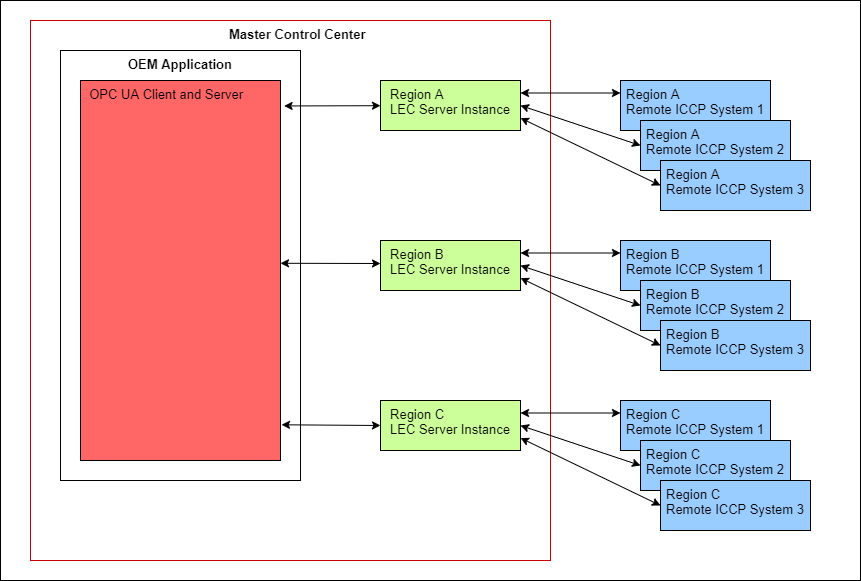
Both the OEM’s OPC UA client-server application and the LEC Server instances have redundant servers at the Main Control Center, so if one instance fails, the system can fail over to the redundant application on another machine.
System Limits and Other Considerations
LEC OPC UA Limits
The following are descriptions of local OPC UA clients, servers, and subscriptions within an LEC Server instance:
- Local OPC UA Client - An OPC UA client within the LEC Server instance also known as an IFE when configured as an OPC UA/ICCP Front End
- Local OPC UA Server - An OPC UA server within the LEC Server instance
- Local OPC UA Subscription - The subscription on OEM's OPC UA client has two points within the local OPC UA server block for Block 1 and Block 4
The following are limitations of local OPC UA clients, servers, and subscriptions:
- Local OPC UA client supports up to 1024 DataValue/DeviceControl variables that connect to the same application’s OPC UA server point. Each of these variables can be seen as an alias for an OPC UA server point.
- The default maximum number of points per subscription allowed by the local OPC UA agent is 10,000. However, this number is configurable within the OpcUaAgent template in LEC Configuration Manager or by setting the number in a batch file. In LEC Configuration Manager, the Points per subscription property allows you to adjust this number.
- The default maximum number of subscriptions per connection is 100. However, this number is configurable within the OpcUaAgent template in LEC Configuration Manager or by batch file. In LEC Configuration Manager, the Maximum number of subscriptions property allows you to adjust this number.
- The default maximum number of sessions per connection is 10. However, this number is configurable within the OpcUaAgent template in LEC Configuration Manager or by batch file. In LEC Configuration Manager, the Maximum total subscriptions property allows you to adjust this number.
LEC Server Limits
While there are not many actual LEC Server limits, Oracle Utilities engineers have identified the following:
- LEC Server has a limit of 16,383 virtual devices, VMDs and VCCs, per LEC Server instance.
- LEC VCCs have a limit of 128 transfer sets per VCC.
Subscriptions and Associations
When an LEC Server instance is configured as an IFE, it connects an OEM’s OPC UA clients to remote ICCP systems so OPC UA clients can subscribe to data from and exercise control over remote ICCP peers’ devices. The way in which LEC IFE connects OPC UA clients to remote ICCP systems follows:
- An application’s OPC UA client subscribes to a set of local OPC UA server points. Some of these points are Block 1 points and others are Block 4 points.
- The local OPC UA server connects to the local ICCP client.
- For Block 1, the local ICCP client makes associations with remote ICCP SCADA systems, subscribing to remote ICCP server points with the ICCP Transfer Set mechanism. Once an association exists, the OPC UA client can also exercise control over the remote ICCP server by utilizing the ICCP Block 5 write mechanism.
- For Block 4, the local OPC UA server connects to the local ICCP server. Through that path, the OPC UA client can cause the local ICCP server to send a block 4 message to the remote SCADA ICCP client.
Similarly, the LEC Server instance connects remote ICCP clients to the OEM application’s OPC UA servers so that remote ICCP systems can subscribe to Block 1 and Block 4 data from the OEM application’s OPC UA servers.
The remote ICCP clients can also exercise control over the OEM application’s OPC UA servers using the Block 5 write mechanism. The following is the way in which each LEC IFE connects remote ICCP systems to OPC UA clients:
- Each remote ICCP client can subscribe to a set of local ICCP Block 1 server points using the ICCP Transfer Set mechanism.
- The local ICCP server (an ICCP server within the LEC instance) connects to the local OPC UA client.
- The local OPC UA client in turn connects to the OEM application’s OPC UA server. Once an association exists, the remote ICCP client can exercise control over the OEM’s OPC UA server by utilizing the ICCP Block 5 write mechanism.
LEC Server supports many protocols, but in this configuration it enables OPC UA clients and servers to have connectivity and control over only ICCP devices. In the future, Oracle Utilities expects to use LEC Server to connect to MultiSpeak and IEC 61850 devices.
For information on Block 1 and Block 4 subscriptions, refer to sections Blocks 1 and/or 2 Bottom Dataflow and Block 4 Subscription. For more information on Block 5, refer to the section Block 5 Top Dataflow.
OPC Clients and Servers, LEC Server Instances, and Remote ICCP Peers
LEC Server supports a subset of the ICCP services that are required for compliance with the international ICCP Standard.
The following image shows an OEM application’s OPC UA server and OPC UA client connect to remote ICCP devices, using LEC Server to facilitate the OPC UA communication to ICCP devices.
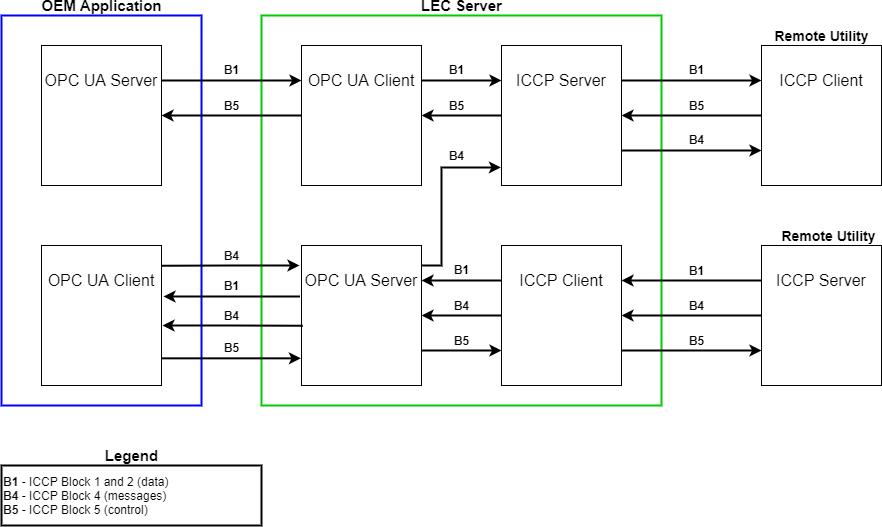
The top dataflow shows an application’s OPC UA server communicating with a remote ICCP client using an LEC Server instance as the ICCP Front End (IFE). This communication transmits both Blocks 1 and 2 and Block 5 data. Blocks 1 and 2 transfer measurement and state information from a local ICCP server to a remote ICCP client. Block 5 provides for the transfer of control information from the remote ICCP client to the local ICCP server.
The lower dataflow shows an application’s OPC UA client communicating with a remote ICCP server using LEC Server as the IFE. This communication allows the OPC UA client to receive Block 1 and/or 2 data as well as Block 4 text messages from the remote ICCP server. It also shows how the OPC UA client can transmits Block 5 control information to the ICCP server.
The IFE implements the transfer of Block 4 messages from the OEM’s OPC UA client to the remote ICCP client by passing the Block 4 messages to the local OPC UA server and then to the local ICCP server in the upper dataflow diagram.
Blocks 1 and/or 2 Top Dataflow
- As the top dataflow in the preceding image shows, an application’s OPC UA server can pass Block 1 (and Block 2) data to a local OPC UA client in an LEC Server instance.
- LEC Server converts the OPC UA data to ICCP data, and then passes this converted data to an ICCP server in the LEC Server instance.
- The ICCP server transfers this data to a remote ICCP client device.
Blocks 1 and/or 2 Bottom Dataflow
- An application’s OPC UA client subscribes to data points on the OPC UA server in the LEC Server instance.
- LEC Server forwards these requests to corresponding points configured on the ICCP client in the LEC Server instance.
- The ICCP client requests the creation of a transfer set from the ICCP server, specifying the list of points.
- Upon receiving the request, the remote ICCP server can push Block 1 and 2 data to the local ICCP client when certain criteria are met. For example, LEC Server can specify that the remote ICCP server push data cyclically after a given period of time or when the data changes or both. LEC Server converts this data into OPC UA data, then passes it to the OPC UA server in the LEC Server.
- The OPC UA server pushes this data to the external OPC UA client.
Block 4 (ConfirmedMessageFromOpcUa and ConfirmedMessageToIccp) Dataflow
- The following image shows an application’s OPC UA client can pass Block 4 messages to a remote ICCP client. By using a ConfirmedMessageFromOpcUa node in LEC’s OPC UA server, the originating OPC UA client can receive confirmation that the local ICCP server received the message.
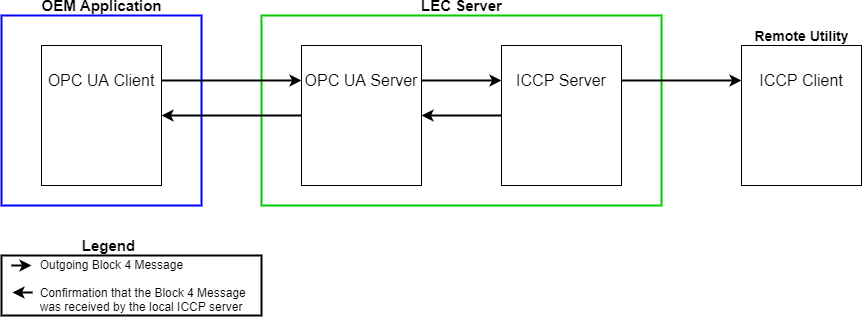
- LEC Server converts the OPC UA data to ICCP data, and then passes this converted data to an ICCP server in the upper dataflow.
- When the local OPC UA server uses a ConfirmedMessageFromOpcUa node, then the local ICCP server returns confirmation that it received the message to the originating device.
- This ICCP server also sends the message to the remote SCADA’s ICCP client if it is able to do so.
To see the table used to configure Block 4 confirmed messages from OPC UA, see #ConfirmedBlk4ToIccp. This section describes the nodes that are required to implement the transfer of Block 4 messages from the application’s OPC UA server to the remote ICCP client.
Block 4 Subscription
- An application’s OPC UA client subscribes to data points on the local OPC UA server.
- LEC Server forwards these subscription requests to corresponding points configured on the ICCP client in the LEC Server instance.
- The ICCP client requests the creation of a transfer set from the ICCP server. Unlike Block 1 and Block 2 transfer sets, a Block 4 transfer set contains no point list; instead, the Block 4 transfer set grants permission to the remote ICCP server to send Block 4 messages.
- Upon receiving the transfer set, the remote ICCP server can push Block 4 messages to the local ICCP client whenever there is a new message. LEC Server converts this data into OPC UA data, then passes it to the OPC UA server in the LEC
The ICCP Block 4 message is formatted as an InformationBuffer message. The InformationBuffer object provides a unique identifier (InfoReference) and a local identifier (LocalReference). The MessageId identifies the particular instance of a message. Each of these identifiers is a signed 32-bit integer. The Size attribute is the length in octets of the actual data being transferred.
LEC Server converts the InformationBuffer message into a data type that the local OPC UA server can understand. This data type consists of four-elements, comma-separated string- type variable, where the elements are the:
- InfoReference
- LocalReference
- MessageId
- Message buffer
- The local OPC UA server makes this data available to the external OPC UA client.
For details on how Block 4 data is configured for subscription, see #Blk4_buflen, #Blk4MessageRouter, and #Blk4FromIccp.
Block 5 Top Dataflow
The remote ICCP client can also initiate Block 5 controls to the application’s OPC server.
Block 5 Bottom Dataflow
- An application’s OPC UA client can initiate Block 5 controls to the local OPC UA server
- LEC Server converts the OPC UA data to Block 5 ICCP data and passes it to the local ICCP client.
- The ICCP client then transfers this control data to the remote ICCP server device.
For more information on Block 5, see OPC UA Control Over ICCP Devices and OPC UA Client (OEM Applications).