EV Best Time Off-Peak in Weekly Energy Update Email Module
The EV Best Time Off-Peak in Weekly Energy Update (WEU) Email module can be included in Weekly Energy Update emails. This module explains to the reader when the best times are to charge their electric vehicle (EV) during off-peak hours. The module explains how this behavior can ease the strain on the grid.
This module should be included in the second EV-specific Weekly Energy Update email the customer receives, and then again once every six months to remind the customer about the best times to charge their EV.
Design
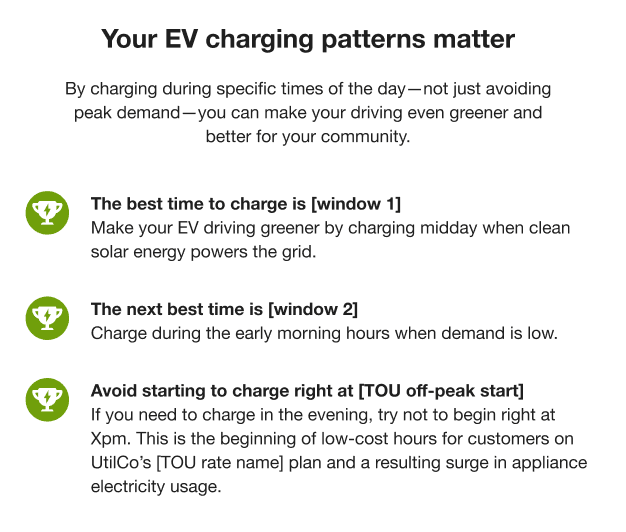
This image shows an example of the Best Time Off-Peak in Weekly Energy Update Emails module:
Figure 6-1 Best Times Off-Peak in Weekly Energy Update Emails Module
User Experience Variations
This section discusses how the module can vary.
Time-Of-Use Customers
The module varies as follows when sent to customers on a time-of-use rate plan.
Header: The header of the module reads, "Save money by charging your EV during off-peak hours"
Explanatory Statement: This statement reads, "Go the extra mile to make the grid more reliable, affordable and clean by charging at certain times within off-peak hours."
Tip 1: The first tip is "Charge when the sun is shining" and is followed by this statement, "Make your EV driving even greener by charging midday when clean solar energy powers the grid."
Tip 2: The second tip is "Set a delayed start time, and is followed by the statement "Help avoid straining the grid at the beginning of off-peak hours, when many people start charging their vehicle, by setting your schedule to start a couple hours into the off-peak period."
Tip 3: The third tip is "Set a departure time" and is followed by the statement "Some vehicles and chargers let you set the time by when you need your car ready. This ensures charging finishes before you leave and helps avoid demand spikes on the grid."
Configuration Options
For each element listed in the table, indicate the desired configuration in the Input Value column. If you do not provide an input for optional configurations, the default will be used.
Table 6-2 Configuration Options
| Configuration Option | Input Value |
|---|---|
|
Images The images can be configured to use client-specific colors. |
Optional Specify client branding colors. |
|
Statement and Tip Text Utilities must specify the time to be included in the Window 1 and Window 2 spots. Additionally, utilities are encouraged to review the statements and adjust them to ensure that they are pushing customers to charge at the times that are most beneficial to the utility. |
Required Specify the following:
|
|
Recurrence Setting Utilities can specify how often they want this module to be included in the email. Default: Module is included in the email every 6 months. |
Optional Select one of the following:
|
To see how this module fits into the overall user experience, see Design and Configuration.