Transition Module
The Transition module serves multiple purposes at different times of the year. This module is used to:
- Welcome customers to their program in their introduction email
- Notify customers that their peak to off-peak price ratios or peak hours are about to change each season
- Remind customers that their peak to off-peak price ratios or peak hours have recently changed for the season
The welcome state of the module is included in the customer's Introduction email. The seasonal transition states of the module are sent one week before the transition date, and again one week after the transition date, along with the regular cadence of the emails.
Requirements and Limitations
This section discusses customer requirements and limitations.
Customer Requirements
This table lists the customer requirements:
| Category | Description |
|---|---|
|
Data History |
AMI data for the last two weeks. |
|
Data Coverage |
50% read coverage for the week covered by the report. Note: This product does not differentiate between estimated and non-estimated reads. Both types of reads are supported. |
Limitations
The limitations are:
- Zero Usage Emails Including the Season Transition Module: In cases where the email includes the pre-transition version of the module, if the Weekly Comparison module has 0 usages, exclude that module but send the communication. If the Hourly Usage module has 0 usages, exclude that module but send the communication. User only has one opportunity to see the rate transition information, so it's valuable to send, even if other modules are excluded from the email.
User Experience
This section describes the user experience for pre-transition and post-transition states of the Transition module when used in the TOU Load Shifting Report emails, where both the peak hours and the peak price ratios are changing.
Pre-Transition State - TOU Load Shifting Reports
This module includes the following components:
Delivery: This module is sent one week before the seasonal changes occur to the customer's TOU rate plan, and can be included in either the Weekly email or Post-Bill Report emails.
Module Placement: When included in the Weekly email, this module is placed above the Weekly Comparison module. When included in the Post-Bill Report email, this module is placed above the Post-Bill Report Bill Comparison module.
Subject Line: The subject line for emails that include the pre-transition state is, "Hi [first name], your rate plan has an update coming [date]."
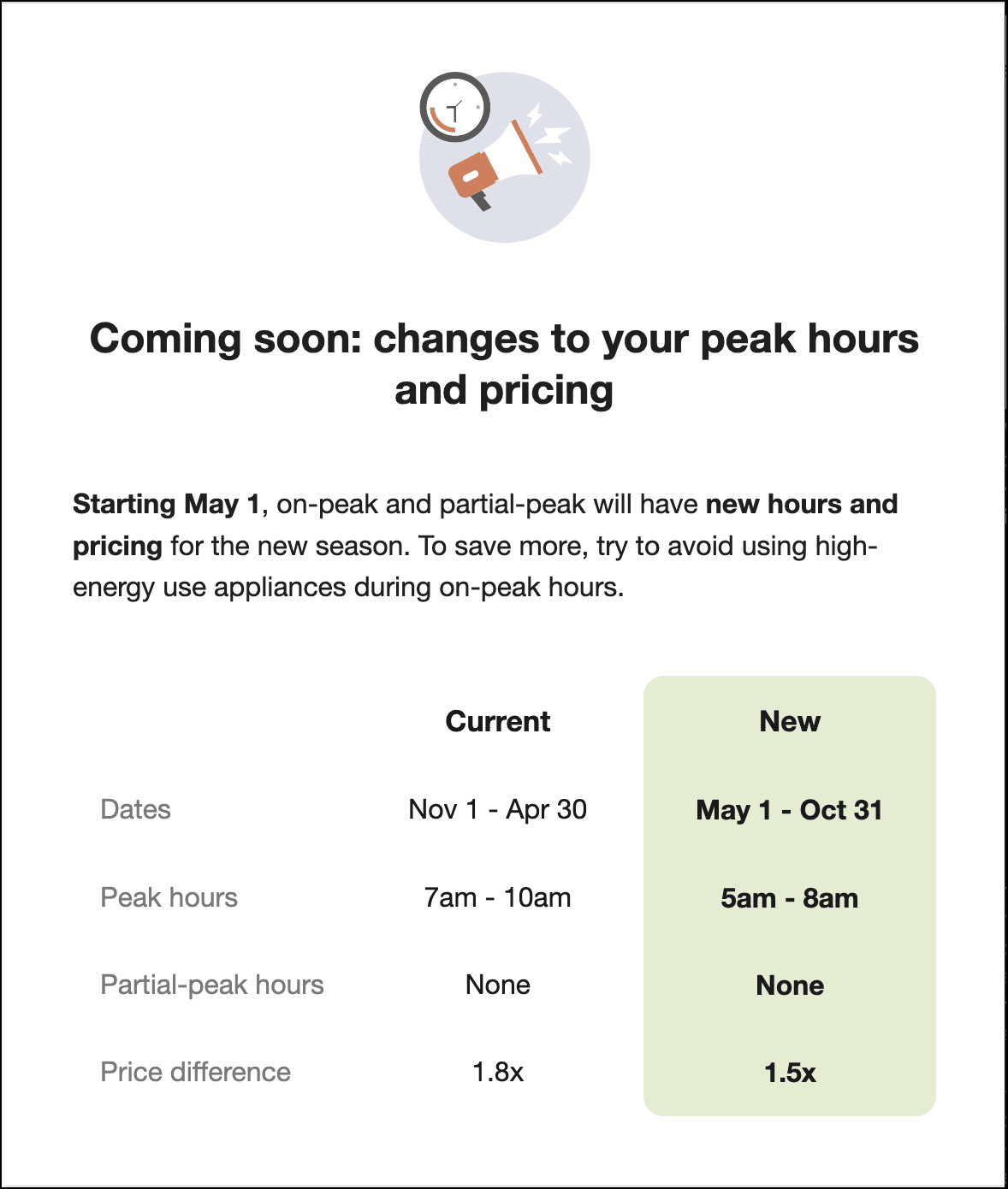
Graphic: The module, when in the pre-transition state, begins with a graphic.
Header: The default heading for the pre-transition state is, "Coming soon: changes to your peak hours and pricing".
Insight Statement: An insight message below the header describes the upcoming change. When both peak price ratios and peak times are changing, the insight statement for the pre-transition state is, "Starting [date], on-peak and partial-peak will have new hours and pricing for the new season. To save more, try to avoid using high-energy use appliances during on-peak hours."
Peak Details Table: This table displays the following information for both the current plan and the upcoming (new) plan:
- Dates the plan is in effect
- Peak hours
- Partial peak hours (if applicable)
- Price difference ratio between peak and off-peak hours
This image shows an example of the module in the pre-transition state:
Post-Transition State
In this state, the module includes the following components:
Delivery: This module is sent one week after the seasonal changes occur to the customer's TOU rate plan, and can be included in either the Weekly email or Post-Bill Report emails.
Module Placement: When included in the Weekly email, this module is placed just below the email header, and the Weekly Comparison module is intentionally hidden. When included in the Post-Bill Report email, this module is placed just below the header, and the Post-Bill Report Bill Comparison and Hourly Usage modules are intentionally hidden. The emails are intentionally structured to focus on the transition details, and usage charts are hidden to reduce confusion and to accommodate transition days that might have occurred during the previous week.
Subject Line: The subject line for emails that include the post-transition state is, "Hi <first name>, your email is here with new peak details."
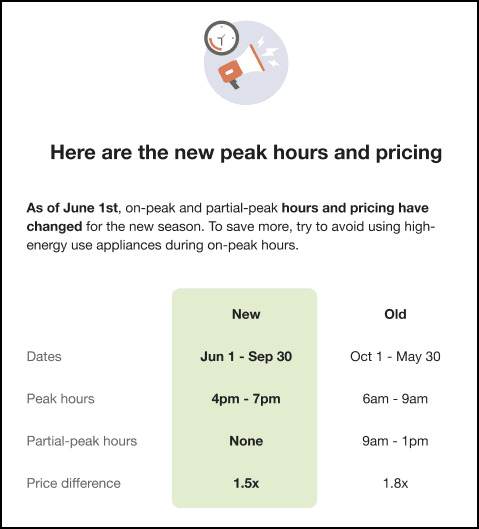
Graphic: The module, when in the post-transition state, begins with a graphic.
Header: The default heading for the post-transition state is, "Here are the new peak hours and pricing".
Insight Statement: An insight message below the header describes the change that was made. When both peak price ratios and peak times are changing, the insight statement for the post-transition module is, "As of <date>, on-peak and partial-peak hours and pricing have changed for the new season. To save more, try to avoid using high-energy use appliances during on-peak hours."
Peak Details Table: This table displays the following information for both the current (new) plan and the old plan, and highlights the data in the current column to call attention to the new details:
- Dates the plan is in effect
- Peak hours
- Partial peak hours (if applicable)
- Price ratio between peak and off-peak hours
This image shows an example of the module in the post-transition state:
User Experience Variations
This section discusses the user experience variations in the Transition module.
Welcome State - TOU Load Shifting Report Emails
When the module is included in the welcome email of the TOU Load Shifting Report, it introduces the customer to their rate plan, and explains why they are receiving the email. In this state, the module contains these components:
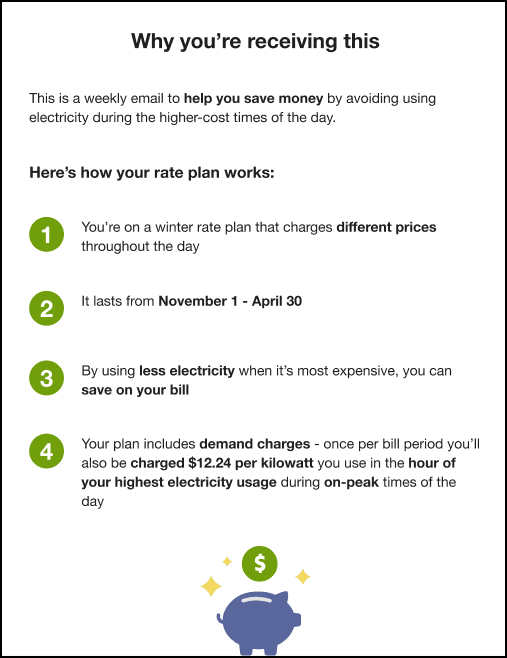
Explanatory Statement: The module begins with the heading "Why you're receiving this" followed by the explanatory statement that reads, "This is a weekly email to help you save money by avoiding using electricity during the higher-cost times of the day."
Plan Steps: The next section of the module explains how the customer's rate plan works. For TOU customers, there are 3 items listed under the "Here's how your rate plan works" heading, while Demand rate customers have an additional 4th item.
Graphic: The module ends with a piggy bank graphic, showing that they can save money.
Welcome State - Flat Rate Load Shifting Emails
When the module is included in the welcome email of the Flat Rate Load Shifting Report program, it introduces the customer to the program and explains why they are receiving the email. In this state, the module contains these components:
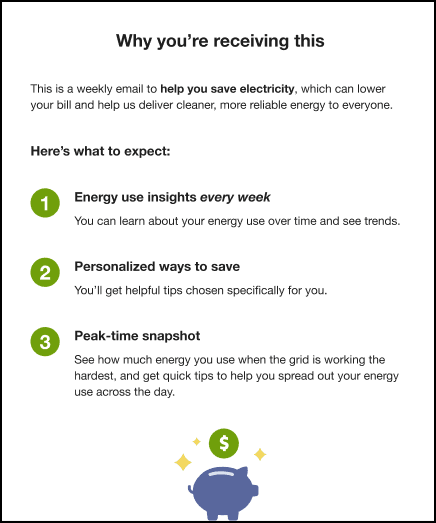
Explanatory Statement: The module begins with the heading "Why you're receiving this" followed by the explanatory statement that reads, "This is a weekly email to help you save electricity, which can lower your bill and help us deliver cleaner, more reliable energy to everyone."
What to Expect Section: The next section of the module explains what the customer can expect from the Flat Rate Load Shifting Email program. There are 3 items listed under the "Here's what to expect" heading, as follows:
- Energy use insights: The first item in the list begins with "Energy use insights every week", followed by the explanatory statement, "You can learn about your energy use over time and see trends."
- Tips: The second item in the list begins with "Personalized ways to save", followed by the explanatory statement, "You'll get helpful tips chosen specifically for you."
- Peak-time information: The third item in the list begins with "Peak-time snapshot", and is followed by the explanatory statement, "See how much energy you use when the grid is working the hardest, and get quick tips to help you spread out your energy use across the day."
Graphic: The module ends with a piggy bank graphic, showing that they can save money.
Peak Hours Change but Price Ratios Stay the Same
When only the peak hours are changing, and the ratios are staying the same, several items in the pre-transition and post-transition modules vary.
Pre-transition variations:
- Header: The module header is, "Coming soon: changes to peak hours."
- Insight Statement: The insight statement is, "Starting [date], peak hours will change for the new season. To save more, try to avoid using high-energy use appliances during peak hours."
- Peak Details Table: The table does not include the price difference row.
Post-transition variations:
- Header: The module header is, "Here are the new peak hours."
- Insight Statement: "As of [date], peak hours have changed for the new season. To save more, try to avoid using high-energy use appliances during peak hours."
- Peak Details Table: The table does not include the price difference row.
Price Ratios Change but Peak Hours Stay the Same
When only the price ratios are changing, and the peak hours are staying the same, several items in the pre-transition and post-transition modules vary.
Pre-transition variations:
- Header: The module header is, "Coming soon: changes to peak pricing."
- Insight Statement: The insight statement is, "Starting [date], peak pricing will change for the new season. To save more, try to avoid using high-energy use appliances during peak hours."
- Peak Details Table: The table does not include the peak hours row.
Post-transition variations:
- Header: The module header is, "Here is the new peak pricing."
- Insight Statement: "As of [date], peak pricing has changed for the new season. To save more, try to avoid using high-energy use appliances during peak hours."
- Peak Details Table: The table does not include the peak hours row.
Peak and Partial-Peak Hours Change but Price Ratios Stay the Same
When only the peak and partial-peak hours are changing, and the price ratios are staying the same, several items in the pre-transition and post-transition modules vary.
Pre-transition variations:
- Header: The module header is, "Coming soon: changes to peak hours."
- Insight Statement: The insight statement is, "Starting [date], peak and partial-peak hours will change for the new season. To save more, try to avoid using high-energy use appliances during peak hours."
- Peak Details Table: The table includes a row for partial-peak hours and does not include the price difference row.
Post-transition variations:
- Header: The module header is, "Here are the new peak hours."
- Insight Statement: "As of [date], peak and partial-peak hours have changed for the new season. To save more, try to avoid using high-energy use appliances during peak hours."
- Peak Details Table: The table includes a row for partial-peak hours and does not include the price difference row.
Peak and Partial-Peak Hours and Price Ratios Change
When the peak and partial-peak hours are changing, and the price ratios are also changing, several items in the pre-transition and post-transition modules vary.
Pre-transition variations:
- Header: The module header is, "Coming soon: changes to peak hours and pricing."
- Insight Statement: The insight statement is, "Starting [date], peak and partial-peak hours will have new hours and pricing for the new season. To save more, try to avoid using high-energy use appliances during peak hours."
- Peak Details Table: The table includes a row for partial-peak hours.
Post-transition variations:
- Header: The module header is, "Here are the new peak hours and pricing."
- Insight Statement: "As of [date], peak and partial-peak hours have changed to new hours and pricing for the new season. To save more, try to avoid using high-energy use appliances during peak hours."
- Peak Details Table: The table includes a row for partial-peak hours.