TOU 101 Module
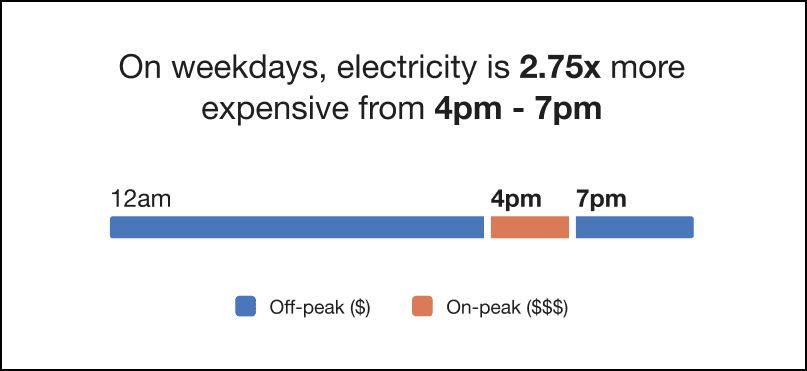
This module educates customers about when electricity is most expensive based on their TOU rate plan. The module provides customers with the following information:
- Whether electricity prices differ on weekdays and weekends
- How much more expensive peak prices are than off-peak prices
- The hours during which electricity is most expensive
- A visual timeline that displays off-peak, partial-peak, and peak hours
Configuration Options
For each element listed in the table, indicate the desired configuration in the Input Value column. If you do not provide an input for optional configurations, the default will be used.
| Configuration Option | Input Value |
|---|---|
|
Peak Time Hours The introduction statement of the TOU 101 module identifies the hours included in peak time pricing. For example:
Note that this value, and the Peak Time Hours value in the Hourly Usage module must be the same. |
Required Specify the peak hours: Specify partial-peak hours (if used): |
|
Peak Time Price Ratio The introduction statement of the TOU 101 module identifies how much more expensive electricity is during peak hours. For example:
By default, this value is automatically calculated by dividing the peak price by off-peak price, based on the rate plan details provided. |
Required Choose one of the following:
|
|
Bar Chart Colors Colors in the bar graph for Off-peak, Partial peak, and Peak can match the utility’s color palette, if desired. The colors shown are the default colors. Research has shown that using a bright color to identify the peak periods is the most successful. Attention to contrast and accessibility guidelines should be considered if changing the default colors. Note that the colors used here must be the same as the colors used in the Hourly Usage module. |
Optional Choose one of the following:
|
|
Peak Time Names You can designate the name of peak and off-peak ranges in the legend. Default values include:
Note that the values used here should be the same as the values used in the Hourly Usage module. |
Optional Choose from the following:
|
User Experience Variations
This section discusses the user experience variations in the TOU 101 module.
Peak Hours Insight Statement
The Peak Hours insight statement varies based on the customer's rate plan and the type of days displayed in the timeline. The following table shows the insight statement variations for different scenarios:
| Peak Hour Scenario | User Experience Example |
|---|---|
| Weekdays with a single peak period for plans with differing rates on weekdays and weekends. | On weekdays, electricity is 1.5x more expensive from <Xpm to Xpm>. |
| Weekdays with multiple peak periods for plans with differing rates on weekdays and weekends. | On weekdays, electricity is 1.5x more expensive from <Xam to Xpm> and <Xpm to Xpm>. |
| Weekend days with a single peak period for plans with differing rates on weekdays and weekends. | On weekends, electricity is 1.5x more expensive from <Xpm to Xpm>. |
| Weekend days with multiple peak periods for plans with differing rates on weekdays and weekends. | On weekends, electricity is 1.5x more expensive from <Xam to Xpm> and <Xpm to Xpm>. |
| Any day for plans with a single peak period, and a pricing scheme that is the same on weekdays and weekends. | Electricity is 1.5x more expensive from <Xpm to Xpm>. |
| Any day for plans with multiple peak periods, and a pricing scheme that is the same on weekdays and weekends. | Electricity is 1.5x more expensive from <Xam to Xpm> and <Xpm to Xpm>. |
| Any of the above variations with tiered TOU rates. |
The above statements are used, but the wording "up to" is included before the price ratio. For example:
Note that the tier with the highest price ratio is used when determining the price ratio in the statement. |
Multiple Peak Periods
For utility customers with rate plans that include multiple peak periods, the timeline shows all peak periods using the same color.
Peak and Partial-Peak Periods
For utility customers with rate plans that include both peak and partial-peak periods, the timeline shows both periods using two different colors.