
Configuration Data Deletion
The import process does not handle deletion of entire entities in the target environment. When importing data from a source environment to a target environment, the import process for the migrated records is able to identify objects to add and objects to change. There is no mechanism for comparing the target environment to detect entities that were previously imported and no longer exist in the source system. In the same way, there is also no mechanism for indicating that records in the target environment should be deleted. The absence of those records in the import is not enough because the migration may be only importing a subset to add or update.
Note that CMA does orchestrate the deletion of child rows of an object as a result of a comparison. This is only applicable to child records that are owned by the implementation.
If data on the target system must be deleted, users must delete the records in the target accordingly.
This section describes available tools to assist with this task.
Delete Entities Online
You may review and delete previously imported configuration entities using the Configuration Deletion portal.
Delete Entities In Batch
You may submit a request to delete configuration entities in batch. The process involves uploading a list of configuration entities from a CSV file onto a request record that is processed in batch by the request monitor process.
To do so create a request record using the Delete Configuration Entities (F1-DeleteConfigEntitiesType) request type. This option allows you to upload a list of entities to delete from a CSV file onto the request record and submit the request for batch processing when ready. When processed in batch, the request deletes all the entities in the list as a single transaction.
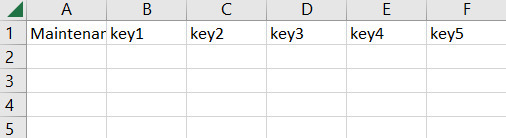
The file with the entities to delete should be prepared with the following header columns: maintenance object, key1, key2, key3, key4, key5. Add rows after the header row for each configuration entity to delete.
The deletion process abides to the application's standard referential integrity rules and therefore the order in the list should reflect data model relationship dependency.
The process stops at the first error, i.e. it does not accumulate exceptions. The user needs to review the exception, correct the issue, and resubmit the request as needed.