Digital Self Service - Energy Management Data Browser Costs View v3
Information about rebates can be displayed in the Costs view of the Digital Self Service - Energy Management Data Browser if a customer earns rebates for using less energy during peak event periods. Peak event periods are times of day when energy costs more money due to higher demand. The display of the rebates varies depending on the view selected.
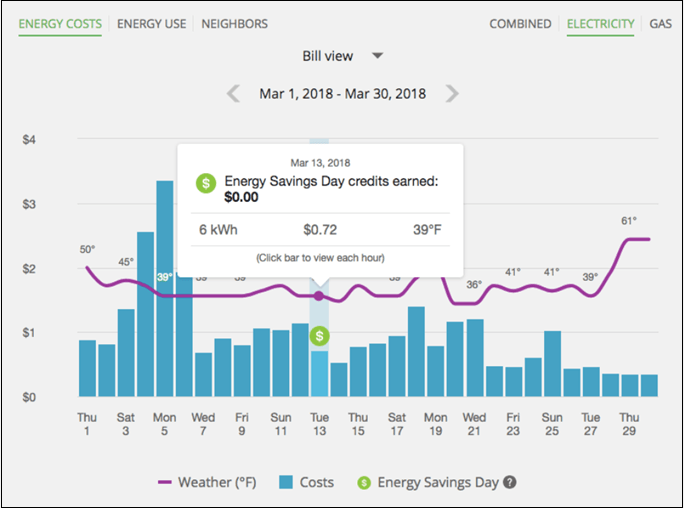
Bill view: An icon displays above the days when a customer had an opportunity to receive a peak time rebate. You can click on the icon to view the tooltip, which displays the amount of any credits earned.
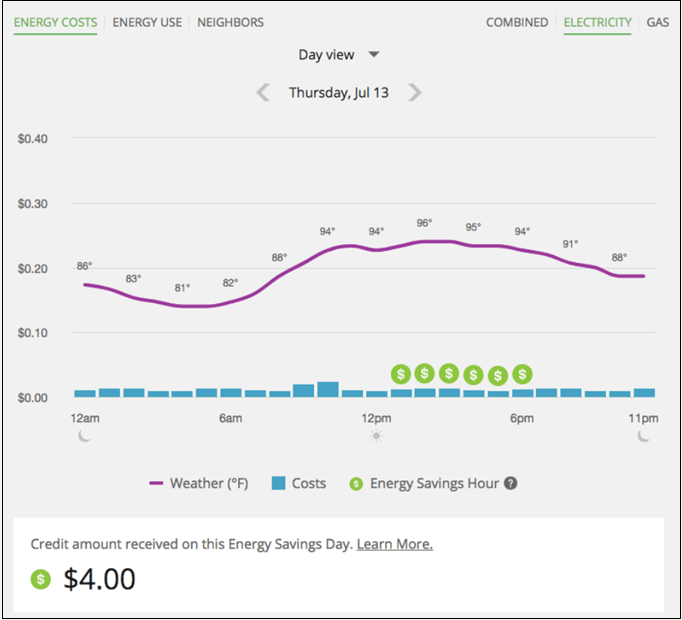
Day view: An icon displays above the hours when a customer had an opportunity to receive a peak time rebate. You can click on the icon to display a tooltip with details about that hour. Additionally, you can see any credits earned during that day below the graph.
See the Energy Management Cloud Service Overview for additional information about the Digital Self Service - Energy Management product requirements and features.