Home Energy Analysis Module
The Home Energy Analysis modules prompt the customer to answer simple questions about their home attributes and energy habits to improve their report experience. The type of module the customer receives is configurable.
- Mini Home Energy Analysis (default): The Mini Home Energy Analysis prompts the customer to answer simple questions about their home attributes and energy habits from within the report.
- Easy Open Home Energy Analysis: The Easy Open Home Energy Analysis encourages customers to complete the Home Energy Analysis in order to improve their report experience, and includes a call to action button that redirects the customer to the Home Energy Analysis in Digital Self Service - Energy Management where they can complete the full survey.
Design
The default experience for the Home Energy Analysis is the Mini Home Energy Analysis, which is shown below.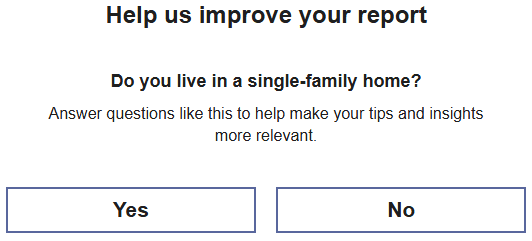
This image shows an example of the Easy Open module configuration option.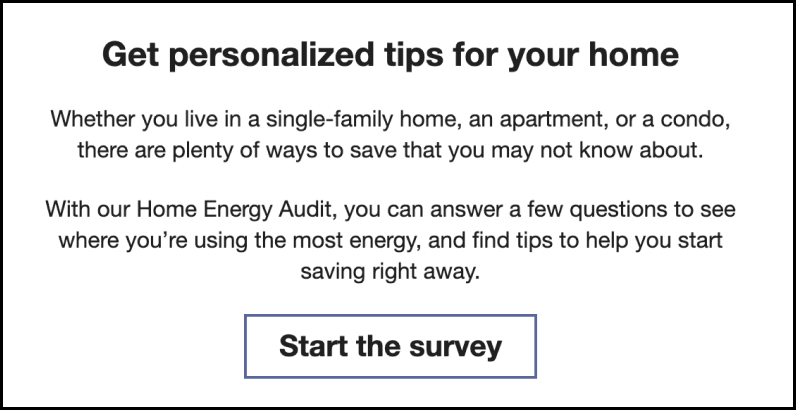
Configuration Options
For each element listed in the table, indicate the desired configuration in the Input Value column. If you do not provide an input for optional configurations, the default will be used.
| Configuration Options | Input Value |
|---|---|
|
Hide the Home Energy Analysis Module The Home Energy Analysis module can be hidden from High Bill Alerts AMI v3. Default: Include the Home Energy Analysis module in High Bill Alerts AMI v3. |
Required Choose one of the following:
|
|
Design Option The Home Energy Analysis supports a Mini Home Energy Analysis and Easy Open Home Energy Analysis experience. Default: Mini Home Energy Analysis |
Required Choose one of the following:
|
|
Start The Survey Button (Easy Open) If the Easy Open experience is configured, you can update the text on this button, as well as the URL to which the customer is directed when clicking the button. Default: Start the survey You must also specify the URL the customer should link to when clicking the button. |
Optional Choose one of the following:
|