Trends Module
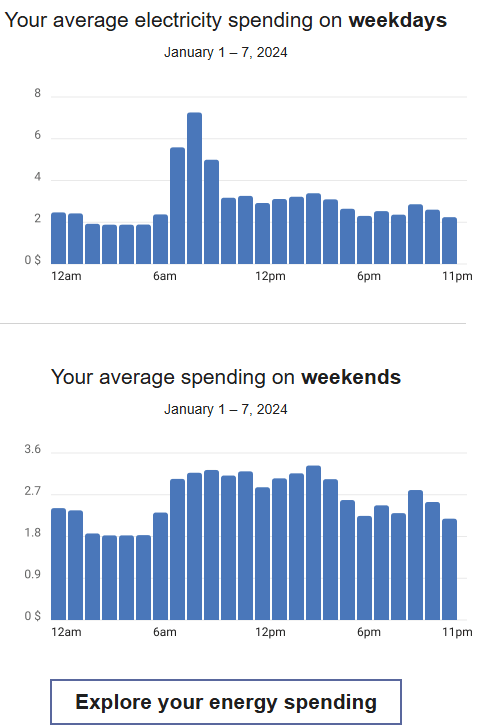
The Trends module identifies the time of day when customers tend to use the most energy so that they know when to focus on being more energy-efficient. The energy usage is displayed in two bar charts: one for average weekday usage and one for average weekend usage. The usage value represents usage-to-date within the current bill period.
Configuration Options
For each element listed in the table, indicate the desired configuration in the Input Value column. If you do not provide an input for optional configurations, the default will be used.
| Configuration Options | Input Value |
|---|---|
|
Heading Weekdays Rates Modeled You can update the heading for the weekday chart of the module for customers that have rates modeled as needed. Default: "Your average <fuel type> spending on weekdays". |
Optional Choose one of the following:
|
|
Heading Weekdays Usage Version You can update the heading for the weekday chart of the module for customers that receive the usage version as needed. Default: "Your average <fuel type> use on weekdays". |
Optional Choose one of the following:
|
|
Heading Weekends Rates Modeled You can update the heading for the weekend chart of the module for customers that have rates modeled as needed. Default: "Your average spending on weekends". |
Optional Choose one of the following:
|
|
Heading Weekends Usage Version You can update the heading for the weekend chart of the module for customers that receive the usage as needed. Default: "Your average use on weekends". |
Optional Choose one of the following:
|
|
Explore Your Energy Spending or Usage Button You can update the text on this button, as well as the URL to which the customer is directed when clicking the button. Defaults:
You must also specify the URL the customer should link to when clicking the button. |
Required Choose one of the following:
|