Rates Light
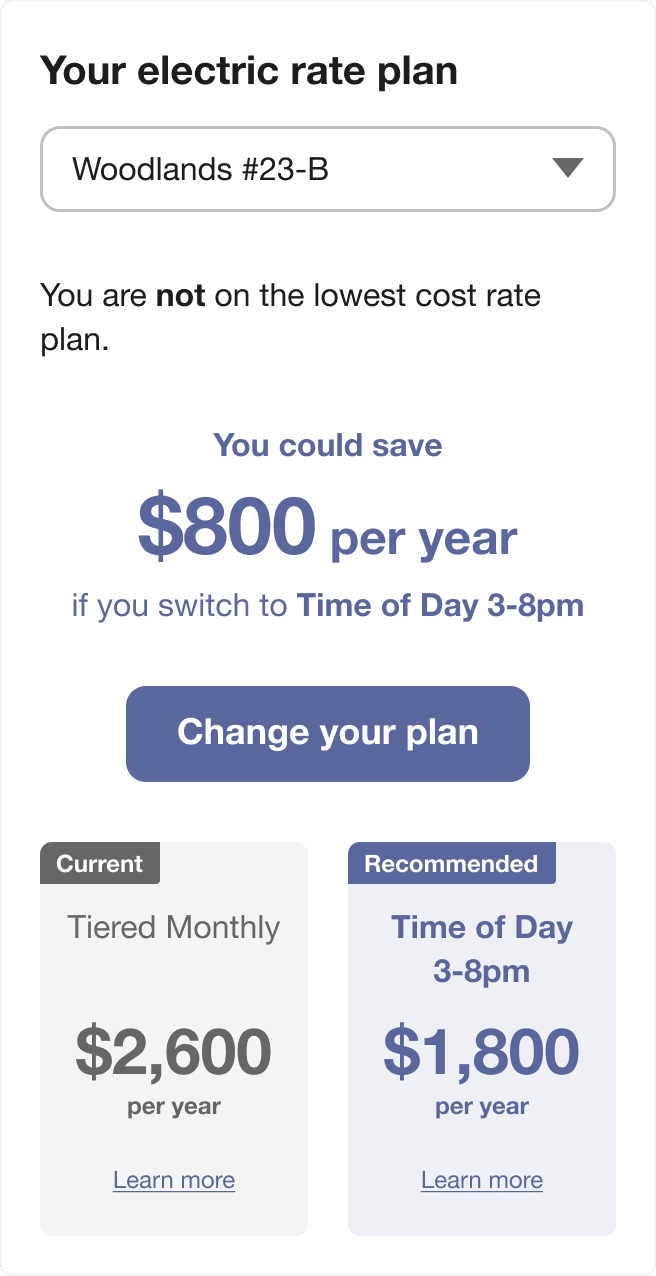
The Rates Light widget is a dashboard-friendly tool designed to help customers quickly view and compare utility rate plans. Customers can use the widget to understand at a glance whether they are on the best rate, and if not, which plan is recommended. The widget directs customers to the detailed Rate Comparison Feature for a more in-depth comparison.
Configuration Options
For each element listed in the table, indicate the desired configuration in the Input Value column. If you do not provide an input for optional configurations, the default will be used.
| Configuration Option | Input Value |
|---|---|
|
Show Compact Widget A more compact version of the Rates Light widget can be displayed. In this state, the widget shows the customer’s rate plan status, potential yearly savings, and a call-to-action to change their plan. The detailed rate comparison cards are hidden for a cleaner, smaller display. This option applies only to the vertical layout and only when customers are not on the lowest cost rate plan. (In the horizontal layout, the detailed cards always appear.) Default: The full version of the widget with detailed rate comparison cards is shown. |
Optional Choose one of the following:
|
|
Change Call-to-Action Format The call-to-action button can be changed to text and a phone number. This gives customers the option to initiate a plan switch by calling the provided number.Default: A button appears as the call-to-action. |
Optional Choose one of the following:
|
|
Always Show Horizontal Comparison Cards in Vertical Widget The rate comparison cards can be displayed horizontally (side by side) even when the widget is in its vertical orientation, instead of stacking the cards vertically. This option is especially recommended for clients with very long rate plan names, business customers with high total costs, or for use in locales with longer messages or monetary values. This setting is automatically activated—regardless of manual configuration—if either card’s rate plan title exceeds two lines, or if the cost value including "per year" does not fit on one line. Default: Cards are stacked vertically in the vertical orientation, unless the rate plan title or cost values exceed the supported length. |
Optional Choose one of the following:
|
|
Change Text Alignment The alignment of the widget content can be changed to left alignment. This can be useful for matching the widget’s appearance with other left-aligned content on a web page.Default: All content in the widget is center aligned. |
Optional Choose one of the following:
|
User Experience Variations
The user experience varies for customers depending upon their service types, available data, costs, and locale. For more information, see Rates Light in the Rates Engagement Cloud Service Overview.