Creating a Component Definition
A component consists of several component definition lines. Each component definition line comprises a keyword, object, display name, attribute values, default data, function name, and output parameters. All keywords for this type of component start with ‘WS’.
The following list describes each entity in a component definition:
- Keyword: Defines the action to be performed by the component line.
Example: WS-SETVARIABLEFROM RESPONSE, WS-VALIDATE, etc
- Object: The name of the function library whose functions may be used for defining a component.
- Display Name: Description of the component line that is made visible to the user while entering test data against the component line in a flow.
- Attribute Values: The xpath of the component's element as defined in the Oracle Utilities Enterprise application.
- Default Data: The default data that may be used while providing test data for a component in a flow.
- Function Name: The name of the function that is used as a plugin to perform actions such as generating randomized test data or performing validation on web service response values.
- Output Parameters: If a function returns an output, the output can be stored in a variable which is defined against the Output Parameters field. This variable can be used across components in a flow to pass test data from one component to another.
- Tooltip: The information presented as a tool tip during the flow creation.
Figure 7-4 Component definition
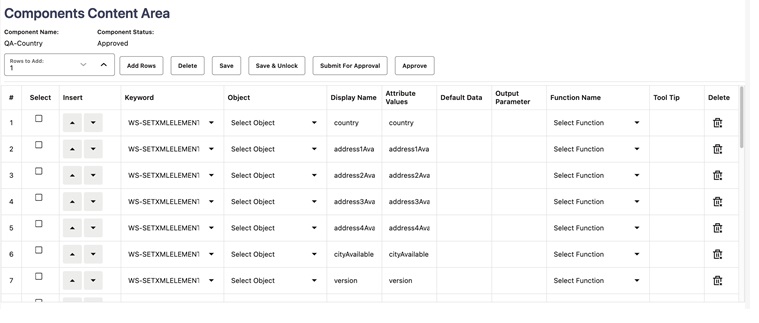
Add the required component definition lines using the Keyword drop-down list to define the web services based component.
For a list of keywords used to define the web service based components, refer to Appendix A: Web Service Component Keywords.
The following example shows different component lines created for the CM-MobileWorker component.
- Select SETAPPTYPE in the Keyword drop-down list to define the component type.
- Select WS in the Object drop-down list to denote that it is a web service based component.
- Select the WS-SETWEBSERVICENAME keyword to allow for the web service name to be set for this component in a flow.
- Select the WS-SETTRANSACTIONTYPE keyword to allow for the transaction type of the web service call to be set for this component, in a flow.
Note:
The final script of a component is web service call to create, update, and delete. - Select the WS-LOGMESSAGE keyword to log comments in component step as part of a flow run. This helps in better understanding of the Flow run results in which the component is used.
- Select the WS-SETXMLELEMENT keyword to allow test data to be set against a specific element of request XML.
Consider the CM-Account component in Oracle Utilities Customer Cloud Service. This component maps to the C1-Account business object. It includes elements, such as:
<accountId/> <billCycle/> - Select the WS-SETXMLLISTELEMENT keyword to allow multiple sets of test data to be set against the list element of request XML. The list element is ‘skills’.
Note:
The schema of a web service/business object/business service can be complex (the schema has group elements which in turn may have group elements within them).
For instructions about how to handle such scenarios, refer to the Handling the List Elements section.