Creating a Generic REST Service Component Definition
A component consists of several component definition lines. Each component definition line comprises a keyword, object, display name, attribute values, default data, function name, and output parameters.
The following list describes each entity in a component definition:
- Keyword: The step to be performed.
Example: RS-SETREQUESTHEADER, RS-SETENDPOING, RS-PROCESSREQUEST, etc
- Object: The Oracle Utilities Testing Accelerator function library name from where the function is called.
- Display Name: Component definition
- Attribute Values: The web service XML tag name used as variable to store its value.
- Default Data: The default data used in the component definition.
- Function Name: The function name called from the library.
- Output Parameters: The output in the form of a variable.
For more options, refer to Appendix D: Generating Re-runnable Test Data.
- Tooltip: The data presented as a tool tip during the flow creation.
Figure 7-10 REST component definition
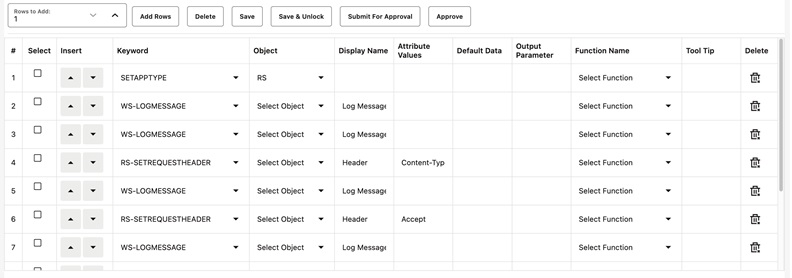
Add the required component definition lines using the Keyword drop-down list to define the REST web service based component.
For a list of keywords used to define the REST web service based components, refer to Appendix B: REST Component Keywords.
The following example shows different component lines that can be created.
- Select SETAPPTYPE in the Keyword drop-down list to define the application type.
- Select RS in the Object drop-down list to denote that it is a generic rest services based component.
- Select the WS-LOGMESSAGE keyword to log comments in component definition. This helps in debugging the script code for that component.
- Select RS-SETREQUESTHEADER keyword to specify any headers that need to be passed to the REST end point.
- Select RS-SETMETHOD keyword to specify whether the REST end point needs to be invoked using a GET/POST call.
- Select RS-PROCESSRESTREQUEST keyword to specify processing of the response from the REST end point.
- Add more component definition lines as needed and select appropriate keywords based on the REST web service that the component represents.
- Click Save.