Hybrid Integration Scenario
In this integration scenario, Oracle Utilities Testing Accelerator is used to develop and run a test flow spanning an Oracle Utilities cloud service and an Oracle Utilities enterprise application that is hosted either on-premises or PaaS. The following configuration needs to be added to either the flow configuration set or user configuration set.
Define the environment configuration properties pertaining to the on-premise Oracle Utilities Enterprise application. Prefix them with a custom keyword. This keyword is used in the component's test data in a flow to specify the application configuration context to a component for execution.
Example: Oracle Utilities Customer Care and Billing is the on-premise application and the custom keyword chosen is “CCB”. In the flow configuration set or user configuration set, use the “Add Property” option and add the following properties:
| Property Name | Property Value |
|---|---|
|
CCB |
<CCB url> |
|
CCB_gStrApplicationUserName |
<username> |
|
CCB_gStrApplicationUserPassword |
<encryptedpassword> |
CCB property holds the external web service end point URL prefixed with “@ext_pub@”, up to but not including the web service name. If the web service end point URL for the WSDL of person object in CCB is https:myccbserver.mycompany.com/webservices/ATC1PersonAdd?WSDL, the CCB property should hold the value - “@ext_pub@myccbserver.mycompany.com/webservices/”.
The properties CCB_gStrApplicationUserName and CCB_gStrApplicationUserPassword hold the user name and password respectively for authenticating the user posting the web service request to Oracle Utilities Customer Care and Billing.
Figure 8-35 Integration environment configuration
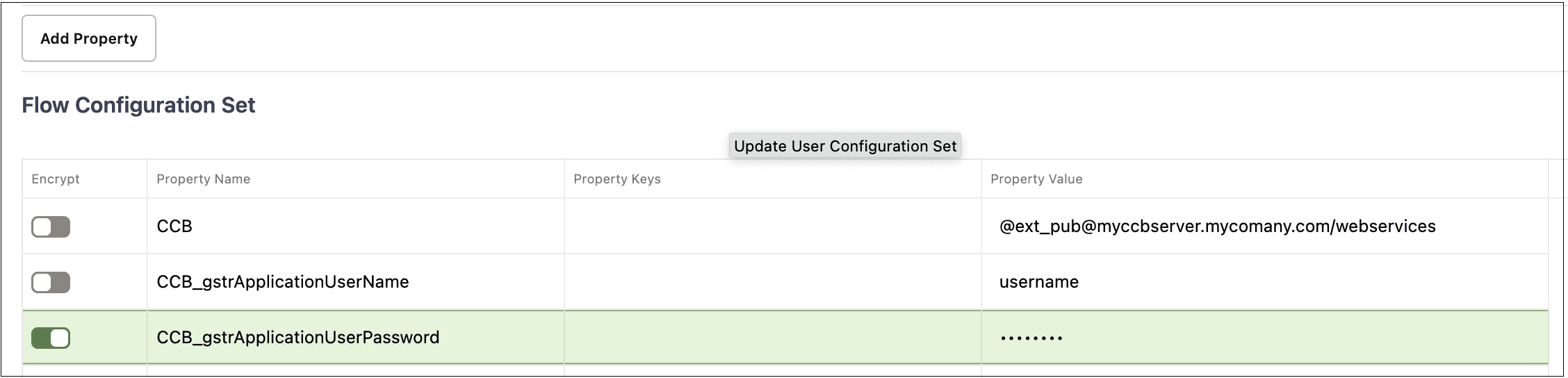
Figure 8-36 Integration web service details
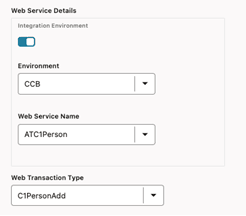
In the example where Oracle Utilities Customer Care and Billing is the on-premises application and “CCB” is the keyword, the environment name for the C1-PersonAdd component's test data in the integration flow should be specified as “CCB” and the web service name should be specified as ATC1Person. This ensures that the C1-PersonAdd component posts the request to Oracle Utilities Customer Care and Billing whose configuration has been specified in the flow configuration set or user configuration set using the keyword prefix “CCB”.
During the integration flow execution, the flow configuration set and user configuration set that have the required environment properties should be selected.